

Technologies are capturing our time and attention, and it’s no longer just amusing; it’s sad, to the point of , anxiety, and bipolar disorders. I regularly publish research on the impact of technology on mental health on my Telegram channel, and over time I've gathered some observations.
Okay, Google, what should we do in a world where technology connects our professional, social, and personal lives? Can we use techniques and attention hygiene to improve our existence?
Approaches
We can tackle the solution radically: cut off all connections, buy a flip phone, and throw away the iPhone, take a vacation, do a digital detox, go to a Vipassana retreat, or head to Koh Phangan.
That’s all great, but I’d prefer less drastic measures. For various reasons, I have chosen to live in the most technologically saturated spot on Earth, in San Francisco, and as a result, managing the boundaries of my time, attention, and energy has become a daily practice for me.
I enjoy having access to the latest technologies, but I also love that I have friends I can meet at any moment; lectures and workshops I can easily drop into in the evening; practically every weekend, I can go outdoors or take a road trip.
I resonate with a middle path, avoiding extremes. To organize it, I had to experiment significantly, optimizing my time and technological space.
10 habits that have stuck
I have a small set of practices that allow me to take control of technology into my own hands. Here they are:
Screen Time: by default, 0 minutes on all dopamine-stimulating apps.
- I need to invest time to enter a password and grant the app permission for 15 minutes, after which it goes back on the banned list. This reduces the time I spend on apps. A minimal set of applications on my phone.
- Minimum set of applications on the phone. 10 messengers? 6 social networks? 7 banking apps? No, thanks, one per group is enough.
- Key communication in 1-2 channels: Telegram for all main conversations, SMS/Apple Messages for American contacts and close friends.
- Limitations of Google and Facebook products. These companies profit from advertising, so they need to optimize their products around engagement metrics and usage duration. Amazon, Apple, and Microsoft earn from the sale of physical products, apps, and subscriptions. Given the choice, I prefer products from the latter group.
- All work applications are on my computer. On my phone, I only have basic communication, navigation, money exchange apps, etc.
- The top 3 apps in my Screen Time statistics have been removed from my phone. I created three hours of free time every day. Magic!
- Notifications only for phone calls and SMS messages. By default, they are turned off in all other apps.
- I have a second phone that I use for attention-demanding apps. For example, I use it to manage Instagram and update Facebook. Access to it is limited.
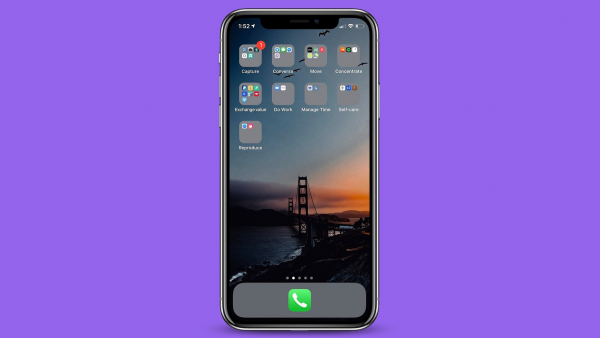
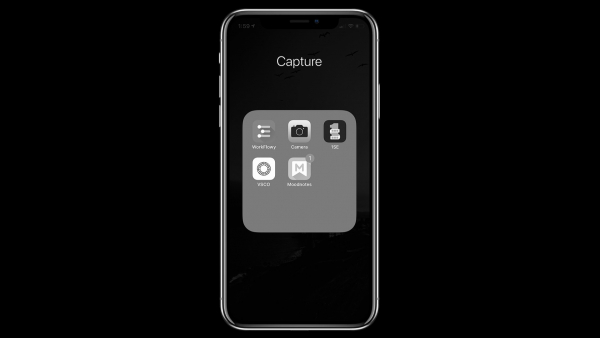
- Apps on my phone are grouped by basic principles/Jobs To Be Done: conversation, movement, reproduction ¯_(ツ)_/¯, recording, concentration, money exchange, time management, self-care.
- Browsers are separated and equipped with attention-saving plugins. Chrome for work, Safari for personal projects. Both have a set of plugins for access restrictions (by time, resources, parts of the site, means of perception): UnDistracted, Stay Focused, Decreased Productivity, Mercury Reader, AdBlock. There are many such solutions, but the good ones can be counted on fingers, so if you're interested, I can write a separate post about this.
10 helpful practices that didn't stick.
- Black-and-white mode on my phone to hide red notification colors. Red notifications attract attention and create interruptions in work, leading to a loss of focus. Instead of choosing the black-and-white mode available in settings, I reduced the number of apps and the ones allowed to notify me.
- Remove all notifications. Some notifications are important, so I enabled them only in essential apps.
- Remove all notifications from the Lock Screen. The same considerations apply.
- Delete all social media. Instead, I limited my stay, got a separate phone for media where I needed to be occasionally, and
- Voice messages instead of text. It didn’t catch on (except for one friend — it turned into a ritual for a while). Mainly because in Western culture, it's not common to dictate messages.
- Complete block of all attention-consuming applications using Freedom, Self Control, etc. It's too strict of an approach, and I'm pretty laid-back in this regard.
- Calling applications only through Spotlight (iOS) or Search (Android). I do launch some applications this way, but most are organized into folders named after basic principles / jobs to be done.
- Dark Mode on websites by default. In theory, 'dark mode' should reduce the number of bright websites, but in practice, it doesn't work well with various website display features.
- Meditation apps. As is known, mindfulness meditation allows for greater control over the quality of attention and affects emotional state. I started with Headspace five years ago, but as my practice became more serious, I began meditating on my own with a regular timer app.
- Pomodoro timers. 25 minutes of work, 5 minutes of rest, repeat. After the fourth repeat, take a long break. It works for some people, but as it turned out, not for me.
How do you preserve your time and attention?
Source: habr.com
