

In We told you about the new features in the Update 4 released in January for Veeam Backup & Replication 9.5 (VBR), intentionally not mentioning backups to magnetic tape. A discussion about this area deserves a separate article, as there were indeed many new features.
– Guys from QA, will you write an article?
– Why not!

Tape Drives in the 21st Century
Data storage on magnetic tapes (cassettes, "tapes", as we in R&D call them) is not limited to the outdated ZX-Spectrum computer, where one game could load into 48 kb of RAM from for several minutes. Over a quarter of a century, the speed and capacity of tapes have increased by 6-7 orders of magnitude. This is not quite a fair comparison, and by the standard it is not keeping up. Nonetheless, modern technologies allow recording 12 terabytes of data (up to 30 terabytes in compressed mode) on a kilometer-long tape of one cassette, thus, the $160 drive leaves competitors behind in terms of the cost of long-term storage of large amounts of data, even considering the investments in read/write equipment. Data on such tapes is reliably stored for 15-30 years.
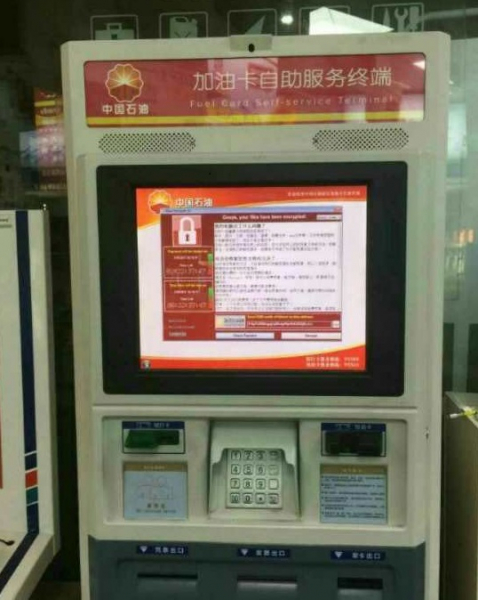
Let me approach it from another angle. Recently, has hit a new level. They can lie in wait within a large company's infrastructure for weeks and months, and with the emergence of another zero-day vulnerability, they can destroy (not without human help, as big money is at stake) not only all data but also all backups that can be reached. Here’s , when a company had to pay the ransom. The so-called air gap, i.e., physically isolated backups from the infrastructure, have essentially become the only reliable protection against such scenarios. Magnetic tape is one of the timeless solutions.
However, one specification and technological innovations in iron and barium ferrite from leading manufacturers (IBM, HPE, Oracle, Dell) are not enough for reliable data protection; good software is needed. At Veeam, we have an entire team dedicated to tape backups, with about 10 people analyzing, planning, researching, developing, and testing daily. You might have seen the results of this work in previous articles (, ). What has been accomplished over the past year?
Glossary
There comes a choice between freedoms regarding the native language and bureaucratic phrases that complicate readability. I prefer the former, so I apologize in advance if any jargon from the list below is jarring to someone. Here, I will briefly remind you what each term means.
Experts in VBR can skip this partJob is the task of backing up. Essentially, the entire VBR is built on jobs. Besides backup and replication, it may also involve copying to tape (backup to tape job). I should mention that restoring from a backup (restore) is also a job, but in this article, the term will specifically refer to backup.
Storage is a historically established name. These are files in the repository (repository), which contain backups – full and incremental.A single storage can contain one or several virtual machines.
Chain is a sequence of interconnected storages. To restore data from the nth incremental storage, all previous storages from (n-1) to 1 and the full storage referenced by the first incremental are needed.
Source, Target are the source and the target. The source is the original entity that the job processes. In the case of backups/replicas, this is usually a virtual machine in the hypervisor. In the case of tape jobs, the source is the backup job itself (or the files in the case of a file to tape job). The target for backup jobs is the repository where backups are stored. For tape jobs, it is the media pool.
Media pool – GFS pools. Media set
media set – – a set of tapes in the media pool that are continuously written to for backups/files. For GFS pools, media sets are also tied to an interval (for example, yearly), with tapes rotating only within their specific interval.
– elements of the tape library. The drive reads and rewinds the tape, while the changer is a robot that moves tapes between storage slots, unload slots, and the drive. There are also standalone drives (standalone) where a person performs the role of the changer. A correctly installed manufacturer driver on a Windows machine connected to the library is mandatory for the drive; however, we can work with the changer without drivers, using native SCSI.
Tenant to tape. The provider is protected – clients are protected.
Let's lay the cards on the table. The most significant feature of our update designed for , using VBR in their infrastructure. Development started two years ago. Soon, we realized we wouldn't be able to handle such a serious task by the next release, took a brief pause, and ultimately released the feature in 9.5 Update 4.
In short, providers now have the ability to copy their clients' backups to tapes using tape jobs in the GFS pool. This offers providers – who are very important to our hearts and commercial department – two opportunities:
- to protect their clients (tenants, tenant – renter) from data loss due to accidental deletion or infrastructure issues ("flood in the server room");
- to provide tenants with an additional service of recovering data from an old backup that has long been deleted from the cloud repository according to data retention policies but is still available on tapes.
From a marketing perspective, the functionality is very appealing, and from our side – equally challenging to implement.
Development
The main issue that has arisen is data encryption. Most cloud backups are encrypted, with statistics showing about two-thirds of the total. This figure surprised us, as we assumed almost everything was encrypted, but it turns out that many clients seem to have unreserved confidence in their providers.
The paradigm is simple: the provider should not be able to decrypt the data of its tenants. In this new feature, however, it is required for the provider to open storages with backups. This is necessary to transfer data blocks, for example, to create . The main point is that this needs to be done independently of the tenant, as the required keys are not transmitted to the provider during the job execution.
The solution to this problem, which is also involved in another crucial feature of the released add-on – – lies in adding an additional encryption key. The archive key is stored in the provider's database in an encrypted form. Using a clever scheme on the provider's side, it is possible to open the storage, move, and re-encrypt data blocks between storages (since each has its own key), but it is not possible to decrypt the data itself.
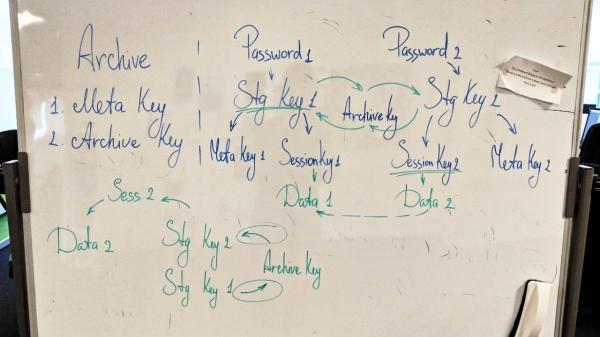
The clever scheme (working version)
I would like to add that all engineers in R&D really love encryption in our product, although no one knows all the details of how it works. (There was also a joke about 'why it works at all,' but the editors didn’t let that pass.)
Testing
Hundreds of bugs were recorded for this feature. The most challenging areas were encryption, the user interface, and issues with restore.
From a testing perspective, the difficulty was the large variability, the 'combinatorics' of tenant job types and repositories – I mean both source and target during backup restoration in the infrastructure. All this is threaded through the logic within (including the new one – parallelism and daily media sets, more on that below), and in general, the unfamiliar cloud specificity for the types. Don’t forget to generously season with encryption. If we continue the metaphor, we have thoroughly indulged in this dish – but have also savored it from all sides.
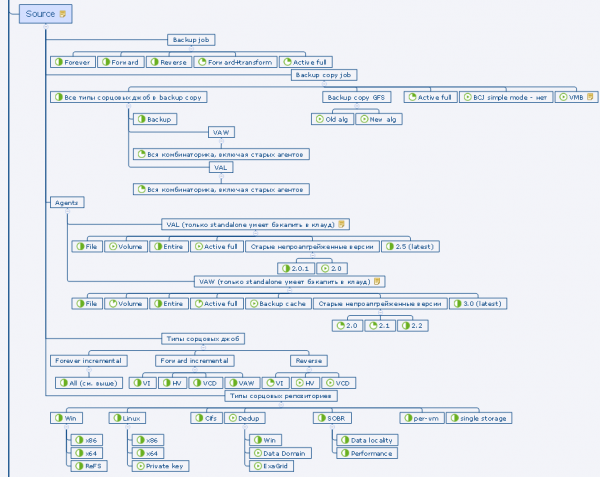
Fragment of the test plan
As a result
A detailed description can be found in (currently in English): , . I will focus on the main points.
Backup
The provider adds tenants to the tape job with a GFS pool as the target. With a cloud license available, the option is accessible on the second step of the wizard TenantsYou can add all tenants at once or individually, or you can choose only a specific quota (but not a subquota) of a particular tenant. Mixing tenant backups and regular local backups in one job is not allowed.
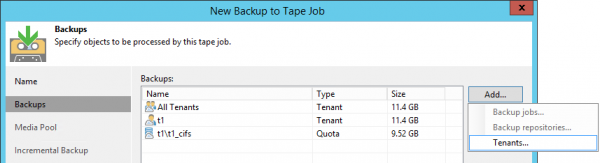
Other settings are almost entirely identical to a standard job in the GFS pool.
Data restoration can be done both on the provider's side and on the tenant's side.
Restoration on the provider's side
It is performed through a new wizard. Here you can drill down to a specific job, restoring the entire chain that was in the repository on a specific day.
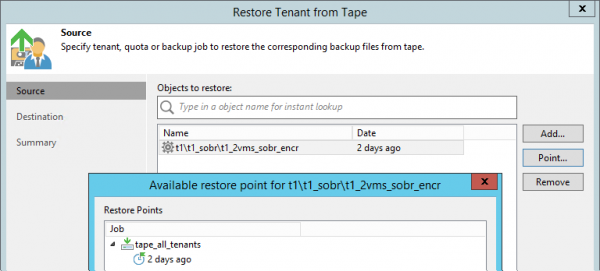
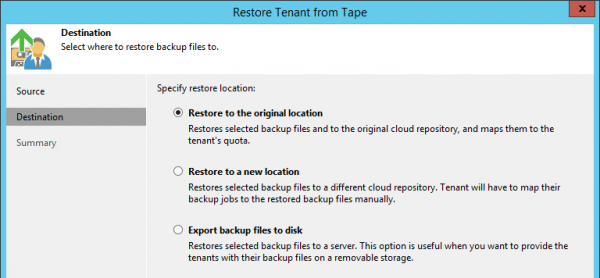
There are three options for restoration:
- To the original location. In this case, the original backup, if available, is deleted; tenant jobs are automatically reconfigured to the restored chain. It is implied that such a restoration will be completely invisible to the client, only for a short time they will be disconnected from the cloud repository.
- To a new quota/repository. The provider can, for example, create a separate temporary account for this purpose, which will be deleted later. The backup appears in the tenant's infrastructure after synchronization with the provider's database.
- Directly to the disk of a Linux or Windows server registered in the provider's infrastructure. This chain can then be written to a flash drive and sent to the tenant.
Restoration on the tenant's side
This option implies that the client has their own tape infrastructure and a large volume of data for restoration. The provider can physically send the tape with the recorded backups to the client via a delivery service, who catalogs it on their equipment, decrypts the tapes and backups, and works with the backups as if they recorded them on tape themselves. This is a hack to avoid downloading terabytes over WAN.
Significant improvements to the GFS pool
-media pools appeared in VBR two years ago, in version 9.5. In the released update, both due to the emergence of the Tenant to tape feature and at the request of users, we have greatly enhanced this functionality.
Daily media sets
A new daily (daily) media set. Now, you can store daily backups in the GFS pool, including not only full backups but also incremental ones. The latter take up significantly less space, which is intended for tape saving. It is implied that these tapes are continuously rotated in the library and are not sent for remote storage. For a restore from an incremental point, tapes from one of the older media sets (weekly, monthly, quarterly, or yearly) will be needed. You cannot enable a daily media set without enabling the weekly set to ensure that, in most cases, the weekly tapes are required for recovery from an incremental copy. They are either always kept in the library or stored at a less remote warehouse.
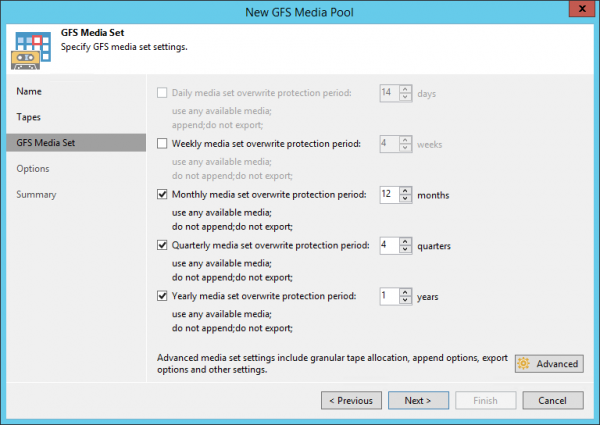
The logic of tape jobs in the GFS media pool , technical writers can attest to that. In short, without going into details, only full backups (including virtual full backups) are copied into the weekly and older media sets, one for each date, whereas the daily media set contains all backups present in the repository for the current day, since the backup job can be initiated more frequently than once a day.
Parallelism, start time, and waiting in GFS pools
Now, parallel writing for multiple chains or jobs on several library drives is possible in GFS media pools (previously it was only available in regular pools). This is enabled at the step Options of the media pool.
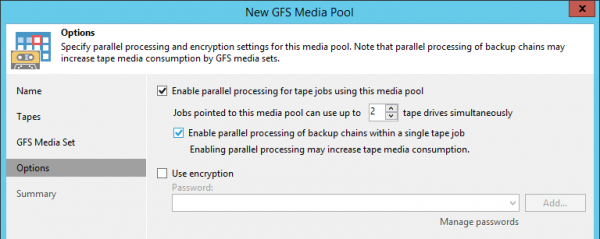
Important clarification: the same file is always written in one stream, so for multiple large virtual machines, it is recommended to enable , so that the backup consists of multiple chains.
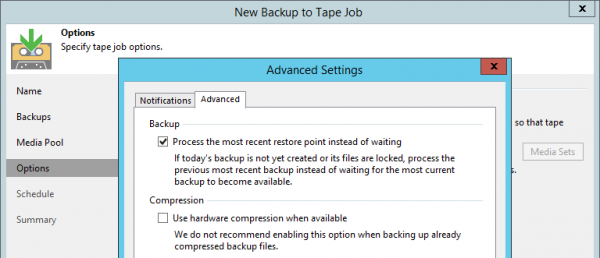
Additionally, it is now possible to choose the start time for the GFS job itself. Many users disliked the midnight start and the subsequent wait of nearly an entire day until the source job completed. Now this time can be set, for example, to the late evening when there is already something to copy to tape. Moreover, upon user requests, we have added an option in the advanced settings that could previously only be activated with a registry key. All you need to do is select Process the most recent restore point instead of waiting – and what is present in the repository at the start of the tape job (for instance, a point from yesterday) is copied directly to the tape, with no waiting involved.
Enhanced multiple library operation
We'll discuss a situation where more than one library is added to a media pool. We supported this before, but now and then we receive complaints from clients about unpredictable behavior.
Was
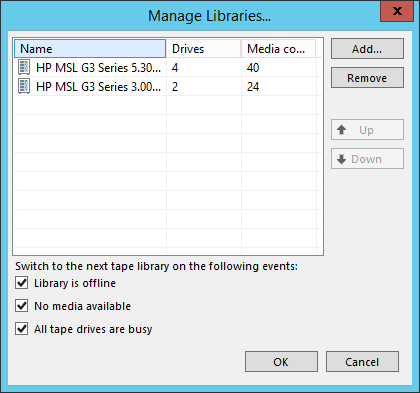
For example, a tape job started, occupying two drives in the first library, but the parallelism settings allow it to use up to 4 drives. Should this job switch to the second library of the media pool and utilize it as well, or would that be resource overuse?
Another case. The option to switch based on the condition "no available tapes" is selected; there is only one tape in the first library, but all data can potentially fit on it. However, the settings allow writing to two tapes in parallel. Should the second library be engaged in this case?
We've decided to streamline this area by allowing explicit configuration of behavior.
Became
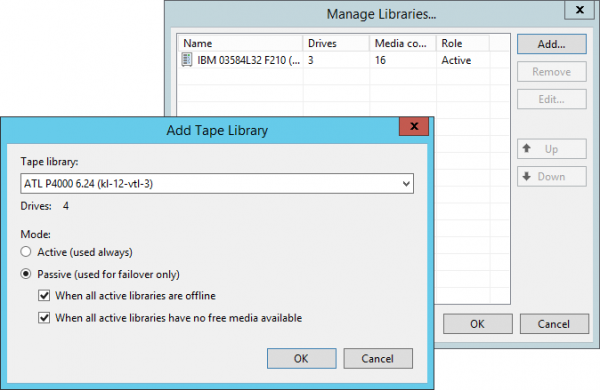
now have roles - active and passive. And the media pool itself has two modes: fault-tolerant, or failover (failover) and parallel writing (paralleling). Now, depending on the requirements, the media pool can be configured differently.
- If you have multiple equal libraries and need to parallelize writing to them - enable the parallel writing mode, in which all libraries must be assigned active roles. In this case, new tapes and drives will be utilized immediately, as soon as the need arises, regardless of which library they are in. There is still a priority - we will first attempt to find resources in the library that is higher on the list.
- If there is one primary library and one old or standalone drive as a backup, enable the failover mode, placing the primary library at the top of the list and assigning a passive role to the backup devices. Switching to such a device will only occur when absolutely necessary to ensure the job can operate at all. This situation will be considered a fault, and a notification will be sent via email.
There is a more complex situation that we do not currently support – multiple active libraries alongside passive ones. Feedback will show if there is a need for such configurations and whether we need to enhance this feature in the future. This is standard practice.
WORM Support
WORM – Write Once Read Many – tapes that cannot be erased or overwritten , data can only be appended. Their mandatory use is regulated by the rules of certain organizations, for example, those operating in the field of medicine. The main problem with such tapes in the past was that VBR during or recorded a header that could no longer be erased, causing tape jobs to fail with an error during such attempts.
Full support for such tapes was implemented in 9.5 Update 4. WORM media pools, both normal and GFS, were added, where only tapes of this type can be placed.
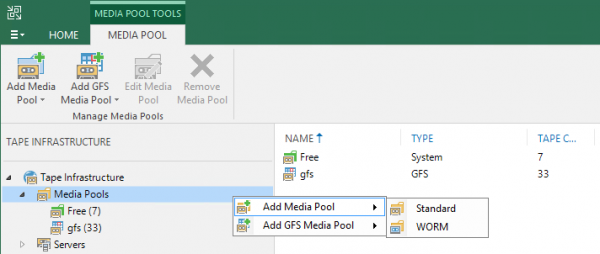
New tapes feature a blue, ‘frozen’ icon. From the user's perspective, working with WORM tapes is no different from working with regular ones.
The ‘worminess’ of tapes is initially determined by the suffix , but if the barcode is regular or unreadable, the driver provides this information upon the first tape insertion. WORM tapes cannot be placed in a regular media pool and written to. Interestingly, some users have already applied WORM barcodes to regular tapes and were surprised by the changes in their infrastructure after the update.
The tape chip
Alongside the implementation of non-rewriteable tapes, work began on the . Standard attributes in the chip were not previously used by us; now we write and read some of them but do not consider them the primary source of data. The main reference point remains the tape header. This decision proved to be correct: a month after the release, we see how the ‘zoo’ of users’ hardware presents surprises in terms of working with the chip.
Backup of NDMP volumes to tape
In conclusion – regarding the most requested feature based on the number of reviews in this Update. Backup of NDMP volumes to tapes has become available. An NDMP server must be added to the VBR infrastructure. , after which you can select volumes from this host in the file tape job. They are stored on tapes as files with a special attribute to distinguish them from regular ones during cataloging.
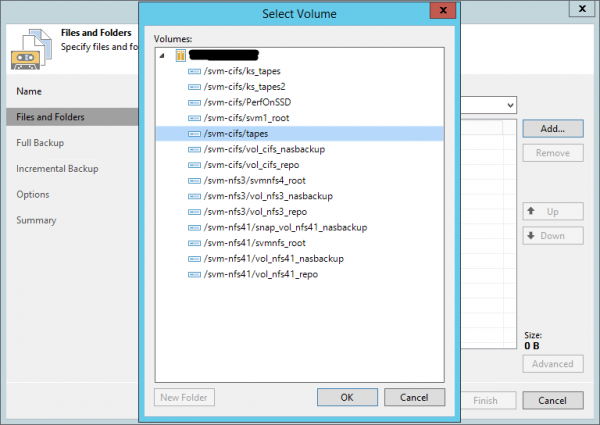
The first implementation has certain limitations: extensions are not supported, and backup and restore are possible only for the full volume, not individual files. The backup operates via (in the case of NetApp – ), there are specific details: the maximum number of incremental points is 9, after which a full backup is enforced.
In conclusion
These were just the most significant innovations in magnetic tape backup in VBR 9.5 Update 4. Other changes are listed as follows:
- the ability to specify the order of source jobs and files in tape jobs;
- a Tape Operator role has been added (the user can do everything except restore from tape – that is handled by the Restore Operator);
- full include/exclude masks have been added in the file tape job (except for NDMP);
- the recovery process in the file tape job has been improved (the folder is restored with those files that were present at the time of backup, rather than all that have ever been in it during its entire backup history – a highly requested feature, by the way);
- the speed of restoring a very large number of files from tapes has increased;
- the algorithm for selecting the next tape for writing has been refined, in particular, taking into account the volume of data written/read throughout its entire life, selecting the most recent one;
- the stability of the product has improved.
Useful links
For variety, here are a few links to Russian-language resources:
- And back to the previous place are the overview videos "How It Works" (though currently in English) – you can watch them . Tapes are discussed on slides 95 – 102.
Source: habr.com
