

In this article, I will share how I became familiar with Quest Netvault Backup. I had heard many positive reviews about Netvault Backup when this software was still owned by Dell, but I had not yet had the chance to get hands-on experience with it.
Quest Software, also known as Quest, is a software company headquartered in California, with 53 offices in 24 countries around the world. It was founded in 1987. The company is known for its software used by professionals in database management, cloud management, information security, data analysis, and backup and recovery. Quest Software was acquired by Dell in 2012. By November 1, 2016, the sale was completed and the company relaunched as Quest Software.
I only recently got a close look at Quest Netvault. In one of the projects, the Client asked for an affordable and optimal solution to protect their infrastructure. The Client was considering various backup software solutions, one of which was Quest Netvault Backup. Based on the test results, taking into account the parameters important to the Client (some of which are listed at the end of the article), Quest Netvault Backup was selected.
In addition to the main requirements, the Client wanted the software to be installed on servers running Linux. Not every backup software can meet such requirements, but Quest Netvault Backup can do this.
Initial Data and Requirements
The task set by the Client was to design a system that ensures the backup of data amounting to 62 TB. This data was contained in application systems such as SAP, Microsoft SQL, PostgreSQL, MariaDB, Microsoft Exchange, Microsoft SharePoint, etc. These application systems operated on physical and virtual servers running Microsoft Windows Server, Linux, and FreeBSD operating systems. The virtual environment was built on the VMware vSphere virtualization platform. The infrastructure was hosted at a single site.
A general view of the Client's infrastructure is shown in Figure 1.1.
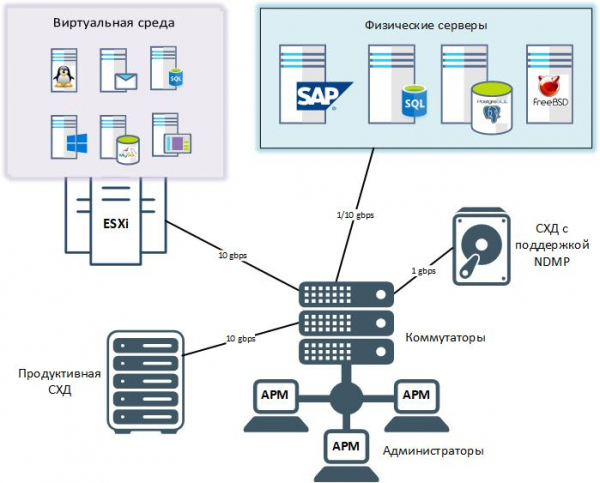
Figure 1.1 – Client Infrastructure
The analysis examined the capabilities of Quest Netvault Backup applicable to the Client's infrastructure, specifically regarding backup, recovery, management, and data monitoring. The typical functionality and operating principles are virtually indistinguishable from software provided by other vendors. Therefore, I would like to focus on the features of Quest Netvault Backup that distinguish it from other backup solutions.
Interesting Features
Installation
The size of the Quest Netvault Backup distribution is only 254 megabytes, allowing for quick deployment.
Plugins for supported platforms and tasks are downloaded separately, which positively affects the target state of the system, ensuring it has only the functionality necessary for protecting a specific infrastructure and is not overloaded with excessive features.
Management
Netvault administration is done through the WebUI web interface. Access is granted via username and password.
Figure 1.2 – Login window for the management console
Connection to the web console can be made from any computer on the network using a browser.
The WebUI features a simple and user-friendly interface, making administration straightforward. The management logic is accessible and clear; if questions arise, detailed .
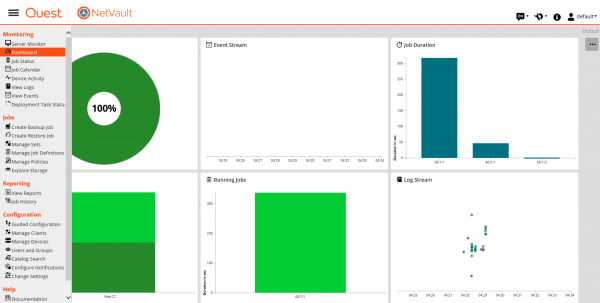
Figure 1.3 – WebUI Interface
WebUI is designed for managing and controlling Quest Netvault Backup, enabling the following tasks:
– configuration of performance, security, and other parameters;
– management of clients, storage devices, and media;
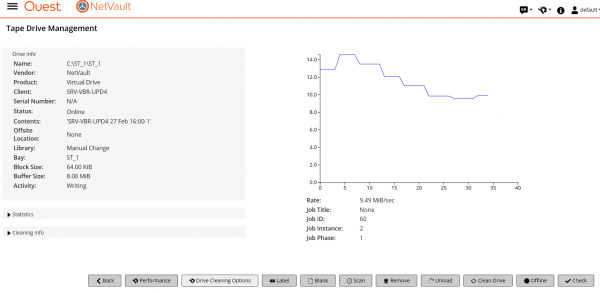
Figure 1.4 – Managing storage devices
– performing backup and recovery;
– monitoring jobs, device activity, and event logs;
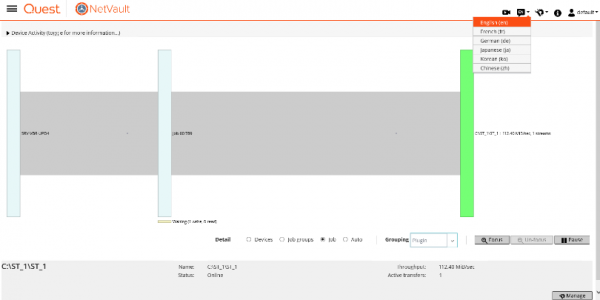
Figure 1.5 – Monitoring device activity
– configuring notifications;
– creating and viewing reports.
Storage Devices
Quest Netvault easily implements the 3-2-1 storage rule, as it can work with both devices for operational backup storage (disk storage systems) and long-term storage devices (deduplication devices, physical tape libraries, autoloaders, virtual tape libraries (VTL), and shared virtual tape libraries (SVTL)). Non-locatable backups can be stored in the cloud, at a remote site, or on removable media (for example, on a tape drive).
When working with deduplication devices, specialized protocols RDA and DD Boost are supported. The use of these protocols:
– reduces network load and increases backup task performance, as data is deduplicated on the client and only the necessary blocks are sent. For example, operation in conjunction with Quest Qorestor using the RDA protocol allows for performance of up to 20 terabytes per hour and a compression ratio of 20 to 1;
– protects backups from ransomware viruses. Even if the backup server itself becomes infected and encrypted, the backups will remain untouched. .
Clients
Quest Netvault Backup supports over thirty platforms and applications. More detailed information can be found on the vendor's website at (Figure 1.7). Compatibility checks for the protected systems with Quest Netvault Backup are conducted according to the official document 'Quest Netvault Backup Compatibility Guide' located at .
The support for such a large number of systems allows designing solutions for complex Enterprise-level infrastructures. Clients are distributed as plugins (similar to agents from other vendors) that are installed on servers. As a result, data is protected using a single system with a unified management point.
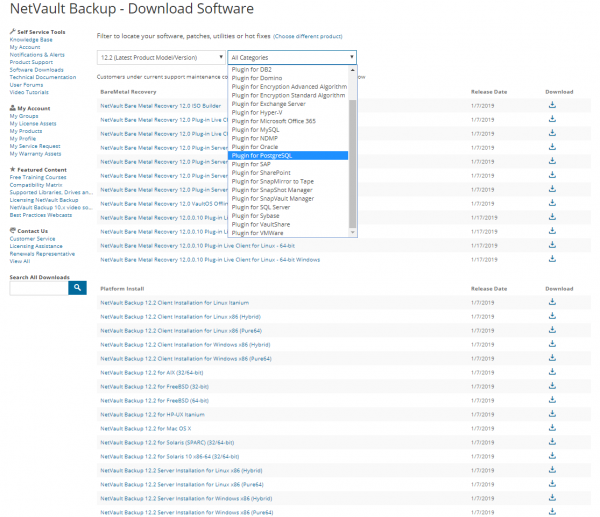
Figure 1.6 – List of Plugins
After downloading plugins for these platforms, we place them in a shared folder, which we connect to Netvault, and then remotely install the plugins on the protected servers.
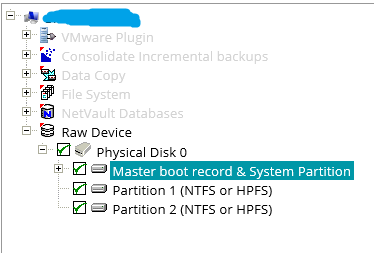
Another advantage, in my opinion, is the clarity in selecting the objects to be backed up. For example, in the illustration below, we select the system state of the server and the logical disk c: as the objects.
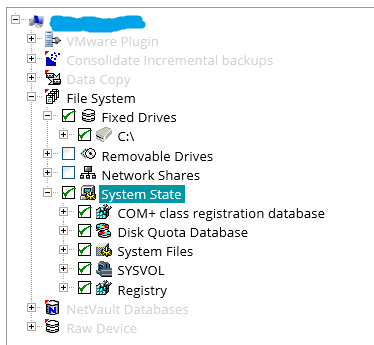
This illustration shows the selection of hard disk partitions.
In addition to plugins for platforms running on standalone servers, Quest Netvault Backup also has versions of plugins that support various clustering systems. In this case, the cluster nodes are grouped into a virtual client where the clustering-supporting plugin is installed. Backup and recovery of cluster nodes will then be performed through this virtual client. The table below presents the cluster versions of the plugins.
Table 1.2 Plugins Supporting Clustering Systems
Plugin
Description
Plug-in for FileSystem
This plugin is used for configuring backups of file system data on the following platforms: – Windows Server clusters; – Linux clusters; – Sun clusters (Solaris SPARC)
Plug-in for Exchange
This plugin is used for configuring backups of Microsoft Exchange servers operating with Database Availability Group (DAG) technology.
Plug-in for Hyper-V
This plugin is used for configuring backups of fault-tolerant Hyper-V clusters.
Plug-in for Oracle
This plugin is used for configuring backups of Oracle Database on Oracle's Real Application Clusters (RAC).
Plug-in for SQL Server
This plugin is used for configuring backups of fault-tolerant Microsoft SQL Server clusters.
Plug-in for MySQL
This plugin is used for configuring backups of MySQL Server in a fault-tolerant cluster.
Implementation Result
The result of the project work was the deployment of a backup system for the Customer based on Quest Netvault Backup software, with architecture as shown in Figure 1.8.
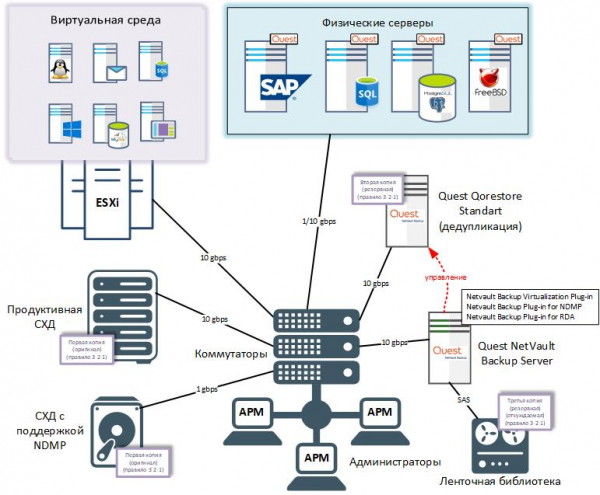
Figure 1.7 – Target State of the System
All components of Netvault Backup were deployed on a physical server with the following specifications:
– two processors with ten cores each;
– 64 GB of RAM;
– two SAS 300GB 10K hard drives (RAID1);
– four SAS 600GB 15K hard drives (RAID10);
– HBA with two external SAS ports;
– two 10 gbps ports;
– OS CentOS.
Operational backups were stored on Quest Qorestor Standard (back end 150TB). Work with Qorestor was done via RDA protocol. The deduplication ratio on Qorestor after the trial operation of the system was 14.7 to 1.
For long-term storage, a tape library with four LTO-7 standard drives was used. The tape library was connected to the backup server via SAS. Periodically, cartridges were removed and relocated for storage in one of the remote branches.
All necessary plugins were downloaded and placed in a network folder for remote installation. The deployment and configuration time for this system was nine days.
Conclusions
Based on the project results, I can say that Quest Netvault Backup fulfilled all the Client's requirements and this solution is one of the means for building a backup system, suitable for both small companies and Enterprise-level Clients.
Most of the parameters used for evaluating the solutions are provided in the comparative table.
Table 1.3 – Comparative Table
Criteria
Commvault
IBM Spectrum Protect
Micro Focus Data Protector
Veeam Backup & Replication
Veritas NetBackup
Quest Netvault
Support for Microsoft Windows OS for the backup server
Yes
Yes
Yes
Yes
Yes
Yes
Support for Microsoft Windows OS for the backup server
No
Yes
Yes
No
Yes
Yes
Multilingual interface
Yes
Yes
No
No
Yes
Yes
Functionality of the WEB management interface
6 out of 10
7 out of 10
6 out of 10
5 out of 10
7 out of 10
7 out of 10
Centralized management
Yes
Yes
Yes
Yes
Yes
Yes
Role-based administration
Yes
Yes
Yes
Yes
Yes
Yes
Agent for Microsoft Windows OS
Yes
Yes
Yes
Yes
Yes
Yes
Agent for Linux OS
Yes
Yes
Yes
Yes
Yes
Yes
Agent for Solaris OS
Yes
Yes
Yes
Yes
Yes
Yes
Agent for AIX OS
Yes
Yes
Yes
Yes
Yes
Yes
Agent for FreeBSD OS
Yes
No
Yes
Yes
Yes
Yes
Agent for MAC OS
Yes
Yes
Yes
No
Yes
Yes
Agent for Microsoft SQL
Yes
Yes
Yes
Yes
Yes
Yes
Agent for IBM DB2
Yes
Yes
Yes
Yes
No
Yes
Agent for Oracle Database
Yes
Yes
Yes
Yes
Yes
Yes
Agent for PostgreSQL
Yes
Yes
Yes
No
Yes
Yes
Agent for MariaDB
Yes
Yes
Yes
No
Yes
Yes
Agent for MySQL
Yes
Yes
Yes
No
Yes
Yes
Agent for Microsoft SharePoint
Yes
Yes
Yes
Yes
Yes
Yes
Agent for Microsoft Exchange
Yes
Yes
Yes
Yes
Yes
Yes
Agent for IBM Informix
Yes
Yes
Yes
No
Yes
Yes
Agent for Lotus Domino Server
Yes
Yes
Yes
No
Yes
Yes
Agent for SAP
Yes
Yes
Yes
No
Yes
Yes
Support for VMware ESXi
Yes
Yes
Yes
Yes
Yes
Yes
Support for Microsoft Hyper-V
Yes
Yes
Yes
Yes
Yes
Yes
Support for tape storage devices
Yes
Yes
Yes
Yes
Yes
Yes
Support for DD boost protocol
Yes
Yes
Yes
Yes
Yes
Yes
Support for Catalyst protocol
Yes
Yes
Yes
Yes
Yes
No
Support for OST protocol
Yes
No
Yes
No
Yes
No
Support for RDA protocol
Yes
Yes
Yes
Yes
Yes
Yes
Support for encryption
Yes
Yes
Yes
Yes
Yes
Yes
Client-side deduplication
Yes
Yes
Yes
Yes
Yes
Yes
Server-side deduplication
Yes
Yes
Yes
Yes
Yes
Yes
Support for NDMP
Yes
Yes
Yes
No
Yes
Yes
Usability
6 out of 10
3 out of 10
4 out of 10
8 out of 10
5 out of 10
7 out of 10
Authors: Fedotov Mikhail — Backup Systems Architect
Source: habr.com
