

Controlling all information circulating within the organization is one of the main tasks in the practical implementation of organizational and administrative documents (information security policy and other internal lower-level documents) of the organization.
Data Leak Prevention (DLP) systems are largely capable of addressing this problem.
There are enough types of these systems on the modern market, such as SearchInform DLP, Infowatch Traffic Monitor DLP, Zecurion DLP, Symantec DLP, and others. However, today's article will focus on the product of SearchInform LLC.
The SearchInform Information Security Framework (KIB SearchInform) is a serious and flexibly configurable software complex that, due to its functionality and extensive analytical tools, creates significant competition for other companies in this field. However, like all products, KIB SearchInform has a drawback, which will be discussed now.

Figure 1 – KIB SearchInform Logo
In KIB SearchInform, one of the sources of information gathering is the agent (Windows/Linux). The agent for Windows, just like for Linux, has a modular information-gathering system, where modules can be turned on or off as needed. We will examine the Device module (control of external devices, network devices, processes, etc.). A demo version of this product can be obtained officially through the developer's website (with full functionality). Further actions will be carried out using the obtained license key — EndPointController version 5.51.0.9 (agent version 5.51.0.9).
The main problem with this module is the encryption algorithm for information on external removable devices. Let’s consider how the encryption algorithm works in KIB SearchInform.
We install the agent on the workstation and set up control of external devices (Device module) in the 'Network Environment' section of EndPointController 5.51.0.9.
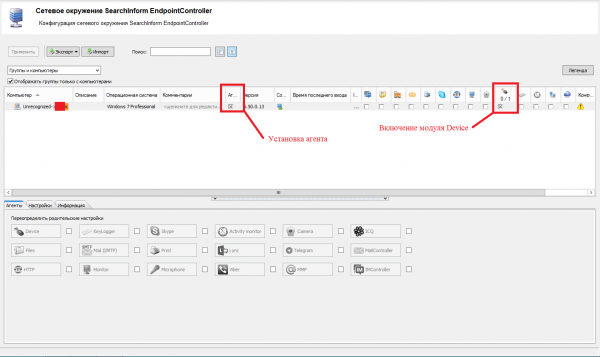
Figure 2 – Installation and activation of the module
We configure encryption in the Device module settings under the 'Encryption' tab: we generate a key and enable encryption for all media (encryption can optionally be enabled only for specific information carriers).
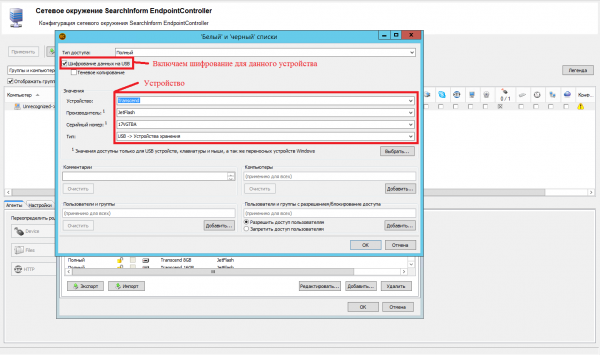
Figure 3 – Whitelist configuration
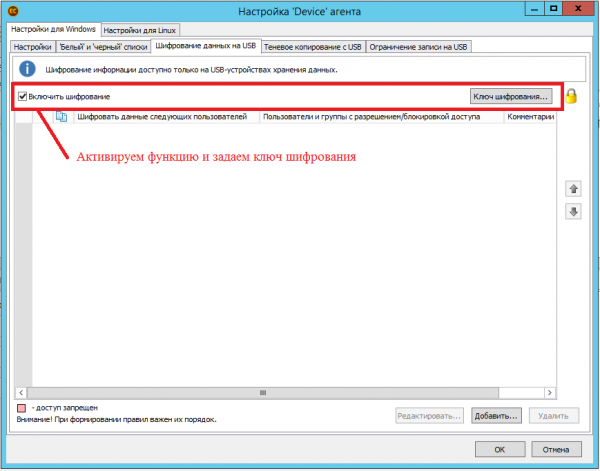
Figure 4 – Encryption Configuration
Now we proceed to analyze the file encryption algorithm using this product. We will copy the files "Install.exe" and "Fundamentals of Law.rtf" from the controlled workstation "WINOC" to an external removable storage device "Removable Disk (E:)". As shown in Figure 5, in the hidden folder "System Volume Information", the objects "Install.exe" and "Fundamentals of Law.rtf" have been created. Thus, we can conclude that the folder "System Volume Information" contains a list of encrypted objects on the removable storage.
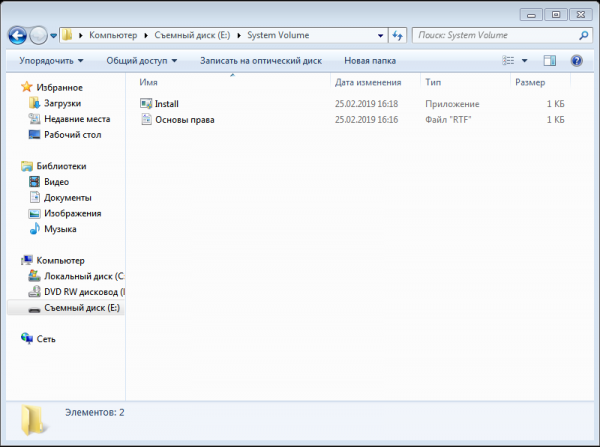
Figure 5 – the folder "System Volume Information"
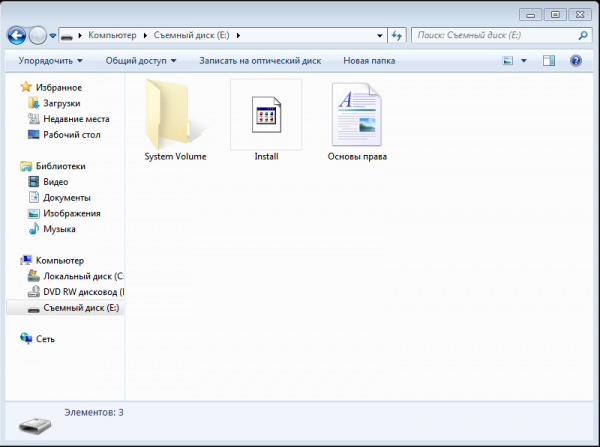
Figure 6 – Root folder of the information removable storage
As is known, there are three aspects upon which information security is built – integrity, availability, and confidentiality. These aspects are compromised with the use of this encryption approach, as the system information indicating whether an object is encrypted must reside within the object's header.
With the current algorithm design, there is a possibility of random modification/deletion of the objects in the folder "System Volume Information" on the removable storage, leading to the loss of the original encrypted objects, as well as modification of the objects themselves on uncontrolled workstations (for example, renaming the object "Install.exe" with the network path "E:Install.exe" on a computer without an agent, while the informational file of the KIB Searchinform product in the folder "System Volume Information" "Install.exe" with the network path "E:System Volume InformationInstall.exe" remains unchanged since there is no agent to modify the metadata, making the opening of this file impossible).
We hope that the developer will take note of this flaw in the encryption functionality for removable information storage in the KIB Searchinform product and revise its algorithm.
Source: habr.com
