


The goal of this project was:
- Studying the DHCP protocol while working in an IPv4 network
- Learning Python (slightly more than from scratch 😉)
- server replacement (my fork), original , which is becoming increasingly difficult to build for the new OS. Plus, I don't like that there's no way to "change it right now" for the binary.
- obtaining a functioning DHCP server with the ability to select the subscriber's IP address based on the subscriber's MAC address or the combination of switch MAC + port (Option 82)
- writing another bike (Oh! This is my favorite pastime)
- getting flak for my clumsiness on Habrhabr (or better yet, an invite) 😉
Result: works 😉 Tested on FreeBSD and Ubuntu OS. Theoretically, the code can be requested to run on any OS, as there seem to be no specific ties in the code.
Caution! There’s a lot more ahead.
Link to the repository for enthusiasts .
The process of installation, setup, and use of the result of "studying the material" is much further below, and then a bit of theory on the DHCP protocol. For myself. And for history 😉
A bit of theory
What is DHCP
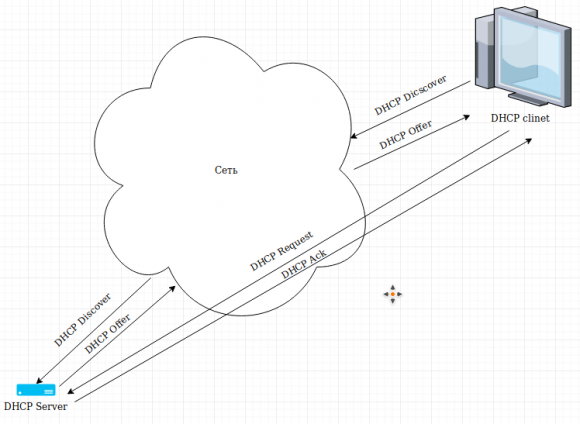
It is a network protocol that allows a device to learn its IP address (and other parameters like gateway, DNS, etc.) from the DHCP server. The packet exchange occurs over the UDP protocol. The general principle of the device's operation when requesting network parameters is as follows:
- The device (client) broadcasts a UDP request (DHCPDISCOVER) across the entire network asking, "Well, can someone give me an IP address?" The request usually (but not always) comes from port 68 (source), while the destination is port 67 (destination). Some devices send packets from port 67 as well. The DHCPDISCOVER packet includes the MAC address of the client device.
- All DHCP servers present in the network (and there can be several) create an offer DHCPOFFER with network settings for the device that sent DHCPDISCOVER and also broadcast it across the network. Identification of whom this packet is intended for is done by the MAC address of the client provided earlier in the DHCPDISCOVER request.
- The client receives packets with network configuration offers, selects the most appealing one (criteria may vary, including delivery time of the packet and the number of intermediary routes), and makes an 'official request' DHCPREQUEST with network settings to the preferred DHCP server. In this case, the packet is sent to a specific DHCP server.
- The server that receives the DHCPREQUEST sends a DHCPACK packet, which again lists the network settings intended for this client.
Additionally, there are DHCPINFORM packets that come from the client, aimed at informing the DHCP server that the 'client is alive' and is using the issued network settings. In this server implementation, these packets are ignored.
Packet Format
In general, the Ethernet frame packet looks like this:

In our case, we will only consider the data directly contained in the UDP packet, without the OSI layer protocol headers, namely the structure of DHCP:
DHCPDISCOVER
So, the process of obtaining an IP address for a device begins with the DHCP client sending a broadcast request from port 68 to 255.255.255.255:67. In this packet, the client includes its MAC address as well as what it wants to receive from the DHCP server. The packet structure is described in the table below.
Table of DHCPDISCOVER Packet Structure
Position in Packet
Value Name
Example
Representation
Byte
Explanation
1
Boot Request
1
Hex
1
Message type. 1 — request from client to server, 2 — response from server to client.
2
Hardware type
1
Hex
1
Type of hardware address, in this protocol, 1 — MAC.
3
Hardware address length
6
Hex
1
Length of the device's MAC address.
4
Hops
1
Hex
1
Number of intermediary routes.
5
Transaction ID
23:cf:de:1d
Hex
4
Unique transaction identifier. Generated by the client at the start of the request operation.
7
Second elapsed
0
Hex
4
Time in seconds since the start of the address acquisition process.
9
Bootp flags
0
Hex
2
Some flags that can be set as indications of protocol parameters.
11
Client IP address
0.0.0.0
Line
4
Client IP address (if any).
15
Your client IP address
0.0.0.0
Line
4
IP address proposed by the server (if any).
19
Next server IP address
0.0.0.0
Line
4
Server IP address (if known).
23
Relay agent IP address
172.16.114.41
Line
4
IP address of the relay agent (e.g., switch).
27
Client MAC address
14:d6:4d:a7:c9:55
Hex
6
MAC address of the packet sender (client).
31
Client hardware address padding
Hex
10
Reserved space. Typically filled with zeros.
41
Server host name
Line
64
DHCP server name. Usually not transmitted.
105
Boot file name
Line
128
File name on the server used by diskless stations during boot
235
Magic cookie
63:82:53:63
Hex
4
The 'magic' number used to indicate that this packet belongs to the DHCP protocol
DHCP options. Can appear in any order
236
Option number
53
Dec
1
Option 53 that specifies the type of DHCP packet
1 — DHCPDISCOVER
3 — DHCPREQUEST
2 — DHCPOFFER
5 — DHCPACK
8 — DHCPINFORM
Length of the option
1
Dec
1
Value of the option
1
Dec
1
Option number
50
Dec
1
Which IP address the client wants to receive
Length of the option
4
Dec
1
Value of the option
172.16.134.61
Line
4
Option number
55
1
Requested network parameters by the client. The composition can vary
01 — Subnet mask
03 — Gateway
06 — DNS
0c — Hostname
0f — Network domain name
1c — Broadcast address
42 — TFTP server name
79 — Classless Static Route
Length of the option
8
1
Value of the option
01:03:06:0c:0f:1c:42:79
8
Option number
82
Dec
Option 82, which transmits the MAC address of the relay device and some additional values.
Most often — the switch port on which the DHCP client operates. This option 'contains' additional parameters. The first byte is the suboption number, the second is its length, followed by its value.
In this case, option 82 includes suboptions:
Agent Circuit ID = 00:04:00:01:00:04, where the last two bytes represent the port of the DHCP client from which the request came
Agent Remote ID = 00:06:c8:be:19:93:11:48 — MAC address of the DHCP relay device
Length of the option
18
Dec
Value of the option
01:06
00:04:00:01:00:04
02:08
00:06:c8:be:19:93:11:48
Hex
End of the packet
255
Dec
1
255 signifies the end of the packet
DHCPOFFER
As soon as the server receives a DHCPDISCOVER packet and it sees it can offer something to the client from the request, it creates a response — DHCPOFFER. This response is sent to the port 'from where it came,' as a broadcast, since at that moment, the client still does not have an IP address, and thus can only accept the packet if it is sent as a broadcast. The client recognizes that this packet is for it by its MAC address inside the packet, as well as the transaction number, which it generates at the moment of creating the first packet.
Structure table of the DHCPOFFER packet
Position in Packet
Common name of the value
Example
Representation
Byte
Explanation
1
Boot Request
1
Hex
1
Message type. 1 — request from client to server, 2 — response from server to client.
2
Hardware type
1
Hex
1
Type of hardware address, in this protocol, 1 — MAC.
3
Hardware address length
6
Hex
1
Length of the device's MAC address.
4
Hops
1
Hex
1
Number of intermediary routes.
5
Transaction ID
23:cf:de:1d
Hex
4
Unique transaction identifier. Generated by the client at the start of the request operation.
7
Second elapsed
0
Hex
4
Time in seconds since the start of the address acquisition process.
9
Bootp flags
0
Hex
2
Some flags that can be set as an indication of protocol parameters. In this case, 0 — indicates a Unicast request type
11
Client IP address
0.0.0.0
Line
4
Client IP address (if any).
15
Your client IP address
172.16.134.61
Line
4
IP address proposed by the server (if any).
19
Next server IP address
0.0.0.0
Line
4
Server IP address (if known).
23
Relay agent IP address
172.16.114.41
Line
4
IP address of the relay agent (e.g., switch).
27
Client MAC address
14:d6:4d:a7:c9:55
Hex
6
MAC address of the packet sender (client).
31
Client hardware address padding
Hex
10
Reserved space. Typically filled with zeros.
41
Server host name
Line
64
DHCP server name. Usually not transmitted.
105
Boot file name
Line
128
File name on the server used by diskless stations during boot
235
Magic cookie
63:82:53:63
Hex
4
The 'magic' number used to indicate that this packet belongs to the DHCP protocol
DHCP options. Can appear in any order
236
Option number
53
Dec
1
Option 53, specifying DHCP packet type 2 — DHCPOFFER
Length of the option
1
Dec
1
Value of the option
2
Dec
1
Option number
1
Dec
1
Option offering the DHCP client a subnet mask
Length of the option
4
Dec
1
Value of the option
255.255.224.0
Line
4
Option number
3
Dec
1
Option offering the DHCP client a default gateway
Length of the option
4
Dec
1
Value of the option
172.16.12.1
Line
4
Option number
6
Dec
1
Option offering the DHCP client DNS
Length of the option
4
Dec
1
Value of the option
8.8.8.8
Line
4
Option number
51
Dec
1
Lifetime of the issued network parameters in seconds, after which the DHCP client should request them again
Length of the option
4
Dec
1
Value of the option
86400
Dec
4
Option number
82
Dec
1
Option 82 repeats what was received in DHCPDISCOVER
Length of the option
18
Dec
1
Value of the option
01:08:00:06:00
01:01:00:00:01
02:06:00:03:0f
26:4d:ec
Dec
18
End of the packet
255
Dec
1
255 signifies the end of the packet
DHCPREQUEST
After the client receives the DHCPOFFER, it constructs a packet requesting network parameters not from all DHCP servers in the network, but only from one specific server whose DHCPOFFER it liked the most. The criteria for 'liking' can vary and depend on the implementation of the DHCP client. The recipient of the request is specified using the MAC address of the DHCP server. The DHCPREQUEST packet can also be sent by the client without a prior DHCPDISCOVER if an IP address from the server was previously obtained.
Structure Table of the DHCPREQUEST Packet
Position in Packet
Common name of the value
Example
Representation
Byte
Explanation
1
Boot Request
1
Hex
1
Message type. 1 — request from client to server, 2 — response from server to client.
2
Hardware type
1
Hex
1
Type of hardware address, in this protocol, 1 — MAC.
3
Hardware address length
6
Hex
1
Length of the device's MAC address.
4
Hops
1
Hex
1
Number of intermediary routes.
5
Transaction ID
23:cf:de:1d
Hex
4
Unique transaction identifier. Generated by the client at the start of the request operation.
7
Second elapsed
0
Hex
4
Time in seconds since the start of the address acquisition process.
9
Bootp flags
8000
Hex
2
Some flags may be set as an indication of protocol parameters. In this case, 'broadcast' is set.
11
Client IP address
0.0.0.0
Line
4
Client IP address (if any).
15
Your client IP address
172.16.134.61
Line
4
IP address proposed by the server (if any).
19
Next server IP address
0.0.0.0
Line
4
Server IP address (if known).
23
Relay agent IP address
172.16.114.41
Line
4
IP address of the relay agent (e.g., switch).
27
Client MAC address
14:d6:4d:a7:c9:55
Hex
6
MAC address of the packet sender (client).
31
Client hardware address padding
Hex
10
Reserved space. Typically filled with zeros.
41
Server host name
Line
64
DHCP server name. Usually not transmitted.
105
Boot file name
Line
128
File name on the server used by diskless stations during boot
235
Magic cookie
63:82:53:63
Hex
4
The 'magic' number used to indicate that this packet belongs to the DHCP protocol
DHCP options. Can appear in any order
236
Option number
53
Dec
3
Option 53, indicating the packet type DHCP 3 — DHCPREQUEST
Length of the option
1
Dec
1
Value of the option
3
Dec
1
Option number
61
Dec
1
Client Identifier: 01 (for Ethernet) + Client MAC Address
Length of the option
7
Dec
1
Value of the option
01:2c:ab:25:ff:72:a6
Hex
7
Option number
60
Dec
'Vendor class identifier'. In my case, it reports the version of the DHCP client. Other devices may return different information. Windows, for example, reports MSFT 5.0.
Length of the option
11
Dec
Value of the option
udhcp 0.9.8
Line
Option number
55
1
Requested network parameters by the client. The composition can vary
01 — Subnet mask
03 — Gateway
06 — DNS
0c — Hostname
0f — Network domain name
1c — Broadcast address
42 — TFTP server name
79 — Classless Static Route
Length of the option
8
1
Value of the option
01:03:06:0c:0f:1c:42:79
8
Option number
82
Dec
1
Option 82 repeats what was received in DHCPDISCOVER
Length of the option
18
Dec
1
Value of the option
01:08:00:06:00
01:01:00:00:01
02:06:00:03:0f
26:4d:ec
Dec
18
End of the packet
255
Dec
1
255 signifies the end of the packet
DHCPACK
As a confirmation that 'yes, this is your IP address, and I won't assign it to anyone else', the DHCP server sends a packet in the DHCPACK format to the client. This packet, like the others, is also sent as a broadcast. However, in the code below for the DHCP server implemented in Python, I also duplicate any broadcast request by sending a packet to a specific IP client if it is already known. Moreover, the DHCP server does not concern itself whether the DHCPACK packet reached the client. If the client does not receive the DHCPACK, it simply repeats the DHCPREQUEST after some time.
Structure Table of the DHCPACK Packet
Position in Packet
Common name of the value
Example
Representation
Byte
Explanation
1
Boot Request
2
Hex
1
Message type. 1 — request from client to server, 2 — response from server to client.
2
Hardware type
1
Hex
1
Type of hardware address, in this protocol, 1 — MAC.
3
Hardware address length
6
Hex
1
Length of the device's MAC address.
4
Hops
1
Hex
1
Number of intermediary routes.
5
Transaction ID
23:cf:de:1d
Hex
4
Unique transaction identifier. Generated by the client at the start of the request operation.
7
Second elapsed
0
Hex
4
Time in seconds since the start of the address acquisition process.
9
Bootp flags
8000
Hex
2
Some flags may be set as an indication of protocol parameters. In this case, 'broadcast' is set.
11
Client IP address
0.0.0.0
Line
4
Client IP address (if any).
15
Your client IP address
172.16.134.61
Line
4
IP address proposed by the server (if any).
19
Next server IP address
0.0.0.0
Line
4
Server IP address (if known).
23
Relay agent IP address
172.16.114.41
Line
4
IP address of the relay agent (e.g., switch).
27
Client MAC address
14:d6:4d:a7:c9:55
Hex
6
MAC address of the packet sender (client).
31
Client hardware address padding
Hex
10
Reserved space. Typically filled with zeros.
41
Server host name
Line
64
DHCP server name. Usually not transmitted.
105
Boot file name
Line
128
File name on the server used by diskless stations during boot
235
Magic cookie
63:82:53:63
Hex
4
The 'magic' number used to indicate that this packet belongs to the DHCP protocol
DHCP options. Can appear in any order
236
Option number
53
Dec
3
Option 53, indicating the packet type DHCP 5 — DHCPACK
Length of the option
1
Dec
1
Value of the option
5
Dec
1
Option number
1
Dec
1
Option offering the DHCP client a subnet mask
Length of the option
4
Dec
1
Value of the option
255.255.224.0
Line
4
Option number
3
Dec
1
Option offering the DHCP client a default gateway
Length of the option
4
Dec
1
Value of the option
172.16.12.1
Line
4
Option number
6
Dec
1
Option offering the DHCP client DNS
Length of the option
4
Dec
1
Value of the option
8.8.8.8
Line
4
Option number
51
Dec
1
Lifetime of the issued network parameters in seconds, after which the DHCP client should request them again
Length of the option
4
Dec
1
Value of the option
86400
Dec
4
Option number
82
Dec
1
Option 82 repeats what was received in DHCPDISCOVER
Length of the option
18
Dec
1
Value of the option
01:08:00:06:00
01:01:00:00:01
02:06:00:03:0f
26:4d:ec
Dec
18
End of the packet
255
Dec
1
255 signifies the end of the packet
Installation
The installation essentially involves setting up the necessary Python modules for operation. It is assumed that MySQL is already installed and configured.
FreeBSD
pkg install python3
python3 -m ensurepip
pip3 install mysql-connector
Ubuntu
sudo apt-get install python3
sudo apt-get install pip3
sudo pip3 install mysql-connector
Create a MySQL database, import the pydhcp.sql dump into it, and configure the configuration file.
Configuration
All server settings are contained within an XML format file. Reference file:
0.0.0.0
        255.255.255.255
        192.168.0.71
	8600
	1
        255.255.255.0
        192.168.0.1
        8.8.8.8


        localhost
	test
	test
	pydhcp


       option_82_hex:sw_port1:20:22
       option_82_hex:sw_port2:16:18
       option_82_hex:sw_mac:26:40


        3
	select ip,mask,router,dns from users where upper(mac)=upper('{option_82_AgentRemoteId_hex}') and upper(port)=upper('{option_82_AgentCircuitId_port_hex}')
        select ip,mask,router,dns from users where upper(mac)=upper('{sw_mac}') and upper(port)=upper('{sw_port2}')
        select ip,mask,router,dns from users where upper(mac)=upper('{ClientMacAddress}')
	insert into history (id,dt,mac,ip,comment) values (null,now(),'{ClientMacAddress}','{RequestedIpAddress}','DHCPACK/INFORM')
Now, let's take a closer look at the tags:
The dhcpserver section describes the main settings for starting the server, specifically:
- host — the IP address the server listens on port 67
- broadcast — the IP that is the broadcast for DHCPOFFER and DHCPACK
- DHCPServer — the IP of the DHCP server
- LeaseTime — the lease time of the assigned IP address
- ThreadLimit — how many threads are simultaneously processing incoming UDP packets on port 67. It is presumed to help in high-load projects 😉
- defaultMask, defaultRouter, defaultDNS — what is offered to the subscriber by default if the IP is found in the database, but no additional parameters are specified
The mysql section:
host, username, password, basename — all self-explanatory. An approximate structure of the database is outlined at
The query section: this describes the requests for obtaining OFFER/ACK:
- offer_count — the number of rows with requests that return results in the form of ip, mask, router, dns
- offer_n — query string. If the return is empty, it executes the next offer query
- history_sql — a query that writes, for example, to the 'authorization history' for the subscriber
Requests can involve any variables from the options section or options from the DHCP protocol.
The options section. Now it gets more interesting. Here we can create variables that we can use later in the query section.
For example:
option_82_hex:sw_port1:20:22, this command line takes the entire string received in the DHCP request option 82, in hex format, from byte 20 to byte 22 inclusive, and places it into a new variable sw_port1 (the switch port from which the request came)
option_82_hex:sw_mac:26:40, we define the variable sw_mac, extracting hex from range 26:40
You can see all possible options that can be used in requests by running the server with the -d key. We will see a log like this:
--a DHCPINFORM packet arrived on port 67, from 0025224ad764, b'x91xa5xe0xa3xa5xa9-x8fx8a', ('172.30.114.25', 68)
{'ClientMacAddress': '0025224ad764',
 'ClientMacAddressByte': b'x00%"Jxd7d',
 'HType': 'Ethernet',
 'HostName': b'x91xa5xe0xa3xa5xa9-x8fx8a',
 'ReqListDNS': True,
 'ReqListDomainName': True,
 'ReqListPerfowmRouterDiscover': True,
 'ReqListRouter': True,
 'ReqListStaticRoute': True,
 'ReqListSubnetMask': True,
 'ReqListVendorSpecInfo': 43,
 'RequestedIpAddress': '0.0.0.0',
 'Vendor': b'MSFT 5.0',
 'chaddr': '0025224ad764',
 'ciaddr': '172.30.128.13',
 'flags': b'x00x00',
 'giaddr': '172.30.114.25',
 'gpoz': 308,
 'hlen': 6,
 'hops': 1,
 'htype': 'MAC',
 'magic_cookie': b'cx82Sc',
 'op': 'DHCPINFORM',
 'option12': 12,
 'option53': 53,
 'option55': 55,
 'option60': 60,
 'option61': 61,
 'option82': 82,
 'option_82_byte': b'x12x01x06x00x04x00x01x00x06x02x08x00'
                   b'x06x00x1eXx9exb2xad',
 'option_82_hex': '12010600040001000602080006001e589eb2ad',
 'option_82_len': 18,
 'option_82_str': "b'x12x01x06x00x04x00x01x00x06x02x08x00x06x00x1eXx9exb2xad'",
 'result': False,
 'secs': 768,
 'siaddr': '0.0.0.0',
 'sw_mac': '001e589eb2ad',
 'sw_port1': '06',
 'xidbyte': b'<x89}x8c',
 'xidhex': '3c897d8c',
 'yiaddr': '0.0.0.0'}
Accordingly, we can wrap any variable in {} and it will be used in the SQL query.
Let's note for the record, the IP address the client received:
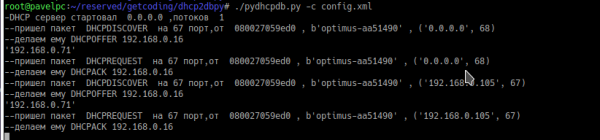
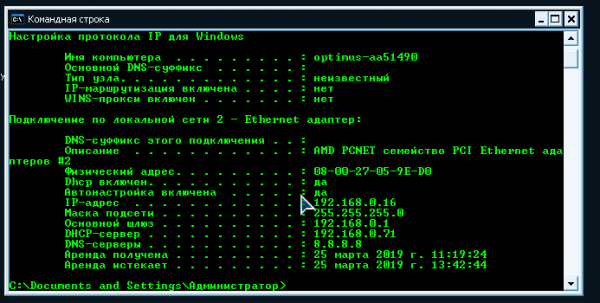
Server Launch
.\/pydhcpdb.py -d -c config.xml
— d for DEBUG console output mode
— c <file_name> configuration file
Flight analysis
Now, let's go into detail about the server implementation in Python. This is painful. Python was studied "on the fly". Many moments were done in the style of: "wow, somehow I did it, and it works." It is not optimized at all and left in this state mainly due to the low development experience in Python. I will focus on the most interesting aspects of the server implementation in "code."
XML Configuration File Parser
The standard Python module xml.dom is used. It seems simple, but during implementation, there was a noticeable lack of decent documentation and examples online using this module.
    tree = minidom.parse(gconfig["config_file"])
    mconfig=tree.getElementsByTagName("mysql")
    for elem in mconfig:
        gconfig["mysql_host"]=elem.getElementsByTagName("host")[0].firstChild.data
        gconfig["mysql_username"]=elem.getElementsByTagName("username")[0].firstChild.data
        gconfig["mysql_password"]=elem.getElementsByTagName("password")[0].firstChild.data
        gconfig["mysql_basename"]=elem.getElementsByTagName("basename")[0].firstChild.data
    dconfig=tree.getElementsByTagName("dhcpserver")
    for elem in dconfig:
        gconfig["broadcast"]=elem.getElementsByTagName("broadcast")[0].firstChild.data
        gconfig["dhcp_host"]=elem.getElementsByTagName("host")[0].firstChild.data
        gconfig["dhcp_LeaseTime"]=elem.getElementsByTagName("LeaseTime")[0].firstChild.data
        gconfig["dhcp_ThreadLimit"]=int(elem.getElementsByTagName("ThreadLimit")[0].firstChild.data)
        gconfig["dhcp_Server"]=elem.getElementsByTagName("DHCPServer")[0].firstChild.data
        gconfig["dhcp_defaultMask"]=elem.getElementsByTagName("defaultMask")[0].firstChild.data
        gconfig["dhcp_defaultRouter"]=elem.getElementsByTagName("defaultRouter")[0].firstChild.data
        gconfig["dhcp_defaultDNS"]=elem.getElementsByTagName("defaultDNS")[0].firstChild.data
    qconfig=tree.getElementsByTagName("query")
    for elem in qconfig:
        gconfig["offer_count"]=elem.getElementsByTagName("offer_count")[0].firstChild.data
        for num in range(int(gconfig["offer_count"])):
            gconfig["offer_"+str(num+1)]=elem.getElementsByTagName("offer_"+str(num+1))[0].firstChild.data
        gconfig["history_sql"]=elem.getElementsByTagName("history_sql")[0].firstChild.data
    options=tree.getElementsByTagName("options")
    for elem in options:
        node=elem.getElementsByTagName("option")
        for options in node:
            optionsMod.append(options.firstChild.data)
Multithreading
Strangely enough, multithreading in Python is implemented in a very straightforward and simple manner.
def PacketWork(data, addr):
...
# implementation for parsing the incoming packet and responding to it
...


while True:
    data, addr = udp_socket.recvfrom(1024) # waiting for a UDP packet
    thread = threading.Thread(target=PacketWork, args=(data, addr,)).start()  # as soon as it arrives, start the previously defined PacketWork function in the background with parameters
    while threading.active_count() > gconfig["dhcp_ThreadLimit"]:
       time.sleep(1) # if the number of already launched threads exceeds the set limit, wait until it decreases
Receiving/Sending DHCP Packet
To capture UDP packets coming through the network interface, you need to "bring up" the socket:
udp_socket = socket.socket(socket.AF_INET, socket.SOCK_DGRAM, socket.IPPROTO_UDP)
udp_socket.bind((gconfig["dhcp_host"], 67))
, where the flags:
- AF_INET — indicates that the address format will be IP: port. It can also be AF_UNIX — where the address is specified by a file name.
- SOCK_DGRAM means that we receive not a 'raw packet', but one that has already passed through the firewall, and with a partially truncated packet. That is, we only receive the UDP packet without the 'physical' wrapper of the UDP packet. If the SOCK_RAW flag is used, it will be necessary to also parse this 'wrapper'.
The packet can be sent either as a broadcast:
                    udp_socket.setsockopt(socket.SOL_SOCKET, socket.SO_BROADCAST, 1) #switching the socket to broadcast mode
                    rz=udp_socket.sendto(packetack, (gconfig["broadcast"],68))
, or to the address 'from which the packet came':
                        udp_socket.setsockopt(socket.SOL_SOCKET,socket.SO_REUSEADDR,1) # switching the socket to 'many listeners' mode
                        rz=udp_socket.sendto(packetack, addr)
, where SOL_SOCKET means 'protocol level' for setting options,
, SO_BROADCAST is the option that sends the packet 'as a broadcast'
, SO_REUSEADDR is an option that switches the socket to 'many listeners' mode. In theory, it is unnecessary in this case, but on one of the FreeBSD servers I was testing, the code did not work without this option.
Parsing the DHCP packet
Here I really liked Python. It turns out that right out of the 'box' it allows a fairly free manipulation of byte code. It makes it very easy to convert to decimal values, strings, and hex — that is, what we essentially need to understand the packet structure. For example, you can get a range of bytes in HEX and as plain bytes:
    res["xidhex"]=data[4:8].hex()
    res["xidbyte"]=data[4:8]
, pack the bytes into a structure:
res["flags"]=pack('BB',data[10],data[11])Get the IP from the structure:
res["ciaddr"]=socket.inet_ntoa(pack('BBBB',data[12],data[13],data[14],data[15]));And vice versa:
res=res+socket.inet_pton(socket.AF_INET, gconfig["dhcp_Server"])
That's all 😉
Source: habr.com
