


For the untrained, the role of a security administrator appears to be an exciting duel between the anti-hacker and malicious hackers who constantly invade the corporate network. Our hero expertly and swiftly repels daring attacks with real-time command inputs, ultimately emerging as a brilliant victor.
He is like a royal musketeer with a keyboard instead of a sword and musket.
In reality, it all looks rather mundane, straightforward, and even somewhat boring.
One of the main analysis methods remains the reading of event logs. A careful examination reveals:
- who tried to access from where, which resource they attempted to reach, and how they proved their access rights;
- what failures, errors, and just suspicious coincidences occurred;
- who and how tested the system's strength, scanned ports, attempted to crack passwords;
- and so on and so forth…
Well, where's the romance in that? Just try not to "fall asleep at the wheel."
To keep our specialists from losing their love for the craft, tools are developed to ease their tasks. These include various analyzers (log parsers), monitoring systems with alerts for critical events, and much more.
However, if you take a good tool and start manually attaching it to each device, such as an internet gateway, it won't be that easy or convenient, and on top of that, you'll need additional knowledge from entirely different fields. For instance, where should the monitoring software be hosted? On a physical server, virtual machine, or a special device? In what format should the data be stored? If a database is used, which one? How should backups be performed, and are they even necessary? How is management carried out? What interface is used? How do you secure the system? What encryption method should be utilized — and much more.
It's much simpler when there is a single mechanism that addresses all these questions, allowing the administrator to work strictly within their specific realm.
According to tradition, the term 'cloud' refers to anything that is not located on the given host. The Zyxel CNM SecuReporter cloud service not only addresses many issues but also provides convenient tools.
What is Zyxel CNM SecuReporter?
It is an intelligent analytics service with data collection, statistical analysis (correlation), and reporting functions for Zyxel devices from the ZyWALL series. It provides network administrators with a centralized view of various actions within the network.
For example, attackers may attempt to breach the security system using types of attacks such as stealthy, targeted and persistent. SecuReporter identifies suspicious behavior, allowing the administrator to take necessary protective measures by configuring ZyWALL.
Of course, ensuring security is unthinkable without constant data analysis that issues real-time alerts. Beautiful graphs can be drawn endlessly, but if the administrator is unaware of what’s happening… No, that definitely cannot happen with SecuReporter!
Some questions about using SecuReporter
Analytics
Personal analysis of ongoing events is the core of building information security. By analyzing incidents, a security specialist can prevent or timely stop an attack and obtain detailed information for reconstruction to gather evidence.
What advantages does 'cloud architecture' provide?
This service is built on a Software as a Service (SaaS) model, simplifying scalability through the use of remote server power, distributed data storage systems, and more. Embracing the cloud model allows one to abstract from hardware and software nuances, focusing all efforts on creating and enhancing the security service.
For the user, this significantly reduces costs for purchasing equipment for storage, analysis, and access provisioning, and there is no need to deal with maintenance tasks such as backup, updates, prevention of failures, and so on. It is sufficient to have a device that supports operation with SecuReporter and the appropriate license.
IMPORTANT! Thanks to cloud architecture, security administrators can proactively monitor the network's state anytime and anywhere. This addresses issues such as vacations, sick leaves, and more. Access to equipment, for example, a stolen laptop used to access the SecuReporter web interface, will be of no use as long as its owner follows security protocols, does not store passwords locally, and so on.
The cloud management option is well-suited for both single-location companies and organizations with branches. Such independence from location is essential in various industries, such as service providers or software developers with business spread across different cities.
We often talk about analysis capabilities, but what does that entail?
These include various analytical tools, such as event frequency summaries, lists of the Top 100 real and potential victims of a specific event, logs indicating specific targets for attack, and so on. All these help administrators identify hidden trends and detect suspicious user or service behavior.
And what about reporting?
SecuReporter allows for customizable report formats and the option to receive results in PDF format. Naturally, if desired, you can embed your logo, report title, notes, or recommendations into the report. Reports can be generated on-demand or scheduled, for example, once a day, week, or month.
You can configure alert outputs based on the specific traffic characteristics within the network infrastructure.
Is it possible to reduce the risk from insiders or simply negligent individuals?
The special User Partially Quotient tool allows the administrator to quickly identify risk-creating users without much effort and while considering dependencies between different network logs or events.
This means a deep analysis of all events and traffic related to users who have exhibited suspicious behavior.
What other aspects are characteristic of SecuReporter?
Simple setup for end-users (security administrators).
Activating SecuReporter in the cloud is done through a simple setup procedure. After this, administrators are immediately granted access to all data, analysis tools, and reporting.
Multi-Tenants on a unified cloud platform allows for the setup of custom analytics for each client. Again, as the client base grows, the cloud architecture makes it easy to adapt the control system without compromising efficiency.
Data Protection Laws
IMPORTANT! Zyxel takes international and local laws and regulations on personal data protection, including GDPR and OECD Privacy Principles, very seriously. It complies with the Federal Law on Personal Data No. 152-FZ dated 27.07.2006.
To ensure compliance, SecuReporter comes with three personal data protection options:
- non-anonymized data — personal data is fully identifiable in the Analyzer, Report, and uploaded Archive Logs;
- partially anonymized — personal data is replaced with artificial identifiers in the Archive Logs;
- completely anonymized — personal data is fully anonymized in the Analyzer, Report, and uploaded Archive Logs.
How to enable SecuReporter on the device?
Let's take the ZyWall device as an example (in this case, we have the ZyWall 1100). Go to the settings section (tab on the right with an icon of two gears). Then expand the Cloud CNM section and select the SecuReporter subsection.
To allow the use of the service, you need to activate the Enable SecuReporter feature. It is also advisable to enable the Include Traffic Log option for collecting and analyzing traffic logs.
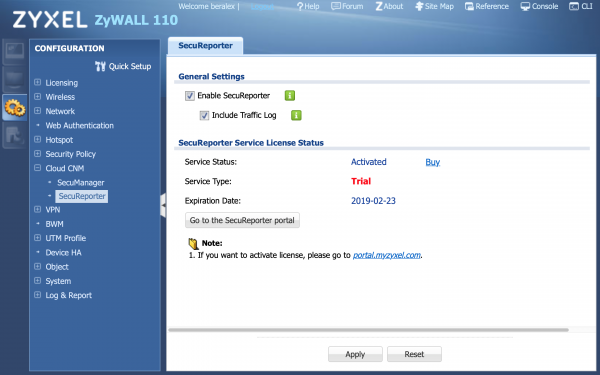
Figure 1. Enabling SecuReporter.
The second step is to allow statistics collection. This is done in the Monitoring section (tab on the right with a monitor icon).
Next, go to the UTM Statistics section, subsection App Patrol. Here, you need to activate the Collect Statistics option.
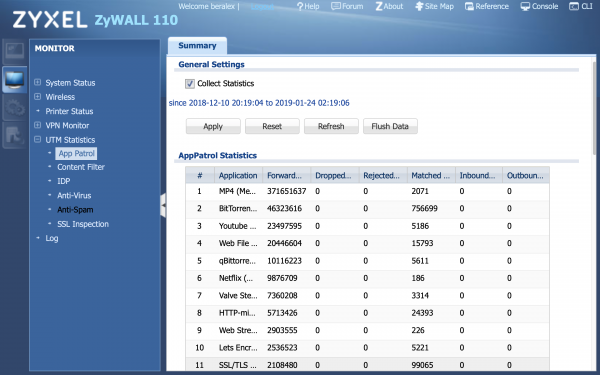
Figure 2. Enabling statistics collection.
That's it, you can now connect to the SecuReporter web interface and utilize the cloud service.
IMPORTANT! There is excellent documentation for SecuReporter available in PDF format. You can download it at .
Overview of the SecuReporter Web Interface
It won't be possible to provide a detailed account of all the functions that SecuReporter offers to the security administrator here — there are quite a few for one article.
Therefore, we will limit ourselves to a brief description of the services that the administrator sees and works with constantly. So, let’s get acquainted with the components of the SecuReporter web console.
Map
This section displays the registered equipment indicating the city, device name, and IP address. It shows whether the device is on and the status of alerts. The Threat Map shows the source of packets used by attackers and the frequency of attacks.
Dashboard
A brief overview of the main actions and a condensed analytical overview for the specified period. You can specify a range from 7 days down to 1 hour.
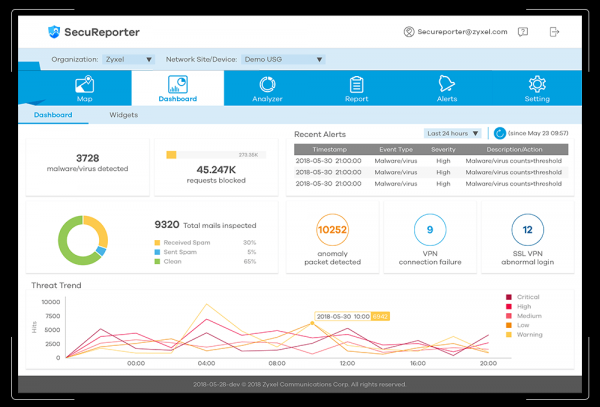
Figure 3. Example of the appearance of the Dashboard section.
Analyzer
The name speaks for itself. This console of the same name diagnoses suspicious traffic for the chosen period, identifies trends in the emergence of threats, and collects information about suspicious packets. The Analyzer can track the most commonly occurring malicious code and provide additional information regarding security issues.
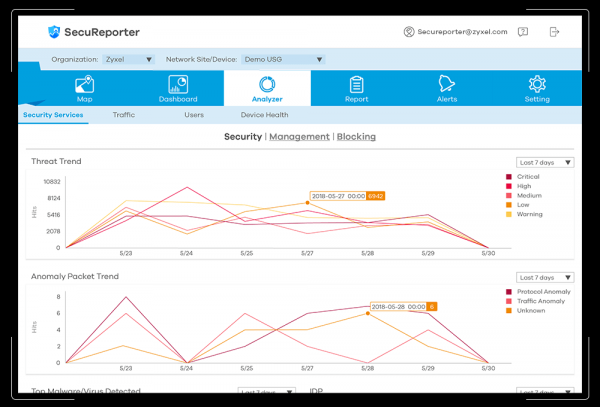
Figure 4. Example of the appearance of the Analyzer section.
Report
In this section, customizable reports with a graphical interface are available to the user. The required information can be collected and formatted into a convenient view immediately or according to a scheduled timing.
Alerts
Here, the alert system is configured. Threshold values and various levels of importance can be set, simplifying the process of detecting anomalies and potential attacks.
Setting
Well, actually, settings are just settings.
Additionally, it is worth noting that SecuReporter can support different protection policies when processing personal data.
Conclusion
Local methods of analyzing security-related statistics have proven to be quite effective.
However, the range and seriousness of threats are increasing every day. The level of protection that was previously acceptable is becoming insufficient over time.
In addition to the mentioned problems, using local resources requires certain efforts to maintain functionality (hardware maintenance, backups, etc.). There is also the issue of remote location — it’s not always feasible to have a security administrator in the office 24/7. Therefore, it's necessary to somehow organize secure access to the local system from outside and manage it independently.
Utilizing cloud services helps to bypass such issues, allowing a focus on maintaining the required level of security and protection against intrusions, as well as violations by users.
SecuReporter is precisely an example of the successful implementation of such a service.
Promotion
Starting today, customers of firewalls supporting Secureporter can take advantage of a joint promotion by Zyxel and our Gold Partner, X-Com:
Useful links
[1] .
[2] on the official Zyxel website.
[3] .
Source: habr.com
