

Note: translation.: This part focused on introducing Istio's capabilities and demonstrating them in action. Now we will discuss more complex aspects of configuring and using this service mesh, particularly fine-tuned routing and network traffic management.
We also remind you that the article uses configurations (Kubernetes and Istio manifests) from the .
Traffic Management
With Istio in the cluster, new capabilities emerge that allow for:
- Dynamic request routing: canary releases, A/B testing;
- Load balancing: straightforward and consistent, based on hashes;
- Fault recovery: timeouts, retries, circuit breakers;
- Fault injection: delays, request drops, etc.
In the continuation of the article, these capabilities will be demonstrated using a selected application while presenting new concepts. The first such concept will be DestinationRules (i.e., rules regarding the recipient of traffic/requests — note from the translator), which we will use to enable A/B testing.
A/B Testing: DestinationRules in Practice
A/B testing is applied in cases where there are two versions of an application (usually differing visually) and we are not 100% sure which one will improve user interaction. Therefore, we simultaneously launch both versions and collect metrics.
To deploy the second version of the frontend needed for demonstrating A/B testing, execute the following command:
$ kubectl apply -f resource-manifests/kube/ab-testing/sa-frontend-green-deployment.yaml
deployment.extensions/sa-frontend-green created
The manifest for the deployment of the 'green version' differs in two places:
- The image is based on a different tag —
istio-green, - Pods have the label
version: green.
Since both deployments have the label app: sa-frontend, requests routed by the virtual service sa-external-services to the service sa-frontend, will be directed to all its instances, and the load will be distributed using , which will lead to the following situation:
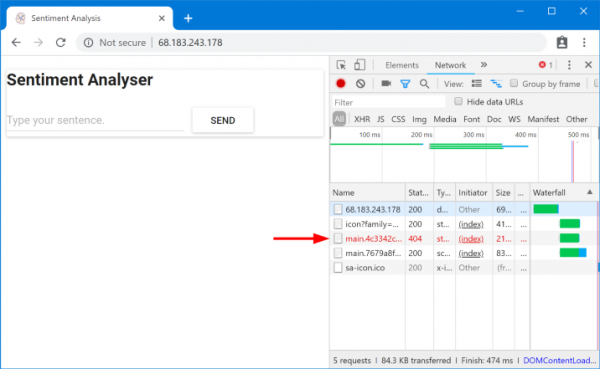
Requested files not found
These files were not found because they are named differently in the different versions of the application. Let's confirm this:
$ curl --silent http://$EXTERNAL_IP/ | tr '"' 'n' | grep main
/static/css/main.c7071b22.css
/static/js/main.059f8e9c.js
$ curl --silent http://$EXTERNAL_IP/ | tr '"' 'n' | grep main
/static/css/main.f87cd8c9.css
/static/js/main.f7659dbb.js
This means that index.html, requesting a version of static files, can be sent by the load balancer to pods that have a different version, where, for obvious reasons, such files do not exist. Therefore, in order for the application to work, we need to impose a restriction: "the same version of the application that served index.html must also handle subsequent requests».
We will achieve this goal through consistent hash-based load balancing (Consistent Hash Loadbalancing). In this case, requests from a single client are sent to the same backend instance, for which a predetermined property is used — for example, an HTTP header. This is implemented with DestinationRules.
DestinationRules
After VirtualService directs the request to the appropriate service, through DestinationRules we can define the policies that will be applied to the traffic intended for instances of this service:
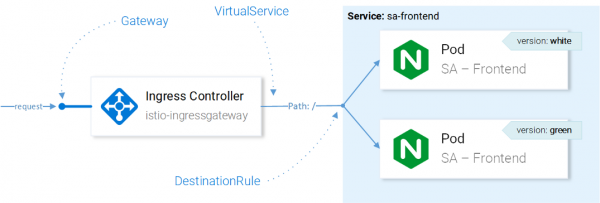
Traffic management with Istio resources
Note: The impact of Istio resources on network traffic is presented here in an easily understandable way. To be precise, the decision on which instance to send the request to is made by Envoy in the Ingress Gateway configured in the CRD.
With Destination Rules, we can configure load balancing to use consistent hashes and ensure that responses from the same service instance are sent to the same user. The following configuration allows us to achieve this ():
apiVersion: networking.istio.io/v1alpha3
kind: DestinationRule
metadata:
  name: sa-frontend
spec:
  host: sa-frontend
  trafficPolicy:
    loadBalancer:
      consistentHash:
        httpHeaderName: version   # 1
1 — the hash will be generated based on the content of the HTTP header version.
Apply the configuration with the following command:
$ kubectl apply -f resource-manifests/istio/ab-testing/destinationrule-sa-frontend.yaml
destinationrule.networking.istio.io/sa-frontend created
Now run the command below and ensure you receive the correct files when you specify the header version:
$ curl --silent -H "version: yogo" http://$EXTERNAL_IP/ | tr '"' 'n' | grep mainNote: To add different values in the header and test the results directly in the browser, you can use for Chrome (or for Firefox — ed..
In general, DestinationRules have more capabilities in load balancing — for details, please inquire. .
Before delving further into VirtualService, let's remove the 'green version' of the application and the corresponding traffic routing rule by executing the following commands:
$ kubectl delete -f resource-manifests/kube/ab-testing/sa-frontend-green-deployment.yaml

deployment.extensions 'sa-frontend-green' deleted
$ kubectl delete -f resource-manifests/istio/ab-testing/destinationrule-sa-frontend.yaml
destinationrule.networking.istio.io 'sa-frontend' deleted
Mirroring: Virtual Services in Practice
Shadowing ("screening") or Mirroring ("mirroring") is used when we want to test a change in production without affecting end users: we duplicate ("mirror") requests to a second instance where the necessary changes have been made and observe the results. In simple terms, this is when your colleague picks the most critical issue and makes a pull request in the form of such a huge chunk of mess that no one can actually review it.
To test this scenario in action, we will create a second instance of SA-Logic with bugs (buggy), executing the following command:
$ kubectl apply -f resource-manifests/kube/shadowing/sa-logic-service-buggy.yaml
deployment.extensions/sa-logic-buggy created
And now let's run the command to ensure that all instances with app=sa-logic also have labels with the corresponding versions:
$ kubectl get pods -l app=sa-logic --show-labels
NAME                              READY   LABELS
sa-logic-568498cb4d-2sjwj         2/2     app=sa-logic,version=v1
sa-logic-568498cb4d-p4f8c         2/2     app=sa-logic,version=v1
sa-logic-buggy-76dff55847-2fl66   2/2     app=sa-logic,version=v2
sa-logic-buggy-76dff55847-kx8zz   2/2     app=sa-logic,version=v2
The service sa-logic targets pods with the label app=sa-logic, so all requests will be distributed among all instances:
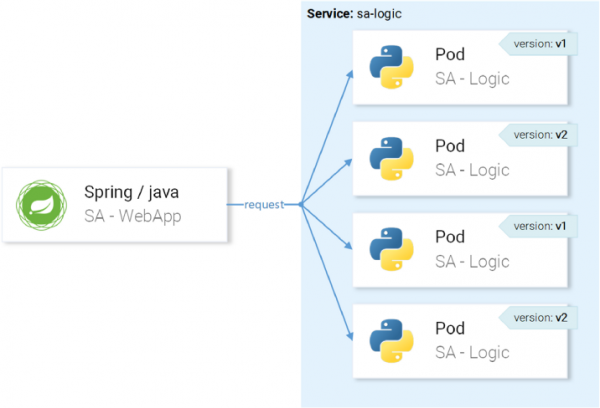
… but we want requests to be routed to instances with version v1 and mirrored to instances with version v2:
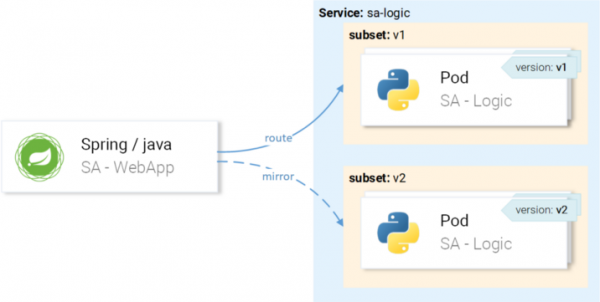
We will achieve this through a VirtualService in combination with a DestinationRule, where the rules will define subsets and routes of the VirtualService to a specific subset.
Defining Subsets in Destination Rules
Subsets (subsets) are defined by the following configuration ():
apiVersion: networking.istio.io/v1alpha3
kind: DestinationRule
metadata:
  name: sa-logic
spec:
  host: sa-logic    # 1
  subsets:
  - name: v1        # 2
    labels:
      version: v1   # 3
  - name: v2
    labels:
version: v2- The host (
host) defines that this rule applies only when the route is directed towards the servicesa-logic; - The names (
name) of the subsets are used when routing to the subset instances; - The label (
label) defines key-value pairs that instances must match to become part of the subset.
Apply the configuration with the following command:
$ kubectl apply -f resource-manifests/istio/shadowing/sa-logic-subsets-destinationrule.yaml
destinationrule.networking.istio.io/sa-logic created
Now that the subsets are defined, we can move on and configure the VirtualService to apply rules to requests to sa-logic so that they:
- Are routed to the subset
v1, - Are mirrored to the subset
v2.
The following manifest achieves the intended result ():
apiVersion: networking.istio.io/v1alpha3
kind: VirtualService
metadata:
  name: sa-logic
spec:
  hosts:
    - sa-logic
  http:
  - route:
    - destination:
        host: sa-logic
        subset: v1
    mirror:
      host: sa-logic
      subset: v2
No explanations are needed here, so let's just see it in action:
$ kubectl apply -f resource-manifests/istio/shadowing/sa-logic-subsets-shadowing-vs.yaml
virtualservice.networking.istio.io/sa-logic created
Let's add load by calling the following command:
$ while true; do curl -v http://$EXTERNAL_IP/sentiment
    -H "Content-type: application/json"
    -d '{"sentence": "I love yogobella"}';
    sleep .8; done
Let's look at the results in Grafana, where we can see that the buggy version (buggy) leads to failures for ~60% of requests, but none of these failures affect the end users, as they are served by the functioning service.
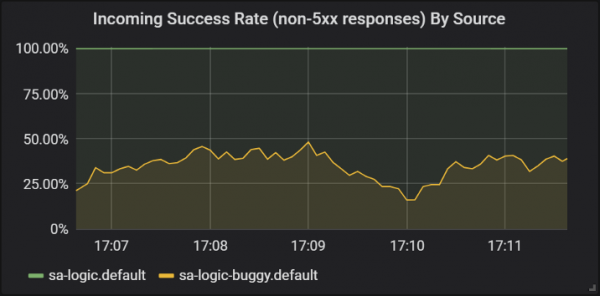
Success rates of different versions of the sa-logic service
Here we saw for the first time how VirtualService is applied to the Envoys of our services: when sa-web-app makes a request to sa-logic, it passes through the sidecar Envoy, which — via VirtualService — is set to route the request to subset v1 and mirror the request to subset v2 of the service sa-logic.
I know: you might have already thought that Virtual Services are simple. In the next section, we will expand this idea, showing that they are also truly magnificent.
Canary releases
Canary Deployment is the process of rolling out a new version of an application to a small number of users. It is used to ensure that there are no issues with the release and only after confirming its (release's) quality, to spread it to ahigher level of isolation, as if one controller is broken, the problem is confined to that specific context).larger audience.
To demonstrate canary releases, we will continue working with the subset buggy at sa-logic.
Let's not be petty and immediately send 20% of users to the buggy version (which will represent our canary release), and the remaining 80% to the normal service. We will apply the following VirtualService ():
apiVersion: networking.istio.io/v1alpha3
kind: VirtualService
metadata:
  name: sa-logic
spec:
  hosts:
    - sa-logic
  http:
  - route:
    - destination:
        host: sa-logic
        subset: v1
      weight: 80         # 1
    - destination:
        host: sa-logic
        subset: v2
      weight: 20 # 1
1 — is the weight (weight), which determines the percentage of requests that will be directed to the destination or subset of the destination.
Let's update the previous VirtualService configuration with sa-logic the following command:
$ kubectl apply -f resource-manifests/istio/canary/sa-logic-subsets-canary-vs.yaml
virtualservice.networking.istio.io/sa-logic configured
… and we will immediately see that part of the requests lead to failures:
$ while true; do
   curl -i http://$EXTERNAL_IP/sentiment
   -H "Content-type: application/json"
   -d '{"sentence": "I love yogobella"}'
   --silent -w "Time: %{time_total}s t Status: %{http_code}n"
   -o /dev/null; sleep .1; done
Time: 0.153075s Status: 200
Time: 0.137581s Status: 200
Time: 0.139345s Status: 200
Time: 30.291806s Status: 500
VirtualServices enable canary deployments: in this case, we narrowed down the potential impact of issues to 20% of the user base. Great! Now whenever we are unsure about our code (in other words — always…), we can use mirroring and canary deployments.
Timeouts and retries
But bugs are not always in the code. At the top of the list of "" is the mistaken belief that "the network is reliable." In reality, the network do not is reliable, and for this reason we need timeouts (timeouts) and retries (retries).
To demonstrate, we will continue using the same version of the problem sa-logic (buggy), and we will simulate network unreliability with random failures.
Let our buggy service have a 1/3 chance of responding too slowly, a 1/3 chance of finishing with an Internal Server Error, and a 1/3 chance of successfully returning a page.
To mitigate the effects of such problems and make users' lives better, we can:
- add a timeout if the service takes longer than 8 seconds to respond,
- attempt to retry if a request fails.
To implement, we will use the following resource definition ():
apiVersion: networking.istio.io/v1alpha3
kind: VirtualService
metadata:
  name: sa-logic
spec:
  hosts:
    - sa-logic
  http:
  - route:
    - destination:
        host: sa-logic
        subset: v1
      weight: 50
    - destination:
        host: sa-logic
        subset: v2
      weight: 50
    timeout: 8s           # 1
    retries:
      attempts: 3         # 2
perTryTimeout: 3s # 3- The timeout for the request is set to 8 seconds;
- Retry attempts for requests are made 3 times;
- Each attempt is considered unsuccessful if the response time exceeds 3 seconds.
This way, we achieved optimization since the user won't have to wait more than 8 seconds, and we will make three new attempts to get a response in case of failure, increasing the chance of a successful reply.
Apply the updated configuration with the following command:
$ kubectl apply -f resource-manifests/istio/retries/sa-logic-retries-timeouts-vs.yaml
virtualservice.networking.istio.io/sa-logic configured
And check in the Grafana charts that the number of successful responses has exceeded:
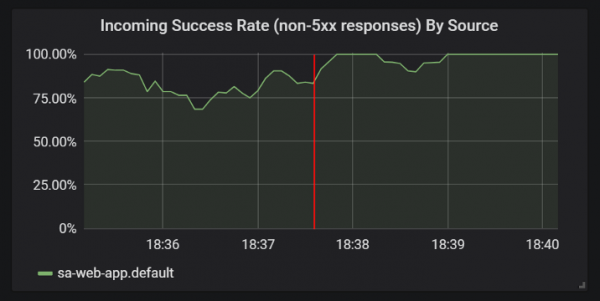
Improvements in the statistics of successful responses after adding timeouts and retries
Before moving on to the next section (or rather — to the next part of the article, since there will be no more practical experiments in this one — ed. note), delete sa-logic-buggy and VirtualService by executing the following commands:
$ kubectl delete deployment sa-logic-buggy
deployment.extensions "sa-logic-buggy" deleted
$ kubectl delete virtualservice sa-logic
virtualservice.networking.istio.io "sa-logic" deleted
Patterns of Circuit Breaker and Bulkhead
These are two important patterns in microservices architecture that enable self-healing (self-healing) of services.
Circuit Breaker ("automatic switch") is used to stop requests coming to an instance of a service that is considered unhealthy, while client requests are redirected to healthy instances of that service (which increases the percentage of successful responses). (Ed. note: A more detailed description of the pattern can be found, for example, .)
Bulkhead ("bulkhead") isolates failures in services from affecting the entire system. For instance, if service B is broken, another service (a client of service B) makes a request to service B, which results in exhausting its thread pool and being unable to serve other requests (even if they don't relate to service B). (Ed. note: A more detailed description of the pattern can be found, for example, .)
I will leave out the details of implementing these patterns because they are easy to find in , and I really want to show authentication and authorization, which will be covered in the next part of the article.
P.S. from the translator
Also read in our blog:
- "Back to Microservices with Istio": , ;
- «»;
- «».
Source: habr.com
