

SAP HANA is a popular in-memory database management system that includes data warehousing services (Data Warehouse), analytics, integrated middleware, application server, and a platform for configuring or developing new utilities. By eliminating the delays of traditional database management systems, SAP HANA can significantly enhance system performance, transaction processing (OLTP), and business analytics (OLAP).
SAP HANA can be deployed in Appliance and TDI modes (when referring to production environments). Each option has its own requirements set by the manufacturer. In this post, we will discuss the advantages and disadvantages of different options, as well as showcase our real projects with SAP HANA.
SAP HANA consists of three main components: host, instance, and system.
Host is the server or operating environment for running the SAP HANA database management system. Its mandatory components are CPU, RAM, storage, network, and OS. The host provides links to installation directories, data, logs, or directly to storage. The storage for SAP HANA installation does not necessarily have to be located on the host. If the system has multiple hosts, either a shared storage or one that is accessible on demand from all hosts will be required.
Instance is a set of SAP HANA system components installed on a single host. The main components are the Index Server and Name Server. The former, also known as the 'working server,' processes requests, manages the current data storages, and database cores. The Name Server stores information about the topology of the SAP HANA installation—where the components operate and what data is located on them. server.
System is one or more instances with the same number. Essentially, it is a separate element that can be turned on, turned off, or copied (backed up). Data is distributed across the memory of various servers that make up the SAP HANA system.
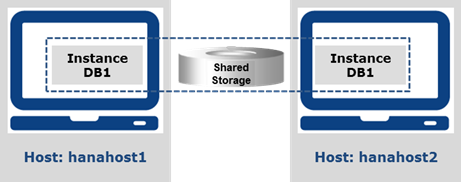
The system can be configured as single-host (one instance on one host) or multi-host distributed (multiple SAP HANA instances distributed across several hosts, with each host having one instance). In multi-host systems, each instance must have the same number. The SAP HANA system is identified by the System ID (SID) – a unique number consisting of three alphanumeric characters.
SAP HANA Virtualization
One of the main limitations of SAP HANA is the support for only one system — a single instance with a unique server SID. To make more efficient use of hardware or reduce the number of servers in the data center, virtualization can be used. This allows other landscapes to coexist on one server with systems that have lower requirements (non-production systems). For backup HA/DR servers, virtualization can improve the failover speed between production and non-production virtual machines.
SAP HANA includes support for the VMware ESX hypervisor. This means that different SAP HANA systems — SAP HANA installations with different SID numbers — can coexist on a single host (a common physical server) in different virtual machines. Each virtual machine must run on a supported operating system.
For production environments, SAP HANA virtualization has serious limitations:
- scale-out is not supported — virtualization can only be used with Scale-Up systems, whether BwoH/DM/SoH or 'pure' SoH;
- virtualization must be conducted within the rules established for Appliance devices or TDI;
- In General Availability (GA), there can be only one virtual machine — companies wishing to use virtualization with production HANA environments must participate in the Controlled Availability program with SAP.
In non-production environments, where the listed limitations are absent, virtualization can be used to optimize equipment usage.
SAP HANA Topologies
Let's move on to the deployment of SAP HANA. Here, two topologies are defined.
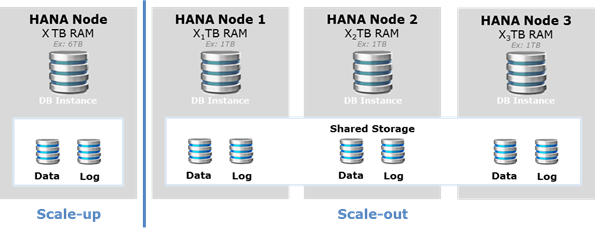
- Scale-up — one large server. As the HANA database grows, the server itself grows: the number of CPUs and the amount of memory increases. In High Availability (HA) and Disaster Recovery (DR) solutions, backup or failover servers must match production servers in specifications.
- Scale-out – the entire volume of the SAP HANA system is distributed across several identical servers. The Master server contains information for the Index Server and Name Server. Slave servers do not contain this data, except for the server that assumes Master functions in case of a failure of the primary server. Working servers (Index Servers) manage the data segments assigned to them and respond to queries. Name Servers know how the data is distributed among the working servers. In case of growth, HANA simply adds another node. server configuration In such a topology, having one backup node is sufficient to ensure the security of the entire server.
SAP hardware requirements
SAP has mandatory requirements for the hardware used with HANA. These apply to productive environments — for non-prod, minimal specifications are enough. So, here are the requirements for productive environments:
- CPU Intel Xeon v5 (SkyLake) / 8880/90/94 v4 (Broadwell)
- from 128 GB RAM for BW applications with 2 CPUs, 256 GB with 4+ CPUs;
Deploying SAP HANA in Appliance and TDI modes
Now let's move to practice and discuss how to implement SAP HANA in Appliance and TDI modes. We will use our SAP HANA platforms based on BullSequana S and Bullion S servers, which are certified by SAP for operation in these modes.
A brief overview of the products. BullSequana S based on Intel Xeon Scalable includes various models, up to 32 CPUs in a single server. The server is built with a modular design, allowing scalability up to 32 CPUs and the same number of GPUs. RAM ranges from 64 GB to 48 TB. Among the features of BullSequana S are support for enterprise AI for improved performance, accelerated data analytics, enhanced in-memory computing, and modernization through virtualization and cloud technologies.
Bullion S comes with Intel Xeon E7 v4 Family CPUs. The maximum number of processors is 16. RAM scales from 128 GB to 24 TB. A large number of RAS features provide a high level of availability for mission-critical infrastructures like SAP HANA. Bullion S is suitable for large-scale data center consolidation, working with in-memory applications, mainframe migration, or legacy systems.
SAP HANA Appliance
Appliance – a pre-configured solution that includes a server, storage system, and software package for a turnkey implementation, with centralized support and guaranteed performance level. HANA is provided as a fully integrated and certified hardware and software package. The Appliance device is ready for installation in a data center, with the operating system, SAP HANA, and (if necessary) an additional VMWare instance already configured and installed.
SAP certification defines the guaranteed performance level as well as the CPU model, amount of RAM, and storage system. After certification, the configuration cannot be changed without losing the warranty. To scale the HANA platform, SAP offers three options.
- Scale-Up BWoH/DM/SoH – vertical scaling suitable for single systems (one SID). Appliance device growth occurs in increments of 256/384 GB, starting from SAP HANA SPS 11. This ratio indicates the maximum capacity supported by a single CPU and is common across the entire list of certified Appliance devices. Appliance BWoH/DM/SoH with vertical scaling is optimally suited for BW on HANA (BWoH), Data Mart (DM), and SAP Suite on HANA (SoH) applications.
- Scale-Up SoH — this is a lighter version of the previous model, with fewer restrictions on RAM capacity. It is still a vertically scalable server, but the maximum RAM capacity for 2 processors is already 1536 GB (up to SPS 11) and 3 TB (SPS 12+). Suitable only for SoH.
- Scale-Out – this option features horizontal scaling, supporting multi-server configurations. Horizontal scaling is optimally suited for BW and – with some limitations – for SoH.
In BullSequana S and Bullion S servers, vertical scaling is primary as it has fewer operational constraints and requires less administration. The Appliance mode has a wide range of different devices.
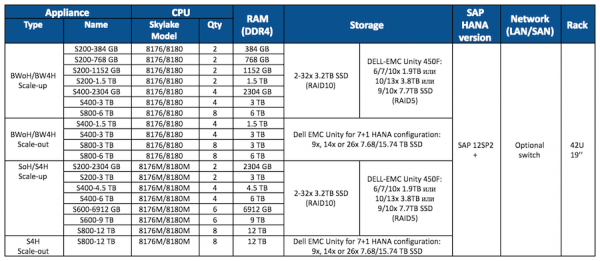
BullSequana S solutions for SAP HANA in Appliance mode
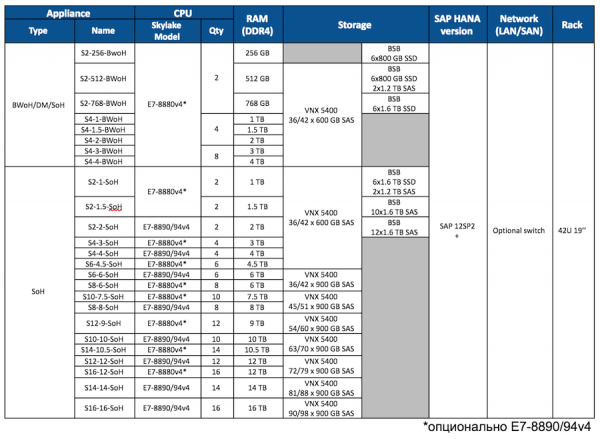
*Optional E7-8890/94v4
Bullion S solutions for SAP HANA in Appliance mode
All Bull Appliance solutions from SAP HANA SPS 12 onwards are certified. The equipment is installed in a standard 19-inch 42U rack, with two power sources — internal PDUs. The servers are certified by SAP:
- BullSequana S with Intel Xeon Skylake 8176, 8176M, 8180, 8180M (processors with the letter 'M' support 128 GB memory modules). The best value-for-money options are those with Intel 8176.
- Bullion S with Intel Xeon E7-8880 v4, 8890, and 8894.
The storage system connects directly to the server via FC ports, so SAN switches are not needed here. They may be useful for access to systems connected to LAN or SAN.
Here is an example configuration of the EMC Unity 450F storage system in our setup:
- Height: 5U (DPE 3U (25×2.5" HDD/SSD) + DAE 2U (25×2.5" HDD/SSD))
- Controllers: 2
- Disks: from 6 to 250 SAS SSD, from 600 GB to 15.36 TB each
- RAID: level 5 (8+1), 4 RAID groups
- Interface: 4 FC per controller, at 8 or 16 Gbit/s
- Software: Unisphere Block Suite
The appliance is a reliable deployment option, but it has a significant drawback: limited freedom in configuring hardware. Moreover, this option may require changes in IT department processes.
SAP HANA TDI
An alternative to the appliance is TDI (Tailored Data center Integration) mode, where specific manufacturers and infrastructure components can be chosen based on customer preferences – taking into account the tasks performed and workload. For example, the SAN can be reused in the data center, with some disks allocated for HANA installation.
Compared to the appliance, TDI mode provides the user with much greater freedom in meeting requirements. This greatly simplifies HANA integration into the data center — a customized infrastructure can be built. For instance, the type and number of processors can vary depending on the load.
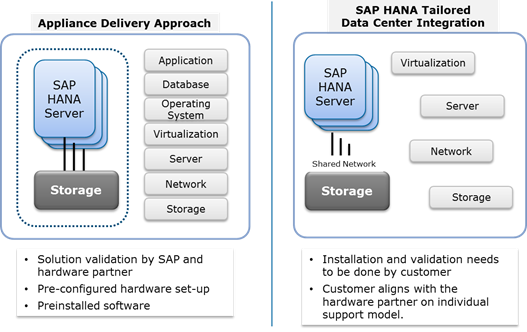
To calculate capacities, it is recommended to use SAP Quick Sizer — a simple tool that provides CPU and memory requirements for different workloads in SAP HANA. Then, for planning the IT landscape, SAP Active Global Support can be consulted. After that, the hardware partner for SAP HANA translates the calculation results into various possible system configurations — both on top-tier and simpler hardware. In TDI mode for servers it is permissible to use Intel E7 CPUs, including Intel Broadwell E7 and Skylake-SP (Platinum, Gold, Silver with 8 or more cores per processor), as well as IBM Power8./9.
Servers are delivered without storage systems, switches, and racks, but hardware requirements remain the same as in appliance mode — the same single nodes, solutions with vertical or horizontal scaling. SAP requires that only certified servers, storage systems, and switches were used, but that's not a concern — almost all equipment from most manufacturers is certified.
Performance testing should be conducted using HWCCT (Hardware Configuration Check Tool) tests, which check compliance with certain SAP KPIs. There is also a requirement unrelated to hardware: HANA, OS, and hypervisor (optional) must be installed by specialists certified by SAP. Only systems that comply with all the listed rules can receive SAP support related to performance.
The BullSequana S server line in TDI mode is similar to the appliance line but without storage systems, switches, and racks. Any certified SAP storage system can be attached to them — VNX, XtremIO, NetApp, and others. For example, if the VNX5400 meets the performance requirements for SAP HANA, a Dell EMC Unity 450F storage system can be connected as part of the TDI configuration. If necessary, FC adapters (1 or 10 Gb/s) and Ethernet switches can be installed.
Now, to give you a clearer picture of the described modes, we will share a few of our real-life cases.
Appliance + TDI: HANA for an online store
The online store Mall.cz, which is part of the Mall Group, was founded in 2000. It has branches in the Czech Republic, Slovakia, Poland, Hungary, Slovenia, Croatia, and Romania. It is the largest online store in the country, selling up to 75,000 products a day, with revenue of approximately 280 million euros in 2017.
Data center infrastructure upgrades were required due to migration to SAP HANA. The estimated sizing was 2×6 TB for the prod environment and 6 TB for the test/dev environments. At the same time, a disaster recovery solution was required for the SAP HANA production environment in an active-active cluster.
At the time of the tender announcement, the customer had a system under SAP based on standard rack and blade servers. Two data centers, located approximately 10 km apart, were equipped with various storage systems – IBM SVC, HP, and Dell. Key systems operated in disaster recovery mode.
Initially, the client requested a certified Appliance solution for SAP HANA for all systems (Production and test/dev environments) with growth up to 12 TB. However, due to budget constraints, they started considering other options—such as more CPUs with smaller RAM modules (64 GB modules instead of 128 GB modules). Additionally, to optimize costs, a shared storage system for both Production and test/dev environments was considered.
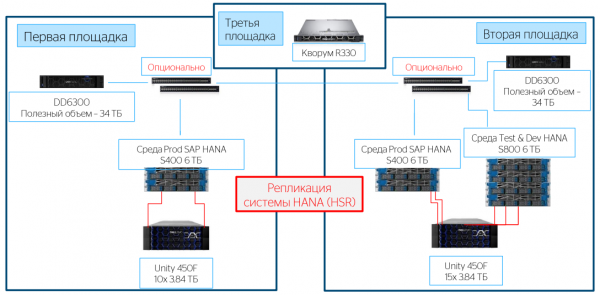
They settled on 4 CPUs and 6 TB RAM for the Production environment, with growth potential. For the test/dev environments in TDI mode, they opted for less expensive CPUs—resulting in 8 CPUs and 6 TB RAM. Due to the increased number of features requested by the client—replication, backup, shared Production and test/dev environments on a second site—they utilized DellEMC Unity storage in a full-flash configuration instead of internal disks. Furthermore, the client requested a disaster recovery solution based on HANA system replication (HSR) with a quorum node at a third site.
The final configuration for the Prod environment consisted of a BullSequana S400 server with Intel Xeon P8176M (28 cores, 2.10 GHz, 165 W) and 6 TB RAM. The storage system used was Unity 450F 10x 3.84 TB. For disaster recovery in the Prod environment, they used a BullSequana S400 with Intel Xeon P8176M (28 cores, 2.10 GHz, 165 W) and 6 TB RAM. For the test/dev environment, they selected a BullSequana S800 server with Intel Xeon P8153 (16 cores, 2.00 GHz, 125 W) and 6 TB RAM, plus Unity 450F storage with 15x 3.84 TB. For quorum, application servers (VxRail Solution), and backup solutions (DataDomain), our specialists installed and configured DellEMC servers.
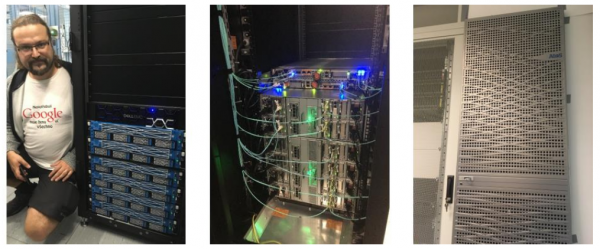
The equipment is ready for future upgrades. The client anticipates an increase in HANA sizing in 2019, and will only need to install new modules in the racks.
Appliance: HANA for a major integrator in the tourism sector
This time, our client was a large IT service provider focused on developing technological solutions for tourism companies. The client launched an ambitious SAP HANA project to implement a new billing system. An Appliance solution with 8 TB RAM was required for Production and PreProd environments. Following SAP's recommendations, the client chose a vertically scalable option.
The key task was to implement a hardware infrastructure based on certified Appliance devices for SAP HANA. The prioritized criteria were cost efficiency, high performance, scalability, and high data availability.
We proposed and implemented a SAP certified solution that includes two Bullion S16 servers for Prod and PreProd environments. The hardware operates on Intel Xeon E7-v4 8890 processors (24 cores, 2.20 GHz, 165 W) and is equipped with 16 TB of RAM. For BW and Dev/Test environments, we installed nine Bullion S4 servers (22 cores, 2.20 GHz, 150 W) with 4 TB of RAM each. A hybrid EMC Unity was used as the storage system.
This solution supports scalability for all device components – for example, up to 16 sockets with Intel Xeon E7-v4 CPUs. Administration in this configuration is simplified, particularly for reconfiguration or partitioning of the server.
Appliance + TDI: HANA for metallurgists
Norilsk Nickel, one of the largest producers of nickel and palladium, decided to upgrade its SAP HANA hardware platform to ensure the operation of critical business applications and projects. An expansion of the existing landscape in terms of computing power was required. One of the main conditions set by the client was high availability of the platform – despite hardware limitations.
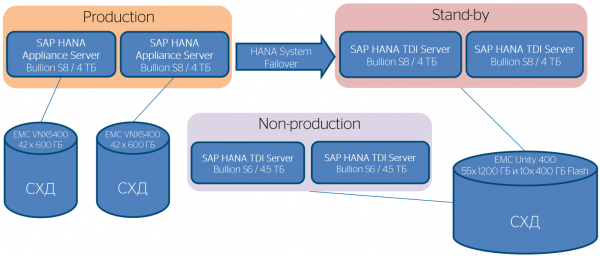
For production environments, we used the Bullion S8 server and the storage system in SAP HANA Appliance mode. For HA and test/dev, the platform was deployed in TDI mode. We used one Bull Bullion S8 server, two Bull Bullion S6 servers, and a hybrid storage system. This combination significantly increased the application performance in the SAP landscape, increased the computing power and data storage resources, and minimized operational costs. Importantly, the client retained the ability to scale up to 16 CPUs.
We invite you to the SAP Forum
In this post, we discussed various deployment methods for SAP HANA, attempting to highlight the advantages and disadvantages of the available options. If you have any questions about the implementation of SAP HANA, we would be happy to answer them in the comments.
Everyone interested in Bull's solutions and their implementation possibilities for SAP HANA is invited to the largest SAP event of the year: the SAP Forum 2019 will take place on April 17 in Moscow. We look forward to seeing you at our booth in the IoT zone where we will share a lot of interesting information and hold a number of prize draws.
See you at the forum!
Source: habr.com
