

Introduction to Operating Systems
Hello, Habr! I would like to present to your attention a series of translation articles of some interesting literature in my opinion — OSTEP. This material dives deeply into the workings of Unix-like operating systems, specifically — working with processes, various schedulers, memory, and other similar components that make up a modern OS. You can view the original materials here . Please note that the translation is done non-professionally (rather freely), but I hope I preserved the overall meaning.
Laboratory work on this subject can be found here:
- original:
- original:
- my personal adaptation:
Other parts:
You can also check out my channel on =)
Let's consider the most fundamental abstraction that the OS provides to users: the process. A process is quite simply defined as a running program. A program itself is a lifeless entity, residing on the disk—it is a set of instructions and possibly some static data, waiting for the moment of execution. It is the OS that takes these bytes and executes them, transforming the program into something useful.
Most often, users want to run more than one program simultaneously; for example, you could run a browser, a game, a media player, a text editor, and so on on your laptop. In fact, a typical system can run dozens or even hundreds of processes concurrently. This fact makes the system easier to use; you never have to worry about whether the CPU is free—you just launch programs.
This leads to the question: how to create the illusion of multiple CPUs? How can the OS create the illusion of virtually infinite CPUs, even if you only have one physical CPU?
The OS creates this illusion through CPU virtualization. By running one process, then stopping it, and launching another process, and so on, the OS can maintain the illusion that there are many virtual CPUs, even though there will actually be one or several physical processors. This technique is called time-sharing of CPU resources. This technique allows users to run as many concurrent processes as they wish. The cost of such a solution is performance—since if multiple processes share the CPU, each process will be handled more slowly.
To implement CPU virtualization, and especially to do it well, the OS requires both low-level and high-level support. Low-level support is called mechanisms —these are low-level methods or protocols that implement the necessary part of the functionality. An example of such functionality is context switching, which allows the OS to stop one program and start another program on the CPU. Such time-sharing is implemented in all modern operating systems.
At the top of these mechanisms lies some logic embedded in the OS, in the form of 'policies'. Policy is a certain decision-making algorithm of the operating system. Such policies, for example, decide which program should be started (from the command list) first. For instance, this task will be managed by a policy called scheduling policy and in choosing a solution, it will be guided by data such as: launch history (which program has run the longest in the last minute), what load this process is generating (what types of programs have been launched), performance metrics (is the system optimized for interactive engagement or throughput) and so forth.
Abstraction: Process
The abstraction of a running program, executed by the operating system, is what we call a process. As mentioned earlier, a process is simply a running program at any given moment in time. It is a program through which we can obtain aggregate information from various system resources that it interacts with or is affected by during its execution.
To understand the components of a process, one needs to grasp the states of the system: what a program can read or modify during its operation. At any given moment, it’s important to understand which system elements are crucial for the program’s execution.
One of the obvious elements of the system's state that includes a process is memory. Instructions reside in memory. The data that the program reads or writes also resides in memory. Thus, the memory that the process can address (the so-called address space) is a part of the process.
Registers are also part of the system's state. Many instructions are aimed at changing the value of registers or reading their value, and thus registers also become an important part of the process's operation.
It is worth noting that the machine's state is also formed by some special registers. For example, IP — instruction pointer is the pointer to the instruction that the program is currently executing. There are also stack pointer and the associated frame pointer, which are used to manage: function parameters, local variables, and return addresses.
Finally, programs often access ROM (read-only memory). Such 'I/O' (input-output) information should include a list of files currently opened by the process.
Process API
To improve understanding of process operation, let's look at examples of system calls that should be included in any operating system interface. These APIs are available in one form or another on any OS.
● Create (creation): The OS must include some method for creating new processes. When you enter a command in the terminal or launch an application by double-clicking on its icon, a request is sent to the OS to create a new process and subsequently launch the specified program.
● Deletion: Since there is an interface for creating a process, the OS must also provide a way to forcibly terminate a process. Most programs will naturally start and finish themselves as they run. Otherwise, the user would want to have the ability to kill them, so the interface for stopping a process would not be redundant.
● Wait (waiting): Sometimes it's useful to wait for a process to finish, so some interfaces are provided that allow for waiting.
● Misc Control (various controls): In addition to killing and waiting for a process, there are other diverse control methods. For example, most OSs provide the ability to freeze a process (halt its execution for a period) and then resume (continue execution).
● Status (status): There are various interfaces for obtaining certain information about a process's status, such as how long it has been running or what state it is currently in.
Process Creation: Details
One interesting aspect is how programs are actually transformed into processes. Particularly, how the OS raises and starts a program. How exactly a process is created.
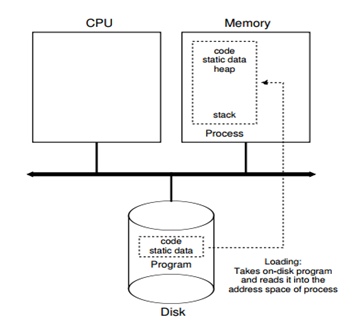
First, the OS needs to load the program code and static data into memory (into the process's address space). Programs are typically stored on a disk or solid-state drive in some executable format. Thus, the process of loading a program and static data into memory requires the OS to read these bytes from disk and place them somewhere in memory.
In early operating systems, the loading process was done eagerly, meaning that the code was loaded into memory in its entirety before the program was executed. Modern operating systems handle this lazily, loading pieces of code or data only as they are needed by the program during execution.
Once the code and static data are loaded into memory, the OS must perform a few more tasks before launching the process. A certain amount of memory must be allocated for the stack. Programs use the stack for local variables, function parameters, and return addresses.. The OS allocates this memory and assigns it to the process. The stack can also be allocated with certain arguments; specifically, it fills in the parameters of the main() function, such as the array of argc and argv.
The operating system may also allocate a certain amount of memory for the program's heap. The heap is used by programs for dynamically allocated data that is explicitly requested.. Programs request this space by calling the function. malloc() and explicitly free it by calling the function. free(). The heap is necessary for data structures such as linked lists, hash tables, trees, and others. Initially, a small amount of memory is allocated for the heap, but over time, while the program is running, the heap may request more memory through the library API call malloc(). The operating system is involved in the process of allocating more memory to help fulfill these requests.
The operating system will also perform initialization tasks, particularly those related to input and output. For example, in UNIX systems, each process has 3 open file descriptors by default for standard input, output, and error streams. These descriptors allow programs to read input from the terminal and also output information to the screen.
Thus, by loading code and static data into memory, creating and initializing the stack, as well as performing other tasks related to input-output operations, the OS prepares the ground for executing a process. Ultimately, the last task remains: to launch the program for execution through its entry point, called the main() function. When transitioning to the execution of the main() function, the OS hands control of the CPU to the newly created process, allowing the program to start executing.
Process State
Now that we have some understanding of what a process is and how it is created, let's list the states in which a process can be. In its simplest form, a process can exist in one of these states:
● Running. In the RUNNING state, the process is executing on the CPU. This means that instructions are being performed.
● Ready. In the READY state, the process is prepared to start, but for some reason, the OS does not execute it at that particular moment.
● Blocked. In the BLOCKED state, the process is performing some operations that prevent it from being ready for execution until some event occurs. A common example is when a process initializes an IO operation; it becomes blocked, thereby allowing another process to use the CPU.
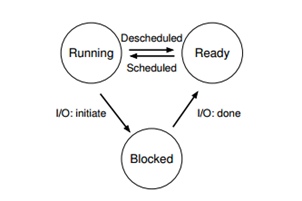
These states can be visualized as a graph. As we can see in the picture, the process state can change between RUNNING and READY at the discretion of the OS. When the state of the process changes from READY to RUNNING, it means that the process has been scheduled. In the opposite direction, it has been unscheduled. At the moment the process becomes BLOCKED, for instance, by initializing an IO operation, the OS will keep it in that state until a certain event occurs, such as the completion of IO. At that moment, it transitions to the READY state and can possibly instantaneously move to the RUNNING state, if the OS decides so.
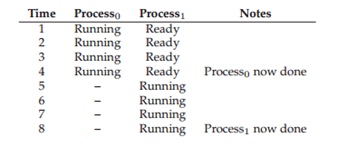
Let's take a look at an example of how two processes move through these states. First, imagine that both processes are running and each is using only the CPU. In this case, their states will look as follows.
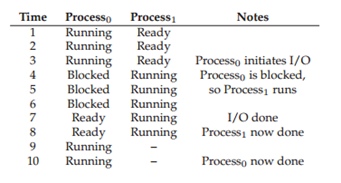
In the following example, the first process requests I/O after some time of running and enters the BLOCKED state, allowing another process to start (FIG 1.4). The OS sees that process 0 is not using the CPU and starts process 1. While process 1 is running, the I/O completes, and the status of process 0 changes to READY. Finally, process 1 finishes, and once it ends, process 0 starts, executes, and completes its task.
Data Structure
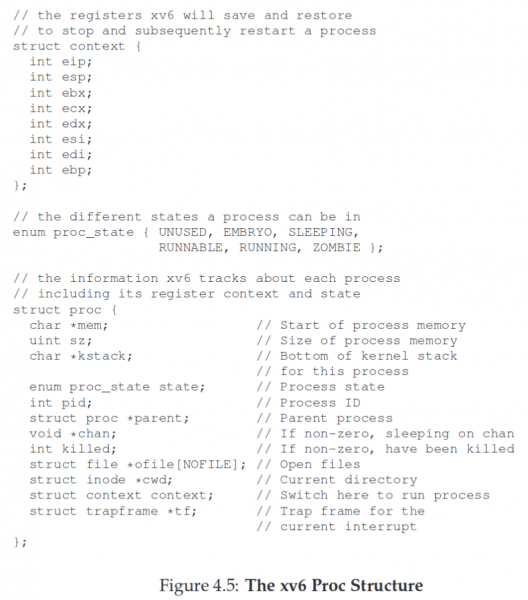
The OS itself is a program, and like any other program, it has certain key data structures that track various relevant pieces of information. To monitor the state of each process, the OS maintains a certain process list for all processes in the READY state and some additional information for tracking the processes currently running. Additionally, the OS must keep track of blocked processes. After completing the I/O, the OS must wake up the necessary process and switch it to a ready-to-run state.
For example, the OS must save the state of the CPU registers. When a process is halted, the state of the registers is saved in the process's address space, and upon resuming its operation, the register values are restored, thus continuing the execution of that process.
Besides the states of ready, blocked, and running, there are a few other states. Sometimes at the moment of creation, a process may have the state INIT. Finally, a process may be placed in the FINAL state when it has already completed, but its information has not yet been cleared. In UNIX systems, this state is called zombie process. This state is useful in cases when the parent process wants to know the return code of its child, for example, usually 0 indicates successful termination, while 1 indicates an error, though programmers can create additional exit codes that signal various problems. Upon termination, the parent process makes the final system call, such as wait(), to wait for the child process to finish and signal the OS that it can clear any data related to the terminated process.
Key points of the lecture:
● Process — the main abstraction of a functioning program in an OS. At any moment in time, a process can be described by its state: the contents of memory in its address space, the contents of the CPU registers, including the instruction pointer and stack pointer, as well as information about I/O, such as open files that are being read or written.
● Process API is made up of calls that programs can make concerning processes. Typically, these are calls for creation, deletion, or others.
● A process is in one of many states, including running, ready, and blocked. Various events, such as scheduling, preemption, or waiting, can transition a process's state from one to another.
● Process list contains information about all processes in the system. Each entry in it is called a process control block, which is actually a structure that holds all the necessary information about a particular process.
Source: habr.com
