

Hello, Habr! This is a sequel to my , in which I will discuss the options for posting messages to queues using JMeter.
We are creating a data bus for a large federal company. Various request formats, transformations, intricate routing. To test, we need to send a lot of messages to the queues. Doing it manually can be a pain that not every manual tester can handle.

Introduction
Although at first, we had to endure this pain. It all started with RFHUtil. Powerful but cumbersome and frightening: you know how it is with Rus.
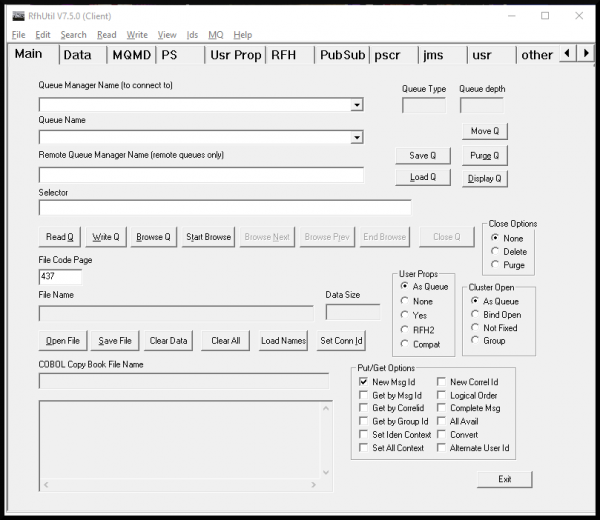
Essential in some cases but consistently crashes under heavy use.
Convenient testing with it is impossible.
With JMeter, everything became easier. After the initial phase of learning and getting used to it, hope for happy testing began to dawn.
I actively use JMS Publisher and JMS Subscriber samplers. Unlike JMS Point-to-Point, this pair seemed more convenient to work with. For example, in the JMS Selector of the Subscriber, you can specify a variable, but you can't with Point-to-Point (or this method isn't very obvious).
Preparing samplers
JMS Publisher
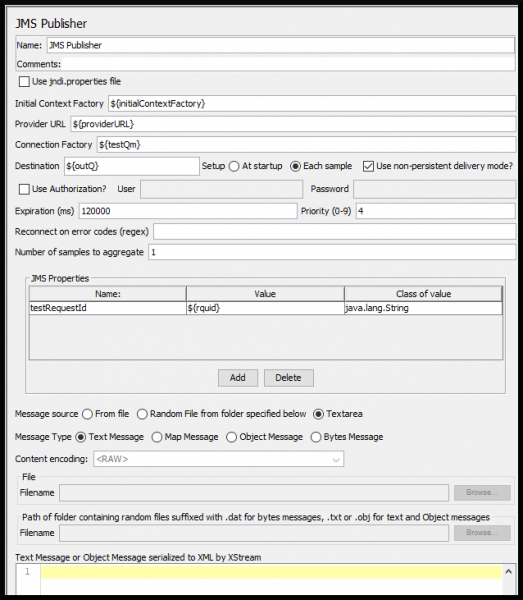
- Setup — Each Sample. Apache use this option if queues/topics are defined via variables.
- Expiration (ms) = 120000. In case of failure, test requests will disappear from the queue after 2 minutes.
- Use non-persistent delivery mode? — true. IBM , which means that persistent mode ensures reliable storage of transmitted messages in case of sudden failure. And faster exchange in non-persistent mode. For testing purposes, speed is more critical.
In each Publisher, I set a JMS property that the Subscriber will use in the JMS Selector. A random value is generated for each sending in the User Parameters test plan element:
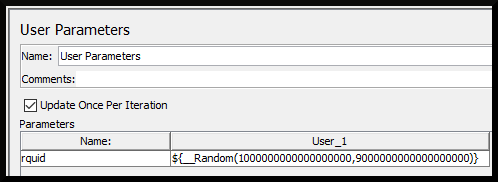
This way, you can be sure that the correct message is read.
The final 'template' of a pre-configured JMS Publisher:
JMS Subscriber
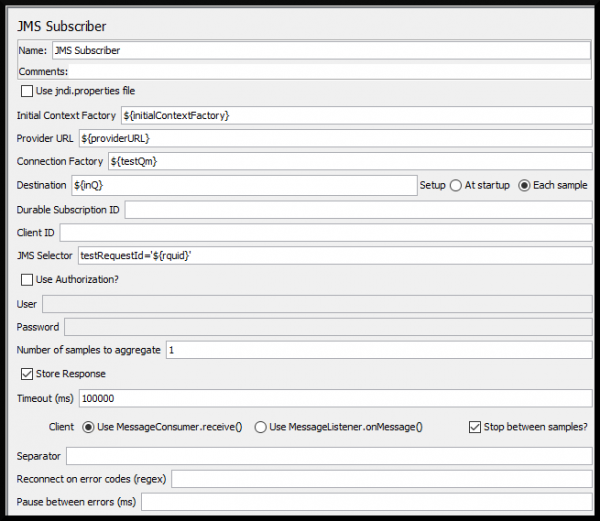
- Setup — Each Sample. You get the idea.
- Timeout (ms) = 100000. If the request does not arrive in the queue after 100 seconds of waiting, something went wrong.
- Stop between sample? — true.
JMS Selector — quite a convenient . The final JMS Subscriber:
What to do with Cyrillic in transmitted messages. In JMeter, it is displayed incorrectly by default after reading. To avoid this and always enjoy the great and mighty language everywhere, you need to:
- Add the following JVM argument to the JMeter launcher:
-Dfile.encoding=UTF-8 - Add a JSR223 PostProcessor to the Subscriber with a Groovy line:
prev.setDataEncoding("UTF-8")
Text transmission
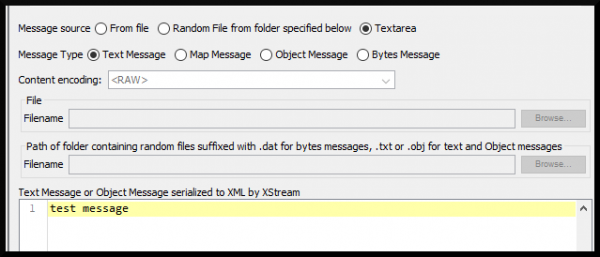
The laziest option. Suitable for debugging freshly written tests or for cases when you need to send at least something small. Select option Message source — Textarea and place the message body in the text block:
File transfer
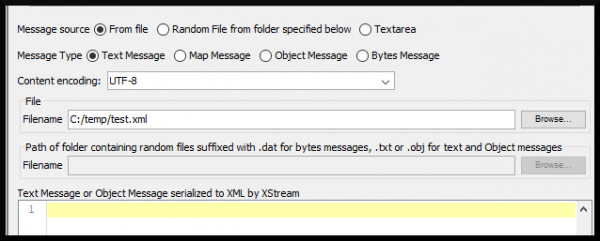
The most common option. Suitable for most scenarios. Select option Message source — From file and specify the path to the message in the field File — Filename:
File transfer in the text field
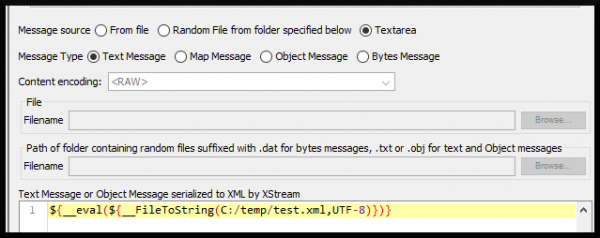
The most versatile option. Suitable for most scenarios + can be used in JMS Point-to-Point, where there is no second sending option:
Byte array transfer
The most complex option. Suitable for testing impeccably precise request transmission to the byte, without distortions, SMS, or perturbations. This cannot be done in default JMeter, I was clearly told about this.
So I had to download and modify JMS Subscriber.
Replaced in the method extractContent(..) the line:
buffer.append(bytesMessage.getBodyLength() + " bytes received in BytesMessage");to:
byte[] bytes = new byte[(int) bytesMessage.getBodyLength()];
bytesMessage.readBytes(bytes);
try {
	buffer.append(new String(bytes, "UTF-8"));
} catch (UnsupportedEncodingException e) {
	throw new RuntimeException(e);
}
and rebuilt JMeter.
Just need to add a couple of JSR223 Samplers. The first — before the pair of Publisher/Subscriber to create a DAT file containing random bytes:
import org.apache.commons.lang3.RandomUtils;

import java.io.File;
import java.io.FileNotFoundException;
import java.io.FileOutputStream;
import java.io.IOException;

vars.put("PATH_TO_BYTES", "C:temprandomBytes.dat");
File RESULT_FILE = new File(vars.get("PATH_TO_BYTES"));
byte[] arr = RandomUtils.nextBytes((int)(Math.random()*10000));
        try {
            FileOutputStream fos = new FileOutputStream(RESULT_FILE);
            fos.write(arr);
            fos.close();
        } catch (IOException e) {
            System.out.println("file not found");
        }
The second — at the end of the scenario, deletes the file:
import java.io.File;

File RESULT_FILE = new File(vars.get("PATH_TO_BYTES"));
RESULT_FILE.delete();
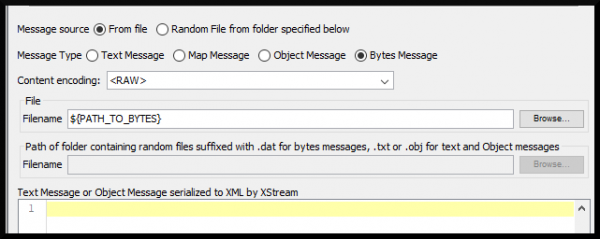
And don't forget to add the file path to the Publisher:
Also, a check in the JSR223 Assertion for the Subscriber — compare the original bytes with those coming into the receiver's queue:
import java.nio.file.Files;
import java.nio.file.Path;
import java.nio.file.Paths;
import java.util.Arrays;

Path path = Paths.get(vars.get("PATH_TO_BYTES"), new String[0]);
byte[] originalArray = Files.readAllBytes(path);
byte[] changedArray = ctx.getPreviousResult().getResponseData();
System.out.println(changedArray.length);

if (Arrays.equals(originalArray, changedArray))
	{
     	SampleResult.setResponseMessage("OK");

	} else {
	   SampleResult.setSuccessful(false);
     	   SampleResult.setResponseMessage("Comparison failed");
	   SampleResult.setResponseData("Bytes have changed","UTF-8");
     	   IsSuccess=false;
	}
Conclusion
I described four methods of sending messages in queues that I use in practice daily. I hope this information makes your life easier. In continuation, I plan to share my experience testing exchanges, where on one end there is a queue, and on the other is a database or file system.
Save your time. Thank you for your attention.

Source: habr.com
