

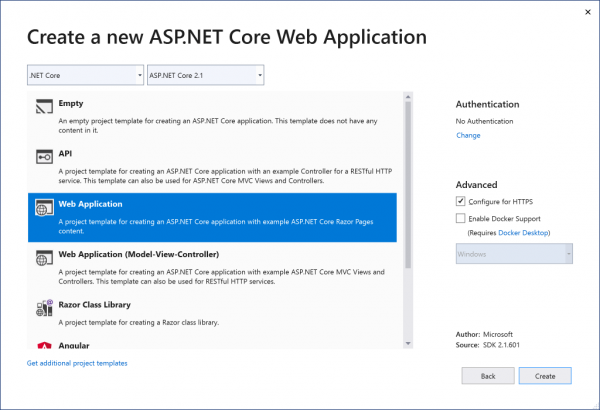
You have probably already seen that . As expected, we have added improvements for web development and Azure development. As a starting point, Visual Studio 2019 provides, and we have also updated the experience of creating ASP.NET and ASP.NET Core projects to meet the following requirements:
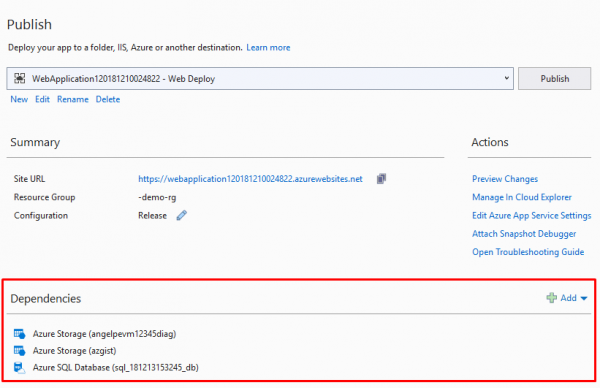
If you are publishing your application to Azure, you can now configure Azure App Service to use Azure Storage instances and Azure SQL Database directly from the summary page in the publish profile without leaving Visual Studio. This means that for any existing web application running in App Service, you can add SQL and Storage since it is no longer limited to just the creation time.
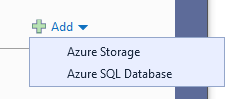
By clicking the 'Add' button, you can choose between Azure Storage and Azure SQL Database (more Azure services will be supported in the future):
and then you can choose between using an existing Azure Storage instance that you prepared earlier or preparing a new one right now:
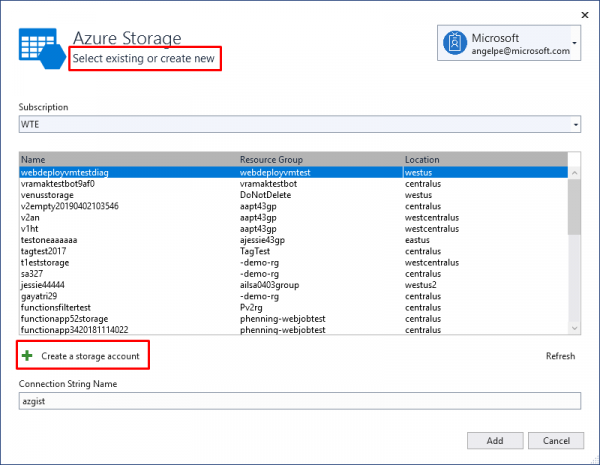
When configuring Azure App Service through the publish profile, as shown above, Visual Studio will update the application settings in Azure App Service to include the connection strings you configured (for example, in this case, azgist). The studio will also apply hidden tags to instances in Azure regarding how they are configured to work together, so this information is not lost and can be later rediscovered by other instances of Visual Studio.
Check out the 30-minute overview of developing with Azure in Visual Studio, :

Send us your feedback
As always, we welcome your feedback. Tell us what you like and what you don’t like, what features you feel are missing, and which parts of the workflow work or don’t work for you. You can do this by sending questions to the developer community or contacting us through Twitter.
Source: habr.com
