


Want to learn about the types of WhatsApp forensic artifacts present in different operating systems and where exactly they can be found? Then this article is for you. This article is presented by a specialist from the Group-IB Computer Forensics Laboratory. Igor Mikhailov kicks off a series of publications about forensic investigation of WhatsApp and the information that can be obtained from analyzing a device.
It is important to note that different operating systems store various types of WhatsApp artifacts. If a researcher can extract certain types of WhatsApp data from one device, it does not mean that similar data can be extracted from another device. For example, if a desktop computer running Windows OS is seized, chat records will likely not be found on its drives (with the exception of iOS device backups that could be located on these drives). There will be specific nuances when seizing laptops and mobile devices. Let's discuss this in more detail.
WhatsApp artifacts on Android devices
To extract WhatsApp artifacts from a device running Android OS, the researcher must have superuser rights (‘root’) on the device being examined or have the means to extract a physical memory dump or its filesystem in other ways (for instance, by exploiting software vulnerabilities of a specific mobile device).
Application files are stored in the phone's memory in the section where user data is kept. Typically, this section is named ‘userdata’. The program's subdirectories and files are located at the path: ‘/data/data/com.whatsapp/’.
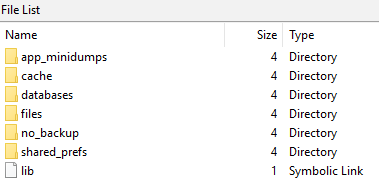
The main files containing WhatsApp forensic artifacts on Android OS are the databases ‘wa.db’ and ‘msgstore.db’.
The database contains a complete list of WhatsApp user contacts, including phone number, display name, timestamps, and any other information provided at registration in WhatsApp. The file is located at the path: ‘wa.db’ ‘/data/data/com.whatsapp/databases/’ ‘wa.db’ and has the following structure: The most interesting tables in the database for the researcher are:
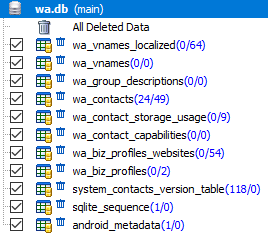
‘wa_contacts’ ‘wa.db’ for the researcher are:
- 'wa_contacts'
This table contains information about contacts: contact ID in WhatsApp, status information, displayed username, timestamps, etc.Table appearance:

Table structureField name Value _id record number (in the SQL table) jid WhatsApp ID of the contact, stored in the format @s.whatsapp.net is_whatsapp_user contains '1' if the contact corresponds to an actual WhatsApp user, '0' otherwise status contains the text displayed in the contact's status status_timestamp contains a timestamp in Unix Epoch Time format (ms) number phone number associated with the contact raw_contact_id contact record number display_name contact's displayed name phone_type type of phone phone_label label associated with the contact's number unseen_msg_count number of messages sent by the contact that have not been read by the recipient photo_ts contains a timestamp in Unix Epoch Time format thumb_ts contains a timestamp in Unix Epoch Time format photo_id_timestamp contains a timestamp in Unix Epoch Time format (ms) given_name the value of this field matches 'display_name' for each contact wa_name contact's name in WhatsApp (the displayed name as indicated in the contact's profile) sort_name contact's name used in sorting operations nickname contact's nickname in WhatsApp (the displayed nickname as indicated in the contact's profile) company company (the displayed company as indicated in the contact's profile) title salutation (Ms./Mr.; the salutation set in the contact's profile is displayed) offset offset - 'sqlite_sequence'
This table contains information about the number of contacts; - 'android_metadata'
This table contains information about the language localization of WhatsApp.
The database contains a complete list of WhatsApp user contacts, including phone number, display name, timestamps, and any other information provided at registration in WhatsApp. The file is located at the path: ‘msgstore.db’ contains information about sent messages, such as contact number, message text, message status, timestamps, details of files sent within messages, etc. The file ‘msgstore.db’ and has the following structure: The most interesting tables in the database for the researcher are:
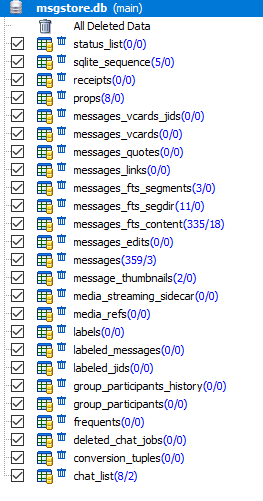
The most interesting tables in the file ‘msgstore.db’ for the researcher are:
- 'sqlite_sequence'
This table contains general information about this database, such as the total number of stored messages, total number of chats, etc.Table appearance:
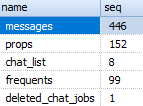
- 'message_fts_content'
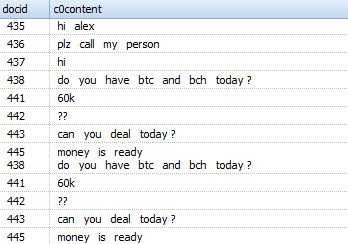
Contains text of sent messages.Table appearance:
- 'messages'
This table contains information such as contact number, message text, message status, timestamps, details of files sent within messages.Table appearance:

Table structureField name Value _id record number (in the SQL table) key_remote_jid WhatsApp ID of the communication partner key_from_me direction of the message: '0' – incoming, '1' — outgoing key_id unique message identifier status message status: ‘0’ – delivered, ‘4’ – pending server, ‘5’ – received at the destination, ‘6’ – delivery report, ‘13’ – message opened by the recipient (read) need_push is ‘2’ if this is a broadcast message, otherwise contains ‘0’ data message text (when the ‘media_wa_type’ parameter is ‘0’) timestamp contains a timestamp in Unix Epoch Time format (ms), value taken from the device clock media_url contains the URL of the transmitted file (when the ‘media_wa_type’ parameter is ‘1’, ‘2’, ‘3’) media_mime_type MIME type of the transmitted file (when the ‘media_wa_type’ parameter is ‘1’, ‘2’, ‘3’) media_wa_type message type: ‘0’ – text, ‘1’ – image file, ‘2’ – audio file, ‘3’ – video file, ‘4’ – contact card, ‘5’ – geodata media_size size of the transmitted file (when the ‘media_wa_type’ parameter is ‘1’, ‘2’, ‘3’) media_name transmitted file name (when the ‘media_wa_type’ parameter is ‘1’, ‘2’, ‘3’) media_caption Contains the words ‘audio’, ‘video’ for the respective ‘media_wa_type’ values (when the ‘media_wa_type’ parameter is ‘1’, ‘3’) media_hash base64 encoded hash of the transmitted file, calculated using the HAS-256 algorithm (when the ‘media_wa_type’ parameter is ‘1’, ‘2’, ‘3’) media_duration duration in seconds for the media file (when the ‘media_wa_type’ parameter is ‘1’, ‘2’, ‘3’) origin is ‘2’ if this is a broadcast message, otherwise contains ‘0’ latitude geodata: latitude (when the ‘media_wa_type’ parameter is ‘5’) longitude geodata: longitude (when the ‘media_wa_type’ parameter is ‘5’) thumb_image auxiliary information remote_resource sender ID (for group chats only) received_timestamp receiving time, contains a timestamp in Unix Epoch Time format (ms), value taken from the device clock (when the ‘key_from_me’ parameter has ‘0’, ‘-1’ or another value) send_timestamp not used, usually has a value of ‘-1’ receipt_server_timestamp time received by the server proxy server, contains a timestamp in Unix Epoch Time format (ms), value taken from the device clock (when the ‘key_from_me’ parameter has ‘1’, ‘-1’ or another value) receipt_device_timestamp time message received by another subscriber, contains a timestamp in Unix Epoch Time format (ms), value taken from the device clock (when the ‘key_from_me’ parameter has ‘1’, ‘-1’ or another value) read_device_timestamp the opening time (reading) of the message, contains a timestamp in Unix Epoch Time format (ms), the value is taken from the device's clock played_device_timestamp the playback time of the message, contains a timestamp in Unix Epoch Time format (ms), the value is taken from the device's clock raw_data thumbnail of the transmitted file (when the ‘media_wa_type’ parameter is equal to ‘1’ or ‘3’) recipient_count number of recipients (for broadcast messages) participant_hash used when transmitting messages with geolocation data starred not used quoted_row_id unknown, usually contains the value ‘0’ mentioned_jids not used multicast_id not used offset offset This list of fields is not exhaustive. For different versions of WhatsApp, some fields may be present or absent. Additionally, other fields may be included ‘media_enc_hash’, ‘edit_version’, ‘payment_transaction_id’ etc.
- ‘messages_thumbnails’
This table contains information about transmitted images and timestamps. The ‘timestamp’ column shows the time in Unix Epoch Time format (ms). - ‘chat_list’
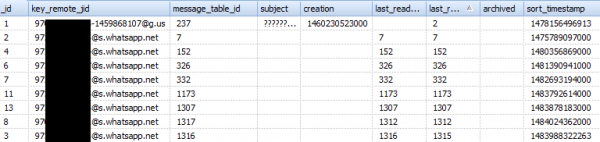
This table contains information about chats.Table appearance:
Also, when investigating WhatsApp on an Android mobile device, the following files should be noted:
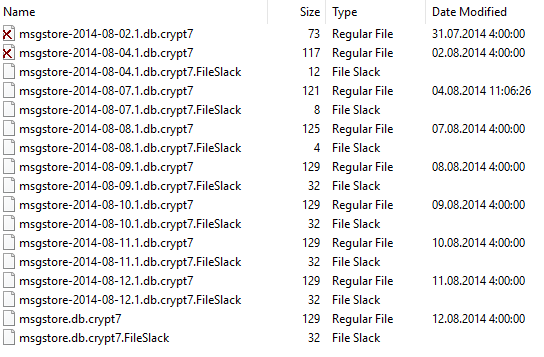
- File ‘msgstore.db.cryptXX’ (where XX is one or two digits from 0 to 12, for instance, msgstore.db.crypt12). Contains an encrypted backup of WhatsApp messages (backup of the file msgstore.db). The file (or files) ‘msgstore.db.cryptXX’ and has the following structure: ‘/data/media/0/WhatsApp/Databases/’ (virtual SD card), ‘/mnt/sdcard/WhatsApp/Databases/ (physical SD card)’.
- File ‘key’. Contains a cryptographic key. Located at: ‘/data/data/com.whatsapp/files/’. Used to decrypt encrypted backups of WhatsApp.
- File ‘com.whatsapp_preferences.xml’. Contains information about the WhatsApp account profile. The file is located at: ‘/data/data/com.whatsapp/shared_prefs/’.
A fragment of the file content
… 9123456789 (phone number associated with the WhatsApp account) … 2.17.395 (WhatsApp version) … Hey there! I am using WhatsApp. (message displayed in the account status) … Alex (account owner's name) … - File ‘registration.RegisterPhone.xml’. Contains information about the phone number associated with the WhatsApp account. The file is located at: ‘/data/data/com.whatsapp/shared_prefs/’.
Contents of the file
- File 'axolotl.db'. Contains cryptographic keys and other data necessary for identifying the account owner. Located at: The most interesting tables in the database.
- File 'chatsettings.db'. Contains information about application configuration.
- File ‘wa.db’. Contains details about contacts. A very interesting (from a forensic perspective) and informative database. It may contain detailed information about deleted contacts.
Also, pay attention to the following directories:
- The directory '/data/media/0/WhatsApp/Media/WhatsApp Images/'. Contains transmitted graphic files.
- The directory '/data/media/0/WhatsApp/Media/WhatsApp Voice Notes/'. Contains voice messages in .OPUS format files.
- The directory '/data/data/com.whatsapp/cache/Profile Pictures/'. Contains graphic files – contact images.
- The directory '/data/data/com.whatsapp/files/Avatars/'. Contains graphic files – thumbnails of contact images. These files have the .j extension, but are actually graphic files in JPEG (JPG) format.
- The directory '/data/data/com.whatsapp/files/Avatars/'. Contains graphic files – the image and thumbnail set as the avatar by the account owner.
- The directory '/data/data/com.whatsapp/files/Logs/'. Contains the program's operation log (file 'whatsapp.log') and backups of operation logs (files named whatsapp-yyyy-mm-dd.1.log.gz).
WhatsApp log files:

Log fragment2017-01-10 09:37:09.757 LL_I D [524:WhatsApp Worker #1] missedcallnotification/init count:0 timestamp:0
2017-01-10 09:37:09.758 LL_I D [524:WhatsApp Worker #1] missedcallnotification/update cancel true
2017-01-10 09:37:09.768 LL_I D [1:main] app-init/load-me
2017-01-10 09:37:09.772 LL_I D [1:main] password file missing or unreadable
2017-01-10 09:37:09.782 LL_I D [1:main] statistics Text Messages: 59 sent, 82 received / Media Messages: 1 sent (0 bytes), 0 received (9850158 bytes) / Offline Messages: 81 received (19522 msec average delay) / Message Service: 116075 bytes sent, 211729 bytes received / Voip Calls: 1 outgoing calls, 0 incoming calls, 2492 bytes sent, 1530 bytes received / Google Drive: 0 bytes sent, 0 bytes received / Roaming: 1524 bytes sent, 1826 bytes received / Total Data: 118567 bytes sent, 10063417 bytes received
2017-01-10 09:37:09.785 LL_I D [1:main] media-state-manager/refresh-media-state/writable-media
2017-01-10 09:37:09.806 LL_I D [1:main] app-init/initialize/timer/stop: 24
2017-01-10 09:37:09.811 LL_I D [1:main] msgstore/checkhealth
2017-01-10 09:37:09.817 LL_I D [1:main] msgstore/checkhealth/journal/delete false
2017-01-10 09:37:09.818 LL_I D [1:main] msgstore/checkhealth/back/delete false
2017-01-10 09:37:09.818 LL_I D [1:main] msgstore/checkdb/data/data/com.whatsapp/databases/msgstore.db
2017-01-10 09:37:09.819 LL_I D [1:main] msgstore/checkdb/list _jobqueue-WhatsAppJobManager 16384 drw=011
2017-01-10 09:37:09.820 LL_I D [1:main] msgstore/checkdb/list _jobqueue-WhatsAppJobManager-journal 21032 drw=011
2017-01-10 09:37:09.820 LL_I D [1:main] msgstore/checkdb/list axolotl.db 184320 drw=011
2017-01-10 09:37:09.821 LL_I D [1:main] msgstore/checkdb/list axolotl.db-wal 436752 drw=011
2017-01-10 09:37:09.821 LL_I D [1:main] msgstore/checkdb/list axolotl.db-shm 32768 drw=011
2017-01-10 09:37:09.822 LL_I D [1:main] msgstore/checkdb/list msgstore.db 540672 drw=011
2017-01-10 09:37:09.823 LL_I D [1:main] msgstore/checkdb/list msgstore.db-wal 0 drw=011
2017-01-10 09:37:09.823 LL_I D [1:main] msgstore/checkdb/list msgstore.db-shm 32768 drw=011
2017-01-10 09:37:09.824 LL_I D [1:main] msgstore/checkdb/list wa.db 69632 drw=011
2017-01-10 09:37:09.825 LL_I D [1:main] msgstore/checkdb/list wa.db-wal 428512 drw=011
2017-01-10 09:37:09.825 LL_I D [1:main] msgstore/checkdb/list wa.db-shm 32768 drw=011
2017-01-10 09:37:09.826 LL_I D [1:main] msgstore/checkdb/list chatsettings.db 4096 drw=011
2017-01-10 09:37:09.826 LL_I D [1:main] msgstore/checkdb/list chatsettings.db-wal 70072 drw=011
2017-01-10 09:37:09.827 LL_I D [1:main] msgstore/checkdb/list chatsettings.db-shm 32768 drw=011
2017-01-10 09:37:09.838 LL_I D [1:main] msgstore/checkdb/version 1
2017-01-10 09:37:09.839 LL_I D [1:main] msgstore/canquery
2017-01-10 09:37:09.846 LL_I D [1:main] msgstore/canquery/count 1
2017-01-10 09:37:09.847 LL_I D [1:main] msgstore/canquery/timer/stop: 8
2017-01-10 09:37:09.847 LL_I D [1:main] msgstore/canquery 517 | time spent:8
2017-01-10 09:37:09.848 LL_I D [529:WhatsApp Worker #3] media-state-manager/refresh-media-state/internal-storage available:1,345,622,016 total:5,687,922,688
- The directory '/data/media/0/WhatsApp/Media/WhatsApp Audio/'. Contains received audio files.
- The directory '/data/media/0/WhatsApp/Media/WhatsApp Audio/Sent/'. Contains sent audio files.
- The directory '/data/media/0/WhatsApp/Media/WhatsApp Images/'. Contains received image files.
- The directory '/data/media/0/WhatsApp/Media/WhatsApp Images/Sent/'. Contains sent image files.
- The directory '/data/media/0/WhatsApp/Media/WhatsApp Video/'. Contains received video files.
- The directory '/data/media/0/WhatsApp/Media/WhatsApp Video/Sent/'. Contains sent video files.
- The directory '/data/media/0/WhatsApp/Media/WhatsApp Profile Photos/'. Contains image files associated with the WhatsApp account owner.
- To save space on an Android smartphone, some WhatsApp data may be stored on the SD card. In the root directory of the SD card, there is a folder 'WhatsApp', where the following artifacts of this program can be found:
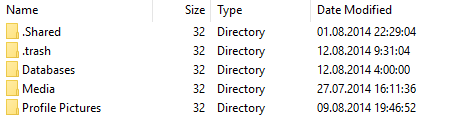
- The directory '.Share' ('/mnt/sdcard/WhatsApp/.Share/'). Contains copies of files that have been sent to other WhatsApp users.
- The directory '.trash' ('/mnt/sdcard/WhatsApp/.trash/'). Contains deleted files.
- The directory 'Databases' ('/mnt/sdcard/WhatsApp/Databases/'). Contains encrypted backups. They can be decrypted with a file ‘key’, extracted from the memory of the examined device.
Files located in the subdirectory 'Databases':
- The directory ‘Media’ (‘/mnt/sdcard/WhatsApp/Media/’). Contains subdirectories ‘WallPaper’, ‘WhatsApp Audio’, ‘WhatsApp Images’, ‘WhatsApp Profile Photos’, ‘WhatsApp Video’, ‘WhatsApp Voice Notes’, which contain received and sent multimedia files (graphic files, video files, voice messages, photos associated with the profile of the WhatsApp account owner, wallpapers).
- The directory ‘Profile Pictures’ (‘/mnt/sdcard/WhatsApp/Profile Pictures/’). Contains graphic files associated with the profile of the WhatsApp account owner.
- Sometimes an SD card may contain a directory ‘files’ (‘/mnt/sdcard/WhatsApp/Files/’). This directory contains files that store program settings and user preferences.
Data storage features in some mobile device models
In some mobile device models running the Android OS, it is possible to store WhatsApp artifacts in a different location. This is due to changes in app data storage introduced by the device's firmware. For example, in Xiaomi mobile devices, there is a feature for creating a second workspace (‘SecondSpace’). When this feature is activated, the data location is altered. Thus, in a standard Android mobile device, user data is stored in the directory ‘/data/user/0/’ (which links to the usual ‘/data/data/’), while in the second workspace, application data is stored in the directory ‘/data/user/10/’. For example, in a typical smartphone running Android: ‘wa.db’:
- (which is equivalent to /data/user/0/com.whatsapp/databases/wa.db’ ‘/data/data/com.whatsapp/databases/wa.db’) in the second workspace of a Xiaomi smartphone:;
- ‘/data/user/10/com.whatsapp/databases/wa.db’ WhatsApp artifacts on iOS devices.
Unlike the Android OS, in iOS, WhatsApp application data is backed up (iTunes backup). Therefore, extracting data from this application does not require accessing the file system or creating a physical memory dump of the device being examined. Most significant information is contained in the database
‘ChatStorage.sqlite’ , located at the path:‘/private/var/mobile/Applications/group.net.whatsapp.WhatsApp.shared/’ (in some programs, this path is displayed as ‘AppDomainGroup-group.net.whatsapp.WhatsApp.shared’ The most informative tables in the ‘ChatStorage.sqlite’ database are).
Structure , located at the path::
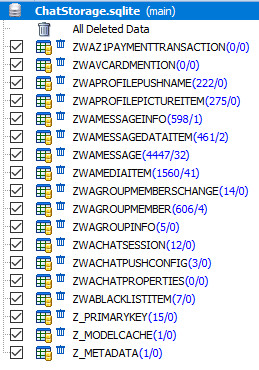
‘ZWAMESSAGE’ ‘ZWAMEDIAITEM’ and Table appearance.
Table appearance ‘ZWAMEDIAITEM’:
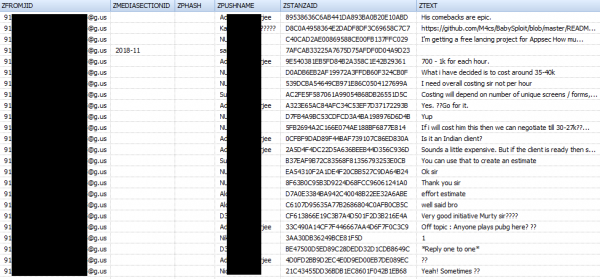
Structure of the table 'ZWAMESSAGE'
| Field name | Value |
|---|---|
| Z_PK | record number (in the SQL table) |
| Z_ENT | table identifier, has a value of '9' |
| Z_OPT | unknown, usually contains values from '1' to '6' |
| ZCHILDMESSAGESDELIVEREDCOUNT | unknown, usually contains the value ‘0’ |
| ZCHILDMESSAGESPLAYEDCOUNT | unknown, usually contains the value ‘0’ |
| ZCHILDMESSAGESREADCOUNT | unknown, usually contains the value ‘0’ |
| ZDATAITEMVERSION | unknown, usually contains a value of '3', probably a text message pointer |
| ZDOCID | unknown |
| ZENCRETRYCOUNT | unknown, usually contains the value ‘0’ |
| ZFILTEREDRECIPIENTCOUNT | unknown, usually contains values '0', '2', '256' |
| ZISFROMME | direction of the message: '0' – incoming, '1' — outgoing |
| ZMESSAGEERRORSTATUS | status of message transmission. If the message is sent/received, it has a value of '0' |
| ZMESSAGETYPE | type of transmitted message |
| ZSORT | unknown |
| ZSPOTLIGHSTATUS | unknown |
| ZSTARRED | unknown, not used |
| ZCHATSESSION | unknown |
| ZGROUPMEMBER | unknown, not used |
| ZLASTSESSION | unknown |
| ZMEDIAITEM | unknown |
| ZMESSAGEINFO | unknown |
| ZPARENTMESSAGE | unknown, not used |
| ZMESSAGEDATE | timestamp in OS X Epoch Time format |
| ZSENTDATE | time of message sent in OS X Epoch Time format |
| ZFROMJID | WhatsApp ID of the sender |
| ZMEDIASECTIONID | contains the year and month of media file sending |
| ZPHASH | unknown, not used |
| ZPUSHPAME | contact name of the person sending the media file in UTF-8 format |
| ZSTANZID | unique message identifier |
| ZTEXT | text of the message |
| ZTOJID | WhatsApp ID of the recipient |
| OFFSET | offset |
Table appearance Table appearance:
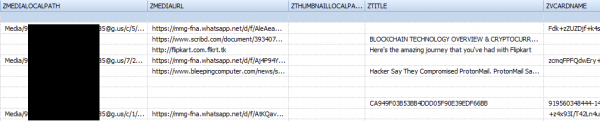
Structure of the table 'ZWAMEDIAITEM'
| Field name | Value |
|---|---|
| Z_PK | record number (in the SQL table) |
| Z_ENT | table identifier, has a value of '8' |
| Z_OPT | unknown, usually contains values from '1' to '3'. |
| ZCLOUDSTATUS | contains the value '4' if the file is uploaded. |
| ZFILESIZE | contains the length of the file (in bytes) for uploaded files |
| ZMEDIAORIGIN | unknown, usually has a value of '0' |
| ZMOVIEDURATION | duration of the media file, for pdf files may contain the number of pages in the document |
| ZMESSAGE | contains the sequential number (the number differs from that specified in the 'Z_PK' column) |
| ZASPECTRATIO | aspect ratio, not used, usually has a value of '0' |
| ZHACCURACY | unknown, usually has a value of '0' |
| ZLATTITUDE | width in pixels |
| ZLONGTITUDE | height in pixels |
| ZMEDIAURLDATE | timestamp in OS X Epoch Time format |
| ZAUTHORNAME | author (for documents, may contain the file name) |
| ZCOLLECTIONNAME | not used |
| ZMEDIALOCALPATH | file name (with the path) in the device's file system |
| ZMEDIAURL | URL where the media file was located. If the file was sent from one subscriber to another, it was encrypted, and its extension will be specified as the extension of the sent file — .enc |
| ZTHUMBNAILLOCALPATH | path to the file's thumbnail in the device's file system |
| ZTITLE | file title |
| ZVCARDNAME | hash of the media file, when the file is sent to a group it may contain the sender's identifier |
| ZVCARDSTRING | contains information about the type of the transmitted file (for example, image/jpeg), when the file is sent to a group it may contain the recipient's identifier |
| ZXMPPTHUMBPATH | path to the file's thumbnail in the device's file system |
| ZMEDIAKEY | unknown, likely contains a key for decrypting the encrypted file. |
| ZMETADATA | metadata of the transmitted message |
| Offset | offset |
Other interesting database tables , located at the path: are:
- ‘ZWAPROFILEPUSHNAME’. Maps WhatsApp ID to contact name;
- ‘ZWAPROFILEPICTUREITEM’. Maps WhatsApp ID to contact avatar;
- ‘Z_PRIMARYKEY’. The table contains general information about this database, such as the total number of stored messages, the total number of chats, etc.
Also, when investigating WhatsApp on a mobile device running iOS, pay attention to the following files:
- File ‘BackedUpKeyValue.sqlite’. Contains cryptographic keys and other data necessary for identifying the account owner. Located at: /private/var/mobile/Applications/group.net.whatsapp.WhatsApp.shared/.
- File ‘ContactsV2.sqlite’. Contains information about the user's contacts, such as full name, phone number, contact status (in text form), WhatsApp ID, etc. Located at: /private/var/mobile/Applications/group.net.whatsapp.WhatsApp.shared/.
- File ‘consumer_version’. Contains the version number of the installed WhatsApp application. Located at: /private/var/mobile/Applications/group.net.whatsapp.WhatsApp.shared/.
- File ‘current_wallpaper.jpg’. Contains the current background wallpaper of the WhatsApp program. Located at: /private/var/mobile/Applications/group.net.whatsapp.WhatsApp.shared/. In older versions of the app, the file is used ‘wallpaper’, which is located at: ‘/private/var/mobile/Applications/net.whatsapp.WhatsApp/Documents/’.
- File ‘blockedcontacts.dat’. Contains information about blocked contacts. Located at: /private/var/mobile/Applications/net.whatsapp.WhatsApp/Documents/.
- File ‘pw.dat’. Contains the encrypted password. Located at: ‘/private/var/mobile/Applications/net.whatsapp.WhatsApp/Library/’.
- File ‘net.whatsapp.WhatsApp.plist’ (or file ‘group.net.whatsapp.WhatsApp.shared.plist’). Contains information about the WhatsApp account profile. The file is located at: ‘/private/var/mobile/Applications/group.net.whatsapp.WhatsApp.shared/Library/Preferences/’.
The content of the file ‘group.net.whatsapp.WhatsApp.shared.plist’ 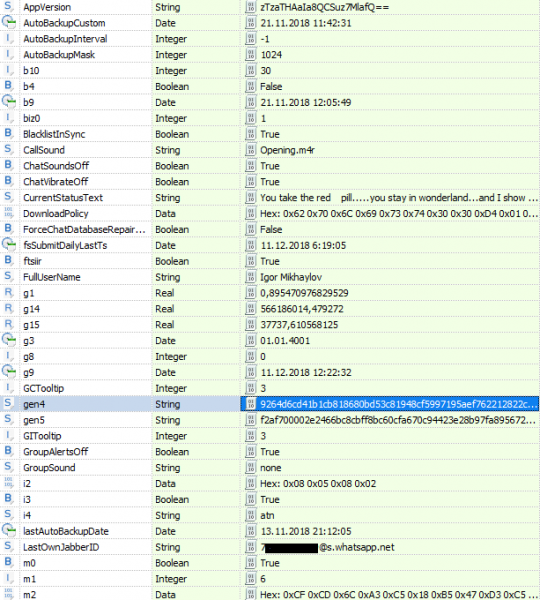
Also, pay attention to the following directories:
- The directory ‘/private/var/mobile/Applications/group.net.whatsapp.WhatsApp.shared/Media/Profile/’. Contains thumbnails of contacts, groups (files with the extension .thumb), contact avatars, the avatar of the WhatsApp account owner (file ‘Photo.jpg’).
- The directory ‘/private/var/mobile/Applications/group.net.whatsapp.WhatsApp.shared/Message/Media/’. Contains multimedia files and their thumbnails
- The directory ‘/private/var/mobile/Applications/net.whatsapp.WhatsApp/Documents/’. Contains the application log (file ‘calls.log’) and backup copies of application logs (file ‘calls.backup.log’).
- The directory ‘/private/var/mobile/Applications/group.net.whatsapp.WhatsApp.shared/stickers/’. Contains stickers (files in the format ‘.webp’).
- The directory ‘/private/var/mobile/Applications/net.whatsapp.WhatsApp/Library/Logs/’. Contains application logs.
WhatsApp artifacts in Windows
WhatsApp artifacts in Windows can be found in several locations. First of all, these are directories that contain executable and auxiliary program files (for Windows 8/10):
- ‘C:Program Files (x86)WhatsApp’
- ‘C:Users%User profile% AppDataLocalWhatsApp’
- ‘C:Users%User profile% AppDataLocalVirtualStore Program Files (x86)WhatsApp’
In the directory ‘C:Users%User profile% AppDataLocalWhatsApp’ is the log file ‘SquirrelSetup.log’, which contains information about checking for updates and installing the program.
In the directory ‘C:Users%User profile% AppDataRoamingWhatsApp’ contains several subdirectories:
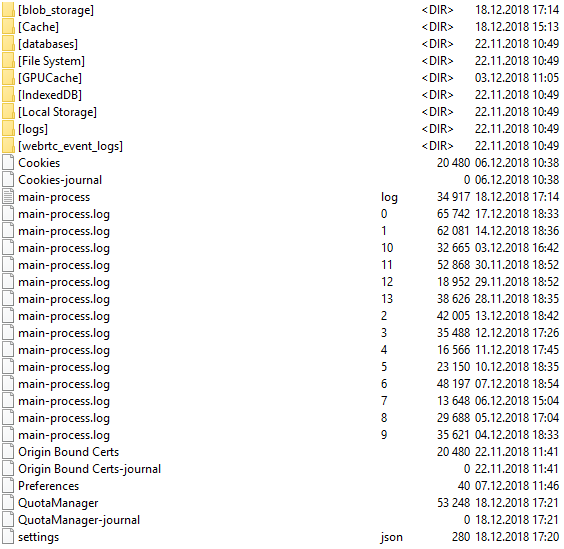
File ‘main-process.log’ contains information about the operation of the WhatsApp program.
Subdirectory ‘databases’ contains the file ‘Databases.db’, but this file does not contain any information about chats or contacts.
The files located in the directory are most interesting from a forensic point of view ‘Cache’. These are mainly files named ‘f_*******’ where * is a number from 0 to 9, containing encrypted multimedia files and documents, but among them are also unencrypted files. Special interest is in the files ‘data_0’, ‘data_1’, ‘data_2’, ‘data_3’, located in the same subdirectory. The files ‘data_0’, ‘data_1’, ‘data_3’ contain external links to the encrypted multimedia files and documents being transmitted.
An example of the information contained in the file ‘data_1’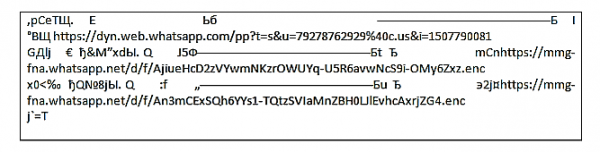
The file ‘data_3’ may also contain graphic files.
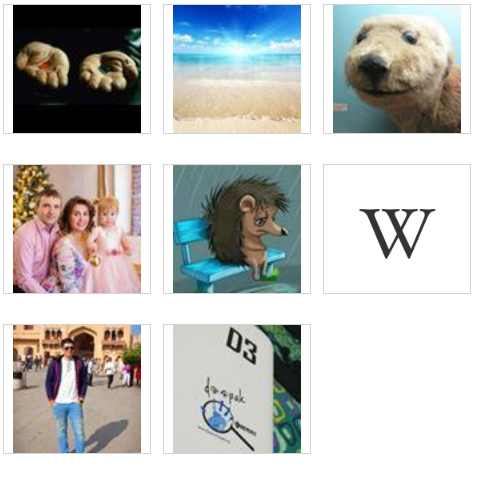
File ‘data_2’ contains contact avatars (which can be recovered by searching through the file headers).
Avatars contained in the file ‘data_2’:
Thus, chats cannot be found in the computer's memory, but the following can be found:
- multimedia files;
- documents transmitted via WhatsApp;
- information about the contacts of the account owner.
WhatsApp artifacts in MacOS
In MacOS, you can find types of WhatsApp artifacts similar to those found in Windows OS.
The program files are located in the directories:
- ‘C:ApplicationsWhatsApp.app’
- ‘C:Applications._WhatsApp.app’
- ‘C:Users%User profile%LibraryPreferences’
- ‘C:Users%User profile%LibraryLogsWhatsApp’
- ‘C:Users%User profile%LibrarySaved Application StateWhatsApp.savedState’
- ‘C:Users%User profile%LibraryApplication Scripts’
- ‘C:Users%User profile%LibraryApplication SupportCloudDocs’
- ‘C:Users%User profile%LibraryApplication SupportWhatsApp.ShipIt’
- ‘C:Users%User profile%LibraryContainerscom.rockysandstudio.app-for-whatsapp’
- ‘C:Users%User profile% Library Mobile Documents WhatsApp Accounts’
In this directory, there are subdirectories whose names consist of phone numbers associated with the WhatsApp account owner. - ‘C:Users%User profile%LibraryCachesWhatsApp.ShipIt’
This directory contains information about program installation. - ‘C:Users%User profile%PicturesiPhoto Library.photolibraryMasters’, ‘C:Users%User profile%PicturesiPhoto Library.photolibraryThumbnails’
These directories contain program service files, including photos and thumbnails of WhatsApp contacts. - 'C:Users%User profile%LibraryCachesWhatsApp'
This directory contains several SQLite databases that are used for data caching. - 'C:Users%User profile%LibraryApplication SupportWhatsApp'
This directory contains several subdirectories: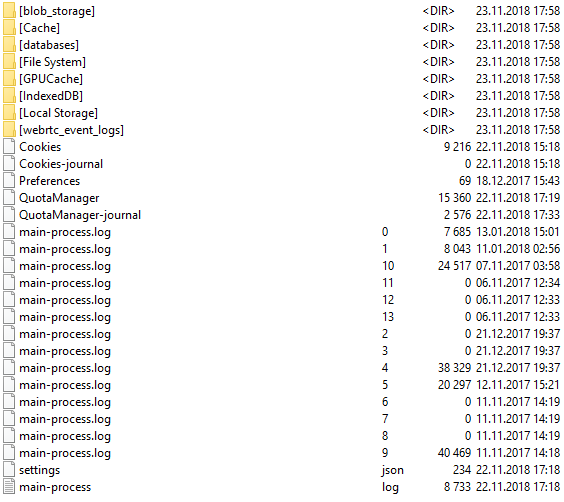
In the directory 'C:Users%User profile%LibraryApplication SupportWhatsAppCache' contain files ‘data_0’, ‘data_1’, ‘data_2’, ‘data_3’ and files named ‘f_*******’ (where * is a number from 0 to 9). Information about what data these files contain is described in the section 'WhatsApp Artifacts in Windows.'In the directory 'C:Users%User profile%LibraryApplication SupportWhatsAppIndexedDB' may contain multimedia files (the files have no extensions).
File ‘main-process.log’ contains information about the operation of the WhatsApp program.
file — continuous reading of events from one or more local files;
- Forensic analysis of WhatsApp Messenger on Android smartphones, by Cosimo Anglano, 2014.
- Whatsapp Forensics: Exploring file systems and databases in Android and iOS applications by Ahmad Pratama, 2014.
In the following articles in this series:
Decrypting encrypted WhatsApp databasesAn article that provides information on how the WhatsApp encryption key is generated and practical examples showing how to decrypt encrypted databases of this application.
Extracting WhatsApp data from cloud storageAn article where we will describe what WhatsApp data is stored in the cloud and explain methods for extracting this data from cloud storage.
Extracting WhatsApp data: practical examplesAn article that will describe step-by-step how to extract WhatsApp data from various devices using different programs.
Source: habr.com
