

Hello, Habr.
This is us, the VPN service . We are currently working on the mirror HideMyna.me. Why? On July 20, 2018, Roskomnadzor added us due to a decision by the Medvedevsky District Court in Yoshkar-Ola. The court ruled that visitors to our site have unrestricted access to extremist materials #withoutregistrationorSMS, and somehow found the book "Mein Kampf" by Adolf Hitler on it. Apparently, for reliability.
This decision surprised us greatly, but we continue to operate on hidemyna.me, hidemyname.org, .one, .biz, and others. The protracted confrontation with Roskomnadzor has not yielded any results. While we contest the blocking and the magical court ruling with our lawyers, we share with you basic tips for maintaining privacy online and news on this topic.

Edward Snowden loves the National Security Agency (probably)
It is no secret that popular Russian services are not safe. Your correspondence can end up under the watchful eye of domestic law enforcement at any moment. Here we explain what you should remember when communicating via various channels.
SORM and ORI
There is ways to tap your phone. The official and legal one is SORM, a system of technical means for ensuring the functions of operational investigative activities. By law in the Russian Federation, all mobile operators are required to install such a system on their exchanges or risk losing their license. There are three types of SORM: the first was developed in the 80s, the second started being implemented in the 2000s, and the third has been trying to be imposed on operators since 2014. , most operators use the second type, but in 70% of cases, the system operates incorrectly or not at all. However, sensitive topics should still not be discussed over a landline phone or during a regular mobile call.
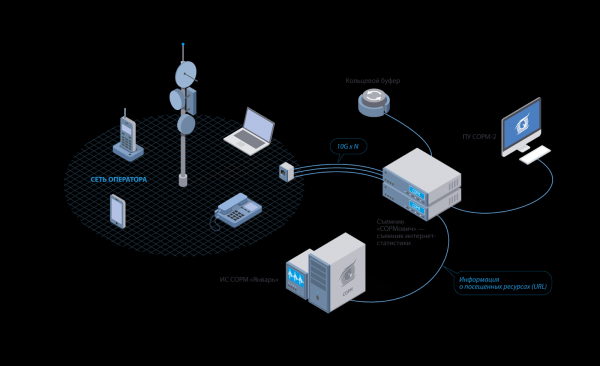
SORM-2 operation scheme (Source: mfisoft.ru)
According to Federal Law 97-FZ, any messengers, services, and websites operating in Russia must be included in the register . According to the "", they are required to store all user data, including records of voice calls and correspondence, for six months. By the way, ORI also includes Habr.
The operation of the register is described in detail For example, Threema illustrates a key point: now, upon request from Russian authorities, any information about you can end up in law enforcement. Therefore, the first step to maintaining privacy is to move calls and messages to messengers that are not listed in the ORI registry. Or those which are listed but refuse to transmit data to the authorities — like Threema and Telegram.
Help: Merely being in the ORI registry does not guarantee that data will be transmitted to the authorities. One must constantly monitor the news and observe how the messenger responds when they come under scrutiny.
Voice Calls and Messages
End-to-end encryption can protect our conversations and messages from third-party interference, so messengers with E2E are considered the most secure. However, it is not that simple: let's consider some popular options.
Telegram End-to-end encryption in their Secret Chats and stores encrypted data about your correspondence in the cloud, which is spread across various countries with a 'secure' jurisdiction. However, after reading about the illusion of security with Telegram Passport in E2E by Durov on Habr, one could start to have doubts.
Of course, communication in Secret Chats remains a good option for paranoids. In their encryption, the server is not involved at all: messages are sent peer-to-peer, meaning directly between participants in the conversation. For added peace of mind, you can use the self-destruct timer for messages. But don’t blindly rely on Telegram. To make it a bit more secure, both you and your recipient should go into the messenger settings and do at least two things:
- Set a password for logging into the app (Privacy and Security —> Passcode);
- Enable two-step authentication (Privacy and Security —> Two-Step Verification).
After this, in addition to the SMS code when logging in from a new device, the app will request a password that only you know.
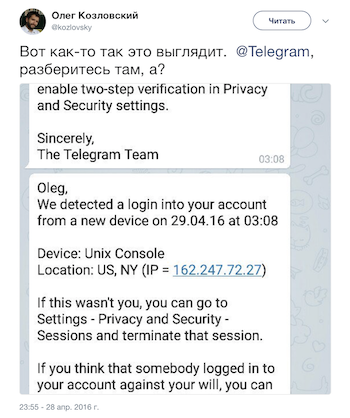
Currently, login confirmation solely via SMS does not protect individuals using a Russian SIM card in any way. There are known cases of Telegram accounts being hacked through intercepted SMS messages — in 2016, attackers to the correspondence of several opposition figures, and in 2017, the account of journalist Mikhail Rubin from "Dozhd".
WhatsApp so far avoids the ORI registry and also uses end-to-end encryption, but things are not so clear-cut with it. Recently, we published about the residents of Magadan, who faced criminal charges for criticizing the city's mayor. Fortunately, this story ended with just a regular fine. However, it confirmed users' concerns: it's unsafe to communicate in WhatsApp group chats.
What will happen?
- As soon as you send a message, your phone number immediately becomes accessible to all group members. With that number, your identity can be easily figured out.
What to do?
- A possible solution might be a 'fake' SIM card or a foreign number — preferably European.
If you are using a Russian card registered in your name, avoid sarcastic comments in groups with names like 'Mayor — Resign': it's best to keep WhatsApp usage to personal chats and calls only.
Viber also isn't listed in the ORI registry but maintains communication with Russian authorities (during spam-free times). This messenger was one of the first to meet the new government requirements: it stores the usernames and phone numbers of Russian users within Russia, but claims to provide messaging data — citing the mechanics of end-to-end encryption and corporate policy.
Apple also uses end-to-end encryption, but when registering with iMessage, it creates two pairs of keys: one private and one public. The message you receive from another Apple device owner is sent to you encrypted using the public key. It can only be decrypted using the recipient's private key, which is stored on their device. You can read about how Apple views user privacy and what it will do if it receives a request from the government There have been no recorded instances of the company providing data of Russian users to the Russian authorities.
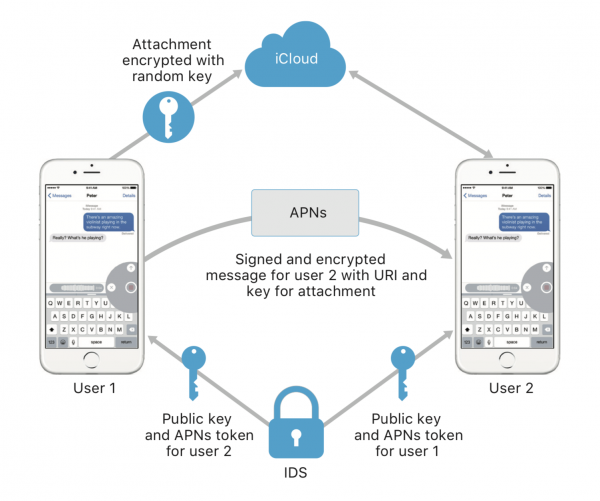
Source:
However, iMessage has two downsides:
- You can write or call only another Apple owner;
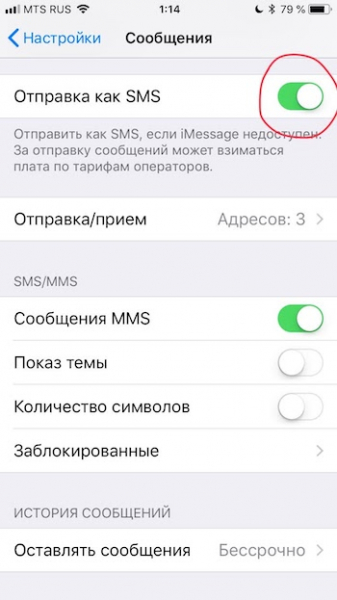
- If you have internet connection issues, the message will go through the regular cellular channel and turn into a simple SMS, which can easily be intercepted.
To prevent iMessage from turning into SMS, you can disable this feature in the settings.
Researchers from the Electronic Frontier Foundation there is no such thing as a 100% secure option for calls and messages. Just because some messengers do not allow authorities to access your private data, it doesn't mean that hackers (or the state, which may make use of their services) can't find a way around the laws. To give users confidence that there's no man-in-the-middle, Telegram has a neat feature: during a call, both participants can confirm they see the same emojis in the top right corner of the screen — this serves as confirmation that there has been no 'intrusion' into the connection.
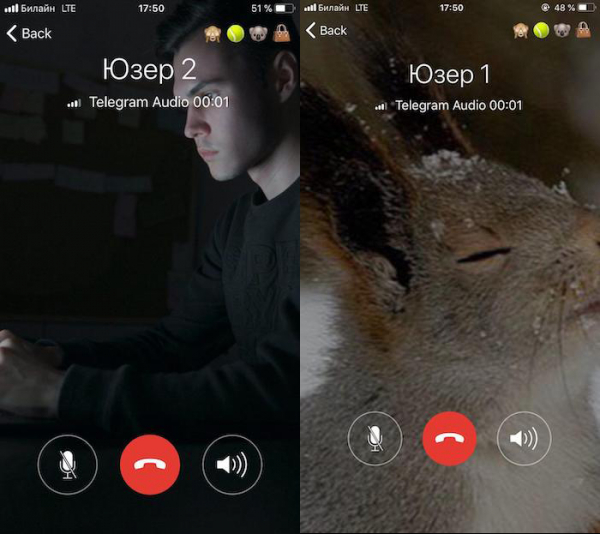
If you need a more reliable way to communicate, we recommend not only using secret chats, passwords, and two-step/two-factor authentication but also looking into less popular niche applications like or .
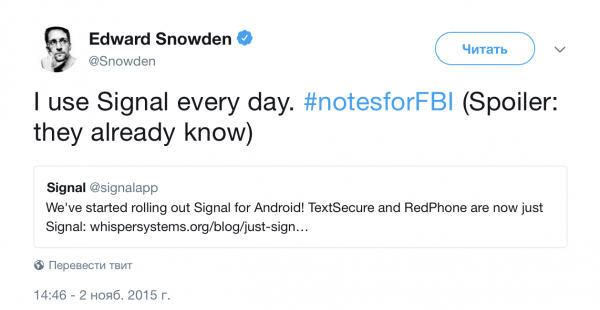
I use Signal every day. #notesforFBI (Spoiler: they already know)
Popular companies that allow their mail clients (in Russia, these include Yandex, Mail.Ru, and Rambler) are already registered with the ORI, which means they are not particularly safe. Yes, Mail.Ru Group criminal cases over memes and amnesty for the convicted, but they can still hand over your data to the authorities at the first request.
Even if you use Western email clients like Gmail or Outlook, enabled two-factor authentication, and know that your email is encrypted using a secure SSL/TLS protocol, you can't be sure that your recipient's email is equally protected.
Protection options:
- When sending sensitive information, encrypt emails using Pretty Good Privacy (). This program helps to turn the data in the email into a meaningless string of characters for everyone except the sender and the recipient;
- When sending important information, always pay attention to the recipient's domain and avoid writing to suspicious addresses;
- Pre-check with the recipient whether they have set up forwarding or collect mail through a Russian email service.
In the case of domestic companies from the ORI registry, no encryption on the user's side will help at all. Information is not intercepted; it is stored and transmitted by end points—similar services. The only solution may be to replace them with more secure alternatives like ProtonMail, Tutanota, or Hushmail. More such email services can be found on the page.
Social Networks
To start, minimize your presence on popular Russian social networks—“My World,” “Classmates,” and “VKontakte.” At least Facebook does not transmit your data to Russian special services. At least, no such cases have been recorded.
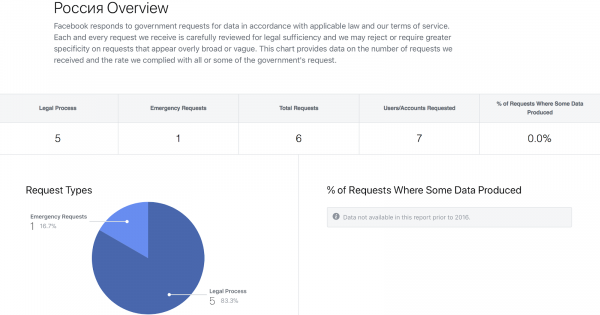
But interestingly, in 2017, 85% of requests from the U.S. government were still met by the company:
Screenshots from
If you are too accustomed to VK but do not want to end up in court, pay attention to a few things:
- your saved pictures;
- posts, comments, and messages you write;
- posts you like;
- posts you share;
- users you are friends with.
In all of the above, it is better to avoid anything that could be considered offensive or extremist. Always remember that 'dissemination' includes sending 'illegal' information to at least one person. Damir Gainutdinov, a lawyer from the international human rights group 'Agora', claims that under the ORI law even drafts of unsent messages to law enforcement agencies.For more on how to avoid getting penalized for reposting, read
By the way, for some time now, anyone who has your phone number can find you on VK by default, even if your page does not reveal your real identity.
You can prohibit being found by phone number in the profile settings (Settings -> Privacy -> Contact me). But of course, this won’t protect you from special services. Do not use calls and video calls on VK: it is unknown whether the network actually encrypts them end-to-end, as claimed by the administration.
Website Security
The only good news is that Most popular websites on the internet already have an HTTPS version or have completely switched to using only HTTPS versions. Information received and transmitted on such sites is encrypted and cannot be read by third parties. These resources are marked in green with the word 'secured.'
However, the good news ends here. Despite the HTTPS protocol, the fact of visiting such a site and DNS queries (information about which domains you have accessed) are still visible to your internet provider.
But the worse news is this: the remaining half of websites operate on the regular HTTP protocol, meaning without data encryption. A potential solution could be a VPN, which encrypts all received and transmitted data in such a way that there is no readable information on the side of the internet provider or anyone trying to intercept between you and the final site. The only thing that will be visible is the fact of connecting to some IP address on the internet (that is, to the VPN server). Nothing more.
We would be happy if life really became that simple: turn on the VPN and forget about the leakage of sensitive information. But that's not the case. Regularly check if your favorite resource has entered the ORI register, monitor how it interacts with authorities, check active connections in the settings of messengers and social networks, and reset suspicious ones (and then definitely change your passwords).
Globally
When working with communication channels and data transfer, a comprehensive approach to security and confidentiality makes sense. Stay updated on internet security events in our Telegram channel , on the website and on other resources dedicated to online events, particularly in the RuNet.
What security measures do you take?
Source: habr.com
