

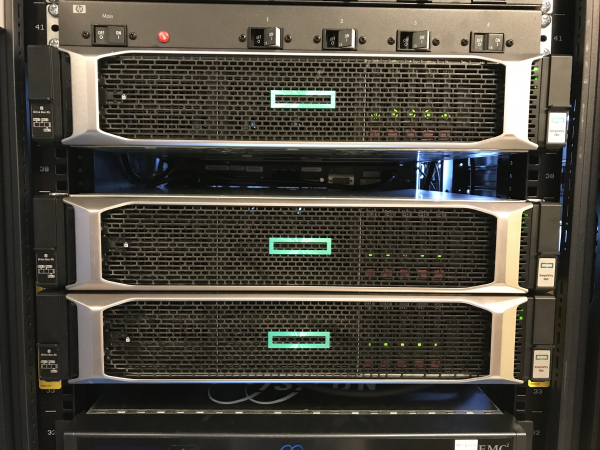
The client wanted VDI. They were particularly interested in the combination of SimpliVity + VDI Citrix Virtual Desktop. This is for all operators and office staff across cities and so on. There are five thousand users in the first wave of migration alone, so they insisted on load testing. VDI might start to lag; it can also crash unexpectedly — and this doesn't always happen due to channel issues. We purchased a very powerful testing package specifically for VDI and overloaded the infrastructure until it collapsed under the disks and processor.
So, we will need a plastic bottle and the LoginVSI software for advanced VDI tests. We have it licensed for 300 users. Then we obtained HPE SimpliVity 380 hardware, configured for maximum user density per server, created virtual machines with good over-subscription, installed office software on Win10, and began testing.
Let's go!
System
Two nodes (servers) of HPE SimpliVity 380 Gen10. On each:
- 2 x Intel Xeon Platinum 8170 26c 2.1GHz.
- RAM: 768GB, 12 x 64GB LRDIMMs DDR4 2666MHz.
- Primary disk controller: HPE Smart Array P816i-a SR Gen10.
- Hard drives: 9 x 1.92 TB SATA 6Gb/s SSD (configured in RAID6 7+2, meaning this is a Medium model in HPE SimpliVity terms).
- Network cards: 4 x 1Gb Eth (user data), 2 x 10Gb Eth (SimpliVity backend and vMotion).
- Special embedded FPGA cards in each node for deduplication/compression.
Nodes are interconnected via 10Gb Ethernet directly without an external switch, which is used as SimpliVity's backend and for transferring virtual machine data via NFS. Virtual machine data in the cluster is always mirrored between the two nodes.
Nodes are clustered in VMware vSphere managed by vCenter.
For testing, a domain controller and Citrix connection broker have been deployed. The domain controller, broker, and vCenter are placed in a separate cluster.
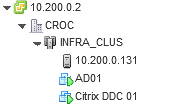
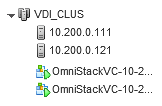
As a testing infrastructure, 300 virtual desktops have been deployed in Dedicated – Full Copy configuration, meaning each desktop is a complete copy of the original virtual machine image and retains all changes made by users.
Each virtual machine has 2 vCPU and 4GB RAM:
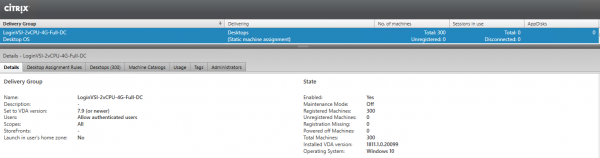
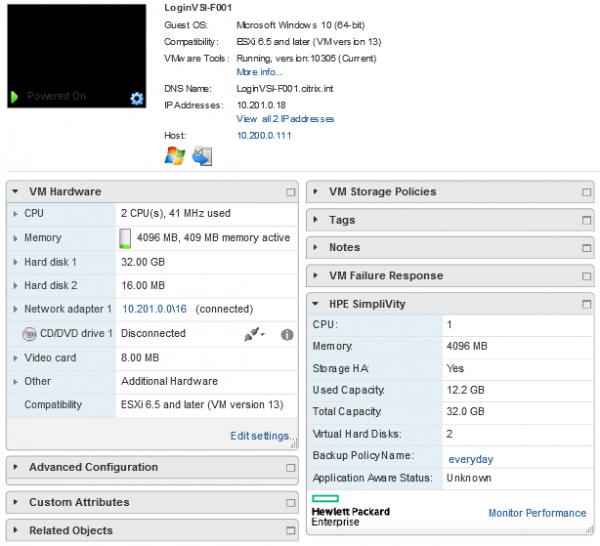
The following software required for testing was installed on the virtual machines:
- Windows 10 (64-bit), version 1809.
- Adobe Reader XI.
- Citrix Virtual Delivery Agent 1811.1.
- Doro PDF 1.82.
- Java 7 Update 13.
- Microsoft Office Professional Plus 2016.
Between nodes, there is synchronous replication. Each data block in the cluster has two copies. This means that there is a complete set of data on each node. In a cluster of three or more nodes, copies of blocks are stored in two different locations. When a new VM is created, an additional copy is made on one of the cluster nodes. If one node fails, all VMs previously running on it automatically restart on other nodes where replicas exist. If a node is down for an extended period, a gradual restoration of redundancy begins, and the cluster returns to N+1 redundancy.
Data balancing and storage occur at the level of the SimpliVity software storage itself.
Virtual machines run a virtualization cluster, which also places them on the software storage. The desktops were based on standard templates: the desktops of financiers and operators were used for testing (these are two different templates).
Testing
The testing was carried out using the testing complex software LoginVSI 4.1. The LoginVSI suite, consisting of a management server and 12 machines for test connections, was deployed on a separate physical host.
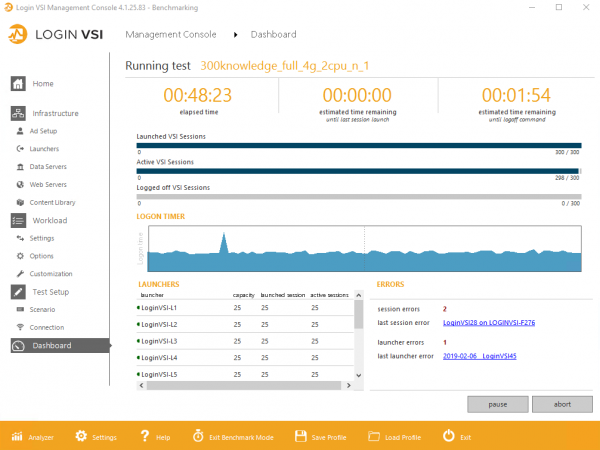
Testing was conducted in three modes:
Benchmark mode — load options for 300 Knowledge workers and 300 Storage workers.
Standard mode — load option for 300 Power workers.
To enable Power workers' operation and increase the variety of load, a library of additional Power Library files was added to the LoginVSI suite. To ensure repeatability of results, all test stand settings were left as Default.
The Knowledge and Power workers tests simulate the actual load of users working on virtual workstations.
The Storage workers test is designed specifically for testing data storage systems, is far from real loads, and mainly involves the user working with a large number of files of various sizes.
During testing, users log onto the workstations over 48 minutes, approximately one user every 10 seconds.
Results
The main result of the LoginVSI testing is the VSImax metric, which is derived from the time taken to perform various tasks initiated by the user. For example: the time to open a file in Notepad, the time to compress a file in 7-Zip, etc.
A detailed description of metric calculation is available in the official documentation for .
In other words, LoginVSI replicates a typical load pattern by simulating user actions in an office suite, reading PDFs, and so on, measuring various latencies. There is a critical latency level ('everything slows down, it's impossible to work'), which, when reached, indicates that the maximum number of users has not been achieved. If the response time is 1,000 ms faster than this 'everything slows down' state, it is considered that the system is functioning normally, and more users can be added.
Here are the main metrics:
Metric
Actions Taken
Detailed description
Components Under Load
NSLD
File Opening Time
for a 1,500 KB file
Notepad is launched and
opens a random document that weighs 1,500 KB, copied from the resource pool
resources
CPU and I/O
NFO
Dialog Box Opening Time in Notepad
Opening a file in VSI-Notepad [Ctrl+O]
CPU, RAM, and I/O
ZHC*
Time to create a Zip file with strong compression
Compressing a local random file in .pst format of size 5MB, copied from
the resource pool
ZLC*
Time to create a Zip file with weak compression
CPU and I/O
I/O
Calculating a large array of random data
the resource pool
ZLC*
Time to create a Zip file with weak compression
Creating a large array of random data to be used in the I/O timer
CPU
During testing, the base metric VSIbase is initially calculated, showing the speed of task execution without system load. Based on this, the VSImax Threshold is determined, which equals VSIbase + 1,000 ms.
Performance conclusions about the system are made based on two metrics: VSIbase, which determines the system's speed, and VSImax threshold, which defines the maximum number of users that the system can handle without significant degradation.
300 Knowledge Workers Benchmark
Knowledge workers are users who regularly burden memory, CPU, and I/O with various small spikes. The software emulates the load of demanding office users as if they are constantly clicking something (PDFs, Java, office suite, photo viewing, 7-Zip). As users are added from zero to 300, the latency for each gradually increases.
CPU
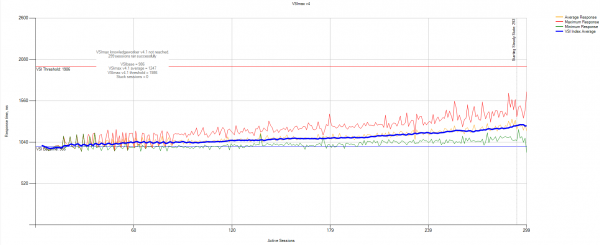
VSImax statistics:
VSIbase = 986 ms, VSI Threshold was not reached.
Storage system load statistics from SimpliVity monitoring:
Note: This is a detailed translation based on the context provided.
No hidden text or formatting was altered.
The structure remains intact.
No additional notes were needed for clarification.
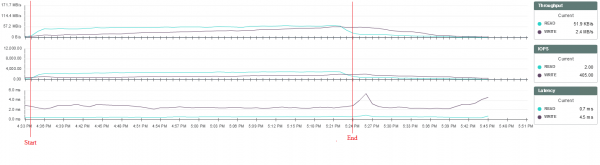
In this type of load, the system can withstand an increase in load almost without performance degradation. The execution time for user tasks increases smoothly, and the system's response time remains unchanged during testing, reaching up to 3 ms for write operations and up to 1 ms for read operations.
Output: 300 knowledge users operate on the current cluster without any issues, not interfering with each other, achieving a pCPU/vCPU over-subscription of 1 to 6. Overall delays increase uniformly with increased load, but the determined threshold has not been reached.
300 Storage workers benchmark
These are users who constantly write and read in a ratio of 30 to 70, respectively. This test was conducted more for experimental purposes. VSImax statistics data:
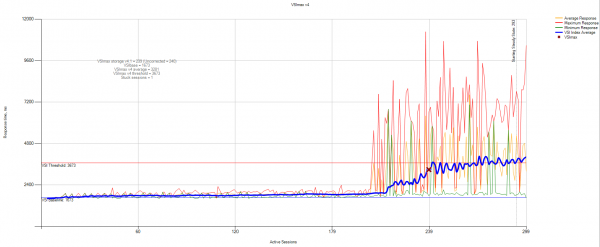
VSIbase = 1673, VSI Threshold was reached at 240 users.
No additional notes were needed for clarification.
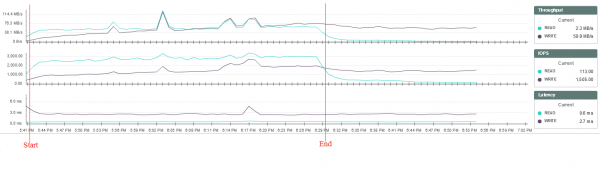
This type of load is essentially a stress test of the storage system. During this test, each user writes many random files of various sizes to the disk. It becomes evident that after exceeding a certain load threshold, some users experience increased task execution times for writing files. However, the load on the storage system, CPU, and memory of the hosts does not significantly change, so it is currently impossible to accurately determine the cause of the delays.
Conclusions about system performance from this test can only be made in comparison with the results of tests on other systems, as such loads are synthetic and unrealistic. Nevertheless, the test overall went quite well. Up to 210 sessions, everything was functioning smoothly, and then strange responses began, which were not tracked anywhere other than in Login VSI.
300 Power workers
These are users who demand CPU, memory, and high I/O. These 'advanced users' regularly run complex tasks with long peaks, such as installing new software and unpacking large archives. VSImax statistics data:
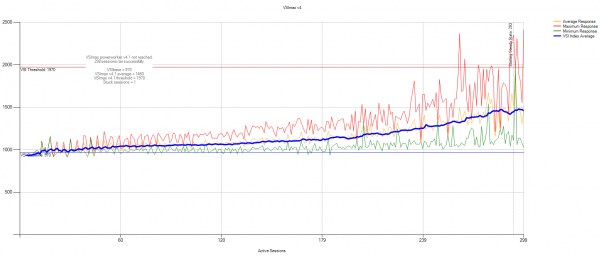
VSIbase = 970, VSI Threshold was not reached.
No additional notes were needed for clarification.
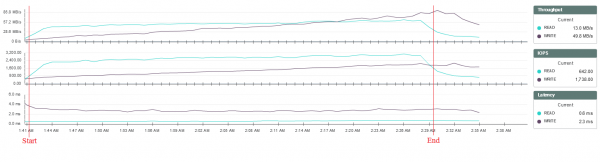
During testing, the CPU load threshold was reached on one of the nodes of the system, but this did not have a significant impact on its operation:
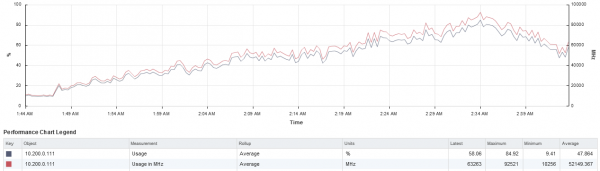
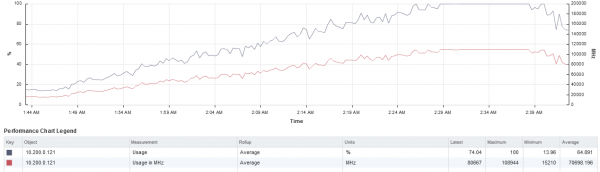
In this case, the system can handle increased loads without significant performance degradation. User task execution times increase smoothly, and the system's response time remains unchanged during testing, reaching up to 3 ms for writes and up to 1 ms for reads.
Standard tests were not enough for the client, so we went further: we enhanced the VM specifications (number of vCPUs to assess over-subscription and disk size) and added extra load.
The following setup configuration was used for the additional tests:
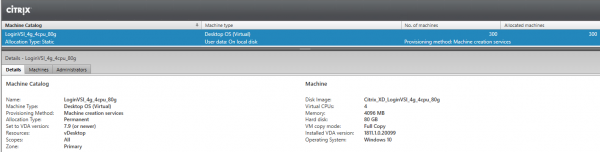
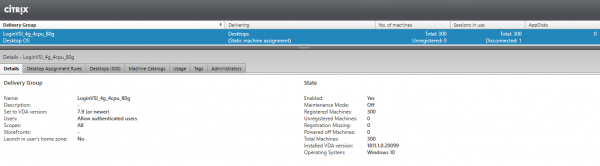
300 virtual workstations deployed with a configuration of 4vCPU, 4GB RAM, and 80GB HDD.
Configuration of one of the test machines:
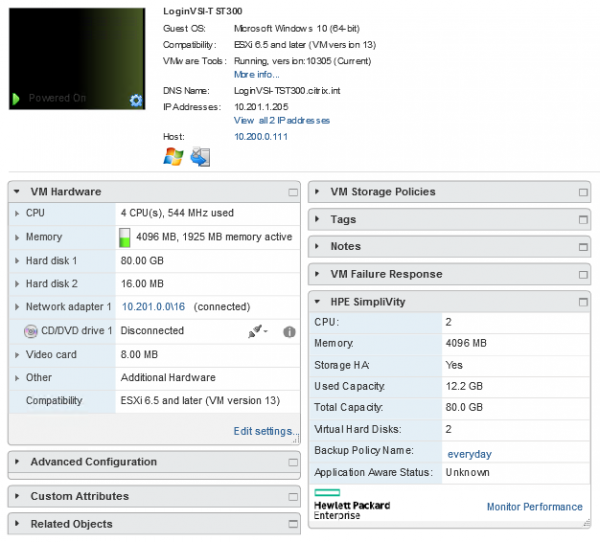
Machines were deployed in the Dedicated – Full Copy variant:
300 Knowledge workers benchmark with a 12x over-subscription
No hidden text or formatting was altered.
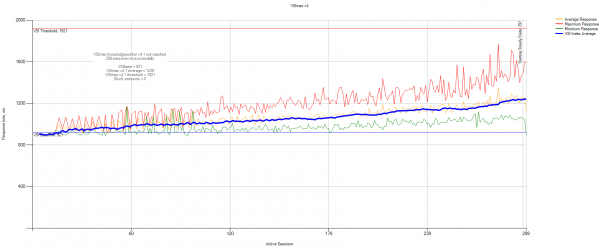
VSIbase = 921 ms, VSI Threshold was not reached.
No additional notes were needed for clarification.
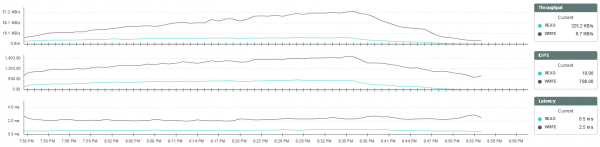
The results obtained are similar to the testing of the previous VM configuration.
300 Power workers with a 12x over-subscription
No hidden text or formatting was altered.
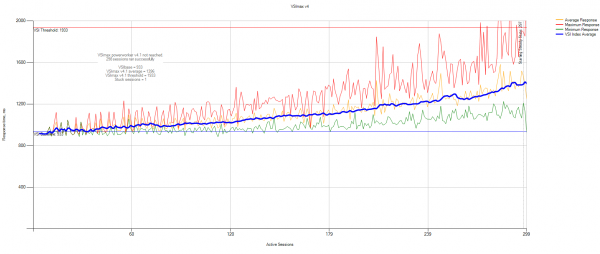
VSIbase = 933, VSI Threshold was not reached.
No additional notes were needed for clarification.
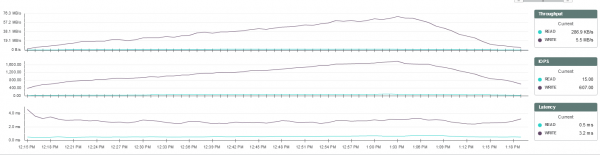
During this testing, the processor load threshold was also reached, but it did not significantly affect performance:
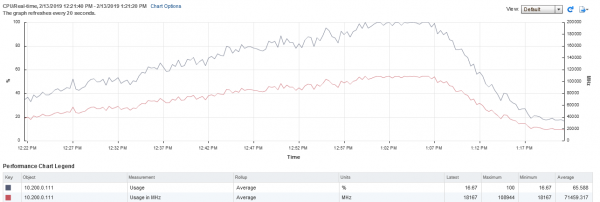
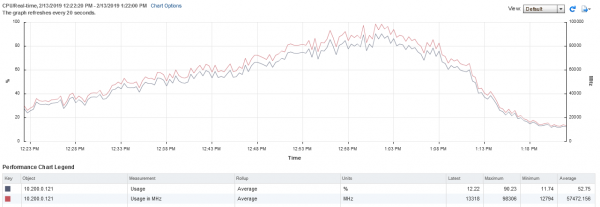
The results obtained are similar to the testing of the previous configuration.
What happens if we run the load for 10 hours?
Now let's see if there will be an 'accumulation effect' and run tests for 10 consecutive hours.
Long-term tests and section description should focus on whether we expect any issues with the farm under prolonged load.
300 Knowledge workers benchmark + 10 hours
Additionally, testing was conducted with a load of 300 knowledge workers followed by user activity over 10 hours.
No hidden text or formatting was altered.
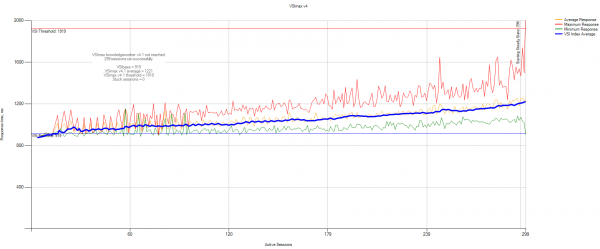
VSIbase = 919 ms, VSI Threshold was not reached.
Detailed VSImax statistics:
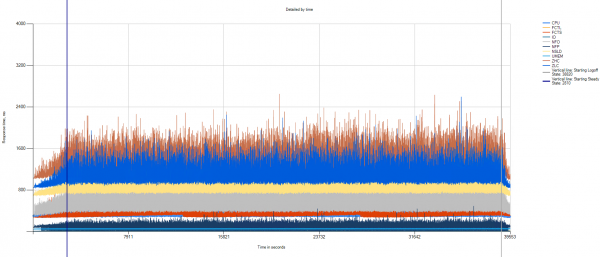
The graph shows that throughout the test, no performance degradation was observed.
No additional notes were needed for clarification.

The storage system performance remains consistent throughout the test.
Additional testing with synthetic load added.
The client requested to add stress testing to the disk. To achieve this, a synthetic disk load job was created on the storage system for each user's virtual machine, triggered upon user login. The load was generated using the fio utility, which allows for limiting disk load by the number of IOPS. Each machine launched a task to generate additional load at a rate of 22 IOPS with a 70%/30% Random Read/Write ratio.
300 Knowledge workers benchmark + 22 IOPS per user
During the initial testing, it was found that fio generated significant additional load on the virtual machine CPUs. This led to rapid CPU overload on the hosts and severely impacted the overall system performance.
CPU load on the hosts:
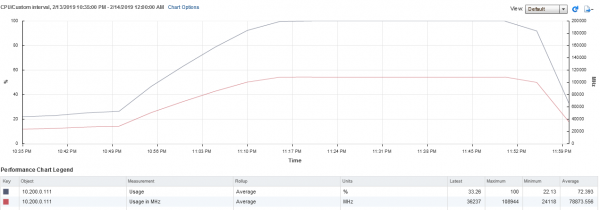
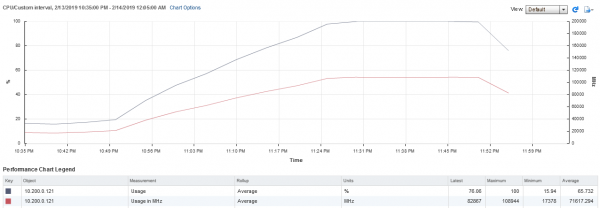
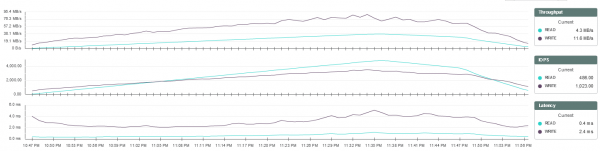
Storage system latencies also predictably increased:
The lack of computational power became critical at around 240 users:
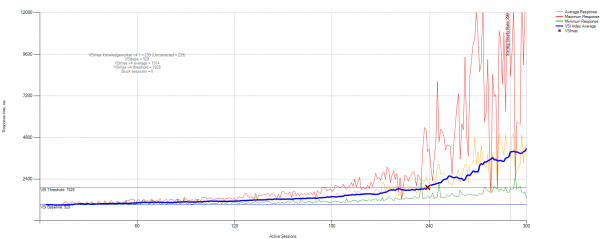
As a result of the findings, it was decided to conduct testing that would place less load on the CPU.
230 Office workers benchmark + 22 IOPS per user
To reduce CPU load, the Office workers load type was chosen, and an additional 22 IOPS synthetic load was added to each session.
The test was limited to 230 sessions to avoid exceeding the maximum CPU load.
The test was run with subsequent user activity over 10 hours to check system stability under a load close to maximum.
No hidden text or formatting was altered.
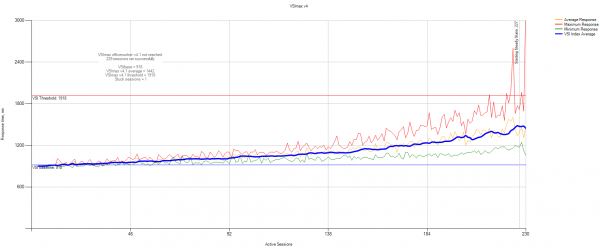
VSIbase = 918 ms, VSI threshold was not reached.
Detailed VSImax statistics:
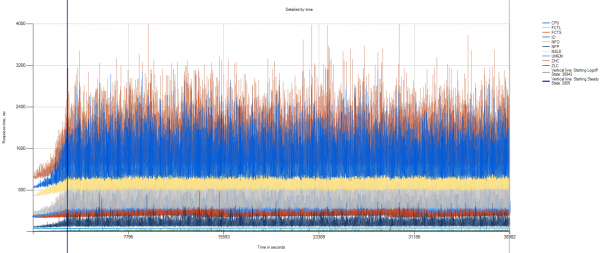
The graph shows that throughout the test, no performance degradation was observed.
Statistics data on CPU load:
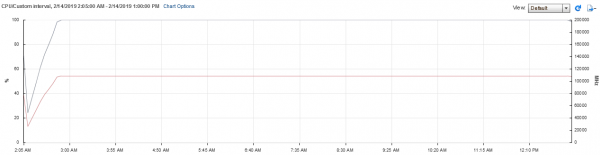
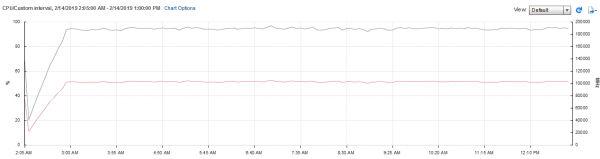
During this test, the CPU load on the hosts was nearly at maximum.
No additional notes were needed for clarification.
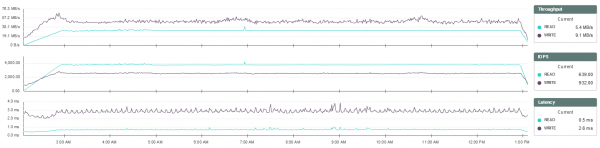
The storage system performance remains consistent throughout the test.
The storage system load during the test was approximately 6,500 IOPS with a 60/40 (3,900 IOPS for reads, 2,600 IOPS for writes) ratio, which is about 28 IOPS per workstation.
Average response time was 3 ms for writes and up to 1 ms for reads.
Summary
When modeling real loads on the HPE SimpliVity infrastructure, results confirmed the system's ability to support at least 300 Full Clone virtual desktops on a pair of SimpliVity nodes. During this time, the storage system's response time remained at an optimal level throughout the testing.
We appreciate the approach of conducting extended tests and comparing solutions before implementation. We can test the performance for your workloads as well, if you'd like. This includes testing on other hyper-converged solutions. The customer mentioned is currently finishing tests on another solution in parallel. Their existing infrastructure consists simply of a cluster of PCs, a domain, and software on each workstation. Transitioning to VDI without tests is certainly quite challenging. It’s particularly difficult to understand the actual capabilities of a VDI farm without migrating real users to it. These tests allow for a quick assessment of the real capabilities of different systems without the need to involve regular users. Hence this study emerged.
The second important approach is that the customer immediately accounted for proper scaling. Here, they can purchase an additional server and add a farm, for example, for 100 users, with costs predictable per user. For example, when they need to add another 300 users, they will know that two servers in an already determined configuration will be required, rather than reassessing the overall upgrade possibilities for their infrastructure.
The capabilities of HPE SimpliVity federation are interesting. The business is geographically distributed, so it makes sense to have a separate VDI machine in the remote office. In SimpliVity federation, each virtual machine is replicated on schedule, with the ability to quickly transfer between geographically remote clusters without burdening the channel—this is a built-in backup of a very good level. During replication of VMs between sites, the channel is utilized as minimally as possible, allowing for the construction of very interesting DR architectures with a single control center and multiple decentralized storage sites.
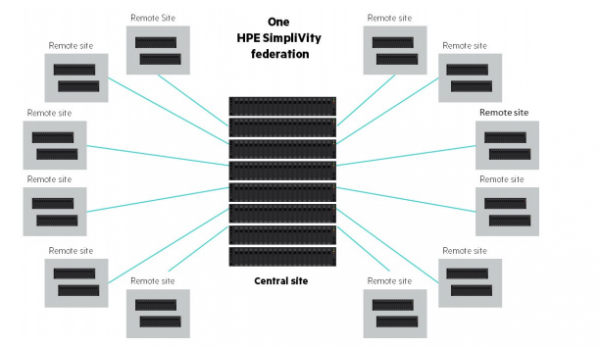
All of this combined allows for a detailed evaluation of the financial aspect, aligning VDI costs with the company's growth plans, and understanding how quickly the solution will pay off and how it will perform. Because any VDI solution ultimately saves a significant amount of resources, but likely lacks an economically viable ability to change over the course of 5-7 years of use.
In general, if you have questions that are not for the comments, feel free to email me at mk@croc.ru.
Source: habr.com
