


To provide IaaS (Virtual Data Center) services, we use the commercial orchestrator (FCO). This solution has a sufficiently unique architecture that distinguishes it from the well-known Openstack and CloudStack.
As for hypervisors, the compute nodes support KVM, VmWare, Xen, Virtuozzo 6/7, as well as containers from the same Virtuozzo. Supported storage includes local, NFS, Ceph, and Virtuozzo Storage.
FCO supports the creation of multiple clusters and managing them from a single interface. In other words, one can manage a Virtuozzo cluster and a KVM + Ceph cluster by switching between them with a click.
Essentially, FCO is a comprehensive solution for cloud providers that, apart from orchestration, also includes billing, with all setups, payment plugins, invoices, notifications, resellers, rates, and so on. However, the billing component cannot cover all the nuances of the Russian market, which is why we abandoned its use in favor of another solution.
The flexible system for distributing rights over all cloud resources is very pleasing: images, disks, products, servers, firewalls – all of these can be 'shared' and rights can be granted among users, even between users of different clients. Each client can create several independent data centers in their cloud and manage them from a single control panel.

Architecturally, FCO consists of several parts, each with its independent code, and some even have their own database.
Skyline – admin and user interface
Jade – business logic, billing, task management
Tigerlily – service coordinator that manages and coordinates the exchange of information between business logic and clusters.
XVPManager – management of cluster elements: nodes, storage, network, and virtual machines.
XVPAgent – an agent installed on nodes for interaction with XVPManager
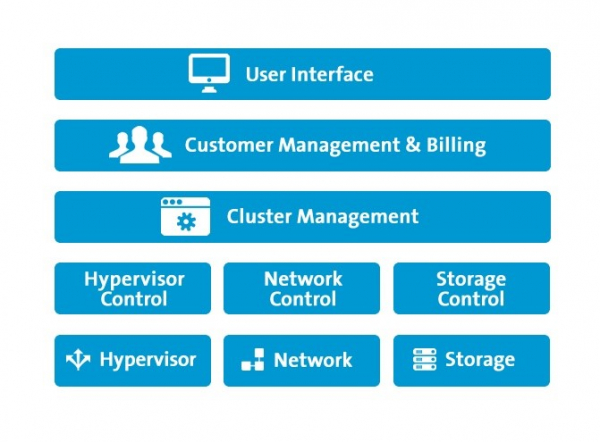
We plan to include a detailed discussion of the architecture of each component in a series of articles, if, of course, the topic creates interest.
The main advantage of FCO stems from its "box-like" nature. You have the benefit of simplicity and minimalism. A single virtual machine running Ubuntu is allocated for the management node, where all necessary packages are installed. All settings are moved to configuration files in the form of variable-value pairs:
# cat /etc/extility/config/vars
…
export LIMIT_MAX_LIST_ADMIN_DEFAULT="30000"
export LIMIT_MAX_LIST_USER_DEFAULT="200"
export LOGDIR="/var/log/extility"
export LOG_FILE="misc.log"
export LOG_FILE_LOG4JHOSTBILLMODULE="hostbillmodule.log"
export LOG_FILE_LOG4JJADE="jade.log"
export LOG_FILE_LOG4JTL="tigerlily.log"
export LOG_FILE_LOG4JXVP="xvpmanager.log"
export LOG_FILE_VARS="misc.log"
…
All configuration is initially modified in templates, and then the generator is launched.
#build-config который сформирует файл vars и даст команду сервисам перечитать конфиг. Пользовательский интерфейс приятный и может быть легко забрендирован.
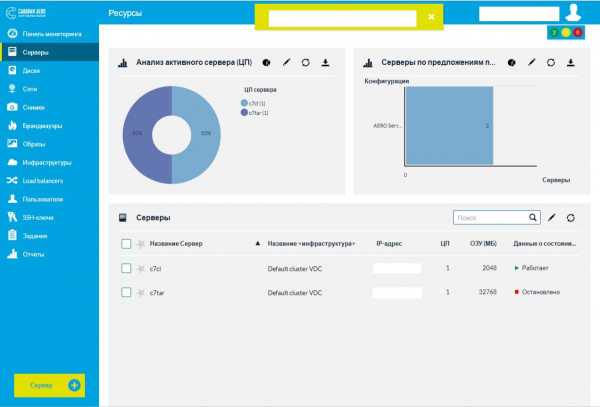
As you can see, the interface consists of widgets, which the user can manage easily. They can effortlessly add/remove widgets from the page, thereby creating their desired dashboard.
Despite its closed nature, FCO is a highly customizable system. It offers a vast number of settings and entry points for modifying the workflow:
- Custom plugins are supported; for example, you can write your own billing method or an external resource for user provision.
- Custom triggers for specific events are supported, such as adding the first virtual machine for a client upon their creation.
- Custom widgets in the interface are supported, such as embedding YouTube videos directly into the user interface.
All customization is written in FDL, a language based on Lua. If you know Lua, you will have no issues with FDL.
Here’s an example of one of the simplest triggers we use. This trigger prevents users from sharing their own images with other clients. We do this to ensure that one user cannot create a harmful image for others.
function register()
    return {"pre_user_api_publish"}
end

function pre_user_api_publish(p)
    if(p==nil) then
        return{
            ref = "cancelPublishImage",
            name = "Cancel publishing",
            description = "Cancel all user’s images publishing",
            triggerType = "PRE_USER_API_CALL",
            triggerOptions = {"publishResource", "publishImage"},
            api = "TRIGGER",
            version = 1,
        }
    end

    -- Turn publishing off
    return {exitState = "CANCEL"}

end
The register function will be called by the FCO core. It will return the name of the function that needs to be invoked. The parameter “p” of this function holds the context of the call, which will be empty (nil) on the first invocation. This allows us to register our trigger. In triggerType, we indicate that the trigger is called BEFORE the publishing operation and applies only to users. Naturally, we allow system administrators to publish everything. In triggerOptions, we detail the operations for which the trigger will activate.
And most importantly – return {exitState = “CANCEL”}, which is exactly what the trigger was designed for. It will return failure when a user tries to share their image in the control panel.
In FCO architecture, any object (disk, server, image, network, network adapter, etc.) is represented as a Resource entity, which has common parameters:
- Resource UUID
- Resource name
- Resource type
- Resource owner UUID
- Resource status (active, inactive)
- Resource metadata
- Resource keys
- Product UUID to which the resource belongs
- Resource VDC
This is very convenient when working with the API, as all resources are handled uniformly. Products are set up by the provider, and customers order them. Since our billing is handled separately, the customer can freely order any product from the panel without charge. Billing will be processed later. A product can be an IP address per hour, an additional GB of disk per hour, or simply a server.
Keys can be used to label specific resources to change how they are managed. For example, we can tag three physical nodes with the Weight key and label some clients with the same key, thereby allocating these nodes specifically to those clients. This mechanism is used for VIP clients who prefer not to have neighbors near their VMs. The functionality can be applied much more broadly.
The licensing model involves payment for each CPU core of the physical node. The cost is also influenced by the number of cluster types. If KVM and VMware are planned to be used together, the license cost will increase.
FCO is a full-fledged product with very rich functionality, so we plan to prepare several articles detailing the operation of the network component.
After working with this orchestrator for several years, we can note it as quite solid. Unfortunately, the product is not without flaws:
- we had to optimize the database, as queries began to lag when the amount of data in them increased;
- after one failure due to a bug, the recovery mechanism failed, and we had to restore the machines of unfortunate clients with our own set of scripts;
- the node unavailability detection mechanism is embedded in the code and is not customizable. That is, we cannot create our own policies for determining node unavailability.
- Logging is not always detailed. Sometimes, when you need to delve very deeply to troubleshoot a specific issue, the source code of some components lacks for understanding the reasons.
TOTAL: Overall, the impressions of the product are positive. We are in constant contact with the orchestrator developers. The team is open to constructive collaboration.
Despite its simplicity, FCO offers extensive functionality. In future articles, we plan to delve into the following topics:
- network organization in FCO
- ensuring live-recovery and FQP protocol
- writing custom plugins and widgets
- connecting additional services, such as Load Balancer and Acronis
- backup
- a unified mechanism for configuring and setting up nodes
- processing virtual machine metadata
P.S. Feel free to comment if you're interested in other aspects. Stay tuned!
Source: habr.com
