


Hello! I want to explain in simple terms about the mechanics of steal occurring within virtual machines and some non-obvious artifacts that we managed to uncover during our research, which I had to dive into as the tech director of the cloud platform. . The platform operates on KVM.
CPU steal time is the time during which a virtual machine is not receiving CPU resources for its execution. This time is only accounted for in guest operating systems within virtualization environments. The reasons behind where those allocated resources go, much like in life, are quite obscure. However, we decided to investigate, and even set up a series of experiments. It's not that we now know everything about steal, but we will share some interesting findings.
1. What is steal
So, steal is a metric indicating a lack of CPU time for processes within a virtual machine. As described steal is the time during which the hypervisor is executing other processes on the host OS, even though it has queued the virtual machine's process for execution. In other words, steal is calculated as the difference between the time when a process is ready to execute and the time when it is allocated CPU time.
The steal metric is obtained by the virtual machine's kernel from the hypervisor. The hypervisor does not specify which other processes it is executing—just "while busy, I can't give you time." Support for counting steal time on KVM has been added in There are two key points here:
- The virtual machine learns about steal from the hypervisor. That is, from the perspective of losses, for processes within the virtual machine, this is an indirect measurement that may be subject to various distortions.
- The hypervisor does not share with the virtual machine information about what else it is busy with—what matters is that it is not dedicating time to it. Because of this, the virtual machine itself cannot identify distortions in the steal metric that could be assessed based on the nature of competing processes.
2. What affects steal
2.1. Calculating steal
Essentially, steal is calculated in a manner similar to ordinary CPU utilization time. There isn't much information on how utilization is calculated. Perhaps because most people consider this question to be obvious. However, there can be pitfalls. To learn about this process, you can read : you will learn about a lot of nuances in calculating utilization and situations when this calculation will be erroneous for the following reasons:
- CPU overheating, during which cycles are missed.
- Enabling/disabling turbo boost, resulting in changes to the processor's clock frequency.
- Changes in the duration of the time quantum that occur when using CPU power-saving technologies, such as SpeedStep.
- The average calculation problem: estimating utilization at 80% over a minute can obscure a short burst at 100%.
- A spin lock leads to the CPU being utilized, but the user process does not see any progress in its execution. As a result, the estimated CPU utilization by the process will be 100%, even though the CPU time will not actually be consumed by the process.
I did not find articles describing a similar calculation for steal (if you know any — please share in the comments). But, judging by the source code, the calculation mechanism is the same as for utilization. It simply adds another counter in the kernel, specifically for the KVM process (the virtual machine process), which counts the duration of the KVM process waiting for CPU time. The counter takes information about the CPU from its specification and checks whether all its ticks have been utilized by the virtual machine process. If they have, we assume that the CPU was only engaged with the virtual machine process. Otherwise, we inform that the CPU was busy with something else, and steal occurred.
The calculation process for steal is subject to the same problems as the standard utilization calculation. It's not to say that such problems occur frequently, but they can be quite discouraging.
2.2. Types of virtualization on KVM
Generally, there are three types of virtualization, and all are supported by KVM. The type of virtualization can affect the mechanism of steal occurrence.
Broadcast. In this case, the guest operating system's work with the hypervisor's physical devices occurs approximately as follows:
- The guest operating system sends a command to its guest device.
- The guest device driver receives the command, formulates a request for the device's BIOS, and sends it to the hypervisor.
- The hypervisor processes the command translation into a command for the physical device, making it, among other things, more secure.
- The physical device driver accepts the modified command and sends it to the physical device itself.
- The results of command execution return along the same path.
The advantage of translation is that it allows the emulation of any device and does not require special preparation of the operating system kernel. However, this comes at the cost of performance.
Hardware virtualization. In this case, the device at the hardware level understands commands from the operating system. This is the fastest and best method. Unfortunately, it is not supported by all physical devices, hypervisors, and guest operating systems. Currently, the primary devices that support hardware virtualization are processors.
Paravirtualization. This is the most common variant of device virtualization on KVM and the most widely used virtualization mode for guest operating systems. Its feature is that interaction with certain hypervisor subsystems (for example, the network or disk stack) or memory page allocation occurs using the hypervisor's API, without translating low-level commands. The drawback of this virtualization method is the necessity of modifying the guest operating system kernel so that it can interact with the hypervisor using this API. This is usually addressed by installing special drivers on the guest operating system. In KVM, this API is called .
Compared to translation, paravirtualization significantly reduces the path to the physical device by sending commands directly from the virtual machine to the hypervisor process on the host. This allows acceleration of all instructions within the virtual machine. In KVM, this is handled by the virtio API, which works only for certain devices, such as network or disk adapters. That is why virtio drivers are installed inside virtual machines.
The downside of such acceleration is that not all processes running inside the virtual machine stay within it. This creates some side effects that can lead to occurrences on the steal. A detailed study of this issue is recommended to start with .
2.3. "Fair" scheduling
A VM on a hypervisor is essentially just another process, which is subject to the scheduling laws (resource distribution among processes) in the Linux kernel. Hence, we will examine it in more detail.
Linux employs what is known as the CFS, Completely Fair Scheduler, which became the default scheduler starting from kernel 2.6.23. To understand this algorithm, you can read the Linux Kernel Architecture or the source code. The essence of CFS lies in distributing CPU time among processes based on the duration of their execution. The more CPU time a process requires, the less of it it receives. This ensures a "fair" execution of all processes—so that one process does not monopolize all the CPUs constantly, allowing other processes to execute as well.
Sometimes such a paradigm leads to interesting artifacts. Long-time Linux users surely recall the freeze of a regular text editor on the desktop while resource-intensive applications like a compiler were being launched. This happened because non-resource-intensive tasks of desktop applications were competing with tasks that actively consumed resources, such as the compiler. CFS deems this unfair, hence it periodically suspends the text editor to allow the CPU to handle the compiler tasks. This was addressed with the mechanism , but many other peculiarities of CPU time distribution among tasks remained. In fact, this narrative is not about how poorly CFS operates, but an attempt to highlight that "fair" distribution of CPU time is not a trivial task.
Another important point in the scheduler is preemption. This is necessary to evict a resource-hogging process from the CPU and allow others to run. The process of eviction is called context switching, where the CPU's context is switched. During this, the entire context of the task is preserved: the stack state, registers, and so on, after which the process is sent to wait, and another process takes its place. This is an expensive operation for the OS and is used rarely, but in essence, there is nothing wrong with it. Frequent context switching may indicate a problem in the OS, but usually, it occurs continuously and does not particularly signify anything.
Such a lengthy explanation is needed to illustrate one fact: the more CPU resources a process tries to consume in the fair scheduler of Linux, the faster it will be halted so that other processes can also have a chance to run. Whether this is right or wrong is a complex question that is resolved differently under various loads. Until recently, the scheduler in Windows was oriented towards prioritizing desktop applications, which could cause background processes to hang. In Sun Solaris, there were five different classes of schedulers. With the introduction of virtualization, a sixth was added, , because the previous five were not adequately compatible with Solaris Zones virtualization. I recommend starting a detailed study of this topic with books like or .
2.4. How to monitor steal?
Monitoring steal inside a virtual machine, like any other CPU metric, is straightforward: you can use any tool to collect CPU metrics. The main requirement is that the virtual machine runs on Linux. For some reason, Windows does not provide this information to its users. 🙁
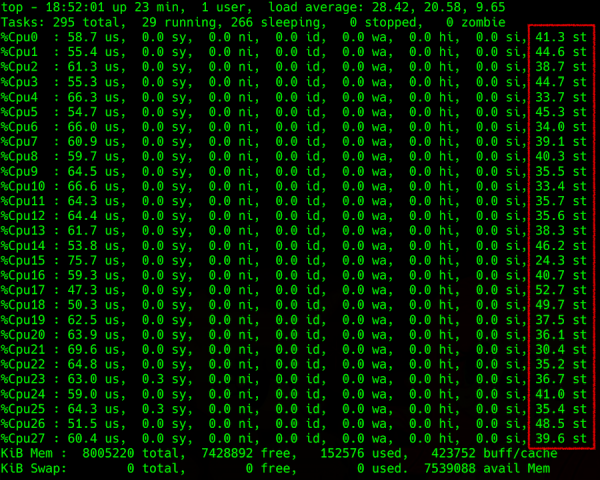
The output of the top command: detailing the load on the CPU, with steal in the far-right column
The difficulty arises when trying to obtain this information from the hypervisor. You can attempt to predict steal on the host machine, for example, by using the Load Average (LA) parameter — the average number of processes waiting in the queue to run. The method for calculating this parameter is not simple, but generally, if the LA normalized by the number of CPU threads is greater than 1, it indicates that the Linux server is overloaded.
What are all these processes waiting for? The obvious answer is the CPU. But that answer isn't quite right, because sometimes the CPU is free, yet the LA spikes. Remember, . The same can happen with disks and other input/output devices. In reality, processes may be waiting for the end of any kind of blockage, whether physical, related to an input/output device, or logical, such as a mutex. This includes hardware-level blockages (like responses from the disk) or logic-level blockages (the so-called blocking primitives, which include a variety of entities like adaptive and spin mutexes, semaphores, condition variables, rw locks, ipc locks…).
Another feature of LA is that it is considered as an average value across the operating system. For example, if 100 processes compete for one file, then LA=50. Such a high value might suggest that the operating system is struggling. However, for poorly written code, this can be a normal state, affecting only that code while other processes in the operating system remain unaffected.
Due to this averaging (which takes at least a minute), determining anything based on the LA indicator can be a thankless task, yielding quite uncertain results in specific cases. If you try to understand it, you’ll find that the articles on Wikipedia and other available resources describe only the simplest cases without in-depth explanations of the process. I direct everyone interested, again, — follow the links. For those who are lazy to read in English — .
3. Special Effects
Now let's focus on the main cases of steal occurrences that we have encountered. I will explain how they flow from the aforementioned and how they relate to metrics on the hypervisor.
Overutilization. The simplest and most common case: the hypervisor is overutilized. Indeed, there are many running VMs, high CPU consumption within them, significant competition, and LA utilization greater than 1 (normalized by CPU threads). Everything inside the VMs is sluggish. The steal reported from the hypervisor also increases; load redistribution or shutting down some VMs is necessary. In general, it’s all logical and understandable.
Paravirtualization vs. standalone instancesOn the hypervisor, there is a single virtual machine that consumes a small part of its resources but generates a significant input/output load, for example, on disk. And somehow, there is a small steal of up to 10% appearing in it (as shown by several experiments conducted).
It's an interesting case. The steal here arises due to locks at the level of paravirtualized drivers. An interrupt is created inside the virtual machine, processed by the driver, and sent to the hypervisor. Due to interrupt processing on the hypervisor, it appears to the virtual machine as a sent request; it is ready for execution and is waiting for the CPU, but it is not allocated CPU time. The virtual machine thinks that this time is stolen.
This occurs at the moment the buffer is sent; it goes into the kernel space of the hypervisor, and we start waiting for it. However, from the perspective of the virtual machine, it should return immediately. Therefore, according to the steal calculation algorithm, this time is counted as stolen. There can probably be other mechanisms in this situation (for example, handling some additional sys calls), but they should not differ significantly.
Scheduler against high-load virtual machinesWhen one virtual machine suffers from steal more than others, it is due to the scheduler. The more a process loads the CPU, the faster the scheduler will evict it, allowing others to work as well. If the virtual machine consumes little, it will hardly notice the steal: its process is honestly waiting, so it needs to be given more time. If the virtual machine applies maximum load across all its cores, it is evicted from the CPU more frequently and is not provided with much time.
It gets even worse when processes inside the virtual machine try to acquire more CPU time because they cannot handle data processing. Then the operating system on the hypervisor, through honest optimization, will allocate less and less CPU time. This process escalates, and steal can skyrocket, while other virtual machines may hardly notice it. The more cores involved, the worse it is for the affected machine. In short, high-load virtual machines with multiple cores suffer the most.
Low LA, but there is stealIf the LA is approximately 0.7 (meaning the hypervisor seems underloaded), but steal is observed within individual virtual machines:
- The previously described scenario involving paravirtualization. The virtual machine can receive metrics indicating steal, even when everything is fine with the hypervisor. According to our experiments, such a steal does not exceed 10% and should not significantly impact the performance of applications within the virtual machine.
- The LA parameter is incorrectly calculated. More specifically, at any given moment it is calculated correctly, but when averaged over a minute, it appears understated. For example, if one virtual machine on a third of the hypervisor uses all its CPUs for exactly half a minute, the LA for the hypervisor over a minute will be 0.15; four such virtual machines running simultaneously would yield 0.6. However, the fact that for half a minute each of them experienced significant steal at 25% according to the LA metric won't be reflected.
- Again, this is due to the scheduler deciding that someone is consuming too much, and that someone should wait. Meanwhile, I will switch contexts, handle interrupts, and attend to other important system tasks. As a result, some virtual machines do not see any issues, while others experience severe performance degradation.
4. Other Distortions
There are also a million reasons for distortions in fair CPU time allocation in a virtual machine. For example, complications in calculations arise from hyper-threading and NUMA. They ultimately confuse the core selection for process execution, as the scheduler uses coefficients - weights, which complicate the counting process even further during context switching.
Distortions can also occur due to technologies like turbo boost or, conversely, power-saving modes, which can artificially raise or lower the frequency or even the time quantum on the server when calculating utilization. Enabling turbo boost reduces the performance of one CPU thread due to the increased performance of another. At this moment, the information about the actual CPU frequency is not transmitted to the virtual machine, and it believes that its time is being stolen (for example, it requested 2 GHz but received half that).
In general, there can be many reasons for distortions. In a specific system, you might uncover something more. It’s best to start with the books linked above and gathering statistics from the hypervisor using utilities like perf, sysdig, systemtap, of which there are dozens. .
5. Conclusions
- Some amount of steal can occur due to paravirtualization, and it can be considered normal. It is noted online that this value can be 5-10%. It depends on the applications inside the virtual machine and the load they place on their physical devices. It is important to pay attention to how applications behave inside virtual machines.
- The correlation between the hypervisor load and steal within the virtual machine is not always straightforward; both assessments of steal can be erroneous in specific situations under different loads.
- The scheduler has a negative attitude towards processes that request a lot. It tries to give less to those who demand more. Large virtual machines are detrimental.
- A small amount of steal can be normal even without paravirtualization (considering the load within the virtual machine, the characteristics of the neighbors' load, thread load distribution, and other factors).
- If you want to determine the steal in a specific system, you have to explore various options, collect metrics, analyze them thoroughly, and think about how to distribute the load evenly. Deviations from any cases are possible, which need to be confirmed experimentally or checked in the kernel debugger.
Source: habr.com
