

In this section, I discuss some of the customization options I needed. This is not a complete list of what Buildroot offers, but they are quite workable and do not require modifications to the Buildroot files.
Using the EXTERNAL Mechanism for Customization
we considered a simple example of adding our configuration by adding a board's defconfig and the necessary files directly to the Buildroot directory.
However, this method is not very convenient, especially when updating Buildroot. To solve this problem, there is a mechanism called external tree. Its essence is that you can store the directories board, configs, packages, and others in a separate directory (for example, I use a directory called patches for applying patches to packages, more details in a separate section), and Buildroot will automatically add them to those already in its directory.
Note: you can apply multiple external trees at once; there is an example in the Buildroot manual.
Let's create a directory my_tree, located next to the Buildroot directory, and move our configuration there. As a result, we should obtain the following file structure:
[alexey@alexey-pc my_tree]$ tree
.
├── board
│   └── my_x86_board
│       ├── bef_cr_fs_img.sh
│       ├── linux.config
│       ├── rootfs_overlay
│       └── users.txt
├── Config.in
├── configs
│   └── my_x86_board_defconfig
├── external.desc
├── external.mk
├── package
└── patches

6 directories, 7 files
As can be seen, the overall structure repeats that of Buildroot.
The directory board contains files specific to each board in our case:
- bef_cr_fs_img.sh — a script that will be executed after building the target filesystem but before packaging it into images. We will use it later.
- linux.config — kernel configuration
- rootfs_overlay — a directory for overlaying on top of the target filesystem
- users.txt — a file describing the created users
The directory configs contains defconfig files for our boards. We have only one.
Package — the directory with our packages. Initially, Buildroot contains descriptions and build rules for a limited number of packages. Later, we will add the window manager icewm and the graphical login manager Slim here.
Patches — allows for convenient storage of your patches for different packages. More details in a separate section later.
Now we need to add the description files for our external-tree. This involves 3 files: external.desc, Config.in, external.mk.
external.desc contains the actual description:
[alexey@alexey-pc my_tree]$ cat external.desc
name: my_tree
desc: My simple external-tree for article
The first line is the name. Subsequently, buildroot will create a variable $(BR2_EXTERNAL_MY_TREE_PATH), which needs to be used when configuring the build. For example, the path to the file with users can be set as follows:
$(BR2_EXTERNAL_my_tree_PATH)/board/my_x86_board/users.txtThe second line is a brief, human-readable description.
Config.in, external.mk — files for describing the added packages. If you are not adding your own packages, these files can be left empty. For now, we will proceed this way.
Now we have our external-tree ready, containing the defconfig of our board and the necessary files. Let's go to the buildroot directory and specify to use the external-tree:
[alexey@alexey-pc buildroot]$ make BR2_EXTERNAL=../my_tree/ my_x86_board_defconfig
#
# configuration written to /home/alexey/dev/article/ramdisk/buildroot/.config
#
[alexey@alexey-pc buildroot]$ make menuconfig
In the first command, we use the argument BR2_EXTERNAL=../my_tree/, indicating the use of the external tree. You can specify multiple external-trees at once. This only needs to be done once, after which a file output/.br-external.mk is created, containing information about the used external-tree:
[alexey@alexey-pc buildroot]$ cat output/.br-external.mk
#
# Automatically generated file; DO NOT EDIT.
#

BR2_EXTERNAL ?= /home/alexey/dev/article/ramdisk/my_small_linux/my_tree
BR2_EXTERNAL_NAMES =
BR2_EXTERNAL_DIRS =
BR2_EXTERNAL_MKS =

BR2_EXTERNAL_NAMES += my_tree
BR2_EXTERNAL_DIRS += /home/alexey/dev/article/ramdisk/my_small_linux/my_tree
BR2_EXTERNAL_MKS += /home/alexey/dev/article/ramdisk/my_small_linux/my_tree/external.mk
export BR2_EXTERNAL_my_tree_PATH = /home/alexey/dev/article/ramdisk/my_small_linux/my_tree
export BR2_EXTERNAL_my_tree_DESC = My simple external-tree for article
Important! In this file, the paths will be absolute!
The menu now has an External options item:
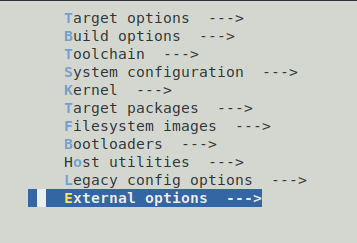
In this submenu, we will find our packages from our external-tree. Currently, this section is empty.
Right now, it is more important for us to rewrite the necessary paths to use the external-tree.
Note that in the Build options → Location to save buildroot config section, there will be an absolute path to the saved defconfig. It is formed at the moment when specifying the use of the external_tree.
Also, in the System configuration section, we will correct the paths. For the table with created users:
$(BR2_EXTERNAL_my_tree_PATH)/board/my_x86_board/users.txtIn the Kernel section, we will change the path to the kernel configuration:
$(BR2_EXTERNAL_my_tree_PATH)/board/my_x86_board/linux.configNow when building, our files from our external-tree will be used. When moving to another directory or updating the buildroot, we will encounter minimal issues.
Adding root fs overlay:
This mechanism allows for easy addition/replacement of files in the target filesystem.
If a file exists in the root fs overlay but not in the target, it will be added.
If a file exists in both the root fs overlay and the target, it will be replaced.
First, let's set the path to the root fs overlay directory. This is done in the section System configuration → Root filesystem overlay directories:
$(BR2_EXTERNAL_my_tree_PATH)/board/my_x86_board/rootfs_overlay/Now let's create two files.
[alexey@alexey-pc my_small_linux]$ cat my_tree/board/my_x86_board/rootfs_overlay/etc/hosts
127.0.0.1   localhost
127.0.1.1   my_small_linux
8.8.8.8     google-public-dns-a.google.com.
[alexey@alexey-pc my_small_linux]$ cat my_tree/board/my_x86_board/rootfs_overlay/new_file.txt
This is a new file from overlay
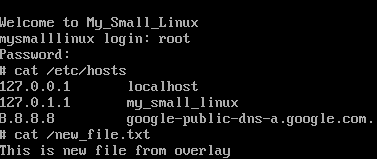
The first file (my_tree/board/my_x86_board/rootfs_overlay/etc/hosts) will replace the file /etc/hosts in the finished system. The second file (cat my_tree/board/my_x86_board/rootfs_overlay/new_file.txt) will be added.
Let's build and check:
Executing customization scripts at different stages of system building
Often, some actions need to be performed inside the target filesystem before it is packaged into images.
This can be done in the section System configuration:

The first two scripts are executed after building the target filesystem, but before packaging it into images. The difference is that the fakeroot script runs in the context of fakeroot, simulating the operation as the root user.
The last script is executed after the system images have been created. You can perform additional actions here, such as copying necessary files to an NFS server or creating an image of your device firmware.
As an example, I will create a script that writes the version and build date to /etc/.
First, I'll specify the path to this file in my external-tree:

And now for the script itself:
[alexey@alexey-pc buildroot]$ cat ../my_tree/board/my_x86_board/bef_cr_fs_img.sh
#!/bin/sh
echo "my small linux 1.0 pre alpha" > output/target/etc/mysmalllinux-release
date >> output/target/etc/mysmalllinux-release
After building, this file can be seen in the system.
In practice, the script can become large. Therefore, in a real project, I took a more advanced approach:
- I created a directory (my_tree/board_my_x86_board/inside_fakeroot_scripts) containing scripts to execute, numbered sequentially. For example, 0001-add-my_small_linux-version.sh, 0002-clear-apache-root-dir.sh.
- I wrote a script (my_tree/board_my_x86_board/run_inside_fakeroot.sh) that traverses this directory and sequentially executes the scripts located within it.
- I specified this script in the board settings under System configuration -> Custom scripts to run inside the fakeroot environment ($(BR2_EXTERNAL_my_tree_PATH)/board/my_x86_board/run_inside_fakeroot.sh).
Source: habr.com
