

One of the pleasant features of the 1C:Enterprise technology is that an application solution developed using managed forms technology can run as both a thin (executable) client on Windows, Linux, MacOS X, and as a web client in 5 browsers – Chrome, Internet Explorer, Firefox, Safari, Edge – all without changing the application's source code. Moreover, externally, the application in the thin client and in the browser functions and looks practically identical.
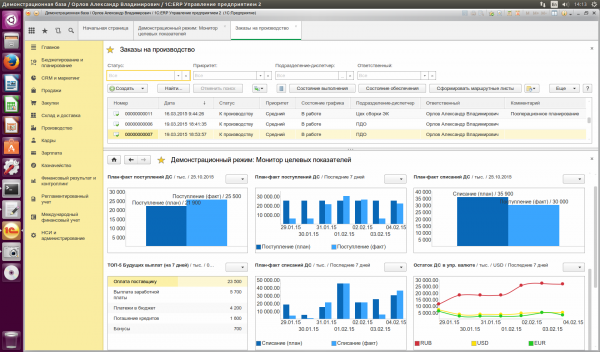
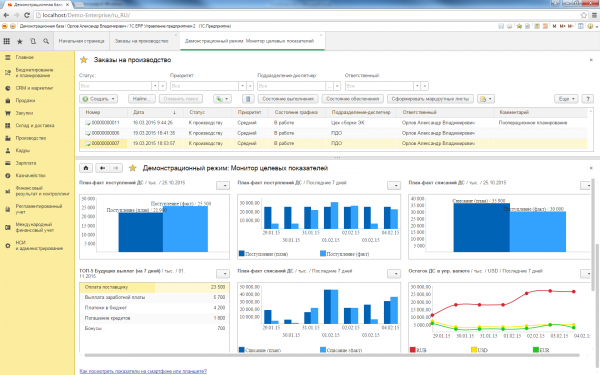
Find 10 differences (2 images below):
Thin client window on Linux:
The same window in the web client (in Chrome browser):
Why did we create the web client? To put it somewhat grandiosely, this task was set for us by time. For quite some time, working via the Internet has become a necessary condition for business applications. Initially, we added the possibility for our thin client to function over the Internet (some of our competitors, by the way, stopped there; others, on the contrary, abandoned the thin client and limited themselves to implementing a web client). We decided to give our users the choice of the client option that suits them best.
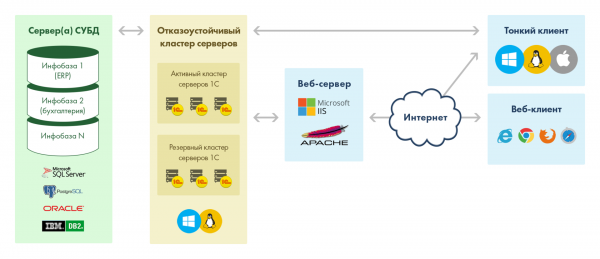
Adding internet functionality to the thin client was a large project involving a complete overhaul of the client-server interaction architecture. The creation of the web client, in contrast, was a brand new project starting from scratch.
Task Definition
So, the project requirements: the web client must perform the same functions as the thin client, namely:
- Display the user interface
- Execute client code written in the 1C language
The user interface in 1C is described in a visual editor, declaratively, without pixel-by-pixel placement of elements; around thirty types of interface elements are used — buttons, input fields (text, numeric, date/time), lists, tables, charts, etc.
Client code in the 1C language may include server calls, work with local resources (files, etc.), printing, and much more.
Both the thin client (when working via the web) and the web client utilize the same set of web services to communicate with the 1C application server. The implementations at the clients, of course, differ – the thin client is written in C++, while the web client is written in JavaScript.
A Bit of History
The project to create a web client started in 2006, involving an average team of 5 people. At various stages of the project, developers were engaged to implement specific functionalities (such as spreadsheets, diagrams, etc.); typically, these were the same developers who had created these functionalities for the thin client. This means that developers rewrote on JavaScript components that they had previously created in C++.
From the very beginning, we rejected the idea of any kind of automatic (even partial) conversion of the C++ code from the thin client to the JavaScript web client due to the significant conceptual differences between these two languages; the web client was written in JavaScript from scratch.
In the early iterations of the project, the web client converted client code written in the 1C embedded language directly into JavaScript. The thin client operates differently — code written in the 1C embedded language is compiled into bytecode, which is then interpreted on the client side. Subsequently, the web client began to do the same — first, this resulted in a performance gain, and second, it allowed unifying the architecture of the thin and web clients.
The first version of the 1C:Enterprise platform with web client support was released in 2009. At that time, the web client supported 2 browsers – Internet Explorer and Firefox. Initial plans included support for Opera, but due to insurmountable problems at that time with the application closure handlers in Opera (it was impossible to track with 100% certainty that the application was closing and to perform the procedure of disconnecting from the 1C application server at that moment), those plans had to be abandoned.
Project Structure
In total, the 1C:Enterprise platform includes 4 projects written in JavaScript:
- WebTools – general libraries used by other projects (this also includes ).
- Control element (implemented in both JavaScript and in the thin client, as well as in the web client)
- Control element (implemented in both JavaScript and in the thin client, as well as in the web client)
- Web client
The structure of each project resembles the structure of Java projects (or .NET projects – whichever is closer); we have namespaces, and each namespace resides in a separate folder. Inside the folder are the files and classes of the namespace. The web client project contains about 1000 files.
Structurally, the web client is broadly divided into the following subsystems:
- Managed interface of the client application
- Overall application interface (system menus, panels)
- Managed forms interface, including around 30 controls (buttons, various input fields – text, numeric, date/time, etc., tables, lists, graphs, etc.)
- Object model available to developers on the client (over 400 types available: managed interface object model, data layout settings, conditional formatting, etc.)
- Interpreter for the built-in 1C language
- Browser extensions (used for functionality not supported in JavaScript)
- Working with cryptography
- File handling
- External components technology, allowing their use in both thin and web clients
Development features
Implementing all the above in JavaScript is no easy task. The 1C web client may be one of the largest client-side applications written in JavaScript, with around 450,000 lines of code. We actively use object-oriented programming in the web client code, simplifying work with such a large project.
To minimize the size of the client code, we initially used our own obfuscator, and starting from version 8.3.6 of the platform (October 2014), we began using . The effect of using it in numbers – the size of the web client framework after obfuscation:
- Our own obfuscator – 1556 kB
- Google Closure Compiler – 1073 kB
Using Google Closure Compiler helped us improve the web client's performance by 30% compared to our own obfuscator. Additionally, the memory consumption of the application decreased by 15-25% (depending on the browser).
Google Closure Compiler works very well with object-oriented code, making its efficiency for the web client particularly high. Closure Compiler does several helpful things for us:
- Static type checking at project build time (ensured by covering the code with JSDoc annotations). As a result, we get static typing very close to C++ level. This helps catch a significant percentage of errors at the compilation stage.
- Reducing code size through obfuscation
- A number of optimizations for the executed code, such as:
- Inline function substitutions. Calling a function in JavaScript is a relatively expensive operation, and inline substitutions of frequently used small methods significantly speed up code execution.
- Constant evaluation at compile time. If an expression depends on a constant, the actual value of the constant will be substituted into it.
As a development environment for our web client, we use WebStorm.
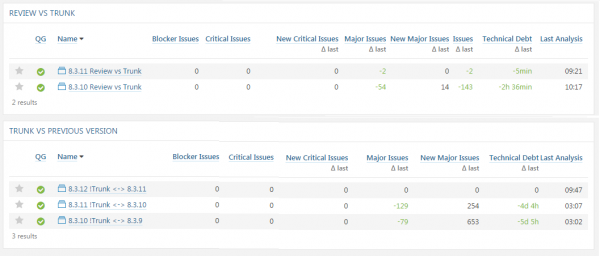
For code analysis, we use , where we integrate static code analyzers. With the help of these analyzers, we monitor the degradation of JavaScript source code quality and strive to prevent it.
What tasks we solved/are solving
During the project implementation, we encountered a number of interesting challenges that we had to address.
Data exchange with the server and between windows
There are situations where obfuscation of the source code can interfere with system operation. Code that is external to the executable code of the web client, due to obfuscation, may have function names and parameters that differ from those expected by our executable code. The external code for us is:
- Code coming from the server in the form of data structures
- Code from another application window
To avoid obfuscation when interacting with the server, we use the @expose tag:
/**
 * @constructor
 * @extends {Base.SrvObject}
 */
Srv.Core.GenericException = function ()
{
    /**
     * @type {string}
     * @expose
     */
    this.descr;

    /**
     * @type {Srv.Core.GenericException}
     * @expose
     */
    this.inner;

    /**
     * @type {string}
     * @expose
     */
    this.clsid;

    /**
     * @type {boolean}
     * @expose
     */
    this.encoded;
}
To avoid obfuscation when interacting with other windows, we use so-called exportable interfaces (interfaces where all methods are exportable).
/**
 * Экспортируемый интерфейс контрола DropDownWindow
 *
 * @interface
 * @struct
 */
WebUI.IDropDownWindowExp = function(){}

/**
 * Перемещает выделение на 1 вперед или назад
 *
 * @param {boolean} isForward
 * @param {boolean} checkOnly
 * @return {boolean}
 * @expose
 */
WebUI.IDropDownWindowExp.prototype.moveMarker = function (isForward, checkOnly){}

/**
 * Перемещает выделение в начало или конец
 *
 * @param {boolean} isFirst
 * @param {boolean} checkOnly
 * @return {boolean}
 * @expose
 */
WebUI.IDropDownWindowExp.prototype.moveMarkerTo = function (isFirst, checkOnly){}

/**
 * @return {boolean}
 * @expose
 */
WebUI.IDropDownWindowExp.prototype.selectValue = function (){}
We used Virtual DOM before it became mainstream)
Like all developers dealing with complex Web UI, we quickly realized that the DOM was poorly suited for working with dynamic user interfaces. Almost immediately, an analogue of the Virtual DOM was implemented to optimize UI work. During event handling, all DOM changes are stored in memory, and only after all operations are completed are the accumulated changes applied to the DOM tree.
Optimizing web client performance
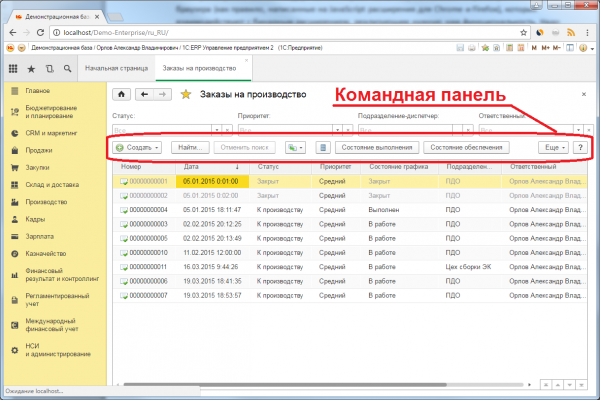
To make our web client faster, we try to maximize the use of the browser's built-in capabilities (CSS, etc.). Thus, the command panel of the form (located on almost every application form) is rendered exclusively using browser tools, with dynamic layout based on CSS.
Testing
For functional testing and performance testing, we use a proprietary tool (written in Java and C++), as well as a set of tests based on it. .
Our tool is versatile — it allows testing of practically any desktop applications, making it suitable for both thin client and web client testing. The tool records the actions of users interacting with the '1C' application, creating a script file. At the same time, it captures images of the working area of the screen — the baselines. When monitoring new versions of the web client, the scripts are executed without user intervention. If the screenshot does not match the baseline at any step, the test is considered failed, after which a quality specialist investigates whether it is an error or a planned change in system behavior. In the case of planned behavior, the baselines are automatically replaced with new ones.
The tool also measures application performance with an accuracy of up to 25 milliseconds. In certain cases, we loop parts of the script (for example, repeating order input several times) to analyze performance degradation over time. The results of all measurements are logged for analysis.
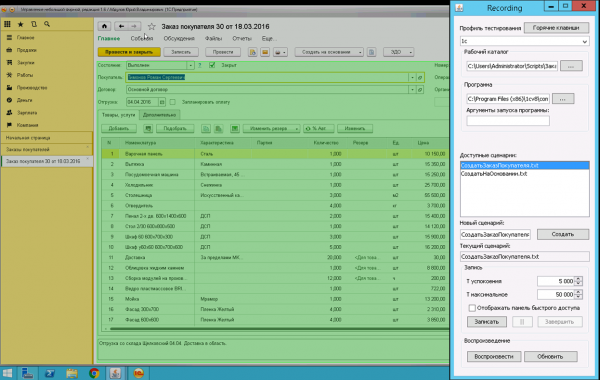
Our testing tool and the application being tested
Our tool and Selenium complement each other; for example, if a button on one of the screens changes its location, Selenium might not track it, but our tool will notice it, as it performs pixel-by-pixel comparison of screenshots with the baseline. The tool can also identify issues with keyboard or mouse input processing, as this is what it reproduces.
Tests on both tools (ours and Selenium) run standard work scenarios from our application solutions. Tests are automatically launched after the daily build of the '1C:Enterprise' platform. If the execution of scripts slows down (compared to the previous build), we conduct an investigation and eliminate the cause of the slowdown. Our criterion is simple — the new build must perform no slower than the previous one.
To investigate incident slowdowns, developers use various tools; primarily using produced by . Execution logs of the problematic operation are recorded for both the previous and the new build, then the logs are analyzed. In this case, the execution time of individual operations (in milliseconds) may not be a decisive factor — the browser periodically runs background processes like garbage collection, which can overlap with the execution time of functions and distort the picture. More relevant parameters in this case will be the number of executed JavaScript instructions, the number of atomic operations on the DOM, etc. If the number of instructions/operations in the same scenario increases in the new version, it almost always indicates a performance drop that needs to be addressed.
Also, one of the reasons for performance degradation may be that the Google Closure Compiler was unable to perform inline function substitution for some reason (for example, because the function is recursive or virtual). In this case, we strive to rectify the situation by rewriting the source code.
Browser Extensions
When the application solution requires functionality not available in JavaScript, we use browser extensions:
- for file handling
- for cryptography
- working with
Our extensions consist of two parts. The first part is what is called a browser extension (usually JavaScript extensions for Chrome and Firefox) that interacts with the second part — a binary extension that implements the required functionality. It should be noted that we write 3 versions of binary extensions for Windows, Linux, and MacOS. The binary extension is packaged with the 1C:Enterprise platform and resides on the 1C application server. Upon the first request from the web client, it is downloaded to the client computer and installed in the browser.
When operating in Safari, our extensions use NPAPI, while in Internet Explorer, they utilize ActiveX technology. currently does not support extensions, so the web client operates with limitations.
Further development
One of the task groups for the web client development team is to further enhance functionality. The functionality of the web client should match that of the thin client, and all new features are implemented simultaneously in both the thin and web clients.
Other tasks include architectural development, refactoring, and improving performance and reliability. For instance, one direction is to move further towards an asynchronous work model. Currently, part of the web client's functionality is built on a synchronous interaction model with the server. The asynchronous model is becoming more relevant in browsers (and beyond), prompting us to modify the web client by replacing synchronous calls with asynchronous ones (along with necessary code refactoring). The gradual transition to the asynchronous model is due to the need to support released solutions and their gradual adaptation.
Source: habr.com

 Russian
 Italian
 German
 Polish
 Estonian
 Albanian
 Bulgarian
 Croatian
 Czech
Czech Danish
 Dutch
Dutch English
 French
 Hungarian
 Latvian
 Norwegian
 Portuguese
 Romanian
 Slovak
 Slovenian
 Spanish
 Swedish