

About Us
At 1C, we develop not only the platform to and , but also applications in Java – specifically a new development environment based on Eclipse, and the server is deeply integrated with the messenger platform – .
Introduction
As the build system for Java applications, we most often use Maven, and in this brief article, we would like to discuss one of the problems we encountered during the organization of development and the approach that allowed us to overcome this issue.
Prerequisites and Workflow
Due to the specifics of development in our Maven projects, we use quite a few modules, dependencies, and sub-projects. The number of POM files in a single tree can reach dozens and even hundreds.
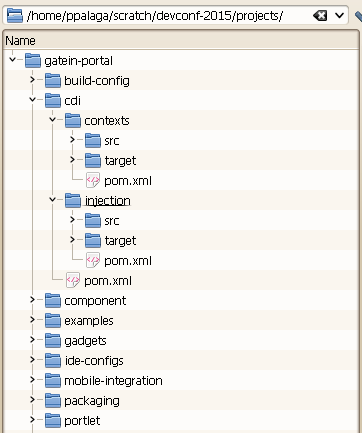
It would seem: nothing terrible, we created them once and forgot. If we need to change or add something in all files at once, there are plenty of convenient tools in editors and IDEs. What is the most common regular change in pom.xml? We believe it's changing the versions of projects and dependencies. Some may want to argue with this, but that’s how it is for us. The reason lies in the fact that alongside the core, we are simultaneously developing many of our own libraries, and for consistent reproducibility of build and test results, the use of snapshots does not seem like a convenient approach. For this reason, we have to raise the version number in the projects with each build.
Additionally, developers occasionally need to build their branch of a library and verify its functionality across all dependencies, which requires manually changing the version in all of them.
Initial Solution
With such frequent and numerous version changes, we want to simplify and automate the process within CI. Here, a convenient well-known plugin comes to the rescue versions-maven-plugin – we connect it and run
mvn -N versions:set -DnewVersion=2.0.1
and Maven will do everything right: it will traverse the hierarchy from top to bottom, substituting all versions — beautiful! Now we just need to create a pull request, colleagues will review the changes, and we can quickly merge into trunk. Quickly? Not just like that. A couple of hundred pom.xml for review, and that doesn't take into account the code. Moreover, no one is immune to merge conflicts when dealing with such a large number of modified files. It should be noted that during the CI process, version changes occur automatically along with functional updates, rather than separately.
New features
For a while, we settled down and, having accepted it, lived on until the guys from included support for so-called 'version placeholders' in Maven starting from version 3.5.0-beta-1. The essence of these placeholders is that pom.xml instead of specifically indicating the project version, variables are used ${revision}, ${sha1} and ${changelist}. The values of these properties are set either in the <properties> element, or they can be defined through the system property
mvn -Drevision=2.0.0 clean package
The values of system properties take precedence over values defined in <properties>.
Parent
<project>
<modelVersion>4.0.0<\/modelVersion>
<parent>
<groupId>org.apache<\/groupId>
<artifactId>apache<\/artifactId>
<version>18<\/version>
<\/parent>
<groupId>org.apache.maven.ci<\/groupId>
<artifactId>ci-parent<\/artifactId>
<name>First CI Friendly<\/name>
<version>${revision}${sha1}${changelist}<\/version>
…
<properties>
<revision>1.3.1<\/revision>
<changelist>-SNAPSHOT<\/changelist>
<sha1\/>
<\/properties>
<\/project>
Child
<project>
<modelVersion>4.0.0<\/modelVersion>
<parent>
<groupId>org.apache.maven.ci<\/groupId>
<artifactId>ci-parent<\/artifactId>
<version>${revision}${sha1}${changelist}<\/version>
<\/parent>
<groupId>org.apache.maven.ci<\/groupId>
<artifactId>ci-child<\/artifactId>
…
<\/project>
If you want to build version 2.0.0-SNAPSHOT, just use
mvn -Drevision=2.0.0 clean package
If you want to make a release, simply reset the SNAPSHOT
mvn -Dchangelist= clean package
*The examples above are taken from the Maven Apache Project website
The Harsh Reality
Everything is fine and great, it's time to feel satisfaction, but no. It turns out that this method won't work for install and deploy, since the descriptions of the artifacts published in the repository won't be replaced ${revision} with its value and Maven won't understand what it's all about.
<parent>
<groupId>org.apache<\/groupId>
<artifactId>apache<\/artifactId>
<version>${revision}<\/version>
<\/parent>
Light at the End of the Tunnel
We need to find a solution to the problem. The situation could be saved by This plugin allows all variables in the pom, but it also removes a lot of other information that is only needed during the build and is not necessary when importing published artifacts into other projects. The plugin also 'flattens' all parent-child dependencies, resulting in flat pom files that include everything needed. The inconvenience was that it cuts out too much 'extra' information, which was not acceptable to us. After studying the information regarding the development of this plugin, it turned out we are not alone in the universe, as in August 2018, a pull request was created in the GitHub repository of the plugin with a request to allow defining how to 'corrupt' pom.xml on our own. The developers listened to the voices of the needy, and already in December, with the release of the new version 1.1.0, a new mode named resolveCiFriendliesOnly was introduced in the flatten-maven-plugin, which was just right for us – it leaves the pom.xml as it is, except for the element <version> and allows ${revision}, ${sha1} and ${changelist}.
Adding the plugin to the project
<plugins>
<plugin>
org.codehaus.mojo
flatten-maven-plugin
1.1.0
<configuration>
true
<flattenMode>resolveCiFriendliesOnly</flattenMode>
</configuration>
<executions>
<execution>
flatten
process-resources
<goals>
flatten
</goals>
</execution>
<execution>
flatten.clean
clean
<goals>
clean
</goals>
</execution>
</executions>
</plugin>
</plugins>
Done!
Happy ending
From now on, to change the version of the entire project and inform all dependencies about it, we only need to edit the <revision> element in just one root pom.xml. A single file with the identical change arrives for review instead of a hundred or so of these files. This also eliminates the need to use versions-maven-plugin.
Source: habr.com
