

What is ? Это так называемый Service mesh, технология, которая добавляет уровень абстракции над сетью. Мы перехватываем весь или часть трафика в кластере и производим определенный набор операций с ним. Какой именно? Например, делаем умный роутинг, или реализуем подход circuit breaker, можем организовывать «canary deployment», частично переключая трафик на новую версию сервиса, а можем ограничивать внешние взаимодействия и контролировать все походы из кластера во внешнюю сеть. Есть возможность задавать policy правила для контроля походов между разными микросервисами. Наконец, мы можем получить всю карту взаимодействия по сети и сделать унифицированный сбор метрик полностью прозрачно для приложений.
You can read about the mechanism of action in . Istio is indeed a powerful tool that addresses numerous tasks and challenges. In this article, I want to answer the main questions that typically arise when starting to work with Istio. This will help you get familiar with it more quickly.

Operating principle
Istio consists of two main zones — the control plane and the data plane. The control plane includes the essential components that ensure the proper functioning of the others. In the current version (1.0), the control plane has three main components: Pilot, Mixer, and Citadel. We will not discuss Citadel as it is needed for generating certificates to ensure mutual TLS operation between services. Let's take a closer look at the structure and purpose of Pilot and Mixer.
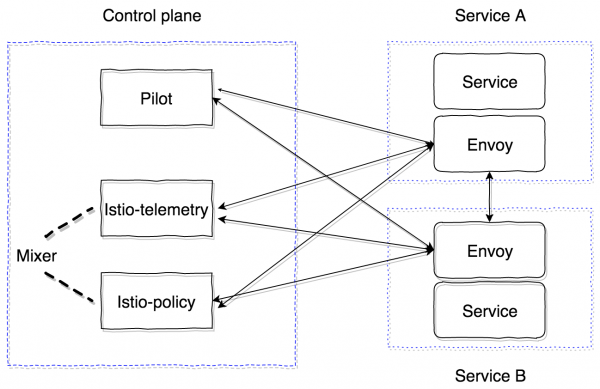
Pilot is the primary management component that distributes all information about what we have in the cluster – services, their endpoints, and routing rules (for example, rules for Canary deployment or circuit breaker rules).
Mixer is an optional control plane component that provides the ability to collect metrics, logs, and any information about network interactions. It also monitors compliance with Policy rules and enforces rate limits.
The data plane is implemented using sidecar proxy containers. By default, it uses a powerful . It can be replaced with another implementation, such as nginx (nginmesh).
To ensure that Istio operates completely transparently for applications, there is an automatic injection system. The latest implementation is suitable for Kubernetes versions 1.9+ (mutational admission webhook). For Kubernetes versions 1.7 and 1.8, it is possible to use Initializer.
Sidecar containers connect to Pilot via the GRPC protocol, which allows for optimizing the push model of changes occurring in the cluster. GRPC has been used in Envoy since version 1.6, and in Istio, it has been used since version 0.8, represented as pilot-agent — a Golang wrapper around Envoy that configures the startup parameters.
Pilot and Mixer are completely stateless components, keeping all state in memory. Their configuration is defined in the form of Kubernetes Custom Resources, which are stored in etcd.
The Istio agent receives the Pilot address and opens a GRPC stream to it.
As I mentioned, Istio implements all functionality completely transparently for applications. Let's understand how. The algorithm is as follows:
- We deploy a new version of the service.
- Depending on the sidecar injection approach, the istio-init container and istio-agent container (envoy) are added during the configuration application stage, or they may already be manually inserted into the Kubernetes Pod entity description.
- The istio-init container is a script that applies iptables rules for the pod. There are two options for configuring traffic wrapping in the istio-agent container: using iptables redirect rules, or . At the time of writing, the default approach uses redirect rules. The istio-init allows for configuring which specific traffic should be intercepted and directed to the istio-agent. For example, to intercept all incoming and outgoing traffic, parameters must be set
-iand-bto*. Specific ports to be intercepted can be indicated. To avoid intercepting a certain subnet, it can be specified using the flag-x. - After the init containers have executed, the main containers are started, including pilot-agent (envoy). It connects to the already deployed Pilot via GRPC and retrieves information about all existing services and routing policies in the cluster. Based on the received data, it configures the clusters and specifies the endpoints for our applications in the Kubernetes cluster. It is also important to note that envoy dynamically configures listeners (pairs of IP, port) that it begins to listen to. Therefore, when requests enter the pod, they are redirected using iptables rules to the sidecar, and envoy can successfully process these connections and understand where to proxy the traffic next. Additionally, at this stage, information is sent to Mixer, which we will discuss later, along with sending tracing spans.
As a result, we have a whole network of envoy proxy servers that we can configure from one point (Pilot). All inbound and outbound requests go through envoy. Moreover, only TCP traffic is intercepted. This means that the Kubernetes service IP is resolved using kube-dns via UDP without any changes. After resolution, the outgoing request is intercepted and processed by envoy, which then decides to which endpoint the request should be sent (or not sent, in case of access policies or circuit breaker algorithm activation).
Having understood Pilot, we now need to understand how Mixer works and why it is necessary. You can read the official documentation on it. .
In its current form, Mixer consists of two components: istio-telemetry and istio-policy (prior to version 0.8, it was a single component called istio-mixer). Each of these components represents a mixer, each responsible for its own task. Istio telemetry receives information via GRPC from sidecar containers about where requests are going and with what parameters. Istio-policy receives Check requests to verify compliance with Policy rules. Policy checks are not conducted for every request; instead, they are cached on the client (in the sidecar) for a certain period. Report checks are sent in batch requests. We will look at how to configure and what specific parameters need to be sent a bit later.
Mixer is intended as a highly available component that ensures seamless operation in collecting and processing telemetry data. The system ultimately acts as a multi-tiered buffer. Initially, data is buffered on the sidecar containers, then on the mixer side, and finally sent to so-called mixer backends. As a result, if any component of the system fails, the buffer grows and, after the system is restored, it gets flushed. Mixer backends serve as the endpoints for sending telemetry data: statsd, newrelic, etc. You can write your own backend, which is quite simple, and we will see how to do this.
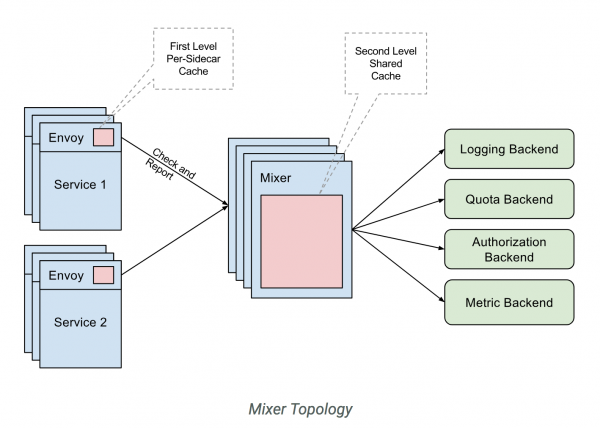
To summarize, the workflow with istio-telemetry is as follows.
- Service 1 sends a request to Service 2.
- Upon leaving Service 1, the request is wrapped in its own sidecar.
- The Sidecar envoy monitors the request as it passes to Service 2 and prepares the necessary information.
- It then sends this information to istio-telemetry via a Report request.
- Istio-telemetry determines whether this Report needs to be sent to backends, which specific ones, and what data to send.
- Istio-telemetry sends Report data to the backend if necessary.
Now let's look at how to deploy a system with Istio consisting only of the core components (Pilot and sidecar envoy).
First, let's examine the main configuration (mesh) that Pilot reads:
apiVersion: v1
kind: ConfigMap
metadata:
  name: istio
  namespace: istio-system
  labels:
    app: istio
    service: istio
data:
  mesh: |-

    # Currently not enabling tracing information sending (pilot will configure envoys in a way that sending will not occur)
    enableTracing: false

    # Currently not specifying mixer endpoints, so the sidecar containers will not send information there
    #mixerCheckServer: istio-policy.istio-system:15004
    #mixerReportServer: istio-telemetry.istio-system:15004

    # Set the time interval for which envoy will re-query Pilot (this is for the old version of envoy proxy)
    rdsRefreshDelay: 5s

    # Default configuration for envoy sidecar
    defaultConfig:
      # Similar to rdsRefreshDelay
      discoveryRefreshDelay: 5s

      # Keeping default (path to envoy configuration and binary)
      configPath: "/etc/istio/proxy"
      binaryPath: "/usr/local/bin/envoy"

      # Default name of the running sidecar container (used, for example, in service names when sending tracing spans)
      serviceCluster: istio-proxy

      # Time that envoy will wait before it forcibly closes all established connections
      drainDuration: 45s
      parentShutdownDuration: 1m0s

      # By default, REDIRECT rules of iptables are used. Can be changed to TPROXY.
      #interceptionMode: REDIRECT

      # Port on which the admin panel of each sidecar container (envoy) will run
      proxyAdminPort: 15000

      # Address to which traces will be sent via the zipkin protocol (we disabled sending at the beginning, so this field will not be used now)
      zipkinAddress: tracing-collector.tracing:9411

      # statsd address for sending envoy container metrics (disabled)
      # statsdUdpAddress: aggregator:8126

      # Disabling support for Mutual TLS option
      controlPlaneAuthPolicy: NONE

      # Address on which istio-pilot will listen to inform sidecar containers about service discovery
      discoveryAddress: istio-pilot.istio-system:15007
All main control plane components will be located in the istio-system namespace in Kubernetes.
At a minimum, we need to deploy only Pilot. For this, we will use
And we will manually configure injecting the sidecar container.
Init container:
initContainers:
 - name: istio-init
   args:
   - -p
   - "15001"
   - -u
   - "1337"
   - -m
   - REDIRECT
   - -i
   - '*'
   - -b
   - '*'
   - -d
   - ""
   image: istio/proxy_init:1.0.0
   imagePullPolicy: IfNotPresent
   resources:
     limits:
       memory: 128Mi
   securityContext:
     capabilities:
       add:
       - NET_ADMIN
And the sidecar:
       name: istio-proxy
       args:
         - "bash"
         - "-c"
         - |
           exec /usr/local/bin/pilot-agent proxy sidecar
           --configPath
           /etc/istio/proxy
           --binaryPath
           /usr/local/bin/envoy
           --serviceCluster
           service-name
           --drainDuration
           45s
           --parentShutdownDuration
           1m0s
           --discoveryAddress
           istio-pilot.istio-system:15007
           --discoveryRefreshDelay
           1s
           --connectTimeout
           10s
           --proxyAdminPort
           "15000"
           --controlPlaneAuthPolicy
           NONE
         env:
         - name: POD_NAME
           valueFrom:
             fieldRef:
               fieldPath: metadata.name
         - name: POD_NAMESPACE
           valueFrom:
             fieldRef:
               fieldPath: metadata.namespace
         - name: INSTANCE_IP
           valueFrom:
             fieldRef:
               fieldPath: status.podIP
         - name: ISTIO_META_POD_NAME
           valueFrom:
             fieldRef:
               fieldPath: metadata.name
         - name: ISTIO_META_INTERCEPTION_MODE
           value: REDIRECT
         image: istio/proxyv2:1.0.0
         imagePullPolicy: IfNotPresent
         resources:
           requests:
             cpu: 100m
             memory: 128Mi
           limits:
             memory: 2048Mi
         securityContext:
           privileged: false
           readOnlyRootFilesystem: true
           runAsUser: 1337
         volumeMounts:
         - mountPath: /etc/istio/proxy
           name: istio-envoy
To ensure everything runs successfully, you need to create a ServiceAccount, ClusterRole, ClusterRoleBinding, and CRD for Pilot, the descriptions of which can be found. .
As a result, the service into which we inject the sidecar with envoy should start successfully, retrieve all discovery from the pilot, and handle requests.
It is important to understand that all control plane components are stateless applications and can be horizontally scaled without issues. All data is stored in etcd as custom Kubernetes resource definitions.
Istio also (currently in experimental mode) has the capability to run outside the cluster and the ability to view and share service discovery between multiple Kubernetes clusters. More details can be found here. .
When installing multi-cluster, consider the following limitations:
- Pod CIDR and Service CIDR must be unique across all clusters and should not overlap.
- All Pod CIDR must be reachable from any Pod CIDR between clusters.
- All Kubernetes API servers must be accessible to each other.
These are the initial pieces of information that will help you get started with Istio. However, there are many more nuances. For example, features of routing external traffic (out of the cluster), approaches to debugging sidecars, profiling, configuring mixer and writing a custom mixer backend, setting up tracing mechanisms and how it works with envoy.
We will cover all of this in upcoming publications. Feel free to ask your questions, and I will do my best to address them.
Source: habr.com
