

I have tried to systematically keep track of tasks probably around 20-25 times. And each attempt has failed, as I now understand, for two reasons.
First, to allocate time for task management, you need to understand why it is being done.
You start managing tasks, spend time on it, accomplish fewer tasks, and it all starts piling up — for what purpose?
It is difficult to manage any work when you don't understand the purpose behind it. "Organizing life" is not the most adequate goal, as an "organized life" is a rather vague notion. However, "reducing anxiety by lowering the level of uncertainty" is a much more concrete and better goal that you can reasonably spend an hour each day on.
Secondly, all the methodologies I have read describe the end state of the process right from the start. "You need to take ToDoIst, break it down by projects, integrate it with a calendar, review tasks weekly, prioritize them..." It's hard to start doing all that at once. Just like in software development, I believe you should use — iteratively.
So I will go through my "iterations", and perhaps this will be useful to you in the same format. After all, what better reason to use the May holidays than to get back to work using a relatively new paradigm?
You can read about how I came to this .
Trello, a pair of lists
We create only 4 lists, using both the desktop and mobile applications.
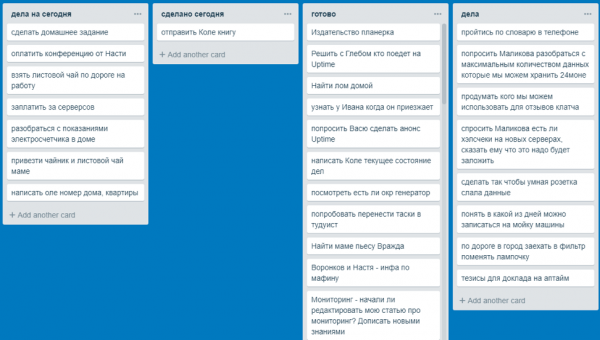
Lists:
- Tasks — write down all the tasks that come to mind here. And write them down immediately as soon as they come to mind. "Take out the trash" — is a task. "Wash the dishes" — is a task. "Schedule a team meeting" — is a task. And so on. Even the most obvious or important things can be forgotten if something unexpected happens or if it was just a tough day.
- Today's tasks — every evening I transfer tasks from the "Tasks" board to the "Today's Tasks" board. If by evening some tasks remain there, that’s okay; more on that below. Over time, you begin to understand how many tasks can be in the list so that you can accomplish most of them on the planned day.
- Done today. This board is the main way to reduce the anxiety of "I did nothing today" and a good avenue for further reflection on self-organization. I jot down tasks I completed today, even if they weren't on the planned list. "Called Vasya about the documents" — noted. "Asked to sign the papers" — noted. "Discussed the contract with Anton" — noted. Thus, by the end of the day, you'll understand where you actually spent your time and what tasks could have been skipped just for the sake of completing a plan.
- Done — a list of all completed tasks. At the beginning or end of the day, I transfer them from "Done today" to "Ready". Essentially, it’s a sort of storage where you can find completed tasks, so it needs regular cleaning.
Trello, "mini-calendar"
At some point, it becomes clear that certain tasks are time-bound, and I want to remember them throughout the week so as not to schedule something else during that time. I've always struggled with calendars, so I added several boards titled "Tasks for Monday", "Tasks for Tuesday", etc., where I started entering time-sensitive tasks.
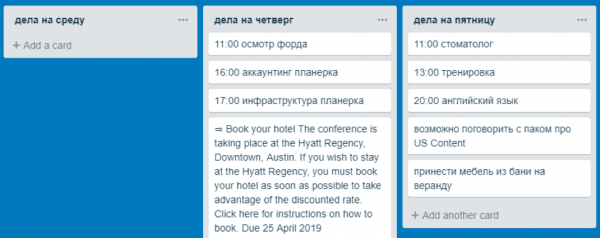
Thus, when someone asks me: "Can we talk on Thursday at 4 PM?" — I simply go to the corresponding board and check what we have scheduled for that time. And don't forget to timely move tasks between lists during the week: for example, shifting "tasks for Thursday" to "tasks for today" when Thursday arrives.
Why not a calendar? For me, it's incredibly challenging to use two tools simultaneously. If I use a calendar for this, I would have to log in, fill it out, and regularly check it to ensure I haven't forgotten anything...
At this point, I reached the limits of Trello. The main problem was that over 50 tasks were recorded in a day, and there was quite a large pool of tasks tied both to the general list and to the lists assigned to specific days. How to know if I have already noted the task I need to do? Duplicates started to appear. How to prioritize all tasks from one of the projects at the same time? How to allow other people to see your calendar plans?
I needed a system that could maintain relative simplicity:
- It should be able to group tasks by projects.
- It should have a calendar link (execute tomorrow) and automatically move these to today's tasks at the start of the day.
- It should integrate with Google Calendar.
That's when I returned to ToDoist, and at this stage, it turned out to be the most suitable solution.
The current flow in ToDoist
Inbox
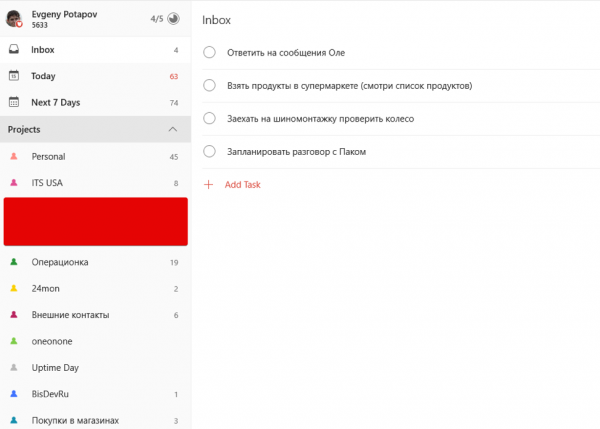
I write any incoming tasks in Inbox, which I try to sort out immediately. By sorting out, I mean:
- Determining the date when the task will be completed (for short tasks, I most often set 'Today', and by evening, I understand when it can actually be done).
- Determining the project to which the task can be assigned (for statistics and the ability to somehow change the priority of all tasks by project).
Tasks that come to mind and are not necessarily to be done soon go into projects. Uncategorized Personal (‘take coaster holders to the car’) and Uncategorized Work (‘think about when we can have a strategy session on PR’). In ToDoist, I can assign recurring tasks: every weekend, I have the task 'Sort Uncategorized Personal', and every Monday — 'Sort Uncategorized Work'.
Integration with Calendar
ToDoist integrates well with Google Calendar, in both directions. My calendar is shared with colleagues so they can see when they definitely cannot reach me.
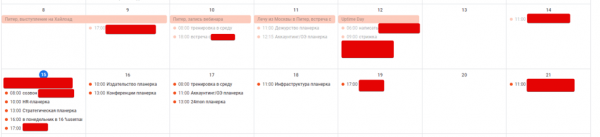
At the same time, tasks from the calendar are transferred back: I can say, 'Seryoga, check my schedule for Friday and book a meeting there', which will appear both in the calendar and in ToDoist. Thus, I actually started using the calendar for the first time, without needing to create events in it.
Processing non-urgent incoming tasks
I do not rush to complete tasks immediately, except for those where the emergency is evident. "We urgently need to contact the management of ABC company, as the server is down and we have not received a response from their employees" — this is clearly a burning task that cannot be postponed, whereas, "Zhenya, may I call you now to discuss a new project" turns into "Schedule when to talk to X about Y," which eventually becomes the tasks "Tell X that we can talk then" and "Talk to X about Y," already tied to a specific time. Almost any incoming task initially transforms into "Schedule…".
Task Prioritization
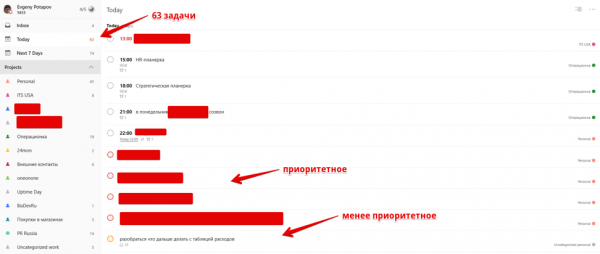
Not all tasks included for the day can be completed. Observing myself, I have come to the following conclusions (each number will have different ones, but the main point is to reach conclusions).
- I record about 50-70 tasks for each day.
- Comfortably for myself (without feeling totally exhausted at the end of the day), I can handle up to 30 tasks.
- Completing up to 50 tasks is tiring, but not critically so.
- I can finish 70 tasks, but after that, I will struggle to exit the "workaholic flow," have difficulty sleeping, and overall will be less social.
Based on this, I decide what to do today. In ToDoist, there is prioritization for each task, so in the morning, I choose critical tasks to complete, while the rest are handled according to my possibilities and desires. Every day, I transfer about 40-20 tasks to the next: interestingly, the number of tasks for the following day again becomes 60-70.
Keeping Statistics
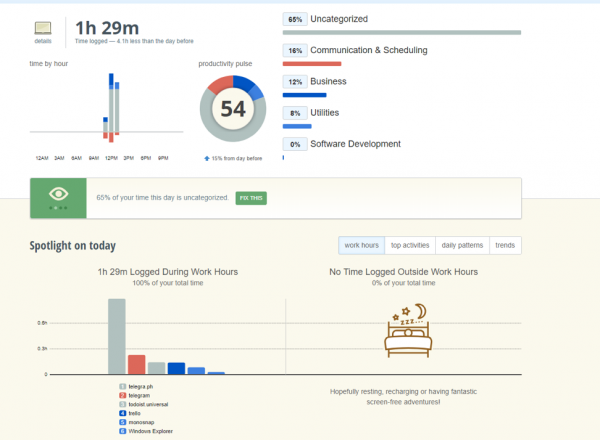
I really want to understand how much time was spent today on work-related matters and on which exactly. For this, I use the application , which is available on both my phone and laptop, as well as Google Maps Location History (yes, I’m not paranoid).
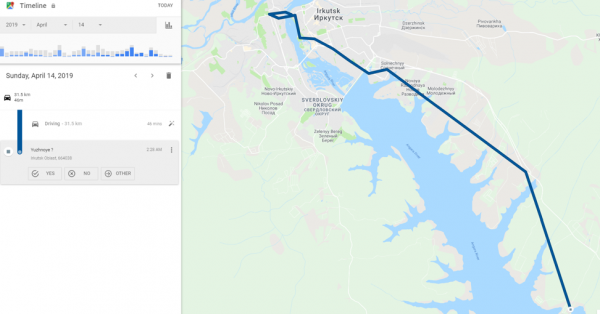
We live in the countryside, so the time spent on the road can be used wisely. Now, when I am not tired, I listen to audiobooks during the journey to make use of those 40 minutes.
I am not aggregating the data yet, creating a sort of personal Data Lake; the time will come — I will get to it.
There will be no conclusions
- The life of a modern person is a large flow of incoming tasks. It will not be possible to reduce it; we must learn to manage this flow.
- Most worries stem from the uncertainty of what lies ahead. If we understand what to expect in the coming days, our anxieties will significantly decrease.
- For this, it's worth spending time organizing my day. I know what will happen today, what will happen tomorrow, and I no longer forget about the tasks I used to overlook.
- Task tracking is not an end in itself; it's a way of self-discipline. Tasks that I used to procrastinate on or that I could never find the time for become much easier to tackle. Many people (myself included) generally feel better when tasks are set from an external source. Task tracking is a way to set tasks for oneself and learn to live according to one's desires.
- Work is not an end in itself. The goal is to organize your work schedule in such a way that predictable free time emerges, allowing you to focus on yourself, your family, and your interests.
Source: habr.com
