

In this article, we will provide a detailed overview of the features . The new version of the PBX offers various enhancements in customer service and increases staff productivity. At the same time, it significantly eases the work of the system engineer managing the system.
In v16, we expanded the capabilities of unified work. Now the system allows communication not only between employees but also with your customers and clients. A new contact center interface has been added to the built-in 3CX call center. Integration with CRM systems has also been enhanced, and new tools for monitoring service quality have been added, including a new Call Center Operator panel.
New 3CX Contact Center
By gathering feedback from over 170,000 customers worldwide, we completely redesigned the new call center module, which is much more efficient and scales better. One of the important innovations is operator qualification-based call routing. This routing is typically found only in expensive specialized call centers, while 3CX offers it at a fraction of the cost of such solutions from competitors. This feature is available in the 3CX Enterprise edition. It’s worth noting that qualification-based call routing is just the beginning of the development of the new 3CX call center. More ‘real’ call center capabilities will be introduced in future updates.
Nowadays, customers often prefer not to call the company—they find it more convenient to reach out via the chat window on the website. Taking customer feedback into account, we've created a new contact center widget that enables website visitors to chat and even call you through the browser! It works like this—operators who start a chat can immediately switch to voice communication, and then even video. This seamless communication channel provides excellent service—without any breaks in communication between the customer and your employee.
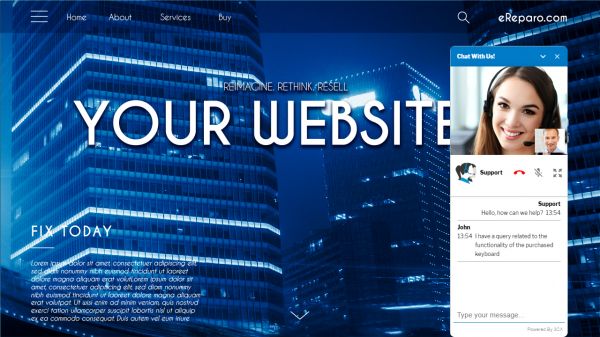
Communication Widget for the Website is offered for free with all editions of 3CX (even the free one!). The advantage of our widget over similar third-party chat services is that the website visitor does not need to call you back on a regular phone — they start in chat and immediately continue speaking. Your operators do not need to learn the interface of third-party services, and the system administrator does not need to support them. Moreover, you save a significant amount on monthly payments for third-party communication services for your website.
To connect the widget to the site and add a block of code to your site (if the site is not on WordPress, ). Then configure the connection to the PBX, the appearance of the chat window, and specify on which pages the widget should appear. Operators will receive messages and respond to visitors directly through the 3CX web client. Note that this technology is currently in beta testing, and new features will be added in upcoming updates.
In 3CX v16, we also enhanced the backend . New CRM systems have been added, and for supported CRMs, call logging, additional options, and CRM dialers have been introduced. This allows for full integration of telephony into the CRM interface. Support for outgoing calls through CRM dialers is currently implemented only for Salesforce CRM, but it will be connected to other CRMs as the REST API improves.
To ensure quality service, it is important to understand how your customers are being served. In v16, a significant improvement has been made for this — a new Operator call and chat monitoring panel. Additionally, reports have been enhanced and the ability to archive call recordings has been added. Call center managers have long requested such features!
The new Call Center Operator panel provides convenient monitoring of events in a separate pop-up window. Over time, new display modes will be added, such as a leaderboard for assessing operator KPIs.
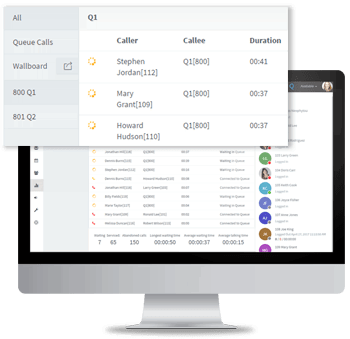
Call reports were a weak point for 3CX due to the outdated call center architecture. The new Queue service architecture in v16 has significantly improved the quality of reports. Naturally, many inaccuracies and bugs previously noted have been fixed. New types of reports will be available in future updates.
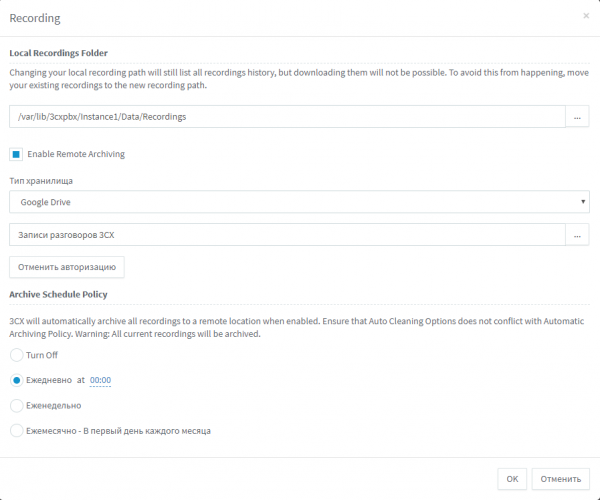
Call recording for operators is used in any call center for quality control as well as sometimes due to legal requirements. In v16, we have significantly enhanced this feature. All data regarding the call recording, including a link to the audio file, is now stored in the database. Additionally, the system recognizes (transcribes to text using Google services) the first minute of each recording—now you can quickly find the desired conversation by searching for keywords. As mentioned, call recordings can be archived on external A significant number of recordings now do not require a large local disk. This not only allows the use of inexpensive VPS hosting but also significantly speeds up backup and recovery of the 3CX server.
UC and collaboration
New employee collaboration technologies have emerged in v16—a full , built-in web softphone, and CRM integration for outbound calls. We have also improved the web client interface, expanded corporate chat capabilities, and enhanced video conferencing.
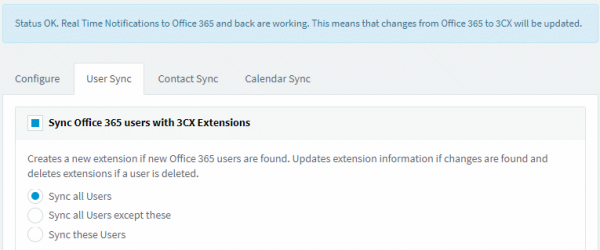
The new system uses the latest version of the Microsoft Office API and supports all Office 365 subscriptions, starting from the affordable Business Essentials. User synchronization with Office 365 is implemented for 3CX—adding or removing users in Office 365 creates and deletes corresponding extensions in the PBX. Contact synchronization works the same way. Calendar synchronization allows automatically setting the status of the 3CX extension based on your status in the Outlook calendar.
The WebRTC browser softphone, which was available in v15.5 as beta, is now released. A 3CX user can call directly from the browser, regardless of the OS and without installing any local applications. By the way, it features integration with Sennheiser headsets—supporting the call answer button functionality.
Version 16 significantly enhances chat functionality. The mobile corporate chat is approaching leading applications like WhatsApp. 3CX chat offers similar features and is easy for users to adapt to. File, image, and emoji sending have been introduced. Soon, users will have message forwarding and chat archiving, and chat reports will also be available — an important feature for call center administrators.
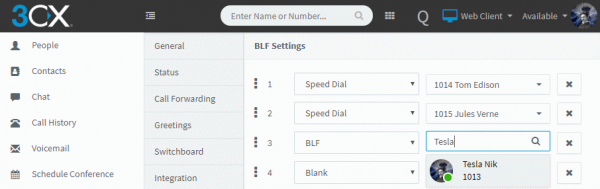
A feature that was in the 3CX client for Windows and missing in the web client — user-configured BLF indicators. Thanks to this, employees can now set BLF indicators themselves without needing a system administrator. The BLF setup now works in the web client too. Additionally, extra information about the caller has been added to the pop-up call card. In short, switching between the web softphone, IP phones, and apps for Android and iOS is now much easier.
3CX WebMeeting Web Conferences
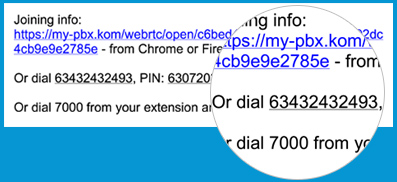
If you are still spending money on Webex or Zoom web conferences, it's time to switch to 3CX! MCU WebMeeting has been moved to Amazon's infrastructure. This has ensured high reliability, optimized traffic transmission, and provided excellent video and audio quality with a large number of participants. Also, sharing your screen now doesn't require a browser extension. Another new feature is that participants can call into the WebRTC web conference from regular phones — and join by voice without using a PC or browser.
New Opportunities for Administrators
Of course, we haven't forgotten about system administrators. Security and performance for the PBX have been significantly improved. So much so that we were able to ! Another interesting feature of version 16 is the new service — the 3CX Instance Manager, which allows you to manage all your PBXs from a single interface.
For small companies, it will be more beneficial to host the PBX locally on a standard Raspberry Pi 3B+ device, which costs around $50, rather than in the cloud. To achieve this, we significantly reduced the requirements for the processor and memory, and launched v16 on the most resource-efficient ARM devices from Raspberry and the cheapest VPS servers.
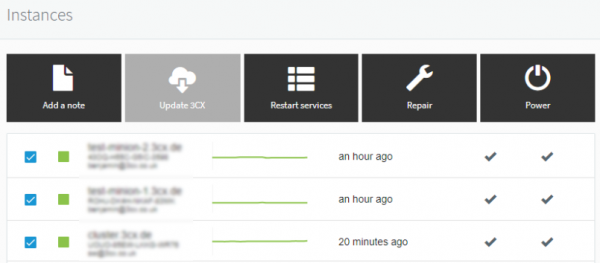
The 3CX instance manager allows for centralized management of all installed PBX instances. This is an excellent solution for 3CX partners and large clients. Updates can be installed simultaneously across all systems, monitoring service status, tracking errors such as disk space shortages. Future updates will include managing SIP trunks and devices connected via the 3CX SBC service, monitoring security events, and remote testing of VoIP traffic quality.
We are constantly working on security technologies for corporate communication. 3CX v16 adds an interesting protection feature — a global list of suspicious IP addresses collected from all installed 3CX systems worldwide. This list is then checked (highlighting IP addresses that are consistently blocked) and sent back to all 3CX servers, including yours. This implements effective cloud protection against hackers. Of course, all open-source components of 3CX have been updated to the latest versions. We emphasize that using outdated systems with older component versions — databases, web servers, etc. — significantly increases intrusion risks. By the way, you can now restrict access to the 3CX interface by IP addresses.
Other features for administrators include RTCP protocol statistics, which help in finding issues with call quality; copying extension numbers — now it can be created as a copy of an existing one, changing only the main parameters. The entire 3CX interface is translated to a ‘one-click’ editing mode, and the order of BLF indicators can now be changed by simply dragging them with the mouse.
Licenses and prices
Despite already quite affordable prices, we have reconsidered them downwards. The 3CX Standard edition has become 40% cheaper (and the free version has been extended to 8 simultaneous calls). Some changes have occurred. , available in various editions. Intermediate license sizes have also been added, allowing you to select the most suitable capacity for your organization's PBX.
The additional license sizes will enable the customer to avoid purchasing a larger license simply because a more appropriate intermediate option is not available. Note that intermediate licenses are offered only as annual subscriptions. Furthermore, these licenses can be upgraded at any time without any so-called penalty — only the actual difference in capacity will be charged.
The 3CX Standard edition is now better suited for small companies that do not require Call Queues, reports, and call recording. Such companies will pay the minimum for the PBX; additionally, Standard now offers 8 simultaneous calls for free forever. Please note that installed Standard edition PBXs with a commercial key will automatically upgrade to Pro when updated to version 16. If you are not comfortable with this transition, refrain from upgrading to v16.
The capabilities of the Pro edition remain unchanged. For small and medium licenses, the price has been reduced by 20%! A significant improvement is that when obtaining a new license (key) from the 3CX website, it will function as a Pro edition for the first 40 days. You specify the license capacity yourself! This allows both clients and partners to fully test all the PBX features. Remember that compared to the Standard edition, the Pro edition adds Call Queues, reports, call recording, and integration with Office 365 and other CRM systems.
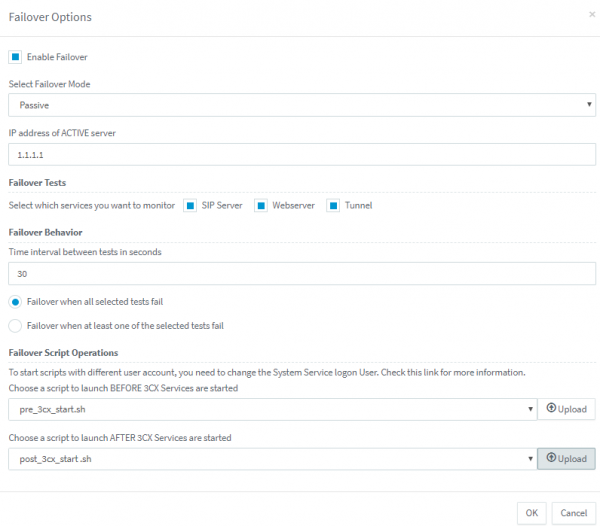
In the Enterprise edition, we continue to add features that previously companies had to pay significantly more for. For example, we’ve implemented an option to prohibit an employee from disabling call recording. The next long-requested feature is qualification-based call routing in the Queues. We remind you that only in 3CX Enterprise is there support for the built-in fault-tolerant telephony cluster.
When discussing the total cost of ownership of 3CX, is now more affordable , especially when calculated over 3 years. A perpetual license costs the same as 3 annual licenses, but for this license you will also need for 2 years (the first year is included in the cost of the perpetual license). Please note that licenses for 4 and 8 simultaneous calls are now only available as annual subscriptions.
We would like to remind you once again that the subscription for updates (applicable only for perpetual licenses) is worth the investment! Even the simple purchase of SSL certificates and a reliable DNS service will be more expensive and complicated to set up than renewing the subscription. Moreover, the subscription provides installation of the latest security updates and new , the service and the right to use smartphone applications (in simpler terms — updated mobile applications may stop working with the old PBX server).
We will soon release v16 Update 1, which will include an updated development environment for voice applications , generating scripts in C#. In addition, there will be improvements to chat and support for SQL databases to retrieve contact information via REST requests.
v16 Update 2 will include the updated with centralized monitoring of remote devices (IP phones) from the 3CX management console (up to 100 phones per SBC). There will also be support for certain DNS technologies for simplified configuration of VoIP operators.
Features expected to be included in future updates: simplified configuration of a fault-tolerant cluster (in the Enterprise edition), input of DID number blocks in the server interface, a new REST API for automating outbound calls, and a new KPI dashboard for call center operators (Leaderboard).
This is an overview. , , enjoy!
Source: habr.com
