

This article will be interesting for both testers and developers, but it is primarily aimed at automation engineers who have encountered issues with configuring GitLab CI/CD for conducting integration testing under conditions of insufficient infrastructure resources and/or lack of a container orchestration platform. I will explain how to set up the deployment of testing environments using docker-compose on a single GitLab shell runner, ensuring that the deployed environments do not interfere with each other.
Content
Prerequisites
In my experience, I have often had to 'fix' integration testing issues in projects. One of the first and most significant problems is the CI pipeline, where integration testing of the developed service(s) is conducted in a dev/stage environment. This has caused numerous issues:
- Due to defects in one service or another during integration testing, the test environment can be corrupted by corrupted data. There have been cases where sending a request with a malformed JSON format crashed the service, rendering the stand completely inoperable.
- Slowing down the performance of the test environment as the volume of test data increases. I believe it is pointless to elaborate on the example of clearing/rolling back the database. In my practice, I have not encountered a project where this procedure went smoothly.
- The risk of disrupting the operability of the test environment when testing shared system settings. For example, user/group/password/application policy.
- Test data from automated tests can interfere with manual testers.
Some may argue that good automated tests should clean up after themselves. I have counterarguments:
- Dynamic stands are quite convenient to use.
- Not every object can be deleted from the system via API. For instance, the call to delete an object may not be implemented as it contradicts business logic.
- When creating an object through the API, a large number of metadata entries can be generated, making them difficult to delete.
- If tests have dependencies on each other, the process of cleaning up data after test execution becomes a headache.
- Additional (and, in my opinion, unjustified) API calls.
- And the main argument: when test data starts being cleaned directly from the database. This turns into a real PK/FK circus! Developers say: 'I only added/deleted/renamed a table, why did 100500 integration tests fail?'
In my opinion, the most optimal solution is a dynamic environment.
- Many people use docker-compose to run test environments, but few use docker-compose during integration testing in CI/CD. And here I am not considering Kubernetes, Swarm, and other container orchestration platforms. Not every company has them. It would be good if the docker-compose.yml file were universal.
- Even if we have our own QA runner, how can we ensure that the services started via docker-compose do not interfere with each other?
- How to collect logs of the tested services?
- How to clean up the runner?
I have my own GitLab runner for my projects, and I encountered these questions during development. for . More precisely, when running integration tests. We will address these issues with examples from this project.
GitLab Shell Runner
For the runner, I recommend a Linux virtual machine with 4 vCPU, 4 GB RAM, and 50 GB HDD.
There is a lot of information available online on configuring gitlab-runner, so briefly:
- Log into the machine via SSH.
If you have less than 8 GB RAM, I recommend , so that the OOM killer doesn't come and kill our tasks due to lack of RAM. This can happen when more than 5 tasks are running simultaneously. Tasks will run a little slower, but reliably.
Example with OOM killer
If in the task logs you see
bash: line 82: 26474 Killed, just execute on the runnersudo dmesg | grep 26474[26474] 1002 26474 1061935 123806 339 0 0 java Out of memory: Kill process 26474 (java) score 127 or sacrifice child Killed process 26474 (java) total-vm:4247740kB, anon-rss:495224kB, file-rss:0kB, shmem-rss:0kBAnd if the picture looks something like this, either add swap or increase RAM.
- Installing , , , make.
- Add the user
gitlab-runnerto the groupdockersudo groupadd docker sudo usermod -aG docker gitlab-runner - gitlab-runner.
Open for editing
/etc/gitlab-runner/config.tomland addconcurrent=20 [[runners]] request_concurrency = 10This will allow running parallel tasks on one runner. Read more in detail. .
If you have a more powerful machine, for example, 8 vCPU, 16 GB RAM, these figures can be increased at least twofold. However, it all depends on what exactly will be running on this runner and in what quantities.
This is sufficient.
Preparing docker-compose.yml
The main task is to create a universal docker-compose.yml that developers/testers can use both locally and in the CI pipeline.
First and foremost, we create unique service names for CI. One of the unique variables in GitLab CI is the variable CI_JOB_ID. If you specify container_name with the value "service-${CI_JOB_ID:-local}", then in the case of:
- if
CI_JOB_IDnot defined in the environment variables,
the service name will beservice-local - if
CI_JOB_IDdefined in the environment variables (for example, 123),
the service name will beservice-123
Secondly, we create a common network for the running services. This provides us with isolation at the network level when launching multiple test environments.
networks:
  default:
    external:
      name: service-network-${CI_JOB_ID:-local}
In fact, this is the first step to success =)
An example of my docker-compose.yml with comments
version: "3"

# For the correct functioning of web (php) and fmt,
# the containers need to have shared executable content.
# In our case, this is the directory /var/www/testrail
volumes:
  static-content:

# Isolate the environment at the network level
networks:
  default:
    external:
      name: testrail-network-${CI_JOB_ID:-local}

services:
  db:
    image: mysql:5.7.22
    # Each container_name contains ${CI_JOB_ID:-local}
    container_name: "testrail-mysql-${CI_JOB_ID:-local}"
    environment:
      MYSQL_HOST: db
      MYSQL_DATABASE: mydb
      MYSQL_ROOT_PASSWORD: 1234
      SKIP_GRANT_TABLES: 1
      SKIP_NETWORKING: 1
      SERVICE_TAGS: dev
      SERVICE_NAME: mysql
    networks:
    - default

  migration:
    image: registry.gitlab.com/touchbit/image/testrail/migration:latest
    container_name: "testrail-migration-${CI_JOB_ID:-local}"
    links:
    - db
    depends_on:
    - db
    networks:
    - default

  fpm:
    image: registry.gitlab.com/touchbit/image/testrail/fpm:latest
    container_name: "testrail-fpm-${CI_JOB_ID:-local}"
    volumes:
    - static-content:/var/www/testrail
    links:
    - db
    networks:
    - default

  web:
    image: registry.gitlab.com/touchbit/image/testrail/web:latest
    container_name: "testrail-web-${CI_JOB_ID:-local}"
    # If the variables TR_HTTP_PORT or TR_HTTPS_PORTS are not defined,
    # the service will run on ports 80 and 443, respectively.
    ports:
      - ${TR_HTTP_PORT:-80}:80
      - ${TR_HTTPS_PORT:-443}:443
    volumes:
      - static-content:/var/www/testrail
    links:
      - db
      - fpm
    networks:
      - default
An example of local execution
docker-compose -f docker-compose.yml up -d
Starting   testrail-mysql-local     ... done
Starting   testrail-migration-local ... done
Starting   testrail-fpm-local       ... done
Recreating testrail-web-local       ... done
But it's not that simple to run in CI.
Preparing Makefile
I use Makefile because it is quite convenient for both local environment management and CI. Next are inline comments.
# У меня в проектах все вспомогательные вещи лежат в директории `.indirect`,
# в том числе и `docker-compose.yml`

# Использовать bash с опцией pipefail
# pipefail - фейлит выполнение пайпа, если команда выполнилась с ошибкой
SHELL=/bin/bash -o pipefail

# Останавливаем контейнеры и удаляем сеть
docker-kill:
    docker-compose -f $${CI_JOB_ID:-.indirect}/docker-compose.yml kill
    docker network rm network-$${CI_JOB_ID:-testrail} || true

# Предварительно выполняем docker-kill
docker-up: docker-kill
    # Создаем сеть для окружения
    docker network create network-$${CI_JOB_ID:-testrail}
    # Забираем последние образы из docker-registry
    docker-compose -f $${CI_JOB_ID:-.indirect}/docker-compose.yml pull
    # Запускаем окружение
    # force-recreate - принудительное пересоздание контейнеров
    # renew-anon-volumes - не использовать volumes предыдущих контейнеров
    docker-compose -f $${CI_JOB_ID:-.indirect}/docker-compose.yml up --force-recreate --renew-anon-volumes -d
    # Ну и, на всякий случай, вывести что там у нас в принципе запущено на машинке
    docker ps

# Коллектим логи сервисов
docker-logs:
    mkdir ./logs || true
    docker logs testrail-web-$${CI_JOB_ID:-local}       >& logs/testrail-web.log
    docker logs testrail-fpm-$${CI_JOB_ID:-local}       >& logs/testrail-fpm.log
    docker logs testrail-migration-$${CI_JOB_ID:-local} >& logs/testrail-migration.log
    docker logs testrail-mysql-$${CI_JOB_ID:-local}     >& logs/testrail-mysql.log

# Очистка раннера
docker-clean:
    @echo Останавливаем все testrail-контейнеры
    docker kill $$(docker ps --filter=name=testrail -q) || true
    @echo Очистка докер контейнеров
    docker rm -f $$(docker ps -a -f --filter=name=testrail status=exited -q) || true
    @echo Очистка dangling образов
    docker rmi -f $$(docker images -f "dangling=true" -q) || true
    @echo Очистка testrail образов
    docker rmi -f $$(docker images --filter=reference='registry.gitlab.com/touchbit/image/testrail/*' -q) || true
    @echo Очистка всех неиспользуемых volume
    docker volume rm -f $$(docker volume ls -q) || true
    @echo Очистка всех testrail сетей
    docker network rm $(docker network ls --filter=name=testrail -q) || true
    docker ps
Checking
make docker-up
$ make docker-up
docker-compose -f ${CI_JOB_ID:-.indirect}/docker-compose.yml kill
Killing testrail-web-local   ... done
Killing testrail-fpm-local   ... done
Killing testrail-mysql-local ... done
docker network rm network-${CI_JOB_ID:-testrail} || true
network-testrail
docker network create network-${CI_JOB_ID:-testrail}
d2ec063324081c8bbc1b08fd92242c2ea59d70cf4025fab8efcbc5c6360f083f
docker-compose -f ${CI_JOB_ID:-.indirect}/docker-compose.yml pull
Pulling db        ... done
Pulling migration ... done
Pulling fpm       ... done
Pulling web       ... done
docker-compose -f ${CI_JOB_ID:-.indirect}/docker-compose.yml up --force-recreate --renew-anon-volumes -d
Recreating testrail-mysql-local ... done
Recreating testrail-fpm-local       ... done
Recreating testrail-migration-local ... done
Recreating testrail-web-local       ... done
docker ps
CONTAINER ID  PORTS                                     NAMES
a845d3cb0e5a  0.0.0.0:80->80/tcp, 0.0.0.0:443->443/tcp  testrail-web-local
19d8ef001398  9000/tcp                                  testrail-fpm-local
e28840a2369c  3306/tcp, 33060/tcp                       testrail-migration-local
0e7900c23f37  3306/tcp                                  testrail-mysql-local
make docker-logs
$ make docker-logs
mkdir ./logs || true
mkdir: cannot create directory ‘./logs’: File exists
docker logs testrail-web-${CI_JOB_ID:-local}       > logs/testrail-web.log
docker logs testrail-fpm-${CI_JOB_ID:-local}       > logs/testrail-fpm.log
docker logs testrail-migration-${CI_JOB_ID:-local} > logs/testrail-migration.log
docker logs testrail-mysql-${CI_JOB_ID:-local}     > logs/testrail-mysql.log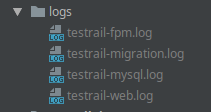
Preparing .gitlab-ci.yml
Running Integration Tests
Integration:
  stage: test
  tags:
    - my-shell-runner
  before_script:
    # Authenticate in the registry
    - docker login -u gitlab-ci-token -p ${CI_JOB_TOKEN} ${CI_REGISTRY}
    # Generate pseudo-unique TR_HTTP_PORT and TR_HTTPS_PORT
    - export TR_HTTP_PORT=$(shuf -i10000-60000 -n1)
    - export TR_HTTPS_PORT=$(shuf -i10000-60000 -n1)
    # create a directory with the job ID
    - mkdir ${CI_JOB_ID}
    # copy our docker-compose.yml to the created directory
    # so that the context is different for each job
    - cp .indirect/docker-compose.yml ${CI_JOB_ID}/docker-compose.yml
  script:
    # raise our environment
    - make docker-up
    # run tests with an executable jar (that's how I do it)
    - java -jar itest.jar --http-port ${TR_HTTP_PORT} --https-port ${TR_HTTPS_PORT}
    # or in a container
    - docker run --network=testrail-network-${CI_JOB_ID:-local} --rm itest
  after_script:
    # collect logs
    - make docker-logs
    # stop the environment
    - make docker-kill
  artifacts:
    # save logs
    when: always
    paths:
      - logs
    expire_in: 30 days
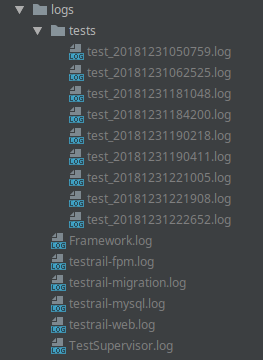
As a result of running such a job, the logs directory in the artifacts will contain the logs of services and tests. This is very convenient in case of errors. Each test runs in parallel and writes its own log, but I will talk about this separately.
Cleaning the Runner
The job will only run on a schedule.
stages:
- clean
- build
- test

Clean runner:
  stage: clean
  only:
    - schedules
  tags:
    - my-shell-runner
  script:
    - make docker-clean
Next, we go to our GitLab project -> CI/CD -> Schedules -> New Schedule and add a new schedule
Result
We start 4 jobs in GitLab CI
In the logs of the last task with integration tests, we see containers from different jobs
CONTAINER ID  NAMES
c6b76f9135ed  testrail-web-204645172
01d303262d8e  testrail-fpm-204645172
2cdab1edbf6a  testrail-migration-204645172
826aaf7c0a29  testrail-mysql-204645172
6dbb3fae0322  testrail-web-204645084
3540f8d448ce  testrail-fpm-204645084
70fea72aa10d  testrail-mysql-204645084
d8aa24b2892d  testrail-web-204644881
6d4ccd910fad  testrail-fpm-204644881
685d8023a3ec  testrail-mysql-204644881
1cdfc692003a  testrail-web-204644793
6f26dfb2683e  testrail-fpm-204644793
029e16b26201  testrail-mysql-204644793
c10443222ac6  testrail-web-204567103
04339229397e  testrail-fpm-204567103
6ae0accab28d  testrail-mysql-204567103
b66b60d79e43  testrail-web-204553690
033b1f46afa9  testrail-fpm-204553690
a8879c5ef941  testrail-mysql-204553690
069954ba6010  testrail-web-204553539
ed6b17d911a5  testrail-fpm-204553539
1a1eed057ea0  testrail-mysql-204553539
More detailed log
$ docker login -u gitlab-ci-token -p ${CI_JOB_TOKEN} ${CI_REGISTRY}
WARNING! Using --password via the CLI is insecure. Use --password-stdin.
WARNING! Your password will be stored unencrypted in /home/gitlab-runner/.docker/config.json.
Configure a credential helper to remove this warning. See
https://docs.docker.com/engine/reference/commandline/login/#credentials-store
Login Succeeded
$ export TR_HTTP_PORT=$(shuf -i10000-60000 -n1)
$ export TR_HTTPS_PORT=$(shuf -i10000-60000 -n1)
$ mkdir ${CI_JOB_ID}
$ cp .indirect/docker-compose.yml ${CI_JOB_ID}/docker-compose.yml
$ make docker-up
docker-compose -f ${CI_JOB_ID:-.indirect}/docker-compose.yml kill
docker network rm testrail-network-${CI_JOB_ID:-local} || true
Error: No such network: testrail-network-204645172
docker network create testrail-network-${CI_JOB_ID:-local}
0a59552b4464b8ab484de6ae5054f3d5752902910bacb0a7b5eca698766d0331
docker-compose -f ${CI_JOB_ID:-.indirect}/docker-compose.yml pull
Pulling web       ... done
Pulling fpm       ... done
Pulling migration ... done
Pulling db        ... done
docker-compose -f ${CI_JOB_ID:-.indirect}/docker-compose.yml up --force-recreate --renew-anon-volumes -d
Creating volume "204645172_static-content" with default driver
Creating testrail-mysql-204645172 ...
Creating testrail-mysql-204645172 ... done
Creating testrail-migration-204645172 ... done
Creating testrail-fpm-204645172       ... done
Creating testrail-web-204645172       ... done
docker ps
CONTAINER ID        IMAGE                                                          COMMAND                  CREATED              STATUS              PORTS                                           NAMES
c6b76f9135ed        registry.gitlab.com/touchbit/image/testrail/web:latest         "nginx -g 'daemon of…"   13 seconds ago       Up 1 second         0.0.0.0:51148->80/tcp, 0.0.0.0:25426->443/tcp   testrail-web-204645172
01d303262d8e        registry.gitlab.com/touchbit/image/testrail/fpm:latest         "docker-php-entrypoi…"   16 seconds ago       Up 13 seconds       9000/tcp                                        testrail-fpm-204645172
2cdab1edbf6a        registry.gitlab.com/touchbit/image/testrail/migration:latest   "docker-entrypoint.s…"   16 seconds ago       Up 13 seconds       3306/tcp, 33060/tcp                             testrail-migration-204645172
826aaf7c0a29        mysql:5.7.22                                                   "docker-entrypoint.s…"   18 seconds ago       Up 16 seconds       3306/tcp                                        testrail-mysql-204645172
6dbb3fae0322        registry.gitlab.com/touchbit/image/testrail/web:latest         "nginx -g 'daemon of…"   36 seconds ago       Up 22 seconds       0.0.0.0:44202->80/tcp, 0.0.0.0:20151->443/tcp   testrail-web-204645084
3540f8d448ce        registry.gitlab.com/touchbit/image/testrail/fpm:latest         "docker-php-entrypoi…"   38 seconds ago       Up 35 seconds       9000/tcp                                        testrail-fpm-204645084
70fea72aa10d        mysql:5.7.22                                                   "docker-entrypoint.s…"   40 seconds ago       Up 37 seconds       3306/tcp                                        testrail-mysql-204645084
d8aa24b2892d        registry.gitlab.com/touchbit/image/testrail/web:latest         "nginx -g 'daemon of…"   About a minute ago   Up 53 seconds       0.0.0.0:31103->80/tcp, 0.0.0.0:43872->443/tcp   testrail-web-204644881
6d4ccd910fad        registry.gitlab.com/touchbit/image/testrail/fpm:latest         "docker-php-entrypoi…"   About a minute ago   Up About a minute   9000/tcp                                        testrail-fpm-204644881
685d8023a3ec        mysql:5.7.22                                                   "docker-entrypoint.s…"   About a minute ago   Up About a minute   3306/tcp                                        testrail-mysql-204644881
1cdfc692003a        registry.gitlab.com/touchbit/image/testrail/web:latest         "nginx -g 'daemon of…"   About a minute ago   Up About a minute   0.0.0.0:44752->80/tcp, 0.0.0.0:23540->443/tcp   testrail-web-204644793
6f26dfb2683e        registry.gitlab.com/touchbit/image/testrail/fpm:latest         "docker-php-entrypoi…"   About a minute ago   Up About a minute   9000/tcp                                        testrail-fpm-204644793
029e16b26201        mysql:5.7.22                                                   "docker-entrypoint.s…"   About a minute ago   Up About a minute   3306/tcp                                        testrail-mysql-204644793
c10443222ac6        registry.gitlab.com/touchbit/image/testrail/web:latest         "nginx -g 'daemon of…"   5 hours ago          Up 5 hours          0.0.0.0:57123->80/tcp, 0.0.0.0:31657->443/tcp   testrail-web-204567103
04339229397e        registry.gitlab.com/touchbit/image/testrail/fpm:latest         "docker-php-entrypoi…"   5 hours ago          Up 5 hours          9000/tcp                                        testrail-fpm-204567103
6ae0accab28d        mysql:5.7.22                                                   "docker-entrypoint.s…"   5 hours ago          Up 5 hours          3306/tcp                                        testrail-mysql-204567103
b66b60d79e43        registry.gitlab.com/touchbit/image/testrail/web:latest         "nginx -g 'daemon of…"   5 hours ago          Up 5 hours          0.0.0.0:56321->80/tcp, 0.0.0.0:58749->443/tcp   testrail-web-204553690
033b1f46afa9        registry.gitlab.com/touchbit/image/testrail/fpm:latest         "docker-php-entrypoi…"   5 hours ago          Up 5 hours          9000/tcp                                        testrail-fpm-204553690
a8879c5ef941        mysql:5.7.22                                                   "docker-entrypoint.s…"   5 hours ago          Up 5 hours          3306/tcp                                        testrail-mysql-204553690
069954ba6010        registry.gitlab.com/touchbit/image/testrail/web:latest         "nginx -g 'daemon of…"   5 hours ago          Up 5 hours          0.0.0.0:32869->80/tcp, 0.0.0.0:16066->443/tcp   testrail-web-204553539
ed6b17d911a5        registry.gitlab.com/touchbit/image/testrail/fpm:latest         "docker-php-entrypoi…"   5 hours ago          Up 5 hours          9000/tcp                                        testrail-fpm-204553539
1a1eed057ea0        mysql:5.7.22                                                   "docker-entrypoint.s…"   5 hours ago          Up 5 hours          3306/tcp                                        testrail-mysql-204553539
All tasks have been successfully completed
The task artifacts contain logs from services and tests
Everything seems fine, but there's one caveat. The pipeline can be forcibly canceled during the execution of integration tests, and in this case, the running containers will not be stopped. From time to time, the runner needs to be cleaned. Unfortunately, the task for improvement in GitLab CE is still pending
But we have added a scheduled task launch, and no one prohibits us from starting it manually.
Let's go to our project -> CI/CD -> Schedules and start the task Clean runner
Total:
- We have one shell runner.
- There are no conflicts between tasks and the environment.
- We have parallel execution of tasks with integration tests.
- Integration tests can be run both locally and in a container.
- Logs from services and tests are collected and attached to the pipeline task.
- There is an option to clean the runner from old Docker images.
Setup time — ~2 hours.
That's it. I would appreciate your feedback.
Source: habr.com
