

Hello, friends. Before heading into the second part of the May holidays, we’re sharing material that we translated in anticipation of the launch of a new session of the course. .

Application developers spend a lot of time comparing several operational databases to choose the one that best fits the intended workload. Needs may include simplified data modeling, transactional guarantees, read/write performance, horizontal scalability, and fault tolerance. Traditionally, the choice begins with the category of the database, SQL or NoSQL, as each category presents a clear set of trade-offs. High performance in terms of low latency and high throughput is often seen as a non-negotiable requirement, making it essential for any database in the selection.
The aim of this article is to assist application developers in making the right choice between SQL and NoSQL in the context of application data modeling. We will explore one SQL database, namely PostgreSQL, and two NoSQL databases – Cassandra and MongoDB, to discuss the fundamentals of database design, such as creating tables, populating them, reading data from the table, and deleting it. In the next article, we will certainly cover indexes, transactions, JOINs, TTL directives, and designing databases based on JSON.
What is the difference between SQL and NoSQL?
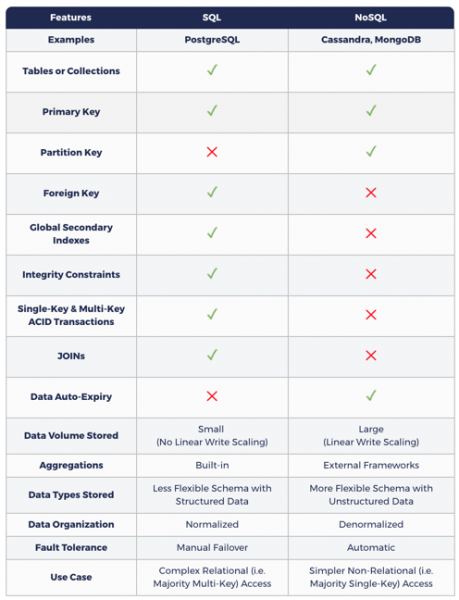
SQL databases enhance application flexibility through ACID transactional guarantees, as well as their ability to query data with JOINs in unexpected ways over existing normalized relational database models.
Due to their monolithic/single-node architecture and the use of a master-slave replication model for redundancy, traditional SQL databases lack two important features: linear write scalability (i.e., automatic sharding across multiple nodes) and automated/no data loss. This means that the volume of incoming data cannot exceed the maximum write throughput of a single node. Additionally, some temporary data loss must be accounted for in fault tolerance (in resource-sharing architecture). It is important to note that recent commits may not yet be reflected in the slave copy. Zero-downtime updates are also difficult to achieve in SQL databases.
NoSQL databases are inherently distributed, meaning that data is partitioned into sections and distributed across multiple nodes. They require denormalization. This means that the data entered must be copied multiple times to respond to specific queries you send. The overall goal is to achieve high performance by reducing the number of shards available during reading. Hence, the statement that NoSQL requires you to model your queries, while SQL requires you to model your data.
NoSQL emphasizes achieving high performance in a distributed cluster, which is the main justification for many design trade-offs in database systems that include the loss of ACID transaction guarantees, JOINs, and consistent global secondary indexes.
There is an opinion that while NoSQL databases provide linear write scalability and high fault tolerance, the loss of transactional guarantees makes them unsuitable for critical data.
The following table shows how data modeling in NoSQL differs from SQL.
SQL and NoSQL: Why Both Are Needed?
Real-world applications with a large number of users, such as Amazon.com, Netflix, Uber, and Airbnb, are tasked with executing complex, diverse functions. For instance, an e-commerce application like Amazon.com needs to store lightweight, high-critical data, such as information about users, products, orders, and invoices, alongside heavier, but less sensitive data, such as product reviews, support messages, user activity, feedback, and recommendations. Naturally, these applications rely on at least one SQL database along with at least one NoSQL database. In interregional and global systems, the NoSQL database functions as a geo-distributed cache for data stored in a trusted source, the SQL database operating in a single region.
How does YugaByte DB integrate SQL and NoSQL?
Built on a log-oriented mixed storage engine, auto-sharding, sharding distributed consensus replication, and ACID distributed transactions (inspired by Google Spanner), YugaByte DB is the world's first open-source database that is simultaneously compatible with both NoSQL (Cassandra & Redis) and SQL (PostgreSQL). As shown in the table below, YCQL, YugaByte DB's API compatible with Cassandra, introduces the concepts of single and multi-key ACID transactions and global secondary indexes to the NoSQL API, thus ushering in an era of transactional NoSQL databases. Additionally, YCQL, the PostgreSQL-compatible API of YugaByte DB, introduces linear write scalability and automatic fault tolerance to the SQL API, showcasing distributed SQL databases to the world. Since YugaByte DB is fundamentally transactional, the NoSQL API can now be utilized in the context of critical data.
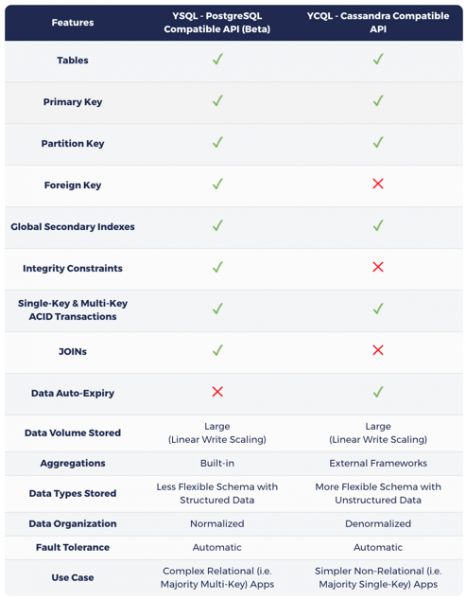
As previously mentioned in the article , the choice between SQL or NoSQL in YugaByte DB entirely depends on the characteristics of the underlying workload:
- If the primary workload involves multi-key operations with JOINs, when choosing YSQL, be aware that your keys may be distributed across multiple nodes, resulting in higher latency and/or decreased throughput compared to NoSQL.
- Otherwise, choose any of the two NoSQL APIs, keeping in mind that you will achieve higher performance from queries served by one node at a time. YugaByte DB can serve as a single operational database for real complex applications that need to manage multiple workloads simultaneously.
The Data Modeling Lab in the following section is based on YugaByte DB databases compatible with PostgreSQL and Cassandra, in contrast to the original databases. This approach highlights the simplicity of interacting with two different APIs (on two different ports) of the same database cluster, unlike using completely independent clusters of two different databases.
In the following sections, we will introduce the Data Modeling Lab to illustrate the differences and some similarities between the databases in question.
Data Modeling Lab
Database Installation
Given the focus on data model design (rather than complex deployment architectures), we will install the databases in Docker containers on a local machine, and then interact with them using their respective command-line shells.
PostgreSQL & Cassandra compatible, YugaByte DB
mkdir ~/yugabyte && cd ~/yugabyte
wget https://downloads.yugabyte.com/yb-docker-ctl && chmod +x yb-docker-ctl
docker pull yugabytedb/yugabyte
./yb-docker-ctl create --enable_postgres
MongoDB
docker run --name my-mongo -d mongo:latestAccess via command line
Let's connect to the databases using the command-line shell for the respective APIs.
PostgreSQL
is the command-line shell for interacting with PostgreSQL. For ease of use, YugaByte DB comes with psql right in the bin folder.
docker exec -it yb-postgres-n1 /home/yugabyte/postgres/bin/psql -p 5433 -U postgresCassandra
is the command-line shell for interacting with Cassandra and its compatible databases through CQL (Cassandra Query Language). For convenience, YugaByte DB comes with cqlsh in the directory bin.
Note that CQL was inspired by SQL and has similar concepts of tables, rows, columns, and indexes. However, as a NoSQL language, it introduces a certain set of constraints, most of which we will also cover in other articles.
docker exec -it yb-tserver-n1 /home/yugabyte/bin/cqlshMongoDB
– is a command-line shell for interacting with MongoDB. It can be found in the bin directory of the MongoDB installation.
docker exec -it my-mongo bash
cd bin
mongo
Creating a table
Now we can interact with the database to perform various operations using the command line. Let's start by creating a table that stores information about songs written by different artists. These songs may be part of an album. Also, optional attributes for the song include release year, price, genre, and rating. We need to consider additional attributes that may be needed in the future, through a 'tags' field. This can hold semi-structured data in the form of key-value pairs.
PostgreSQL
CREATE TABLE Music (
    Artist VARCHAR(20) NOT NULL,
    SongTitle VARCHAR(30) NOT NULL,
    AlbumTitle VARCHAR(25),
    Year INT,
    Price FLOAT,
    Genre VARCHAR(10),
    CriticRating FLOAT,
    Tags TEXT,
    PRIMARY KEY(Artist, SongTitle)
);
Cassandra
Creating a table in Cassandra is very similar to PostgreSQL. One of the main differences is the lack of integrity constraints (e.g., NOT NULL), but this falls under the responsibility of the application, not the NoSQL database.. The primary key consists of a partition key (the Artist column in the example below) and a set of clustering columns (the SongTitle column in the example below). The partition key determines which partition/shard to place the row in, while the clustering columns indicate how the data should be organized within the current shard.
CREATE KEYSPACE myapp;
USE myapp;
CREATE TABLE Music (
    Artist TEXT,
    SongTitle TEXT,
    AlbumTitle TEXT,
    Year INT,
    Price FLOAT,
    Genre TEXT,
    CriticRating FLOAT,
    Tags TEXT,
    PRIMARY KEY(Artist, SongTitle)
);
MongoDB
MongoDB organizes data into databases (Database) (similar to Keyspace in Cassandra), where there are collections (Collections) (similar to tables), which contain documents (Documents) (similar to rows in a table). In MongoDB, it is not necessary to define an initial schema. The command "use database", shown below, creates a database instance upon first call and changes the context to the newly created database. Even collections do not need to be created explicitly; they are created automatically when the first document is added to a new collection. Note that MongoDB uses a test database by default, so any collection-level operation without specifying a specific database will be performed in it by default.
use myNewDatabase;Fetching information about a table
PostgreSQL
d Music
Table "public.music"
    Column    |         Type          | Collation | Nullable | Default
--------------+-----------------------+-----------+----------+--------
 artist       | character varying(20) |           | not null |
 songtitle    | character varying(30) |           | not null |
 albumtitle   | character varying(25) |           |          |
 year         | integer               |           |          |
 price        | double precision      |           |          |
 genre        | character varying(10) |           |          |
 criticrating | double precision      |           |          |
 tags         | text                  |           |          |
Indexes:
    "music_pkey" PRIMARY KEY, btree (artist, songtitle)
Cassandra
DESCRIBE TABLE MUSIC;
CREATE TABLE myapp.music (
    artist text,
    songtitle text,
    albumtitle text,
    year int,
    price float,
    genre text,
    tags text,
    PRIMARY KEY (artist, songtitle)
) WITH CLUSTERING ORDER BY (songtitle ASC)
    AND default_time_to_live = 0
    AND transactions = {'enabled': 'false'};
MongoDB
use myNewDatabase;
show collections;
Inserting data into the table
PostgreSQL
INSERT INTO Music
    (Artist, SongTitle, AlbumTitle,
    Year, Price, Genre, CriticRating,
    Tags)
VALUES(
    'No One You Know', 'Call Me Today', 'Somewhat Famous',
    2015, 2.14, 'Country', 7.8,
    '{"Composers": ["Smith", "Jones", "Davis"],"LengthInSeconds": 214}'
);
INSERT INTO Music
    (Artist, SongTitle, AlbumTitle,
    Price, Genre, CriticRating)
VALUES(
    'No One You Know', 'My Dog Spot', 'Hey Now',
    1.98, 'Country', 8.4
);
INSERT INTO Music
    (Artist, SongTitle, AlbumTitle,
    Price, Genre)
VALUES(
    'The Acme Band', 'Look Out, World', 'The Buck Starts Here',
    0.99, 'Rock'
);
INSERT INTO Music
    (Artist, SongTitle, AlbumTitle,
    Price, Genre,
    Tags)
VALUES(
    'The Acme Band', 'Still In Love', 'The Buck Starts Here',
    2.47, 'Rock',
    '{"radioStationsPlaying": ["KHCR", "KBQX", "WTNR", "WJJH"], "tourDates": { "Seattle": "20150625", "Cleveland": "20150630"}, "rotation": Heavy}'
);
Cassandra
In general, the expression INSERT in Cassandra looks very similar to the one in PostgreSQL. However, there is one major difference in semantics. In Cassandra INSERT is essentially an operation UPSERT, where the latest values are added to the row if the row already exists.
Data input occurs similarly to PostgreSQL
INSERTabove
.
MongoDB
Although MongoDB is a NoSQL database, similar to Cassandra, its data insertion operation has nothing in common with the semantic behavior in Cassandra. In MongoDB does not have the capabilities UPSERT, making it similar to PostgreSQL. Adding data by default without _idspecified will lead to adding a new document to the collection.
db.music.insert( {
 artist: "No One You Know",
 songTitle: "Call Me Today",
 albumTitle: "Somewhat Famous",
 year: 2015,
 price: 2.14,
 genre: "Country",
 tags: {
 Composers: ["Smith", "Jones", "Davis"],
 LengthInSeconds: 214
 }
 }
 );
 db.music.insert( {
 artist: "No One You Know",
 songTitle: "My Dog Spot",
 albumTitle: "Hey Now",
 price: 1.98,
 genre: "Country",
 criticRating: 8.4
 }
 );
 db.music.insert( {
 artist: "The Acme Band",
 songTitle: "Look Out, World",
 albumTitle:"The Buck Starts Here",
 price: 0.99,
 genre: "Rock"
 }
 );
 db.music.insert( {
 artist: "The Acme Band",
 songTitle: "Still In Love",
 albumTitle:"The Buck Starts Here",
 price: 2.47,
 genre: "Rock",
 tags: {
 radioStationsPlaying:["KHCR", "KBQX", "WTNR", "WJJH"],
 tourDates: {
 Seattle: "20150625",
 Cleveland: "20150630"
 },
 rotation: "Heavy"
 }
 }
 );
Querying the table
Perhaps the most significant difference between SQL and NoSQL in terms of query formulation lies in the use of constructs FROM and WHERE. SQL allows selecting multiple tables after the statement FROM , while constructs can be of any complexity (including operations WHERE between tables). However, NoSQL tends to impose strict limitations on JOIN , only working with the specified table, and in FROM, and work only with one specified table, and in WHERE, a primary key must always be specified. This is due to the drive for improved performance in NoSQL, as mentioned earlier. This drive leads to a reduction in any cross-table and cross-key interactions. It can result in significant latency in inter-node communication when responding to a query and is therefore best avoided altogether. For example, Cassandra requires that queries be constrained to specific operators (only allowed =, IN, , =>, <=) on partition keys, except in cases where querying a secondary index is involved (only the = operator is allowed here).
PostgreSQL
Below are three examples of queries that can be easily executed in an SQL database.
- Retrieve all songs by the artist;
- Retrieve all songs by the artist that match the first part of the title;
- Retrieve all songs by the artist that have a specific word in the title and are priced under 1.00.
SELECT * FROM Music
WHERE Artist='No One You Know';
SELECT * FROM Music
WHERE Artist='No One You Know' AND SongTitle LIKE 'Call%';
SELECT * FROM Music
WHERE Artist='No One You Know' AND SongTitle LIKE '%Today%'
AND Price > 1.00;
Cassandra
Of the queries listed above, only the first will work in Cassandra without changes, as the operator LIKE cannot be applied to clustering columns like SongTitle. In this case, only the operators = and IN.
SELECT * FROM Music
WHERE Artist='No One You Know';
SELECT * FROM Music
WHERE Artist='No One You Know' AND SongTitle IN ('Call Me Today', 'My Dog Spot')
AND Price > 1.00;
MongoDB
As shown in the previous examples, the primary method for creating queries in MongoDB is . This method explicitly contains the name of the collection (music in the example below), therefore querying across multiple collections is prohibited.
db.music.find( {
  artist: "No One You Know"
 }
);
db.music.find( {
  artist: "No One You Know",
  songTitle: /Call/
 }
);
Reading all rows of the table
Reading all rows is simply a specific case of the query pattern we discussed earlier.
PostgreSQL
SELECT *
FROM Music;
Cassandra
Similarly to the PostgreSQL example above.
MongoDB
db.music.find( {} );Editing data in the table
PostgreSQL
PostgreSQL provides the UPDATE statement to modify data. It lacks capabilities UPSERT, so executing this statement will result in an error if the rows no longer exist in the database.
UPDATE Music
SET Genre = 'Disco'
WHERE Artist = 'The Acme Band' AND SongTitle = 'Still In Love';
Cassandra
In Cassandra, there is a UPDATE similarity to PostgreSQL. UPDATE it has the same semantics UPSERT, similar to INSERT.
Similarly to the PostgreSQL example above.
MongoDB
The operation In MongoDB, you can fully update an existing document or update only specific fields. By default, it updates only one document with semantics turned off. UPSERT. Updating multiple documents behaves similarly. UPSERT This can be applied by setting additional flags for the operation. For example, in the example below, the genre of a specific artist is updated based on their song.
db.music.update(
  {"artist": "The Acme Band"},
  {
    $set: {
      "genre": "Disco"
    }
  },
  {"multi": true, "upsert": true}
);
Deleting data from a table
PostgreSQL
DELETE FROM Music
WHERE Artist = 'The Acme Band' AND SongTitle = 'Look Out, World';
Cassandra
Similarly to the PostgreSQL example above.
MongoDB
In MongoDB, there are two types of operations for deleting documents — and . Both types delete documents but return different results.
db.music.deleteMany( {
        artist: "The Acme Band"
    }
);
Dropping a table
PostgreSQL
DROP TABLE Music;Cassandra
Similarly to the PostgreSQL example above.
MongoDB
db.music.drop();Conclusion
The debate over choosing between SQL and NoSQL has been raging for over 10 years. There are two main aspects to this dispute: the core database architecture (monolithic, transactional SQL vs. distributed, non-transactional NoSQL) and the approach to database design (data modeling in SQL vs. modeling your queries in NoSQL).
With a distributed transactional database like YugaByte DB, the debates regarding database architecture can be easily dispelled. As data volumes exceed what can be written to a single node, a fully distributed architecture that supports linear write scalability with automatic sharding/rebalancing becomes necessary.
Besides what is mentioned in one of the articles , transactional, strongly consistent architectures are now more widely adopted for providing better flexibility in development than non-transactional, eventually consistent architectures.
Returning to the discussion about database design, it is fair to say that both design approaches (SQL and NoSQL) are essential for any complex real-world application. The SQL approach to 'data modeling' allows developers to more easily meet changing business requirements, while the NoSQL approach to 'query modeling' enables those same developers to handle large volumes of data with low latency and high throughput. This is why YugaByte DB provides both SQL and NoSQL APIs within a single core, rather than promoting one approach over the other. Additionally, by ensuring compatibility with popular database languages, including PostgreSQL and Cassandra, YugaByte DB guarantees that developers do not have to learn a different language to work with its distributed strongly consistent database core.
In this article, we explored how the fundamentals of database design differ in PostgreSQL, Cassandra, and MongoDB. In upcoming articles, we will delve into advanced design concepts such as indexes, transactions, JOINs, TTL directives, and JSON documents.
We wish you a wonderful remainder of the weekend and invite you to , which will take place on May 14.
Source: habr.com
