

Containers are a lightweight version of the user space in the Linux operating system – essentially, they are the bare minimum. However, it is still a full-fledged operating system, and thus the quality of this container is just as important as that of a complete operating system. This is why we have long offered , so users can have certified, modern, and up-to-date enterprise-grade containers. Running RHEL on RHEL container hosts ensures compatibility and portability between environments, not to mention that these are familiar tools. There was, however, one problem. You couldn't just pass such an image to someone else, even if it was a client or partner using Red Hat Enterprise Linux.

But that has now changed
With the release of the Red Hat Universal Base Image (UBI), you can now access the familiar reliability, security, and high performance of official Red Hat container images regardless of whether you have a subscription or not. This means you can build a containerized application on UBI, place it in a container registry of your choice, and share it with the world. Red Hat Universal Base Image allows you to build, share, and collaborate on containerized applications in any environment – wherever you want.
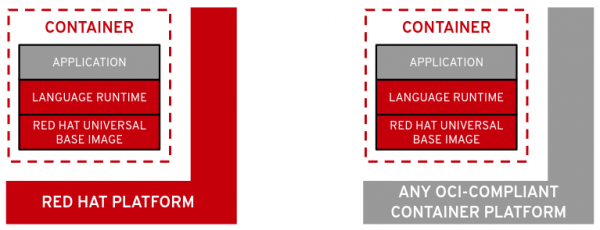
Thanks to UBI, there's the potential to publish and run your applications in virtually any infrastructure. However, if you run them on Red Hat platforms such as Red Hat OpenShift and Red Hat Enterprise Linux, you can gain additional benefits (more gold!). And before we dive into a more detailed description of UBI, let me provide a brief FAQ on the importance of the RHEL Subscription. So, what happens when you run a UBI image on the RHEL/OpenShift platform?
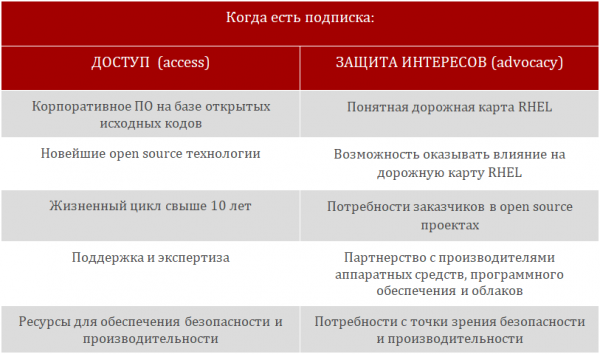
Now that the marketing is satisfied, let’s discuss UBI in more detail.
Reasons to use UBI
What you should feel to understand that UBI will be beneficial for you:
- My developers want to use container images that can be distributed and run in any environment
- My team operations wants a supported base image with an enterprise-level lifecycle
- My architects want to offer to my clients/end users
- My clients want to ensure enterprise-level support for their entire Red Hat environment
- My community want to share, run, publish containerized applications literally everywhere
If any of these scenarios apply to you, definitely take a look at UBI.
More than just a basic image
UBI is less than a full OS, but it has three important features:
- A set of three base images (ubi, ubi-minimal, ubi-init)
- Images with ready-to-use runtime environments for various programming languages (nodejs, ruby, python, php, perl, etc.)
- A collection of related packages in the YUM repository with the most common dependencies
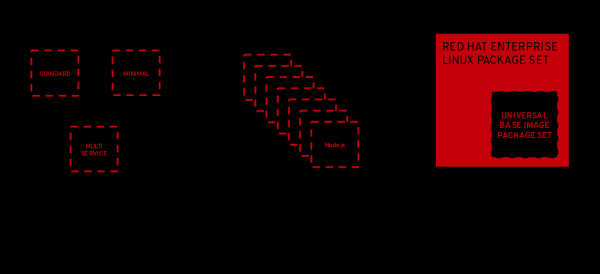
UBI was created as a foundation for cloud-native and web applications developed and delivered in containers. All content in UBI is a subset of RHEL. All packages in UBI come through RHEL channels and are supported like RHEL when running on supported Red Hat platforms such as OpenShift and RHEL.
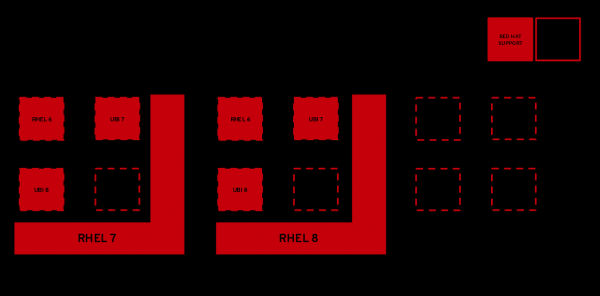
Ensuring quality container support requires considerable effort from engineers, security specialists, and other additional resources. It requires not only testing base images but also analyzing their behavior on any supported host.
To facilitate update-related tasks, Red Hat actively develops and supports UBI, allowing UBI 7 to run, for example, on RHEL 8 hosts, and UBI 8 on RHEL 7 hosts. This provides users with the necessary flexibility, confidence, and peace of mind during processes such as platform updates in container images or used hosts. Now all of this can be divided into two separate projects.
Three base images
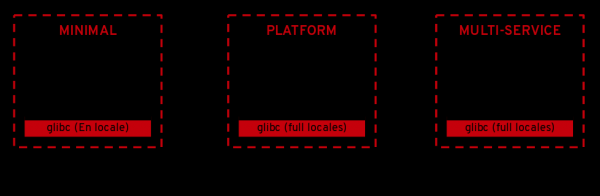
Minimal - designed for applications with all dependencies (Python, Node.js, .NET, etc.)
- Minimal set of pre-installed content
- No executables with suid
- Minimal package manager toolkit (installation, upgrade, and removal)
Platform - for any applications running on RHEL
- Unified OpenSSL cryptographic stack
- Complete YUM stack
- Includes useful core OS utilities (tar, gzip, vi, etc.)
Multi-Service - simplifies running multiple services in one container
- Configured to run systemd on startup
- Ability to enable services at build time
Container images with pre-built programming language runtimes
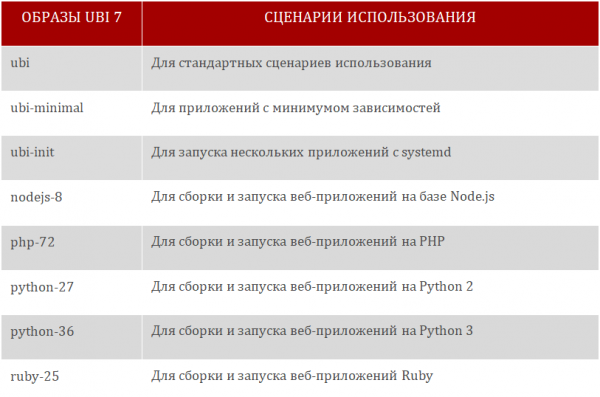
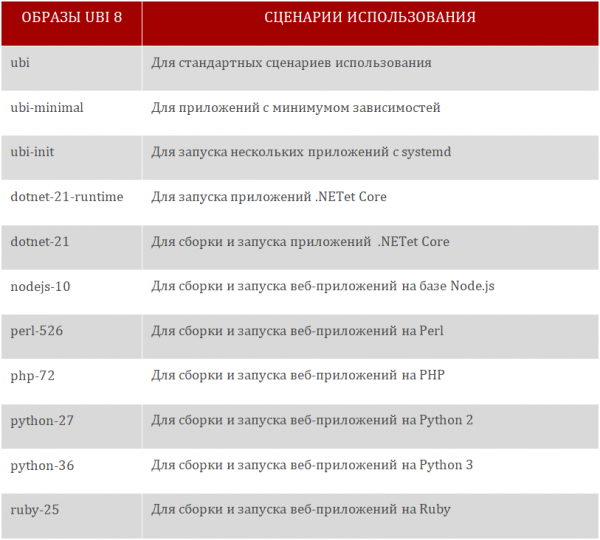
In addition to the basic images that allow for programming language support, UBI includes pre-assembled images with ready-to-use runtimes for several programming languages. Many developers can simply take an image and start working on the application they are developing.
With the launch of UBI, Red Hat offers two sets of images – based on RHEL 7 and RHEL 8. They are drawn from, respectively, Red Hat Software Collections (RHEL 7) and Application Streams (RHEL 8). These runtimes are kept up to date and typically receive up to four updates per year, thus always providing the opportunity to work with the latest and most stable versions.
Here is a list of UBI 7 container images:
Here is a list of container images for UBI 8:
Associated packages
Using ready-made images is indeed very convenient. Red Hat keeps them current and updates them alongside new RHEL releases, as well as when critical CVE updates appear in accordance with the update policy. so that you can take one of these images and immediately start working on an application.
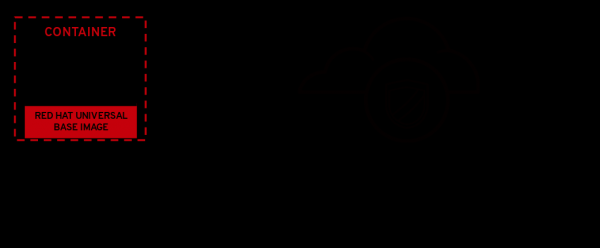
However, sometimes when creating an application, you may suddenly need some additional package. Or, sometimes, to get the application to work, you need to update a particular package. That’s why UBI images come with a set of RPMs that are available through yum, distributed via a fast and highly available content delivery network (you get the package!). When you run a yum update on your CI/CD at that critical moment of release, you can be sure – it will work.
RHEL is the foundation
We never tire of repeating that RHEL is the foundation of everything. Do you know which teams at Red Hat are working on creating the base images? For example, these:
- The engineering team responsible for ensuring that core libraries like glibc and OpenSSL, as well as runtime environments like Python and Ruby, deliver stable performance and work reliably under workloads when used in containers.
- The product security team addresses bugs and security issues in libraries and runtime environments in a timely manner, and their effectiveness is evaluated using a specialized index. .
- The team of product managers and engineers focuses on adding new features and ensuring a long product lifecycle, providing confidence in the invested resources that can serve as a foundation.
Red Hat Enterprise Linux serves as an excellent host and image for containers, but many developers value the ability to work with the system in various formats, some of which may extend beyond the supported use cases of the Linux system. This is where Universal Base Images (UBI) come in.
Suppose right now, at this stage, you are simply looking for a base image to start developing a basic containerized application. Or you are already further ahead and transitioning from standalone containers running on a container engine to a cloud-native story using Operators (building and certifying Operators) that run on OpenShift. In any case, UBI will provide an excellent foundation for this.
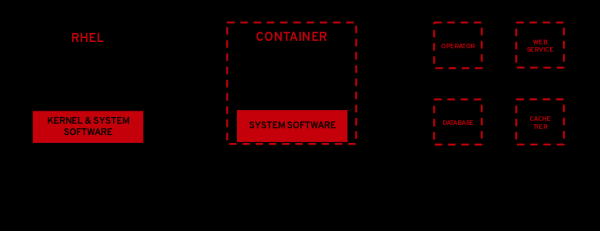
Containers include a lightweight version of the operating system's user space in a new packaging format. The release of UBI images sets a new industry standard for containerized development, making enterprise-class containers accessible to all users, independent software developers, and open source communities. In particular, software developers can standardize their products using a single, proven base for all their containerized applications, including For development companies using UBI, Red Hat Container Certification and Red Hat OpenShift Operator Certification are also available, allowing for continuous verification of software running on Red Hat platforms such as OpenShift.
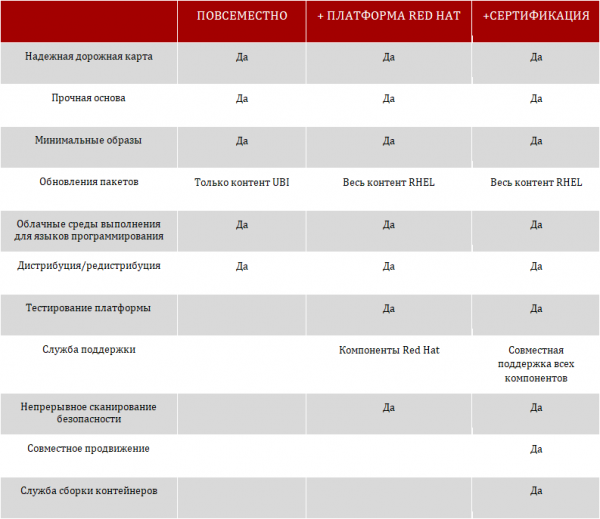
How to Get Started with an Image
In short, it's very simple. Podman is available not only in RHEL but also in Fedora, CentOS, and several other Linux distributions. All you need to do is pull the image from one of the following repositories and you're good to go.
For UBI 8:
podman pull registry.access.redhat.com/ubi8/ubi
podman pull registry.access.redhat.com/ubi8/ubi-minimal
podman pull registry.access.redhat.com/ubi8/ubi-init
For UBI 7:
podman pull registry.access.redhat.com/ubi7/ubi
podman pull registry.access.redhat.com/ubi7/ubi-minimal
podman pull registry.access.redhat.com/ubi7/ubi-init
And check out the complete Universal Base Image Guide
Source: habr.com
