


I want to explain how to safely store SSH keys on a local machine without fearing that any application could steal or decrypt them.
This article will be helpful for those who haven't found an elegant solution after in 2018 and still store keys in $HOME/.ssh.
To solve this problem, I suggest using , which is one of the best password managers, it uses strong encryption algorithms and also has a built-in SSH agent.
This allows you to securely store all keys directly in the password database and automatically add them to the system upon opening. Once the database is closed, using the SSH keys will also become impossible.
First, let's add auto-start for the SSH agent when logging into the system, for this, open ~/ .bashrc in your favorite editor and add at the very end:
SSH_ENV="$HOME/.ssh/environment"

function start_agent {
    echo "Initializing new SSH agent..."
    /usr/bin/ssh-agent | sed 's/^echo/#echo/' > "${SSH_ENV}"
    echo succeeded
    chmod 600 "${SSH_ENV}"
    . "${SSH_ENV}" > /dev/null
}

# Source SSH settings, if applicable
if [ -f "${SSH_ENV}" ]; then
    . "${SSH_ENV}" > /dev/null
    #ps ${SSH_AGENT_PID} doesn't work under cygwin
    ps -ef | grep ${SSH_AGENT_PID} | grep ssh-agent$ > /dev/null || {
        start_agent;
    }
else
    start_agent;
fi
After that, we need to enable support in KeePassXC:
Tools —> Parameters —> SSH agent —> Enable SSH agent
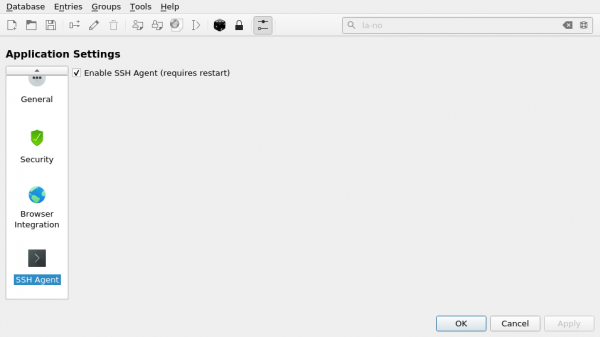
This completes the setup, now let's try to add a new SSH key to KeePassXC:
Click on the key icon, then fill in the details:
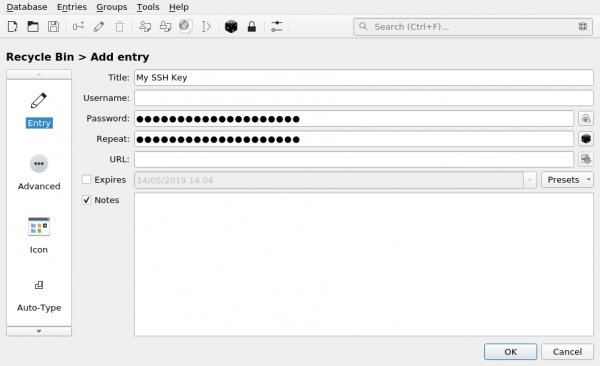
If the key is password-protected, also specify the password for it.
On the tab Additional upload the attachment with our id_rsa:
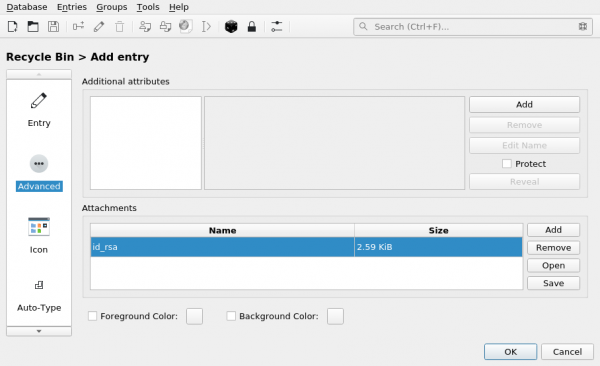
On the tab SSH agent, note that:
- Add the key to the agent upon opening/unlocking the database
- Remove the key from the agent upon closing/locking the database
Next, select our key (id_rsa) in the attachment
And click the button Add to agent:
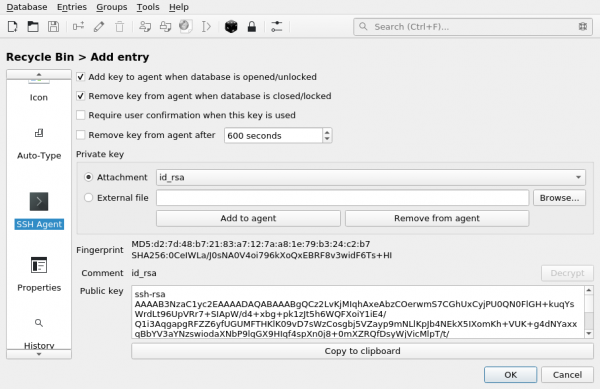
Now when you start KeePassXC, the key will automatically be added to the SSH agent, thus you no longer need to store it on disk!
Source: habr.com
