

Discovered this year allows any domain user to gain domain administrator rights and compromise Active Directory (AD) and other connected hosts. Today, we will explain how this attack works and how to detect it.
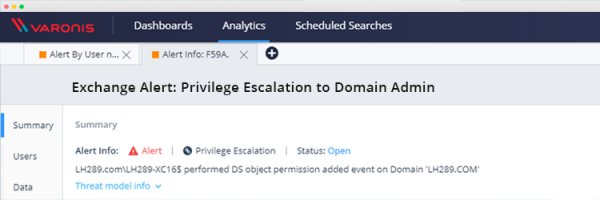
Here's how this attack works:
- The attacker takes over the account of any domain user with an active mailbox to subscribe to the push notification feature from Exchange
- The attacker uses NTLM relay to trick the Exchange server: as a result, the Exchange server connects to the computer of the compromised user using the NTLM over HTTP method, which the attacker then uses to pass the authentication procedure on the domain controller via LDAP with the Exchange account credentials
- As a result, the attacker uses these Exchange account credentials to escalate their privileges. This last step can also be performed by a hostily configured administrator who already has legitimate access to make the necessary permission changes. By creating a rule to detect this activity, you will be protected from this and similar attacks.
Subsequently, the attacker can, for example, run DCSync to obtain the hashed passwords of all domain users. This will enable them to execute various types of attacks, from golden ticket attacks to hash theft.
The Varonis research team has closely examined this attack vector and prepared a guide for our clients to detect it and also check if they have already been compromised.
Detecting Privilege Escalation in the Domain
In create a custom rule to monitor changes to certain permissions on an object. It will trigger when permissions on the object of interest are added in the domain:
- Specify the rule name
- Set the category to 'Privilege Escalation'
- Assign the resource type value 'All resource types'
- File server = DirectoryServices
- Specify the domain of interest, for example, by name
- Add a filter for permission additions on the AD object
- And don't forget to leave the 'Search in child objects' option unchecked
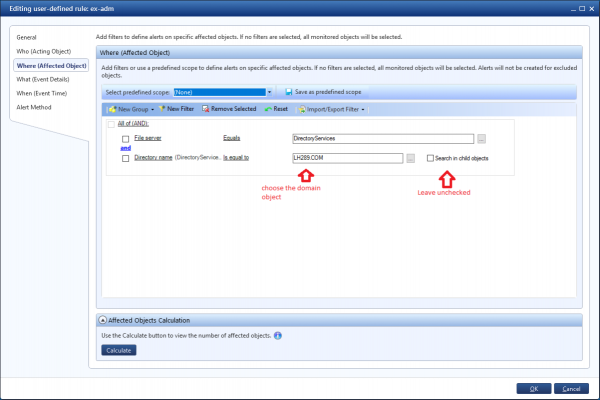
And now the report: detection of permissions change on the domain object
Changes in permissions on the AD object are quite rare, so anything that triggered this warning needs to be investigated. It would also be good to test the appearance and content of the report before deploying the rule.
This report will also show whether you have already been compromised by this attack:
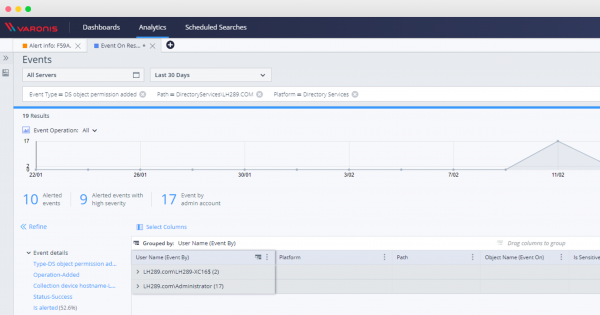
After activating the rule, you can investigate all other privilege escalation events using the DatAlert web interface:
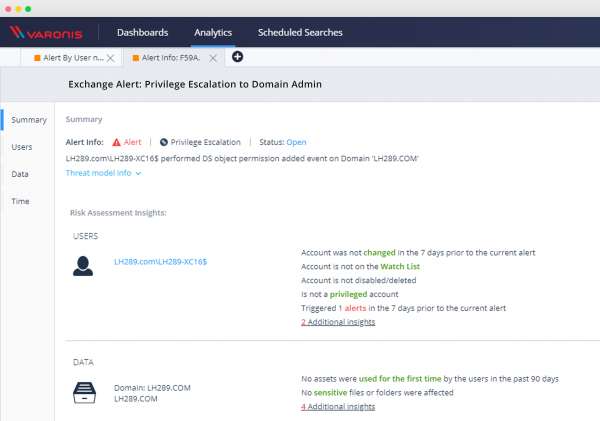
Once this rule is set up, you will be able to monitor and defend against these and similar types of security vulnerabilities, investigate events involving AD directory service objects, and check if you are susceptible to this critical vulnerability.
Source: habr.com
