


Introduction
At the end of March, we , that we discovered a hidden capability to download and execute unverified code in UC Browser. Today, we will detail how this download occurs and how hackers can exploit it.
Some time ago, UC Browser was marketed and distributed very aggressively: it was installed on user devices via malware, distributed from various sites disguised as video files (i.e., users thought they were downloading something like a porn clip but instead received an APK for this browser), and used frightening banners with messages saying the browser was outdated, vulnerable, and so on. There is a , in the official UC Browser group on VK where users can report unfair advertising, and there are many examples. In 2016, there was even a in Russian (yes, an ad for a browser that blocks ads).
At the time of writing, UC Browser has over 500 million installations on Google Play. This is impressive—only Google Chrome has more. Among the reviews, there are quite a few complaints about ads and redirects to some applications on Google Play. This prompted our investigation: we decided to see if UC Browser was doing anything wrong. And it turned out it was!
The application code revealed the capability to download and execute executable code, on Google Play. Besides the fact that UC Browser downloads executable code, it does so unsafely, which could be exploited for a Man-in-the-Middle attack. Let’s see if we can conduct such an attack.
Everything written below is relevant for the version of UC Browser that was available on Google Play at the time of the research:
package: com.UCMobile.intl
versionName: 12.10.8.1172
versionCode: 10598
sha1 of the APK file: f5edb2243413c777172f6362876041eb0c3a928c
Attack vector
In the UC Browser manifest, a service with a telling name can be found com.uc.deployment.UpgradeDeployService.
<service android_exported="false" android_name="com.uc.deployment.UpgradeDeployService" android_process=":deploy" />
When this service is launched, the browser performs a POST request to , which can be noticed in the traffic after some time post-launch. In response, it may receive a command to download some update or new module. During the analysis, the server did not send such commands, but we observed that when attempting to open a PDF in the browser, it makes a repeated request to the address mentioned above, after which it downloads the native library. To conduct the attack, we decided to utilize this feature of UC Browser: its ability to open PDFs using a native library that is not present in the APK and is loaded from the Internet as needed. It's worth noting that theoretically, UC Browser could be made to download something without user interaction — if a properly formatted response is given to the request executed after the browser starts. However, this requires a more detailed examination of the protocol interaction with the server, so we concluded that it would be simpler to edit the intercepted response and substitute the library for working with PDFs.
So, when the user wants to open a PDF directly in the browser, the following requests can be seen in the traffic:
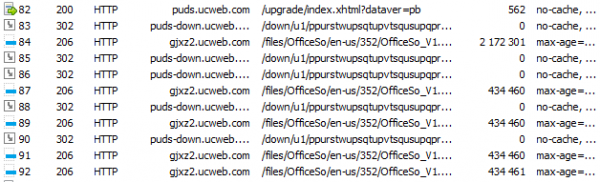
First, there is a POST request to , after which
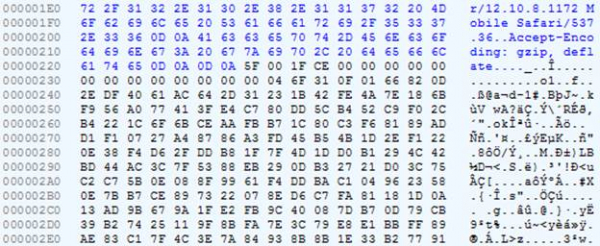
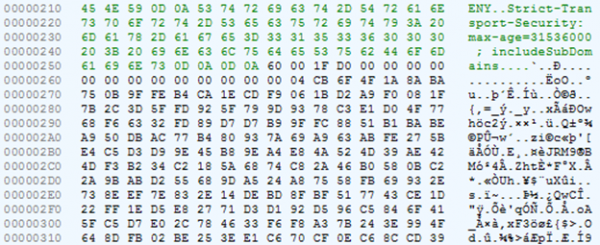
an archive with the library for viewing PDFs and office formats is downloaded. It is logical to assume that in the first request information about the system is transmitted (at least the architecture, to provide the correct library), and in response to it, the browser receives some information about the library that needs to be downloaded: the address and possibly something else. The problem is that this request is encrypted.
Fragment of the request
Fragment of the response
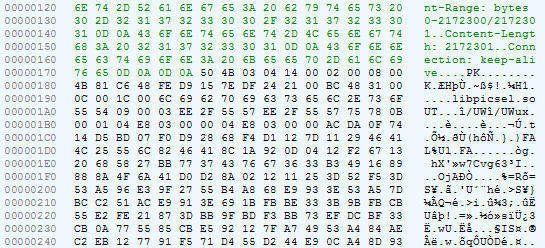
The library itself is packed in a ZIP file and is not encrypted.
Search for traffic decryption code
Let's attempt to decrypt the server's response. Looking at the class code com.uc.deployment.UpgradeDeployService: from the method onStartCommand we go to com.uc.deployment.b.x, and from there to com.uc.browser.core.d.c.f.e:
    public final void e(l arg9) {
        int v4_5;
        String v3_1;
        byte[] v3;
        byte[] v1 = null;
        if(arg9 == null) {
            v3 = v1;
        }
        else {
            v3_1 = arg9.iGX.ipR;
            StringBuilder v4 = new StringBuilder("[");
            v4.append(v3_1);
            v4.append("]product:");
            v4.append(arg9.iGX.ipR);
            v4 = new StringBuilder("[");
            v4.append(v3_1);
            v4.append("]version:");
            v4.append(arg9.iGX.iEn);
            v4 = new StringBuilder("[");
            v4.append(v3_1);
            v4.append("]upgrade_type:");
            v4.append(arg9.iGX.mMode);
            v4 = new StringBuilder("[");
            v4.append(v3_1);
            v4.append("]force_flag:");
            v4.append(arg9.iGX.iEo);
            v4 = new StringBuilder("[");
            v4.append(v3_1);
            v4.append("]silent_mode:");
            v4.append(arg9.iGX.iDQ);
            v4 = new StringBuilder("[");
            v4.append(v3_1);
            v4.append("]silent_type:");
            v4.append(arg9.iGX.iEr);
            v4 = new StringBuilder("[");
            v4.append(v3_1);
            v4.append("]silent_state:");
            v4.append(arg9.iGX.iEp);
            v4 = new StringBuilder("[");
            v4.append(v3_1);
            v4.append("]silent_file:");
            v4.append(arg9.iGX.iEq);
            v4 = new StringBuilder("[");
            v4.append(v3_1);
            v4.append("]apk_md5:");
            v4.append(arg9.iGX.iEl);
            v4 = new StringBuilder("[");
            v4.append(v3_1);
            v4.append("]download_type:");
            v4.append(arg9.mDownloadType);
            v4 = new StringBuilder("[");
            v4.append(v3_1);
            v4.append("]download_group:");
            v4.append(arg9.mDownloadGroup);
            v4 = new StringBuilder("[");
            v4.append(v3_1);
            v4.append("]download_path:");
            v4.append(arg9.iGH);
            v4 = new StringBuilder("[");
            v4.append(v3_1);
            v4.append("]apollo_child_version:");
            v4.append(arg9.iGX.iEx);
            v4 = new StringBuilder("[");
            v4.append(v3_1);
            v4.append("]apollo_series:");
            v4.append(arg9.iGX.iEw);
            v4 = new StringBuilder("[");
            v4.append(v3_1);
            v4.append("]apollo_cpu_arch:");
            v4.append(arg9.iGX.iEt);
            v4 = new StringBuilder("[");
            v4.append(v3_1);
            v4.append("]apollo_cpu_vfp3:");
            v4.append(arg9.iGX.iEv);
            v4 = new StringBuilder("[");
            v4.append(v3_1);
            v4.append("]apollo_cpu_vfp:");
            v4.append(arg9.iGX.iEu);
            ArrayList v3_2 = arg9.iGX.iEz;
            if(v3_2 != null && v3_2.size() != 0) {
                Iterator v3_3 = v3_2.iterator();
                while(v3_3.hasNext()) {
                    Object v4_1 = v3_3.next();
                    StringBuilder v5 = new StringBuilder("[");
                    v5.append(((au)v4_1).getName());
                    v5.append("]component_name:");
                    v5.append(((au)v4_1).getName());
                    v5 = new StringBuilder("[");
                    v5.append(((au)v4_1).getName());
                    v5.append("]component_ver_name:");
                    v5.append(((au)v4_1).aDA());
                    v5 = new StringBuilder("[");
                    v5.append(((au)v4_1).getName());
                    v5.append("]component_ver_code:");
                    v5.append(((au)v4_1).gBl);
                    v5 = new StringBuilder("[");
                    v5.append(((au)v4_1).getName());
                    v5.append("]component_req_type:");
                    v5.append(((au)v4_1).gBq);
                }
            }

            j v3_4 = new j();
            m.b(v3_4);
            h v4_2 = new h();
            m.b(v4_2);
            ay v5_1 = new ay();
            v3_4.hS("");
            v3_4.setImsi("");
            v3_4.hV("");
            v5_1.bPQ = v3_4;
            v5_1.bPP = v4_2;
            v5_1.yr(arg9.iGX.ipR);
            v5_1.gBF = arg9.iGX.mMode;
            v5_1.gBI = arg9.iGX.iEz;
            v3_2 = v5_1.gAr;
            c.aBh();
            v3_2.add(g.fs("os_ver", c.getRomInfo()));
            v3_2.add(g.fs("processor_arch", com.uc.b.a.a.c.getCpuArch()));
            v3_2.add(g.fs("cpu_arch", com.uc.b.a.a.c.Pb()));
            String v4_3 = com.uc.b.a.a.c.Pd();
            v3_2.add(g.fs("cpu_vfp", v4_3));
            v3_2.add(g.fs("net_type", String.valueOf(com.uc.base.system.a.Jo())));
            v3_2.add(g.fs("fromhost", arg9.iGX.iEm));
            v3_2.add(g.fs("plugin_ver", arg9.iGX.iEn));
            v3_2.add(g.fs("target_lang", arg9.iGX.iEs));
            v3_2.add(g.fs("vitamio_cpu_arch", arg9.iGX.iEt));
            v3_2.add(g.fs("vitamio_vfp", arg9.iGX.iEu));
            v3_2.add(g.fs("vitamio_vfp3", arg9.iGX.iEv));
            v3_2.add(g.fs("plugin_child_ver", arg9.iGX.iEx));
            v3_2.add(g.fs("ver_series", arg9.iGX.iEw));
            v3_2.add(g.fs("child_ver", r.aVw()));
            v3_2.add(g.fs("cur_ver_md5", arg9.iGX.iEl));
            v3_2.add(g.fs("cur_ver_signature", SystemHelper.getUCMSignature()));
            v3_2.add(g.fs("upgrade_log", i.bjt()));
            v3_2.add(g.fs("silent_install", String.valueOf(arg9.iGX.iDQ)));
            v3_2.add(g.fs("silent_state", String.valueOf(arg9.iGX.iEp)));
            v3_2.add(g.fs("silent_file", arg9.iGX.iEq));
            v3_2.add(g.fs("silent_type", String.valueOf(arg9.iGX.iEr)));
            v3_2.add(g.fs("cpu_archit", com.uc.b.a.a.c.Pc()));
            v3_2.add(g.fs("cpu_set", SystemHelper.getCpuInstruction()));
            boolean v4_4 = v4_3 == null || !v4_3.contains("neon") ? false : true;
            v3_2.add(g.fs("neon", String.valueOf(v4_4)));
            v3_2.add(g.fs("cpu_cores", String.valueOf(com.uc.b.a.a.c.Jl())));
            v3_2.add(g.fs("ram_1", String.valueOf(com.uc.b.a.a.h.Po())));
            v3_2.add(g.fs("totalram", String.valueOf(com.uc.b.a.a.h.OL())));
            c.aBh();
            v3_2.add(g.fs("rom_1", c.getRomInfo()));
            v4_5 = e.getScreenWidth();
            int v6 = e.getScreenHeight();
            StringBuilder v7 = new StringBuilder();
            v7.append(v4_5);
            v7.append("*");
            v7.append(v6);
            v3_2.add(g.fs("ss", v7.toString()));
            v3_2.add(g.fs("api_level", String.valueOf(Build$VERSION.SDK_INT)));
            v3_2.add(g.fs("uc_apk_list", SystemHelper.getUCMobileApks()));
            Iterator v4_6 = arg9.iGX.iEA.entrySet().iterator();
            while(v4_6.hasNext()) {
                Object v6_1 = v4_6.next();
                v3_2.add(g.fs(((Map$Entry)v6_1).getKey(), ((Map$Entry)v6_1).getValue()));
            }

            v3 = v5_1.toByteArray();
        }

        if(v3 == null) {
            this.iGY.iGI.a(arg9, "up_encode", "yes", "fail");
            return;
        }

        v4_5 = this.iGY.iGw ? 0x1F : 0;
        if(v3 == null) {
        }
        else {
            v3 = g.i(v4_5, v3);
            if(v3 == null) {
            }
            else {
                v1 = new byte[v3.length + 16];
                byte[] v6_2 = new byte[16];
                Arrays.fill(v6_2, 0);
                v6_2[0] = 0x5F;
                v6_2[1] = 0;
                v6_2[2] = ((byte)v4_5);
                v6_2[3] = -50;
                System.arraycopy(v6_2, 0, v1, 0, 16);
                System.arraycopy(v3, 0, v1, 16, v3.length);
            }
        }

        if(v1 == null) {
            this.iGY.iGI.a(arg9, "up_encrypt", "yes", "fail");
            return;
        }

        if(TextUtils.isEmpty(this.iGY.mUpgradeUrl)) {
            this.iGY.iGI.a(arg9, "up_url", "yes", "fail");
            return;
        }

        StringBuilder v0 = new StringBuilder("[");
        v0.append(arg9.iGX.ipR);
        v0.append("]url:");
        v0.append(this.iGY.mUpgradeUrl);
        com.uc.browser.core.d.c.i v0_1 = this.iGY.iGI;
        v3_1 = this.iGY.mUpgradeUrl;
        com.uc.base.net.e v0_2 = new com.uc.base.net.e(new com.uc.browser.core.d.c.i$a(v0_1, arg9));
        v3_1 = v3_1.contains("?") ? v3_1 + "&dataver=pb" : v3_1 + "?dataver=pb";
        n v3_5 = v0_2.uc(v3_1);
        m.b(v3_5, false);
        v3_5.setMethod("POST");
        v3_5.setBodyProvider(v1);
        v0_2.b(v3_5);
        this.iGY.iGI.a(arg9, "up_null", "yes", "success");
        this.iGY.iGI.b(arg9);
    }
Here we see the formation of a POST request. Note the creation of an array of 16 bytes and its population: 0x5F, 0, 0x1F, -50 (=0xCE). This matches what we saw in the request above.
In this class, we can notice a nested class that contains another interesting method:
        public final void a(l arg10, byte[] arg11) {
            f v0 = this.iGQ;
            StringBuilder v1 = new StringBuilder("[");
            v1.append(arg10.iGX.ipR);
            v1.append("]:UpgradeSuccess");
            byte[] v1_1 = null;
            if(arg11 == null) {
            }
            else if(arg11.length < 16) {
            }
            else {
                if(arg11[0] != 0x60 && arg11[3] != 0xFFFFFFD0) {
                    goto label_57;
                }
                int v3 = 1;
                int v5 = arg11[1] == 1 ? 1 : 0;
                if(arg11[2] != 1 && arg11[2] != 11) {
                    if(arg11[2] == 0x1F) {
                    }
                    else {
                        v3 = 0;
                    }
                }
                byte[] v7 = new byte[arg11.length - 16];
                System.arraycopy(arg11, 16, v7, 0, v7.length);
                if(v3 != 0) {
                    v7 = g.j(arg11[2], v7);
                }
                if(v7 == null) {
                    goto label_57;
                }
                if(v5 != 0) {
                    v1_1 = g.P(v7);
                    goto label_57;
                }
                v1_1 = v7;
            }
        label_57:
            if(v1_1 == null) {
                v0.iGY.iGI.a(arg10, "up_decrypt", "yes", "fail");
                return;
            }
            q v11 = g.b(arg10, v1_1);
            if(v11 == null) {
                v0.iGY.iGI.a(arg10, "up_decode", "yes", "fail");
                return;
            }
            if(v0.iGY.iGt) {
                v0.d(arg10);
            }
            if(v0.iGY.iGo != null) {
                v0.iGY.iGo.a(0, ((o)v11));
            }
            if(v0.iGY.iGs) {
                v0.iGY.a(((o)v11));
                v0.iGY.iGI.a(v11, "up_silent", "yes", "success");
                v0.iGY.iGI.a(v11);
                return;
            }
            v0.iGY.iGI.a(v11, "up_silent", "no", "success");
        }
    }
The method receives a byte array and checks that the first byte equals 0x60 or the third byte equals 0xD0, and that the second byte is 1, 11, or 0x1F. Let's look at the server response: the first byte is 0x60, the second is 0x1F, and the third is 0x60. It appears to be what we need. According to the lines (like "up_decrypt"), a method that decrypts the server's response should be called here.
Now, let's move on to the method g.j. Note that the first argument passed to it is the byte at offset 2 (i.e., 0x1F in our case), and the second is the server response without
the first 16 bytes.
     public static byte[] j(int arg1, byte[] arg2) {
        if(arg1 == 1) {
            arg2 = c.c(arg2, c.adu);
        }
        else if(arg1 == 11) {
            arg2 = m.aF(arg2);
        }
        else if(arg1 != 0x1F) {
        }
        else {
            arg2 = EncryptHelper.decrypt(arg2);
        }
        return arg2;
    }
Clearly, here is the selection of the decryption algorithm, and that byte, which is in our
In case it equals 0x1F, it signifies one of three possible options.
Continuing with the code analysis. After a couple of jumps, we arrive at a method with a telling name. decryptBytesByKey.
Here, two more bytes are separated from our response, creating a string. It's clear that this method is used to select the key for decrypting the message.
    private static byte[] decryptBytesByKey(byte[] bytes) {
        byte[] v0 = null;
        if(bytes != null) {
            try {
                if(bytes.length < EncryptHelper.PREFIX_BYTES_SIZE) {
                }
                else if(bytes.length == EncryptHelper.PREFIX_BYTES_SIZE) {
                    return v0;
                }
                else {
                    byte[] prefix = new byte[EncryptHelper.PREFIX_BYTES_SIZE];  // 2 bytes
                    System.arraycopy(bytes, 0, prefix, 0, prefix.length);
                    String keyId = c.ayR().d(ByteBuffer.wrap(prefix).getShort()); // Selecting the key
                    if(keyId == null) {
                        return v0;
                    }
                    else {
                        a v2 = EncryptHelper.ayL();
                        if(v2 == null) {
                            return v0;
                        }
                        else {
                            byte[] enrypted = new byte[bytes.length - EncryptHelper.PREFIX_BYTES_SIZE];
                            System.arraycopy(bytes, EncryptHelper.PREFIX_BYTES_SIZE, enrypted, 0, enrypted.length);
                            return v2.l(keyId, enrypted);
                        }
                    }
                }
            }
            catch(SecException v7_1) {
                EncryptHelper.handleDecryptException(((Throwable)v7_1), v7_1.getErrorCode());
                return v0;
            }
            catch(Throwable v7) {
                EncryptHelper.handleDecryptException(v7, 2);
                return v0;
            }
        }

        return v0;
    }
Looking ahead, it's worth noting that at this stage, what we obtain is not yet the key, but just its "identifier." Getting the actual key is somewhat more complex.
In the next method, two additional parameters are added to the existing ones, making a total of four: the magic number 16, the key identifier, the encrypted data, and an unclear string (in our case, empty).
    public final byte[] l(String keyId, byte[] encrypted) throws SecException {
        return this.ayJ().staticBinarySafeDecryptNoB64(16, keyId, encrypted, "");
    }
After a series of transitions, we arrive at the method staticBinarySafeDecryptNoB64 of the interface com.alibaba.wireless.security.open.staticdataencrypt.IStaticDataEncryptComponent. In the main application code, there are no classes that implement this interface. There is such a class in the file lib/armeabi-v7a/libsgmain.so, which is actually not a .so, but a .jar. The method we are interested in is implemented as follows:
package com.alibaba.wireless.security.a.i;

// ...

public class a implements IStaticDataEncryptComponent {
    private ISecurityGuardPlugin a;
// ...
    private byte[] a(int mode, int magicInt, int xzInt, String keyId, byte[] encrypted, String magicString) {
        return this.a.getRouter().doCommand(10601, new Object[]{Integer.valueOf(mode), Integer.valueOf(magicInt), Integer.valueOf(xzInt), keyId, encrypted, magicString});
    }
// ...
    private byte[] b(int magicInt, String keyId, byte[] encrypted, String magicString) {
        return this.a(2, magicInt, 0, keyId, encrypted, magicString);
    }
// ...
    public byte[] staticBinarySafeDecryptNoB64(int magicInt, String keyId, byte[] encrypted, String magicString) throws SecException {
        if(keyId != null && keyId.length() > 0 && magicInt >= 0 && magicInt  0) {
            return this.b(magicInt, keyId, encrypted, magicString);
        }

        throw new SecException("", 301);
    }
//...
}
Here our list of parameters is supplemented with two more integers: 2 and 0. Apparently,
2 means decryption, as in the method doFinal of the system class javax.crypto.Cipher. And all this is passed to some Router with the number 10601 — this is presumably the command number.
After another chain of transitions, we find the class that implements the interface IRouterComponent and the method doCommand:
package com.alibaba.wireless.security.mainplugin;

import com.alibaba.wireless.security.framework.IRouterComponent;
import com.taobao.wireless.security.adapter.JNICLibrary;

public class a implements IRouterComponent {
    public a() {
        super();
    }
    public Object doCommand(int arg2, Object[] arg3) {
        return JNICLibrary.doCommandNative(arg2, arg3);
    }
}
And also the class JNICLibrary, in which a native method doCommandNative:
package com.taobao.wireless.security.adapter;

public class JNICLibrary {
    public static native Object doCommandNative(int arg0, Object[] arg1);
}
So, we need to find the method in the native code. doCommandNative. And here the fun begins.
Obfuscation of the machine code
In the file libsgmain.so (which is actually a .jar and in which we found the implementation of some encryption-related interfaces above) has one native library: libsgmainso-6.4.36.so. We open it in IDA and get a bunch of error dialog boxes. The problem is that the section header table is invalid. This is done intentionally to complicate the analysis.
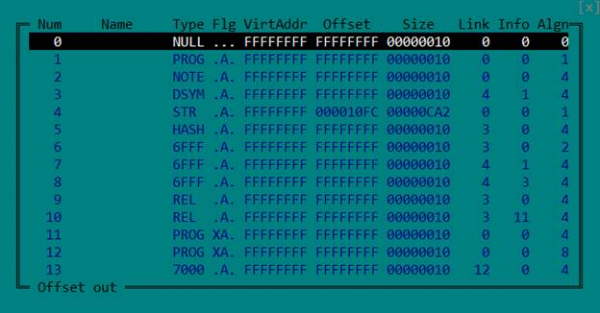
But it's not needed: to correctly load the ELF file and analyze it, the program header table is enough. So we simply delete the section table by zeroing the corresponding fields in the header.
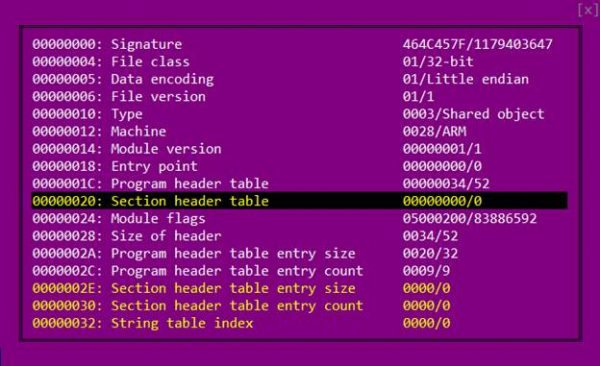
We open the file in IDA again.
There are two ways to inform the Java virtual machine where exactly in the native library the implementation of the method declared in the Java code as native is located. The first is to give it a name like Java_package_name_ClassName_methodName.
The second step is to register it when loading the library (in the function JNI_OnLoad)
by invoking the function RegisterNatives.
In our case, if we use the first method, the name should be as follows: Java_com_taobao_wireless_security_adapter_JNICLibrary_doCommandNative.
There is no such exported function, so we need to look for the call RegisterNatives.
We go to the function JNI_OnLoad and see the following picture:
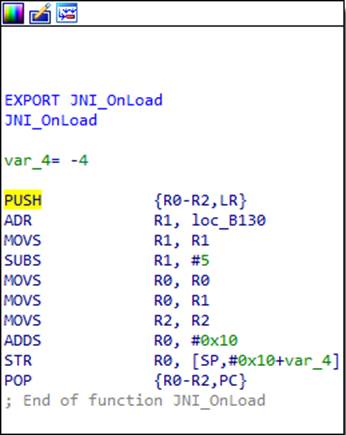
What is happening here? At first glance, the beginning and end of the function are typical for the ARM architecture. The first instruction pushes the contents of the registers that the function will use in its work (in this case R0, R1, and R2) to the stack, along with the contents of the LR register, which holds the return address. The last instruction restores the saved registers, and the return address is immediately placed into the PC register — that’s how the function returns. But upon closer inspection, we can see that the penultimate instruction changes the return address saved in the stack. Let's calculate what it will be after
the code execution. Some address 0xB130 is loaded into R1, 5 is subtracted from it, then it is moved into R0 and 0x10 is added to it. This results in 0xB13B. Thus, IDA thinks that the last instruction represents a regular return from the function, whereas in reality, it is a jump to the calculated address 0xB13B.
It is worth noting that ARM processors have two modes and two instruction sets: ARM and Thumb. The least significant bit of the address tells the processor which instruction set is used. That is, the address is actually 0xB13A, and the one in the least significant bit indicates Thumb mode.
At the beginning of each function in this library, a similar "adapter" and
junk code have been added. We will not dwell on them further – just remember,
that the actual start of almost all functions is slightly further ahead.
Since there is no explicit jump to 0xB13A in the code, IDA itself did not identify that there is code at this location. For this reason, it fails to recognize much of the code in the library as legitimate code, which complicates the analysis somewhat. We tell IDA that there is code here, and here is what we get:
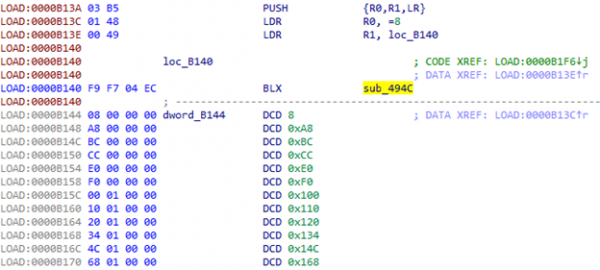
At 0xB144, a table clearly begins. But what is in sub_494C?
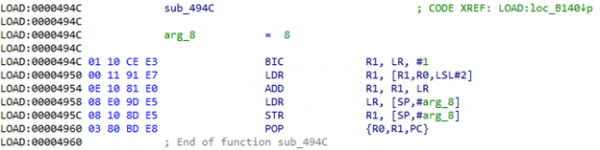
When this function is called, the LR register will contain the address of the aforementioned table (0xB144). In R0 — the index in this table. That is, a value from the table is taken, added to LR, and results in
The address to which you need to go. Let's calculate it: 0xB144 + [0xB144 + 8 * 4] = 0xB144 + 0x120 = 0xB264. We navigate to the resulting address and see just a couple of useful instructions and again a transition to 0xB140:

Now there will be a transition by offset with index 0x20 from the table.
Judging by the size of the table, there will be many such transitions in the code. The question arises, can we somehow automate this more, without manually calculating addresses? And scripts and the ability to patch code in IDA come to our aid:
def put_unconditional_branch(source, destination):
    offset = (destination - source - 4) >> 1
    if offset > 2097151 or offset  1023 or offset > 11) & 0x7ff)
        instruction2 = 0xb800 | (offset & 0x7ff)
        patch_word(source, instruction1)
        patch_word(source + 2, instruction2)
    else:
        instruction = 0xe000 | (offset & 0x7ff)
        patch_word(source, instruction)


ea = here()
if get_wide_word(ea) == 0xb503: #PUSH {R0,R1,LR}
    ea1 = ea + 2
    if get_wide_word(ea1) == 0xbf00: #NOP
        ea1 += 2
    if get_operand_type(ea1, 0) == 1 and get_operand_value(ea1, 0) == 0 and get_operand_type(ea1, 1) == 2:
        index = get_wide_dword(get_operand_value(ea1, 1))
        print "index =", hex(index)
        ea1 += 2
        if get_operand_type(ea1, 0) == 7:
            table = get_operand_value(ea1, 0) + 4
        elif get_operand_type(ea1, 1) == 2:
            table = get_operand_value(ea1, 1) + 4
        else:
            print "Wrong operand type on", hex(ea1), "-", get_operand_type(ea1, 0), get_operand_type(ea1, 1)
            table = None
        if table is None:
            print "Unable to find table"
        else:
            print "table =", hex(table)
            offset = get_wide_dword(table + (index << 2))
            put_unconditional_branch(ea, table + offset)
    else:
        print "Unknown code", get_operand_type(ea1, 0), get_operand_value(ea1, 0), get_operand_type(ea1, 1) == 2
else:
    print "Unable to detect first instruction"
We place the cursor on line 0xB26A, run the script, and see a transition to 0xB4B0:

IDA again did not recognize this section as code. We help it and see another construct there:
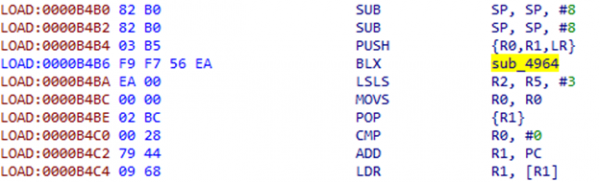
The instructions after BLX look rather meaningless; this seems more like some offset. Let's look at sub_4964:
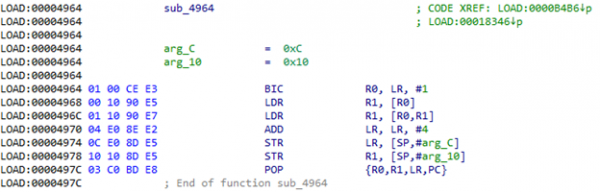
Indeed, here a dword is taken from the address in LR, added to this address, after which the value at the resulting address is taken and placed on the stack. Also, 4 is added to LR to skip this offset after the function returns. After that, the command POP {R1} retrieves the obtained value from the stack. If we look at what is located at address 0xB4BA + 0xEA = 0xB5A4, we can see something resembling a table of addresses:

To patch this construct, you need to obtain two parameters from the code: the offset and the register number into which the result should be placed. For each possible register, a snippet of code must be prepared in advance.
patches = {}
patches[0] = (0x00, 0xbf, 0x01, 0x48, 0x00, 0x68, 0x02, 0xe0)
patches[1] = (0x00, 0xbf, 0x01, 0x49, 0x09, 0x68, 0x02, 0xe0)
patches[2] = (0x00, 0xbf, 0x01, 0x4a, 0x12, 0x68, 0x02, 0xe0)
patches[3] = (0x00, 0xbf, 0x01, 0x4b, 0x1b, 0x68, 0x02, 0xe0)
patches[4] = (0x00, 0xbf, 0x01, 0x4c, 0x24, 0x68, 0x02, 0xe0)
patches[5] = (0x00, 0xbf, 0x01, 0x4d, 0x2d, 0x68, 0x02, 0xe0)
patches[8] = (0x00, 0xbf, 0xdf, 0xf8, 0x06, 0x80, 0xd8, 0xf8, 0x00, 0x80, 0x01, 0xe0)
patches[9] = (0x00, 0xbf, 0xdf, 0xf8, 0x06, 0x90, 0xd9, 0xf8, 0x00, 0x90, 0x01, 0xe0)
patches[10] = (0x00, 0xbf, 0xdf, 0xf8, 0x06, 0xa0, 0xda, 0xf8, 0x00, 0xa0, 0x01, 0xe0)
patches[11] = (0x00, 0xbf, 0xdf, 0xf8, 0x06, 0xb0, 0xdb, 0xf8, 0x00, 0xb0, 0x01, 0xe0)

    ea = here()
if (get_wide_word(ea) == 0xb082 #SUB SP, SP, #8
        and get_wide_word(ea + 2) == 0xb503): #PUSH {R0,R1,LR}
    if get_operand_type(ea + 4, 0) == 7:
        pop = get_bytes(ea + 12, 4, 0)
        if pop[1] == 'xbc':
            register = -1
            r = get_wide_byte(ea + 12)
            for i in range(8):
                if r == (1 <> 4
            if register in patches:
                address = get_wide_dword(ea + 8) + ea + 8
                for b in patches[register]:
                    patch_byte(ea, b)
                    ea += 1
                patch_dword(ea, address)
        else:
            print "POP instruction not found"
    else:
        print "Wrong operand type on +4:", get_operand_type(ea + 4, 0)
else:
    print "Unable to detect first instructions"
Position the cursor at the beginning of the construct to be replaced — 0xB4B2 — and run the script:
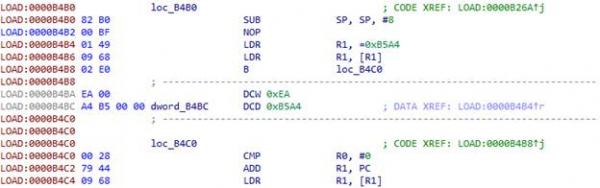
In addition to the constructs already mentioned, similar ones can also be found in the code:

As in the previous case, following the BLX instruction is an offset:
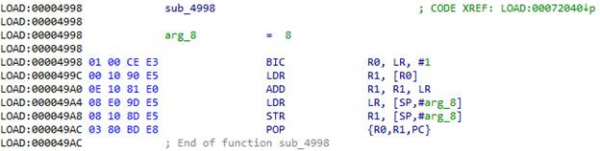
Take the offset from the address in LR, add it to LR, and move there. 0x72044 + 0xC = 0x72050. The script for this construct is quite simple:
def put_unconditional_branch(source, destination):
    offset = (destination - source - 4) >> 1
    if offset > 2097151 or offset  1023 or offset > 11) & 0x7ff)
        instruction2 = 0xb800 | (offset & 0x7ff)
        patch_word(source, instruction1)
        patch_word(source + 2, instruction2)
    else:
        instruction = 0xe000 | (offset & 0x7ff)
        patch_word(source, instruction)


    ea = here()
if get_wide_word(ea) == 0xb503: #PUSH {R0,R1,LR}
    ea1 = ea + 6
    if get_wide_word(ea + 2) == 0xbf00: #NOP
        ea1 += 2
    offset = get_wide_dword(ea1)
    put_unconditional_branch(ea, (ea1 + offset) & 0xffffffff)
else:
    print "Unable to detect first instruction"
The result of the script execution:

After everything is patched in the function, you can point IDA to its real start. It will piece together the entire function code, which can be decompiled using HexRays.
String Decryption
We learned to deal with machine code obfuscation in the library libsgmainso-6.4.36.so from UC Browser and obtained the function code JNI_OnLoad.
int __fastcall real_JNI_OnLoad(JavaVM *vm)
{
  int result; // r0
  jclass clazz; // r0 MAPDST
  int v4; // r0
  JNIEnv *env; // r4
  int v6; // [sp-40h] [bp-5Ch]
  int v7; // [sp+Ch] [bp-10h]
  v7 = *(_DWORD *)off_8AC00;
  if ( !vm )
    goto LABEL_39;
  sub_7C4F4();
  env = (JNIEnv *)sub_7C5B0(0);
  if ( !env )
    goto LABEL_39;
  v4 = sub_72CCC();
  sub_73634(v4);
  sub_73E24(&unk_83EA6, &v6, 49);
  clazz = (jclass)((int (__fastcall *)(JNIEnv *, int *))(*env)->FindClass)(env, &v6);
  if ( clazz
    && (sub_9EE4(),
        sub_71D68(env),
        sub_E7DC(env) >= 0
     && sub_69D68(env) >= 0
     && sub_197B4(env, clazz) >= 0
     && sub_E240(env, clazz) >= 0
     && sub_B8B0(env, clazz) >= 0
     && sub_5F0F4(env, clazz) >= 0
     && sub_70640(env, clazz) >= 0
     && sub_11F3C(env) >= 0
     && sub_21C3C(env, clazz) >= 0
     && sub_2148C(env, clazz) >= 0
     && sub_210E0(env, clazz) >= 0
     && sub_41B58(env, clazz) >= 0
     && sub_27920(env, clazz) >= 0
     && sub_293E8(env, clazz) >= 0
     && sub_208F4(env, clazz) >= 0) )
  {
    result = (sub_B7B0(env, clazz) >> 31) | 0x10004;
  }
  else
  {
LABEL_39:
    result = -1;
  }
  return result;
}
Let's take a closer look at the following lines:
  sub_73E24(&unk_83EA6, &v6, 49);
  clazz = (jclass)((int (__fastcall *)(JNIEnv *, int *))(*env)->FindClass)(env, &v6);
In the function sub_73E24 there is clearly the decryption of the class name. The parameters of this function include a pointer to data resembling encrypted information, some buffer, and a number. Obviously, after the function call, the buffer will contain the decrypted string, as it is passed to the function FindClass, which takes the class name as its second parameter. Thus, the number represents the buffer size or the string length. Let's try to decrypt the class name to see if we are heading in the right direction. Let's examine in more detail what happens in sub_73E24.
int __fastcall sub_73E56(unsigned __int8 *in, unsigned __int8 *out, size_t size)
{
  int v4; // r6
  int v7; // r11
  int v8; // r9
  int v9; // r4
  size_t v10; // r5
  int v11; // r0
  struc_1 v13; // [sp+0h] [bp-30h]
  int v14; // [sp+1Ch] [bp-14h]
  int v15; // [sp+20h] [bp-10h]
  v4 = 0;
  v15 = *(_DWORD *)off_8AC00;
  v14 = 0;
  v7 = sub_7AF78(17);
  v8 = sub_7AF78(size);
  if ( !v7 )
  {
    v9 = 0;
    goto LABEL_12;
  }
  (*(void (__fastcall **)(int, const char *, int))(v7 + 12))(v7, "DcO/lcK+h?m3c*q@", 16);
  if ( !v8 )
  {
LABEL_9:
    v4 = 0;
    goto LABEL_10;
  }
  v4 = 0;
  if ( !in )
  {
LABEL_10:
    v9 = 0;
    goto LABEL_11;
  }
  v9 = 0;
  if ( out )
  {
    memset(out, 0, size);
    v10 = size - 1;
    (*(void (__fastcall **)(int, unsigned __int8 *, size_t))(v8 + 12))(v8, in, v10);
    memset(&v13, 0, 0x14u);
    v13.field_4 = 3;
    v13.field_10 = v7;
    v13.field_14 = v8;
    v11 = sub_6115C(&v13, &v14);
    v9 = v11;
    if ( v11 )
    {
      if ( *(_DWORD *)(v11 + 4) == v10 )
      {
        qmemcpy(out, *(const void **)v11, v10);
        v4 = *(_DWORD *)(v9 + 4);
      }
      else
      {
        v4 = 0;
      }
      goto LABEL_11;
    }
    goto LABEL_9;
  }
LABEL_11:
  sub_7B148(v7);
LABEL_12:
  if ( v8 )
    sub_7B148(v8);
  if ( v9 )
    sub_7B148(v9);
  return v4;
}
Function sub_7AF78 creates an instance of a container for byte arrays of the specified size (we won't elaborate on these containers). Two such containers are created here: one holds a string "DcO/lcK+h?m3c*q@" (it’s easy to guess this is a key), while the other holds the encrypted data. Both objects are then placed into a certain structure that is passed to the function sub_6115C. Also note that this structure contains a field with the value 3. Let's see what happens to this structure next.
int __fastcall sub_611B4(struc_1 *a1, _DWORD *a2)
{
  int v3; // lr
  unsigned int v4; // r1
  int v5; // r0
  int v6; // r1
  int result; // r0
  int v8; // r0
  *a2 = 820000;
  if ( a1 )
  {
    v3 = a1->field_14;
    if ( v3 )
    {
      v4 = a1->field_4;
      if ( v4 field_0, a1->field_10, v3);
            goto LABEL_17;
          case 3u:
            v8 = sub_6364C(a1->field_0, a1->field_10, v3);
            goto LABEL_17;
          case 0x10u:
          case 0x11u:
          case 0x12u:
            v8 = sub_612F4(
                   a1->field_0,
                   v4,
                   *(_QWORD *)&a1->field_8,
                   *(_QWORD *)&a1->field_8 >> 32,
                   a1->field_10,
                   v3,
                   a2);
            goto LABEL_17;
          case 0x14u:
            v8 = sub_63A28(a1->field_0, v3);
            goto LABEL_17;
          case 0x15u:
            sub_61A60(a1->field_0, v3, a2);
            return result;
          case 0x16u:
            v8 = sub_62440(a1->field_14);
            goto LABEL_17;
          case 0x17u:
            v8 = sub_6226C(a1->field_10, v3);
            goto LABEL_17;
          case 0x18u:
            v8 = sub_63530(a1->field_14);
LABEL_17:
            v6 = 0;
            if ( v8 )
            {
              *a2 = 0;
              v6 = v8;
            }
            return v6;
          default:
            LOWORD(v5) = 28032;
            goto LABEL_5;
        }
      }
    }
  }
  LOWORD(v5) = -27504;
LABEL_5:
  HIWORD(v5) = 13;
  v6 = 0;
  *a2 = v5;
  return v6;
}
The switch parameter passes the structure field that was previously assigned the value 3. We look at case 3: in the function sub_6364C the parameters from the structure are passed, which were stored there in the previous function, i.e., the key and the encrypted data. If we look closely at sub_6364C, we can learn the RC4 algorithm from it.
We have the algorithm and the key. Let’s try to decrypt the class name. Here is what we got: com/taobao/wireless/security/adapter/JNICLibrary. Excellent! We are on the right track.
Command tree
Now we need to find the call RegisterNatives, which will point us to the function doCommandNative. We review the functions called from JNI_OnLoad, and find it in sub_B7B0:
int __fastcall sub_B7F6(JNIEnv *env, jclass clazz)
{
  char signature[41]; // [sp+7h] [bp-55h]
  char name[16]; // [sp+30h] [bp-2Ch]
  JNINativeMethod method; // [sp+40h] [bp-1Ch]
  int v8; // [sp+4Ch] [bp-10h]

  v8 = *(_DWORD *)off_8AC00;
  decryptString((unsigned __int8 *)&unk_83ED9, (unsigned __int8 *)name, 0x10u); // doCommandNative
  decryptString((unsigned __int8 *)&unk_83EEA, (unsigned __int8 *)signature, 0x29u); // (I[Ljava/lang/Object;)Ljava/lang/Object;
  method.name = name;
  method.signature = signature;
  method.fnPtr = sub_B69C;
  return ((int (__fastcall *)(JNIEnv *, jclass, JNINativeMethod *, int))(*env)->RegisterNatives)(env, clazz, &method, 1) >> 31;
}
Indeed, here a native method is registered with the name doCommandNative. Now we know its address. Let’s see what it does.
int __fastcall doCommandNative(JNIEnv *env, jobject obj, int command, jarray args)
{
  int v5; // r5
  struc_2 *a5; // r6
  int v9; // r1
  int v11; // [sp+Ch] [bp-14h]
  int v12; // [sp+10h] [bp-10h]
  v5 = 0;
  v12 = *(_DWORD *)off_8AC00;
  v11 = 0;
  a5 = (struc_2 *)malloc(0x14u);
  if ( a5 )
  {
    a5->field_0 = 0;
    a5->field_4 = 0;
    a5->field_8 = 0;
    a5->field_C = 0;
    v9 = command % 10000 / 100;
    a5->field_0 = command / 10000;
    a5->field_4 = v9;
    a5->field_8 = command % 100;
    a5->field_C = env;
    a5->field_10 = args;
    v5 = sub_9D60(command / 10000, v9, command % 100, 1, (int)a5, &v11);
  }
  free(a5);
  if ( !v5 && v11 )
    sub_7CF34(env, v11, &byte_83ED7);
  return v5;
}
From the name, we can guess that this is the entry point for all functions that the developers decided to move to the native library. We are interested in the function with number 10601.
From the code, we can see that three numbers are derived from the command number: command / 10000, command % 10000 / 100 and command % 10, i.e., in our case, 1, 6, and 1. These three numbers, along with a pointer to JNIEnv and the arguments passed to the function, are packed into a structure and passed further. Using the obtained three numbers (let's denote them N1, N2, and N3), a command tree is constructed.
Approximately like this:
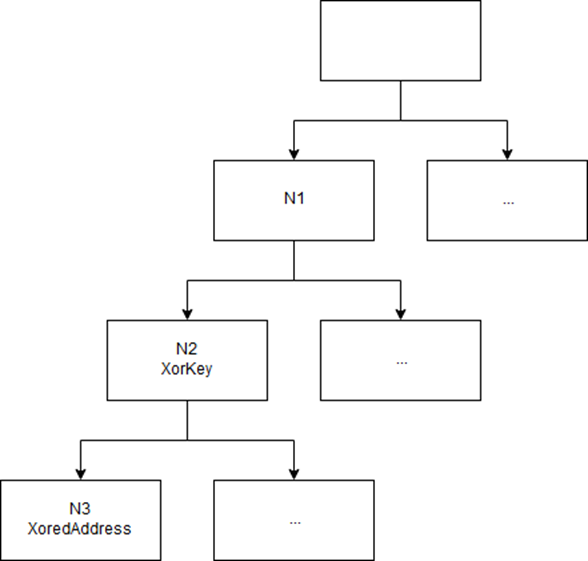
The tree is dynamically populated in JNI_OnLoad.
Three numbers encode a path in the tree. Each leaf of the tree contains a pointer address of the corresponding function. The key is in the parent node. Finding the place in the code where the necessary function is added to the tree is not very difficult if you understand all the structures being used (we won't provide a description to avoid inflating an already quite large article).
More obfuscation
We got the address of the function that should decrypt the traffic: 0x5F1AC. But it's too early to celebrate: the developers of UC Browser prepared another surprise for us.
After receiving parameters from the array that was formed in the Java code, we arrive
at the function at address 0x4D070. And here we encounter another type of code obfuscation.
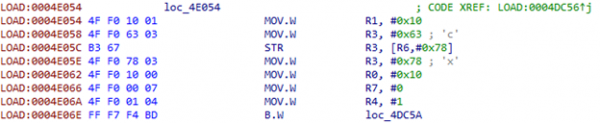
We place two indices in R7 and R4:
We move the first index into R11:

To get the address from the table, we use the index:
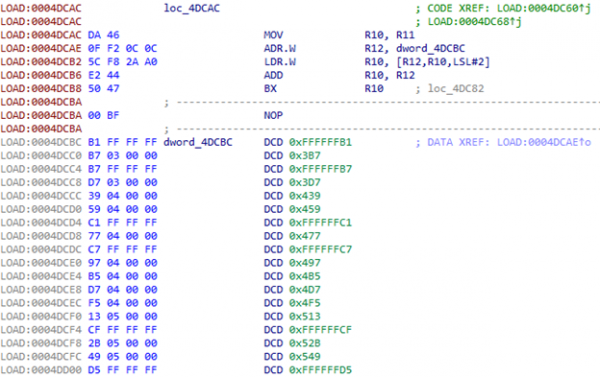
After the jump to the first address, the second index, which is in R4, is used. The table has 230 elements.
What should we do with this? We can tell IDA that this is a switch: Edit -> Other -> Specify switch idiom.
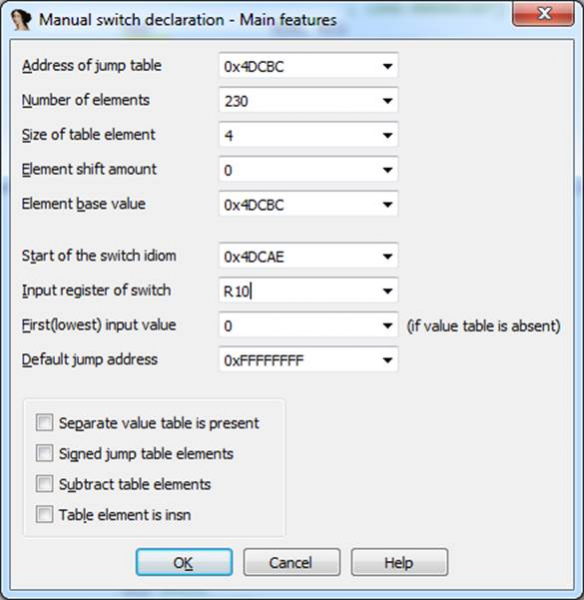
The resulting code is terrifying. However, navigating through its complexities, we can notice a call to a function that is already familiar to us. sub_6115C:
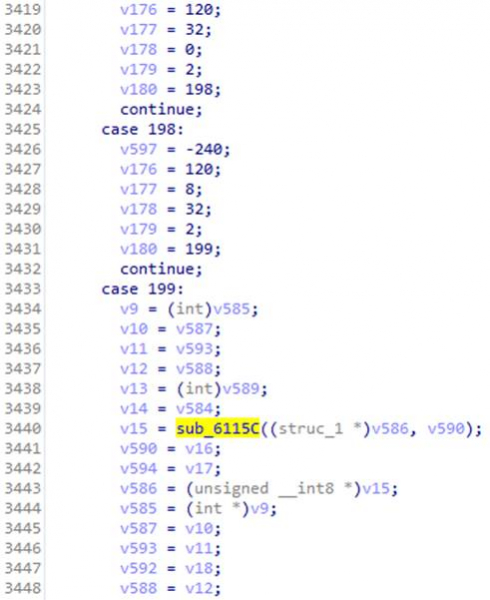
There was a switch where in case 3 there was a decryption using the RC4 algorithm. In this case, the structure passed to the function is filled with parameters provided in doCommandNative. Remember that we had a magicInt with the value 16. We look at the corresponding case – and after several jumps, we find the code that allows us to identify the algorithm.

It's AES!
The algorithm is set, we just need to obtain its parameters: mode, key, and possibly an initialization vector (its presence depends on the working mode of the AES algorithm). The structure containing these should be formed somewhere before the function is called sub_6115C, but this part of the code is particularly well obfuscated, so the idea arises to patch the code so that all the parameters of the decryption function are dumped into a file.
Patch
To avoid writing the entire patch code in assembly language manually, you can launch Android Studio, write a function there that takes the same parameters as our decryption function, and writes to a file, after which you can copy and paste the code that the compiler will generate.
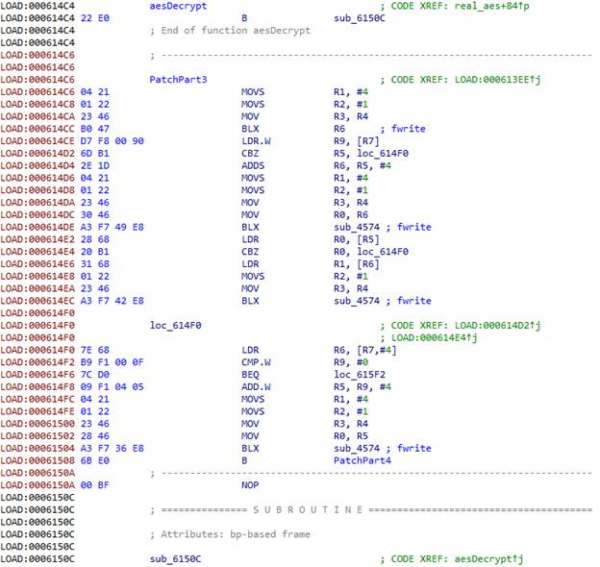
Our friends from the UC Browser team have also taken care of the convenience of adding code. We recall that at the beginning of each function, we have garbage code that can be easily replaced with anything else. It's very handy 🙂 However, at the start of the target function, there isn't much space for the code that saves all parameters to a file. We had to split it into parts and use garbage blocks from neighboring functions. In total, we got four parts.
First part:
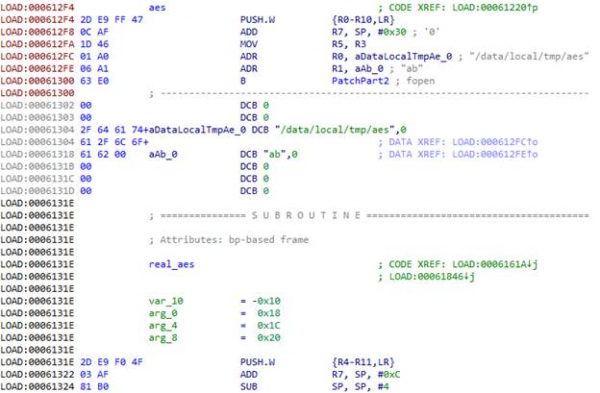
In ARM architecture, the first four function parameters are passed through registers R0-R3; the rest, if any, are passed via the stack. The return address is passed in the LR register. All this needs to be saved to ensure that the function can execute after we dump its parameters. We also need to save all the registers that we will use during the process, so we do a PUSH.W {R0-R10,LR}. In R7, we obtain the address of the parameter list passed to the function via the stack.
Using the function fopen we will open the file /data/local/tmp/aes in "ab" mode,
i.e., for appending. We load the address of the filename into R0, and the address of the mode string into R1. And that's where the garbage code ends, so we proceed to the next function. To keep it running, we place a jump at the beginning to the actual function code bypassing the garbage, and instead of the garbage, we add the continuation of the patch.
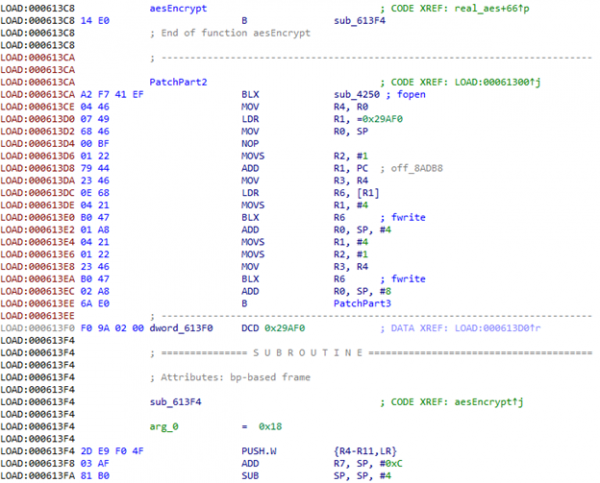
We call fopen.
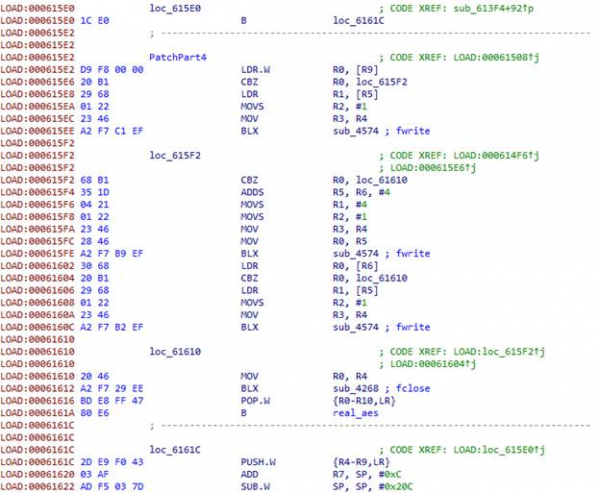
The first three parameters of the function aes are of type int. Since we saved the registers onto the stack earlier, we can simply pass their addresses in the stack to the function. fwrite Next, we have three structures containing the size of the data and a pointer to the data for the key, the initialization vector, and the encrypted data.
Finally, we close the file, restore the registers, and transfer control to the actual function.
We compile the APK with the patched library, sign it, upload it to the device/emulator, and run it. We see that our dump is being created and a lot of data is being written into it. The browser uses encryption not only for traffic, and all encryption goes through the function in question. However, the required data is missing, and the necessary request is not visible in the traffic. To avoid waiting for UC Browser to make the required request, we will take the encrypted response from the server obtained earlier and patch the application again: we will add decryption in onCreate of the main activity. aes.
We are assembling an APK with the patched library, signing it, uploading it to the device/emulator, and launching it. We can see that our dump is being created and a lot of data is being written to it. The browser uses encryption not only for traffic, and all encryption goes through the examined function. However, the required data is somehow missing, and the necessary request is not visible in the traffic. To avoid waiting for the UC Browser to make the needed request, we will take the encrypted response from the server obtained earlier and patch the application again: we will add decryption in the onCreate method of the main activity.
    const/16 v1, 0x62
    new-array v1, v1, [B
    fill-array-data v1, :encrypted_data
    const/16 v0, 0x1f
    invoke-static {v0, v1}, Lcom/uc/browser/core/d/c/g;->j(I[B)[B
    move-result-object v1
    array-length v2, v1
    invoke-static {v2}, Ljava/lang/String;->valueOf(I)Ljava/lang/String;
    move-result-object v2
    const-string v0, "ololo"
    invoke-static {v0, v2}, Landroid/util/Log;->d(Ljava/lang/String;Ljava/lang/String;)I
We assemble, sign, install, and run. We get a NullPointerException because the method returned null.
During further code analysis, a function was found that decrypts interesting lines: "META-INF/" and ".RSA". It seems the application checks its certificate or even generates keys from it. We don't want to deal with what's happening with the certificate, so we'll just provide it with the correct certificate. We'll patch the encrypted line such that instead of "META-INF/" it becomes "BLABLINF/", create a folder with that name in the APK, and slip the certificate of the belka browser into it.
We assemble, sign, install, and run. Bingo! We have the key!
MitM
We obtained the key and the initialization vector, equal to the key. Let's try to decrypt the server's response in CBC mode.

We see the archive URL, something resembling an MD5, "extract_unzipsize" and a number. We check: the MD5 of the archive matches, the unpacked library size matches. We attempt to patch this library and pass it to the browser. To show that our patched library has loaded, we will launch an Intent to create an SMS with the text "PWNED!". We will modify two server responses: and for downloading the archive. In the first we modify the MD5 (the size after unpacking does not change), in the second we provide the archive with the patched library.
The browser attempts to download the archive several times, after which it throws an error. Apparently, something
doesn't sit right with it. As a result of analyzing this murky format, it was found that the server also transmits the size of the archive:

It is encoded in LEB128. After the patch, the size of the archive with the library changed slightly, so the browser thought the archive was downloaded incorrectly, and after several attempts, it threw an error.
We correct the archive size... And - victory! 🙂 The result is in the video.
Consequences and developer reaction
In the same way, hackers could exploit the insecure UC Browser function to distribute and execute malicious libraries. These libraries would operate within the browser's context, thus gaining all its system permissions. As a result, they could display phishing windows and access the working files of the orange Chinese squirrel, including stored login credentials, passwords, and cookies stored in the database.
We contacted the developers of UC Browser to inform them about the discovered issue and attempted to point out the vulnerability and its dangers, but they refused to discuss anything with us. Meanwhile, the browser continued to flaunt the dangerous feature in plain sight. However, once we revealed the vulnerability details, ignoring it as before was no longer an option. On March 27, a
new version of UC Browser 12.10.9.1193 was released, which accessed the server via HTTPS: .
Additionally, after the 'fix' and up until the writing of this article, attempting to open a PDF in the browser resulted in an error message saying ‘Oops, something went wrong!’. The request to the server when trying to open the PDF did not execute, but a request was made when launching the browser, hinting at a lingering possibility to download executable code in violation of Google Play rules.
Source: habr.com
