

My name is Sergey, I am from the company ITSumma, and I want to tell you how we approach redundancy in Kubernetes. Recently, I have been heavily involved in consulting on the implementation of various DevOps solutions for different teams, specifically working on projects utilizing K8s. At the Uptime Day 4 conference, which focused on redundancy in complex architectures, I presented a report on the redundancy of a "cube," and here is a loose summary of it. Just to clarify beforehand, it is not a direct guide to action but rather a generalization of thoughts on the given topic.
In principle, monitoring and redundancy are the two main tools for increasing the resilience of any project. But, you might say, in K8s everything balances itself, everything scales up automatically, and if something happens, it will recover by itself... So, at first glance, when researching this topic, the question of how to approach redundancy in K8s received the internet's response of "why bother?" Many believe that K8s is some sort of magical solution that eliminates all infrastructure problems and ensures that a project will never go down. But... the world is not what it seems.
How did we approach the redundancy process before? We had identical environments for hosting — either they were virtual machines or physical servers servers, to which we applied three basic practices:
- synchronization of code and static files
- synchronization of configurations
- database replication
And voila: at any moment we switch to the backup site, everyone is happy, we stand up and disperse.
What do we have to increase the constant availability of our Kubernetes application? The first thing the unofficial documentation suggests is to set up multiple machines, create multiple masters—the number of which must satisfy quorum requirements within the cluster, and ensure that etcd, api, MC, scheduler, etc. are running on each master. It all seems great: when several worker nodes or masters fail, our cluster will rebalance, and the application will continue to run. It looks like magic! But often our cluster is located within a single data center, which can raise certain questions. What if a backhoe comes and digs up a cable, or lightning strikes, or a universal flood occurs? Everything goes down, and our cluster is no more. How should we approach redundancy considering this side of the problem?
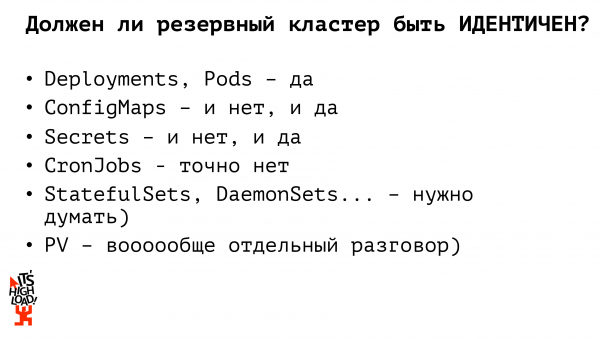
First of all, you need another hot standby cluster, meaning a cluster you can switch to at any moment. From the Kubernetes perspective, the infrastructure must be fully identical. So if there are any non-standard plugins for filesystem interaction, custom ingress solutions, they should be completely identical across your two (or three, or ten, as many as your budget and admin resources allow) clusters. It is necessary to clearly define two sets of applications (deployments, statefulsets, daemonsets, cronjobs, etc.): which of them can operate on standby constantly, and which are better not to start until an actual switch.
Should our standby cluster be completely identical to our production cluster? No. In the past, while dealing with monolithic projects and hardware infrastructure, we maintained almost completely identical environments; however, within Kubernetes, I believe this should not be the case. Let's explore why.
For example, let's start with the basic Kubernetes entities — deployments – they must be identical. Applications must be running that can take over traffic processing at any moment, allowing our project to continue functioning. When it comes to configuration files, we need to consider whether they need to be identical or not. In other words, if we, smart people, do not use any prohibited substances and do not store the database in K8s, then our configmaps must have access settings to the production database (the backup process for which is built separately). Accordingly, to ensure access to the backup database instance, we must have a separate configuration file (configmap). We work similarly with secrets: passwords for database access, API keys; at any given time, we can have either the production secret or the backup one. In total, we already have two Kubernetes entities, the backup versions of which should not be identical to the production ones. The next entity worth stopping at is the cronjob. Cronjobs in the backup must not be identical to the set of cronjobs in the production cluster! If we spin up the backup cluster and bring it up completely with all the enabled cronjobs — for instance, people will receive two emails at the same time instead of one. Alternatively, some data synchronization with external sources will occur twice, resulting in chaos, tears, screams, and arguments.
So how do people on the internet suggest we organize a backup cluster? The second most popular answer after "why bother?" is the use of Kubernetes Federation.
What is it? Let's say it's a large meta-cluster. If we imagine the architecture of Kubernetes—where we have a master and several nodes—then from the federation perspective, we also have a master and several nodes, but each node is a separate cluster. So, we are working with the same entities and primitives as with a single Kubernetes instance, but instead of manipulating our physical machines, we are working with entire clusters. Within the federation, we have full synchronization of federated resources from parents to children. For example, if we deploy something through the federation, it will get deployed on each of our child clusters. If we take any configmap or secret and roll it out through the federation, it will propagate to all our child clusters; at the same time, the federation allows us to customize our resources on the children. So, we took a configmap, deployed it through the federation, and then, if we need to make any adjustments on specific clusters, we go to edit it on the individual cluster, and that change will not synchronize anywhere else.
Kubernetes Federation is a relatively new tool, and it doesn't support the full range of resources provided by K8s: at the time of the release of one of the first versions of the documentation, it mentioned support only for config maps, deployment under replica set, and ingress. Secrets were not supported, and handling volumes was also not supported. It's a very limited set. Especially if we like to have fun — for example, passing our own resources to Kubernetes via custom resource definitions, we can’t push them into the federation. So, it’s kind of… a solution that looks very plausible but makes us periodically shoot ourselves in the foot. On the other hand, the federation allows us to manage our replicaset flexibly. For instance, if we want 10 replicas of our application running, the federation will proportionally distribute this number among the clusters by default. And this can be configured! We can specify that we need to maintain 6 replicas of our application on the production cluster, while on the backup cluster, for resource savings, or just for our own fun — only 4 replicas of our application. Which is also quite convenient. However, with the federation, we have to use some new solutions, deploy things on the fly, and force ourselves to think a little more...
Is there a simpler way to approach the process of backing up Kubernetes? What tools do we actually have?
First of all, we always have some CI/CD system, meaning we don't do things manually, or write create/apply commands on the servers. The system generates YAML files for our containers.
Secondly, we have several clusters; we have either one or multiple (if we are smart) registries that we have also reserved. And there is a wonderful utility called kubectl that can work with multiple clusters simultaneously.
So, in my opinion, the simplest and most accurate solution for building a backup cluster is a straightforward parallel deployment. There is some pipeline in the CI/CD system; first, we build our containers, test them, and deploy applications via kubectl to multiple independent clusters. We can make simultaneous deployments across several clusters. Accordingly, we also address the delivery of configurations at this stage. We can pre-define a set of configurations for our production cluster and a set for the backup cluster and deploy the production environment to the production cluster and the backup environment to the backup cluster at the CI/CD system level. Compared to federation, we do not need to go to each child cluster after defining the federated resource and redefine anything. We did this in advance. Aren't we clever?
But… there are… I had written about it, there is a "root of all evil," but in reality, there are two. First, the file system. There is some PV, or we use external storage. If we store files inside the cluster, we need to act according to old practices that have remained since the days of physical infrastructures: for example, synchronizing with lsync. Or any other workaround you personally prefer. We deploy everything to other machines and go on with our lives.
Secondly, and actually the even more important sticking point — the database. If we are smart and do not keep the database in Kubernetes, then the data backup process follows the same old scheme — master-slave replication, then switching over, catching up the replica, and we'll live well. But if we keep our DB inside the cluster, there are actually many ready-made solutions for organizing a master-slave replica and many solutions for deploying a DB inside Kubernetes.
A billion reports have already been written about database backup, a billion articles have been published, nothing new really needs to be said here. In general, follow your dreams, live as you wish, invent some complex workarounds for yourself too, but make sure to think about how you will back everything up.
Now let's discuss how we will generally switch to a backup site in case of a fire. First, we deploy stateless applications in parallel. They don't affect the business logic of our applications or our project; we can continuously run two sets of applications, and they can start receiving traffic. It's crucial to check whether we need to redefine configurations during the switch to the backup site. For example, we have a production Kubernetes cluster, a backup Kubernetes cluster, an external master database, and a backup master database. We have four options for how these applications in production can interact with each other. The database might switch, and we need to redirect traffic in the production cluster to the new database, or the cluster might fail — and we switched to the backup but continue to work with the production database. The third option is when both fail and we switch both applications, redefining our configuration so that the new applications work with the new database.
So, what conclusions can we draw from all this?
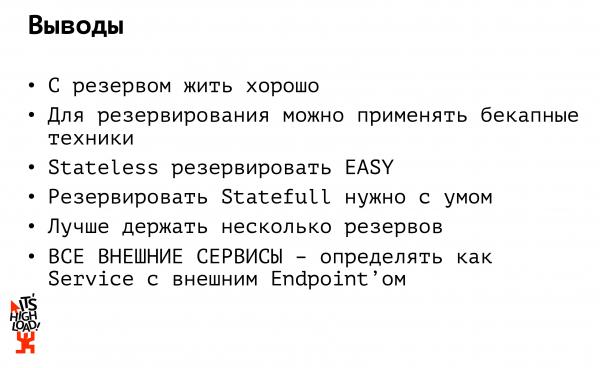
Conclusion one: living with a backup is good. But it's expensive. Ideally, you shouldn't just have one backup. Ideally, you should have multiple backups. First, the backup should be at least not in one data center, and secondly, it should ideally be with a different host. I have unfortunately seen this happen in my experience. I can't name the projects, but there was a fire in a data center... I was like: let's switch to the backup! But the backup servers were in the same rack...
Or imagine if Amazon was banned in Russia (which has happened). And that's it: what's the point of having our backup in another Amazon? It's also inaccessible. So, I repeat: we keep a backup, at a minimum, in another data center, and preferably with another host.
Second output: if you have an application in Kubernetes that communicates with any external sources (this could be a database or some external API), make sure to define it as a service with an external endpoint. This way, when switching, you won’t have to redeploy 15 of your applications that connect to the same database. Define the database as a separate service, access it as if it were within your cluster: if your database fails, you change the IP in one place and continue to operate smoothly.
And finally: I love "the cube", as well as experimenting with it. I also enjoy sharing the results of these experiments and my personal experiences. That’s why I recorded a series of webinars about K8s, welcome to for more details.
Source: habr.com
