

This note continues
the series on backup
- Backup, Part 2: Overview and Testing of rsync-based Backup Solutions
- Backup, Part 3: Overview and Testing of duplicity, duplicaty, deja dup
- Backup, Part 4: Overview and Testing of zbackup, restic, borgbackup
- Backup, Part 5: Testing Bacula and Veeam Backup for Linux
- Backup, Part 6: Comparison of Backup Solutions
- Backup, Part 7: Conclusions
As we mentioned in the first article, there are a substantial number of backup programs based on rsync.
Of those most suitable for our conditions, I will consider three: rdiff-backup, rsnapshot, and burp.
Test File Sets
The file sets for testing will be the same for all candidates, including future articles.
First Set: 10 GB of media files, and about 50 MB of the site’s source code in PHP, file sizes range from a few kilobytes for the source code to tens of megabytes for the media files. The goal is to simulate a static website.
Second Set: created from the first by renaming a subdirectory with media files totaling 5 GB. The goal is to study the backup system’s behavior during directory renaming.
Third Set: derived from the first by deleting 3 GB of media files and adding 3 GB of new media files. The goal is to examine the behavior of the backup system during a typical site update operation.
Obtaining Results
Any backup is performed at least three times and is accompanied by clearing the file system caches with the commands sync and echo 3 > /proc/sys/vm/drop_caches both on the test server and the backup storage server.
On the server that will be the source of backups, monitoring software is installed — netdata, which will evaluate the load on the server during copying; this is necessary for estimating the load on the server caused by the backup process.
I also believe that the backup storage server has a slower CPU than the main server but has larger disks with relatively lower random write speeds — the most common scenario during backups, and since the backup server should ideally not perform any other tasks apart from backups, I will not monitor its load using netdata.
I have also changed the servers on which I will test various backup systems.
Currently, they have the following specificationsProcessor
sysbench --threads=2 --time=30 --cpu-max-prime=20000 cpu run
sysbench 1.0.17 (using system LuaJIT 2.0.4)

Running the test with following options:
Number of threads: 2
Initializing random number generator from current time


Prime numbers limit: 20000

Initializing worker threads...

Threads started!

CPU speed:
    events per second:  1081.62

General statistics:
    total time:                          30.0013s
    total number of events:              32453

Latency (ms):
         min:                                    1.48
         avg:                                    1.85
         max:                                    9.84
         95th percentile:                        2.07
         sum:                                59973.40

Threads fairness:
    events (avg/stddev):           16226.5000/57.50
    execution time (avg/stddev):   29.9867/0.00
Memory, reading…
sysbench --threads=4 --time=30 --memory-block-size=1K --memory-scope=global --memory-total-size=100G --memory-oper=read memory run
sysbench 1.0.17 (using system LuaJIT 2.0.4)

Running the test with following options:
Number of threads: 4
Initializing random number generator from current time


Running memory speed test with the following options:
  block size: 1KiB
  total size: 102400MiB
  operation: read
  scope: global

Initializing worker threads...

Threads started!

Total operations: 104857600 (5837637.63 per second)

102400.00 MiB transferred (5700.82 MiB/sec)


General statistics:
    total time:                          17.9540s
    total number of events:              104857600

Latency (ms):
         min:                                    0.00
         avg:                                    0.00
         max:                                   66.08
         95th percentile:                        0.00
         sum:                                18544.64

Threads fairness:
    events (avg/stddev):           26214400.0000/0.00
    execution time (avg/stddev):   4.6362/0.12
… and writing
sysbench --threads=4 --time=30 --memory-block-size=1K --memory-scope=global --memory-total-size=100G --memory-oper=write memory run
sysbench 1.0.17 (using system LuaJIT 2.0.4)

Running the test with following options:
Number of threads: 4
Initializing random number generator from current time


Running memory speed test with the following options:
  block size: 1KiB
  total size: 102400MiB
  operation: write
  scope: global

Initializing worker threads...

Threads started!

Total operations: 91414596 (3046752.56 per second)

89272.07 MiB transferred (2975.34 MiB/sec)


General statistics:
    total time:                          30.0019s
    total number of events:              91414596

Latency (ms):
         min:                                    0.00
         avg:                                    0.00
         max:                                 1022.90
         95th percentile:                        0.00
         sum:                                66430.91

Threads fairness:
    events (avg/stddev):           22853649.0000/945488.53
    execution time (avg/stddev):   16.6077/1.76
Disk on the data source server
sysbench --threads=4 --file-test-mode=rndrw --time=60 --file-block-size=4K --file-total-size=1G fileio run
sysbench 1.0.17 (using system LuaJIT 2.0.4)

Running the test with following options:
Number of threads: 4
Initializing random number generator from current time


Extra file open flags: (none)
128 files, 8MiB each
1GiB total file size
Block size 4KiB
Number of IO requests: 0
Read/Write ratio for combined random IO test: 1.50
Periodic FSYNC enabled, calling fsync() each 100 requests.
Calling fsync() at the end of test, Enabled.
Using synchronous I/O mode
Doing random r/w test
Initializing worker threads...

Threads started!


File operations:
    reads/s:                      4587.95
    writes/s:                     3058.66
    fsyncs/s:                     9795.73

Throughput:
    read, MiB/s:                  17.92
    written, MiB/s:               11.95

General statistics:
    total time:                          60.0241s
    total number of events:              1046492

Latency (ms):
         min:                                    0.00
         avg:                                    0.23
         max:                                   14.45
         95th percentile:                        0.94
         sum:                               238629.34

Threads fairness:
    events (avg/stddev):           261623.0000/1849.14
    execution time (avg/stddev):   59.6573/0.00
Backup storage server disk
sysbench --threads=4 --file-test-mode=rndrw --time=60 --file-block-size=4K --file-total-size=1G fileio run
sysbench 1.0.17 (using system LuaJIT 2.0.4)

Running the test with following options:
Number of threads: 4
Initializing random number generator from current time


Extra file open flags: (none)
128 files, 8MiB each
1GiB total file size
Block size 4KiB
Number of IO requests: 0
Read/Write ratio for combined random IO test: 1.50
Periodic FSYNC enabled, calling fsync() each 100 requests.
Calling fsync() at the end of test, Enabled.
Using synchronous I/O mode
Doing random r/w test
Initializing worker threads...

Threads started!


File operations:
    reads/s:                      11.37
    writes/s:                     7.58
    fsyncs/s:                     29.99

Throughput:
    read, MiB/s:                  0.04
    written, MiB/s:               0.03

General statistics:
    total time:                          73.8868s
    total number of events:              3104

Latency (ms):
         min:                                    0.00
         avg:                                   78.57
         max:                                 3840.90
         95th percentile:                      297.92
         sum:                               243886.02

Threads fairness:
    events (avg/stddev):           776.0000/133.26
    execution time (avg/stddev):   60.9715/1.59
Network speed between servers
iperf3 -c backup
Connecting to host backup, port 5201
[  4] local x.x.x.x port 59402 connected to y.y.y.y port 5201
[ ID] Interval           Transfer     Bandwidth       Retr  Cwnd
[  4]   0.00-1.00   sec   419 MBytes  3.52 Gbits/sec  810    182 KBytes
[  4]   1.00-2.00   sec   393 MBytes  3.30 Gbits/sec  810    228 KBytes
[  4]   2.00-3.00   sec   378 MBytes  3.17 Gbits/sec  810    197 KBytes
[  4]   3.00-4.00   sec   380 MBytes  3.19 Gbits/sec  855    198 KBytes
[  4]   4.00-5.00   sec   375 MBytes  3.15 Gbits/sec  810    182 KBytes
[  4]   5.00-6.00   sec   379 MBytes  3.17 Gbits/sec  765    228 KBytes
[  4]   6.00-7.00   sec   376 MBytes  3.15 Gbits/sec  810    180 KBytes
[  4]   7.00-8.00   sec   379 MBytes  3.18 Gbits/sec  765    253 KBytes
[  4]   8.00-9.00   sec   380 MBytes  3.19 Gbits/sec  810    239 KBytes
[  4]   9.00-10.00  sec   411 MBytes  3.44 Gbits/sec  855    184 KBytes
- - - - - - - - - - - - - - - - - - - - - - - - -
[ ID] Interval           Transfer     Bandwidth       Retr
[  4]   0.00-10.00  sec  3.78 GBytes  3.25 Gbits/sec  8100             sender
[  4]   0.00-10.00  sec  3.78 GBytes  3.25 Gbits/sec                  receiver
Testing methodology
- The file system is being prepared on the test server with the first test set, and the backup storage server initializes the repository if necessary.
The backup process is initiated and its duration is measured. - Files are migrated on the test server to the second test set. The backup process is initiated and its duration is measured.
- Files are migrated on the test server to the third test set. The backup process is initiated and its duration is measured.
- The received third test set is accepted as the new first; steps 1-3 are repeated another 2 times.
- The data is entered into a summary table, and charts are added with netdata.
- A report on the specific backup method is compiled.
Expected Results
Since all 3 candidates are based on the same technology (rsync), it is expected that the results will be close to normal rsync, including all its advantages, namely:
- Files in the repository will be stored 'as is'.
- The size of the repository will only grow by including the differences between backups.
- There will be a relatively high load on the network during data transfer, as well as a small load on the processor.
A test run of standard rsync will be used as a benchmark, its results
are as follows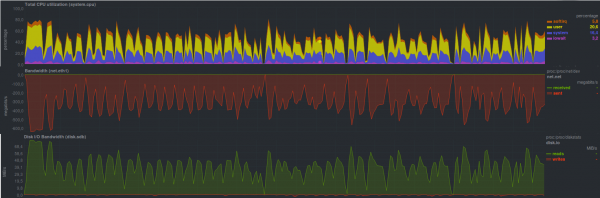
The bottleneck was on the backup storage server in the form of an HDD-based disk, which is clearly visible on the sawtooth graphs.
Data was copied in 4 minutes and 15 seconds.
Testing rdiff-backup
The first candidate is rdiff-backup, a Python script that performs backup from one directory to another. The current backup is kept 'as is', while earlier backups are stored in a special subdirectory incrementally, thus saving space.
We will check the typical operational mode, i.e., the backup process is initiated by the client, while on the server side, a process starts that accepts data for backup.
Let's take a look at what it is capable of under our conditions.
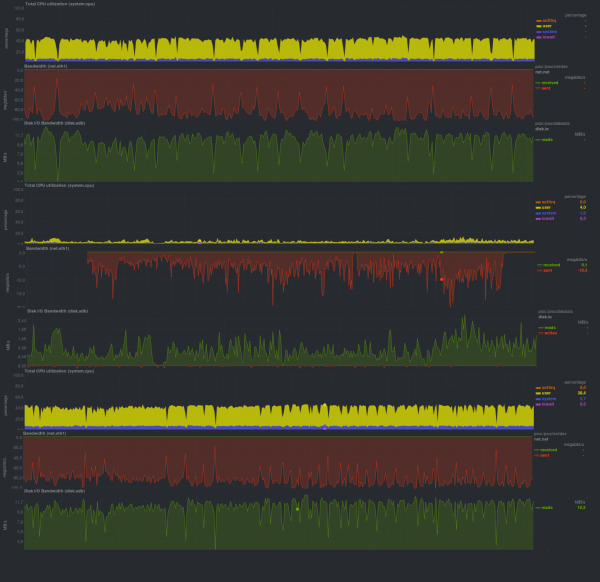
Execution time of each test run:
First launch
Second run
Third run
First Set
16m32s
16m26s
16m19s
Second Set
2h5m
2h10m
2h8m
Third Set
2h9m
2h10m
2h10m
Rdiff-backup reacts quite painfully to any large data changes and does not fully utilize the network.
Testing rsnapshot
The second candidate is rsnapshot, which is a Perl script whose main requirement for effective operation is support for hard links. This saves disk space. Files that have not changed since the last backup refer to the original file using hard links.
The logic of the backup process is also inverted: the server actively 'walks' to its clients and collects data.
Test Results
the following results were obtained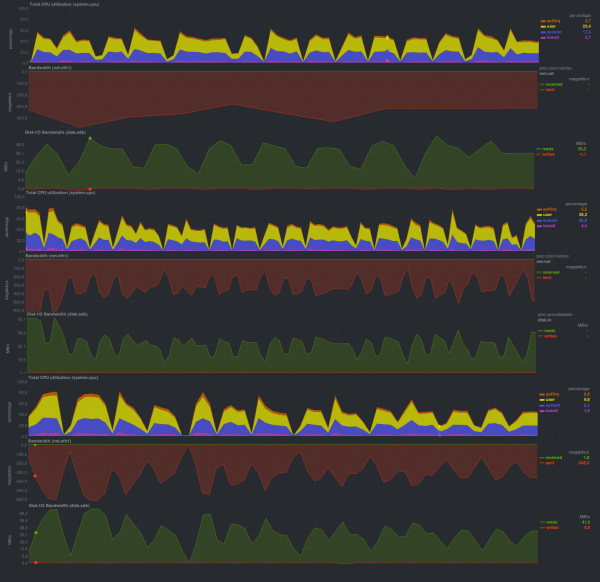
First launch
Second run
Third run
First Set
4m22s
4m19s
4m16s
Second Set
2m6s
2m10s
2m6s
Third Set
1m18s
1m10s
1m10s
It performed quite quickly, much faster than rdiff-backup and very close to pure rsync.
Testing burp
Another option is the C implementation over librsync — burp, which has a client-server architecture including client authorization and a web interface (not included in the basic package). Another interesting feature is backup without recovery rights for clients.
Let's take a look atperformance.
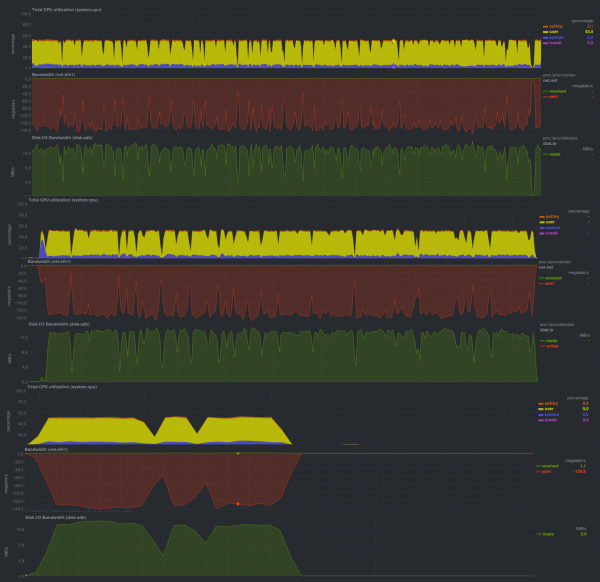
First launch
Second run
Third run
First Set
11m21s
11m10s
10m56s
Second Set
5m37s
5m40s
5m35s
Third Set
3m33s
3m24s
3m40s
It worked twice as slowly as rsnapshot, but still quite fast, and definitely faster than rdiff-backup. The graphs are somewhat serrated — the performance is again limited by the storage server's disk subsystem, though this is not as pronounced as with rsnapshot.
Results
The size of the repositories for all candidates was approximately the same, i.e., growth to 10 GB, then growth to 15 GB, then growth to 18 GB, etc., which is related to the specifics of how rsync operates. It is also worth noting that all candidates operated in single-threaded mode (CPU load around 50% on a dual-core machine). All 3 candidates provided the option to restore the latest backup 'as is', meaning files could be restored without using any third-party programs, including those used to create the repositories. This is also a 'legacy feature' of rsync.
Conclusions
The more complex the backup system and the more features it has, the slower it will run, but for less demanding projects, any of them will suffice, except possibly for rdiff-backup.
Announcement
This note continues the series on backups.
Backup, part 2: Overview and testing of rsync-based backup solutions
Backup, Part 3: Overview and Testing of duplicity, duplicaty, deja dup
Backup, Part 4: Overview and Testing of zbackup, restic, borgbackup
Backup, Part 5: Testing Bacula and Veeam Backup for Linux
Backup, Part 6: Comparison of Backup Solutions
Backup, Part 7: Conclusions
Author of the publication: Pavel Demkovich
Source: habr.com
