

After ten months of development significant release of a specialized browser , which continues the development of functionality based on the ESR branch . The browser focuses on ensuring anonymity, security, and privacy; all traffic is routed exclusively through the Tor network. It is impossible to connect directly via the current system's network connection, making it impossible to trace the user's real IP address (in case of a browser hack, attackers may gain access to system network parameters, so to fully block any potential leaks, products such as ). Tor Browser builds for Linux, Windows, macOS, and Android.
To ensure additional protection, it includes an extension , allowing traffic encryption on all sites wherever possible. To reduce the threats from attacks utilizing JavaScript and blocking plugins by default, an extension is included . To combat traffic blocking and inspection, the following are used and .
To establish an encrypted communication channel in environments that block any traffic except HTTP, alternative transports are offered, which allow, for example, to bypass attempts to block Tor in China. To protect against user tracking and to prevent the highlighting of characteristics specific to individual visitors, APIs such as WebGL, WebGL2, WebAudio, Social, SpeechSynthesis, Touch, AudioContext, HTMLMediaElement, Mediastream, Canvas, SharedWorker, Permissions, MediaDevices.enumerateDevices, and screen.orientation are disabled or restricted, and telemetry sending tools, Pocket, Reader View, HTTP Alternative-Services, MozTCPSocket, and "link rel=preconnect" have been disabled, along with modified libmdns.
In the new release:
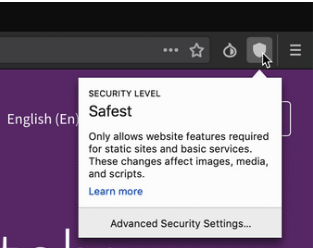
- The panel has been reorganized and access to the protection level indicator has been moved from the Torbutton menu to the main panel. The Torbutton has been relocated to the right side of the panel. The indicators for the HTTPS Everywhere and NoScript extensions have been removed from the panel by default (they can be restored in the panel's settings interface).

The HTTPS Everywhere indicator has been removed as it provides no useful information, and redirection to HTTPS is always applied by default. The NoScript indicator has been removed because the browser provides switching between basic security levels, and the NoScript button often misleads with warnings arising from the settings adopted in Tor Browser. The NoScript button also provides access to advanced settings, and without a detailed understanding of these, changing parameters can lead to privacy issues and non-compliance with the security level set in Tor Browser. Control over JavaScript blocking for specific sites can be managed through the additional permissions section in the address bar context menu (the 'i' button);
- The style has been adjusted, ensuring compatibility of Tor Browser with the new design of Firefox prepared as part of the ''. The design of the landing page 'about:tor' has been changed and unified across all platforms;
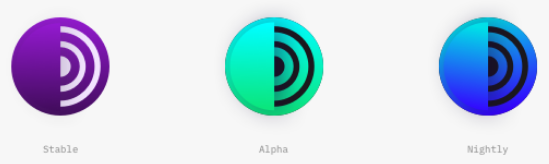
- New Tor Browser logos have been introduced.

- The versions of browser components have been updated:
Firefox 60.7.0esr, Torbutton 2.1.8, HTTPS Everywhere 2019.5.6.1, OpenSSL 1.0.2r, Tor Launcher 0.2.18.3; - Builds have been created with the flag 'used for official Mozilla builds.
- The first stable release of the mobile version of Tor Browser for Android has been prepared, built on the Firefox 60.7.0 codebase for Android, and it operates only through the Tor network, blocking any attempts to establish a direct network connection. It includes the HTTPS Everywhere and Tor Button add-ons. Functionally, the Android edition currently lags behind the desktop version but provides nearly the same level of protection and privacy.
Mobile version in Google Play, but also in APK format from the project website. A publication in the F-droid catalog is expected soon. It supports devices running Android 4.1 or newer. Tor developers noted that they do not intend to create a version of Tor Browser for iOS due to restrictions imposed by Apple and recommend the already available iOS browser , developed by the .
Key differences between Tor Browser for Android and Firefox for Android:
- Blocking tracking code for movement. Each site is isolated from cross-requests, and all cookies are automatically deleted after the session ends;
- Protection against traffic interception and user activity monitoring. All interaction with the outside world occurs only through the Tor network, and in the event of traffic interception between the user and the provider, the attacker can only see that the user is using Tor but cannot determine which sites the user is visiting. Protection against interference is particularly relevant in conditions where some domestic mobile operators do not hesitate to intrude into unencrypted user HTTP traffic and insert their widgets () or advertising banners ( and );
- Protection against identifying visitor-specific features and tracking users through methods identification ("browser fingerprinting"). All Tor Browser users appear identical from the outside and are indistinguishable from each other when using advanced methods of indirect identification.
For example, besides saving the identifier through cookies and local storage API, user-specific characteristics such as the list of installed , timezone, list of supported MIME types, screen parameters, list of available fonts, when rendering using canvas and WebGL, parameters in headers and , manner of operation with and ; - The use of multilayer encryption. In addition to protecting HTTPS, user traffic is additionally encrypted at least three times while passing through Tor (a multilayer encryption scheme is applied in which packets are wrapped in a series of layers using public key encryption, where each Tor node reveals the next layer during its processing and only knows the next stage of transmission, and only the last node can determine the destination address);
- The ability to access resources blocked by the provider or centrally censored websites. According to the Roskomsvoboda project, 97% of currently blocked sites in Russia are wrongfully blocked (they are in the same subnets as blocked resources). For example, 358,000 IP addresses of Digital Ocean, 25,000 addresses of Amazon WS, and 59,000 addresses of CloudFlare remain blocked. Wrongful blocking also affects After ten months of development, a significant release of a specialized browser has been formed
Source: opennet.ru
