


Today, high availability of services is required everywhere and always, not just in large expensive projects. Temporarily unavailable websites with messages like "Sorry, we are undergoing maintenance" still appear, but they usually provoke a condescending smile. Add to this the cloud era, where launching an additional server requires just one API call, without having to think about physical infrastructure. There are no longer any excuses for why a critical system was not made reliable using clustering technologies and redundancy.
We will discuss the solutions we considered to ensure the reliability of databases in our services and what we arrived at. Plus, a demo with far-reaching conclusions.
Legacy in High Availability Architecture
This is even clearer when examining the evolution of various open-source systems. Older solutions had to incorporate high availability technologies as demand increased. Their quality varied. Next-generation solutions embed high availability as the core of their architecture. For example, MongoDB positions clustering as the primary use case. The cluster scales horizontally, which is a strong competitive advantage of this DBMS.
Returning to PostgreSQL, this is one of the oldest popular open-source projects, with its first release in 1995. For a long time, the project team did not regard high availability as a challenge to be solved by the system. Therefore, the replication technology for creating data copies became integrated only in version 8.2 in 2006, but it was file-based (log shipping). In 2010, version 9.0 introduced streaming replication, which serves as the foundation for creating various clusters. This, in fact, surprises people who encounter PostgreSQL after Enterprise SQL or modern NoSQL – the standard solution from the community is simply a pair of master-replica with synchronous or asynchronous replication. In this case, master failover is performed manually, and the issue of client failover is also suggested to be handled by the user.
How We Decided to Make Reliable PostgreSQL and What We Chose for It
However, PostgreSQL would not be as popular as it is without a vast array of projects and tools that help build a fault-tolerant solution that does not require constant attention. In the cloud, (MCS) since the launch of DBaaS, single PostgreSQL servers and master-replica pairs with asynchronous replication have been available.
Naturally, we wanted to simplify life for everyone and provide an installation of PostgreSQL that could serve as the foundation for high-availability services, requiring no constant monitoring or late-night switchovers. In this segment, there are both proven solutions and a new generation of utilities utilizing the latest developments.
Today, the issue of high availability hinges not on redundancy (which is a given), but on consensus — the leader election algorithm. Most major outages occur not due to a lack of servers, but because of consensus issues: no new leader was chosen, or there were two leaders in different data centers, etc. An example is the outage of the MySQL cluster at Github — they wrote .
The mathematical foundation of this issue is quite serious. On one hand, there is the , which imposes theoretical limitations on the possibilities of building HA solutions, and on the other hand — mathematically proven consensus algorithms, such as and . Based on this, there are quite popular DCS (decentralized consensus systems) — Zookeeper, etcd, Consul. Therefore, if the decision-making system operates on its own algorithm that was developed independently, it should be approached with extreme caution. After analyzing a large number of systems, we settled on Patroni — an open-source system predominantly developed by Zalando.
As a lyrical digression, I should mention that we also considered multi-master solutions, i.e., clusters that can be horizontally scaled for write operations. However, for two main reasons, we decided against such a cluster. Firstly, these solutions have a high complexity and, accordingly, more vulnerabilities. It would be difficult to create a stable solution for all scenarios. Secondly, in this case, PostgreSQL ceases to be pure (native); some functions will become unavailable, and hidden bugs may arise in some applications during operation.
Patroni
So, how does Patroni work? The developers did not reinvent the wheel and suggested using one of the proven DCS solutions as a foundation. It takes on all questions regarding configuration synchronization, leader selection, and quorum. We chose etcd for this purpose.
Next, Patroni handles the correct application of all settings on PostgreSQL and replication settings, as well as executing commands for switchover and failover (i.e., normal and emergency master switching). Specifically, in the MCS cloud, you can create a cluster consisting of a master, a synchronous replica, and one or several asynchronous replicas. The presence of a synchronous replica ensures data integrity on at least two servers, and this replica will be the main 'candidate for master.'
Since etcd is deployed on the same servers, a recommended number of servers is 3 or 5, for optimal quorum value. Such a cluster can be horizontally scaled for read operations (I mentioned write scaling above). However, it should be noted that asynchronous replicas tend to lag behind, especially under high loads.
Using such read replicas (hot standby) is justified for reporting or analytics tasks and offloads the master server.
If you want to create such a cluster yourself, you will need to:
- prepare 3 or more servers, configure IP addressing and firewall rules between them;
- install packages for etcd, Patroni, PostgreSQL services;
- configure the etcd cluster;
- set up the Patroni service to work with PostgreSQL.
This means you need to correctly create about ten configuration files in total without making any mistakes. To achieve this, it is definitely worth using a configuration management tool like Ansible. However, there is still no highly available TCP load balancer. Creating one is a separate task.
For those who need a ready-made cluster but don't want to delve into all of this, we’ve tried to simplify life by creating a ready-made cluster on Patroni in our cloud, which can be tested for free. In addition to the cluster itself, we created:
- A TCP load balancer; it always points to the current master, whether synchronous or asynchronous replica, depending on the ports.
- An API to switch the active Patroni master.
They can be connected via both the MCS cloud API and the web console.
Demo
To test the capabilities of the PostgreSQL cluster in the MCS cloud, let’s see how a live application behaves when there are issues with the DBMS.
Below is the code for an application that will log artificial events and display them on the screen. In the case of errors, it will report them and continue working in a loop until we stop it using Ctrl + C.
from __future__ import print_function

from datetime import datetime
from random import randint
from time import sleep
import psycopg2


def main():
    try:
        connection = psycopg2.connect(user = "admin",
                                      password = "P@ssw0rd",
                                      host = "89.208.87.38",
                                      port = "5432",
                                      database = "myproddb")

        cursor = connection.cursor()
        cursor.execute("SELECT version();")
        record = cursor.fetchone()
        print("Connection opened to", record[0])

        cursor.execute(
            "INSERT INTO log VALUES ({});".format(randint(1, 10000)))
        connection.commit()
        cursor.execute("SELECT COUNT(event_id) from log;")
        record = cursor.fetchone()
        print("Logged a value, overall count: {}".format(record[0]))
    except Exception as error:
        print ("Error while connecting to PostgreSQL", error)
    finally:
        if connection:
            cursor.close()
            connection.close()
            print("Connection closed")


if __name__ == '__main__':
    try:
        while True:
            try:
                print(datetime.now())
                main()
                sleep(3)
            except Exception as e:
                print("Caught error:n", e)
                sleep(1)
    except KeyboardInterrupt:
        print("exit")
The application requires PostgreSQL to operate. We will create a cluster in the MCS cloud using the API. In a normal terminal, where the OS_TOKEN variable contains the token for API access (which can be obtained with the command openstack token issue), we will enter the following commands:
Creating a cluster:
cat < pgc10.json
{"cluster":{"name":"postgres10","allow_remote_access":true,"datastore":{"type":"postgresql","version":"10"},"databases":[{"name":"myproddb"}],"users":[{"databases":[{"name":"myproddb"}],"name":"admin","password":"P@ssw0rd"}],"instances":[{"key_name":"shared","availability_zone":"DP1","flavorRef":"d659fa16-c7fb-42cf-8a5e-9bcbe80a7538","nics":[{"net-id":"b91eafed-12b1-4a46-b000-3984c7e01599"}],"volume":{"size":50,"type":"DP1"}},{"key_name":"shared","availability_zone":"DP1","flavorRef":"d659fa16-c7fb-42cf-8a5e-9bcbe80a7538","nics":[{"net-id":"b91eafed-12b1-4a46-b000-3984c7e01599"}],"volume":{"size":50,"type":"DP1"}},{"key_name":"shared","availability_zone":"DP1","flavorRef":"d659fa16-c7fb-42cf-8a5e-9bcbe80a7538","nics":[{"net-id":"b91eafed-12b1-4a46-b000-3984c7e01599"}],"volume":{"size":50,"type":"DP1"}}]}}
EOF

curl -s -H "X-Auth-Token: $OS_TOKEN"
-H 'Accept: application/json'
-H 'Content-Type: application/json'
-d @pgc10.json https://infra.mail.ru:8779/v1.0/ce2a41bbd1434013b85bdf0ba07c770f/clusters
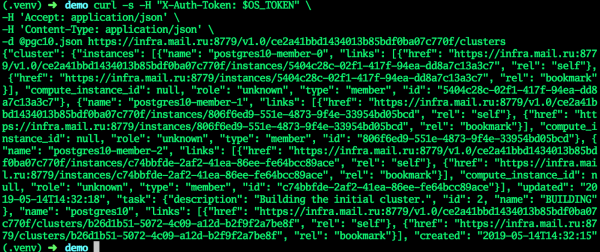
When the cluster transitions to ACTIVE status, all fields will receive current values—the cluster is ready.
In the GUI:
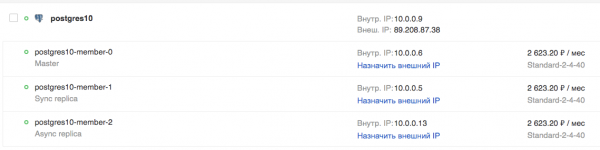
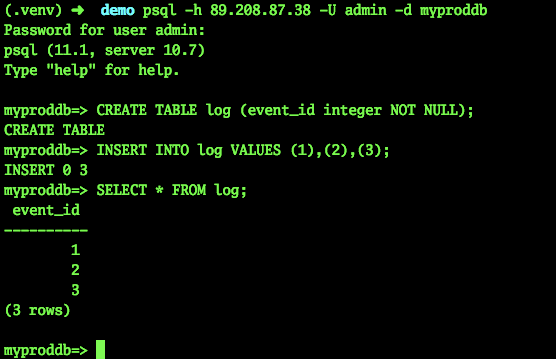
Let’s try to connect and create a table:
psql -h 89.208.87.38 -U admin -d myproddb
Password for user admin:
psql (11.1, server 10.7)
Type "help" for help.

myproddb=> CREATE TABLE log (event_id integer NOT NULL);
CREATE TABLE
myproddb=> INSERT INTO log VALUES (1),(2),(3);
INSERT 0 3
myproddb=> SELECT * FROM log;
 event_id
----------
        1
        2
        3
(3 rows)

myproddb=>
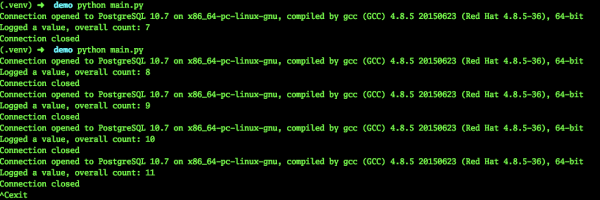
In the application, we will specify the current settings for connecting to PostgreSQL. We will provide the TCP load balancer address, thereby eliminating the need for manual switching to the master address. Let’s start it. As we can see, events are successfully logged into the database.
Planned master switch-over
Now let’s test our application’s operation during the planned master switch-over:
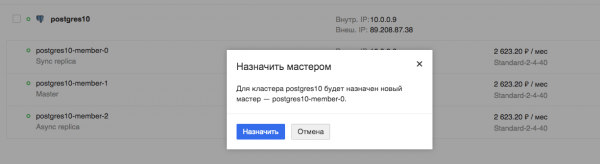
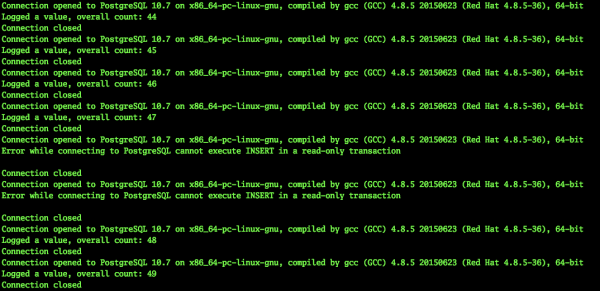
We are monitoring the application. We can see that the application does indeed pause, but this lasts only a few seconds, in this specific case, a maximum of 9 seconds.
Machine failure
Now let’s try to simulate the failure of the virtual machine that is currently the master. One could simply turn off the virtual machine via the Horizon interface, but that would be a normal shutdown. Such a switch will be handled by all services, including Patroni.
We need an unpredictable shutdown. Therefore, I asked our administrators to turn off the virtual machine—the current master—in an emergency way for testing purposes.
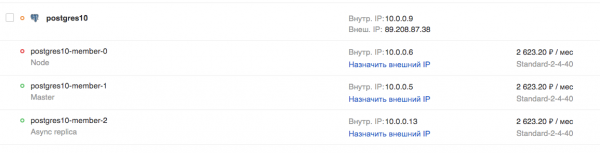
Meanwhile, our application continued to operate. Naturally, such an emergency master switch cannot go unnoticed.
2019-03-29 10:45:56.071234
Connection opened to PostgreSQL 10.7 on x86_64-pc-linux-gnu, compiled by gcc (GCC) 4.8.5 20150623 (Red Hat 4.8.5-36), 64-bit
Logged a value, overall count: 453
Connection closed
2019-03-29 10:45:59.205463
Connection opened to PostgreSQL 10.7 on x86_64-pc-linux-gnu, compiled by gcc (GCC) 4.8.5 20150623 (Red Hat 4.8.5-36), 64-bit
Logged a value, overall count: 454

Connection closed
2019-03-29 10:46:02.661440
Error while connecting to PostgreSQL server closed the connection unexpectedly
        This probably means the server terminated abnormally
        before or while processing the request.

Caught error:
 local variable 'connection' referenced before assignment
……………………………………………………….. - a certain number of errors occurred here
2019-03-29 10:46:30.930445
Error while connecting to PostgreSQL server closed the connection unexpectedly
        This probably means the server terminated abnormally
        before or while processing the request.

Caught error:
 local variable 'connection' referenced before assignment
2019-03-29 10:46:31.954399
Connection opened to PostgreSQL 10.7 on x86_64-pc-linux-gnu, compiled by gcc (GCC) 4.8.5 20150623 (Red Hat 4.8.5-36), 64-bit
Logged a value, overall count: 455
Connection closed
2019-03-29 10:46:35.409800
Connection opened to PostgreSQL 10.7 on x86_64-pc-linux-gnu, compiled by gcc (GCC) 4.8.5 20150623 (Red Hat 4.8.5-36), 64-bit
Logged a value, overall count: 456
Connection closed
^Cexit
As can be seen, the application was able to continue functioning in less than 30 seconds. Yes, some users of the service may notice issues. However, this is a serious server failure, which does not happen very often. An administrator would likely not have been able to respond as quickly unless they were sitting at the console ready with a switch script.
Output
In my opinion, such a cluster provides a colossal advantage for administrators. Essentially, serious malfunctions and outages of database servers will not be noticeable to the application and, consequently, to the user. There will be no need to rush to fix something and switch to temporary configurations, servers, etc. And if such a solution is used as a ready-made cloud service, there will be no need to spend time on its setup. One can focus on more interesting tasks.
Source: habr.com
