

When we talk about steganography, people envision terrorists, pedophiles, spies, at best crypto-anarchists and other scholars. And indeed, who else might need to hide something from external scrutiny? What benefit could this possibly offer an ordinary person?
It turns out that there is some. That's why today we will be compressing data using steganography methods. By the end, the reader will even be able to use their precious JPEG photo archives to free up more gigabytes on their file system.
What?
If the reader recalls, steganography refers to strange algorithms that allow hiding the existence of one piece of information within another. To put it more simply: image + file == roughly the same image, but not quite (it could be anything instead of images, but they tend to be clearer). At the same time, there should be no simple way to determine whether something is inside or not.
But if one cannot distinguish between the two, is there really a difference? From the consumer's point of view, the user is not concerned with mathematical accuracy (reflected by a specific set of bits), only the way they perceive it.
For example, let’s look at three images of a cute dog:
Careful, JPEG!
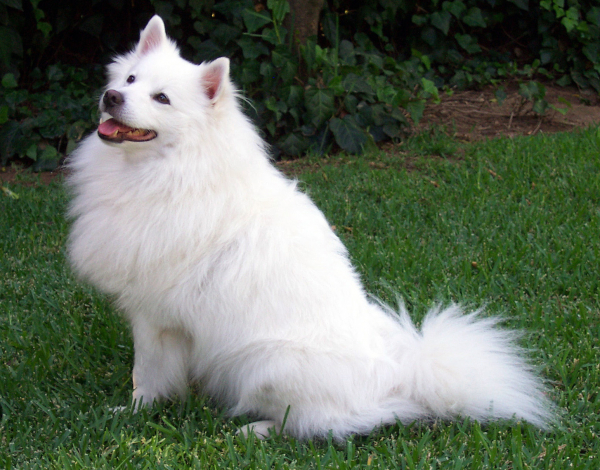
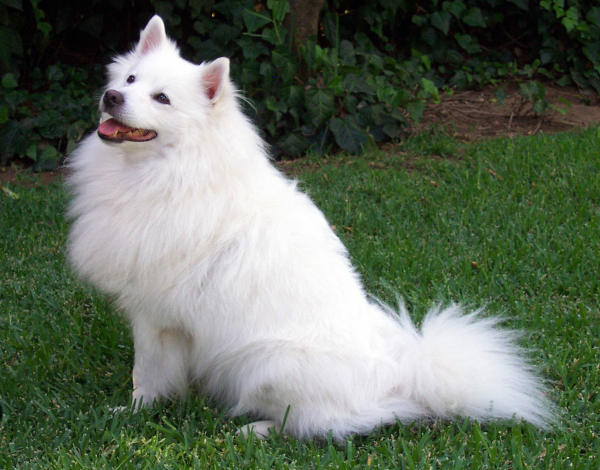
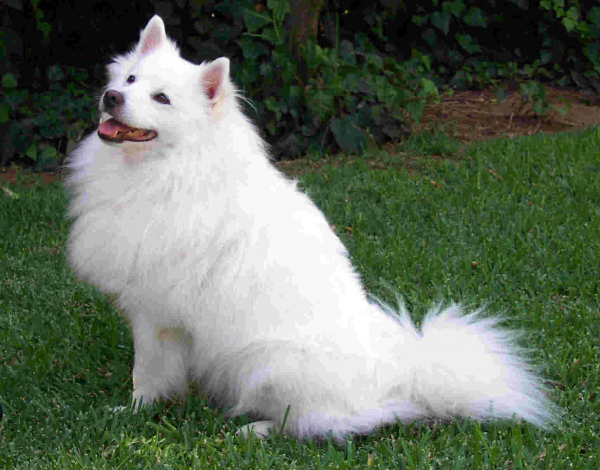
Despite the enormous difference in size, few would choose the third version. On the other hand, the difference between the first two photos is less noticeable, and the amount of information in them (from my perspective) can be considered equivalent.
This principle is already old and has been actively exploited by lossy compression methods for many years. But breaking is not building; we are interested in the more advanced side of the issue. Is it possible to embed additional information of size N into a file in such a way that its size increases by M < N, and the changes are not noticeable to the user?
Of course, it is possible. But I must make a couple of caveats right away:
- Firstly, the method must be universal and yield positive results on most input data. That is, on average, for arbitrary input, there should be an actual reduction in the amount of stored information. 'On average' means that opposite cases can occur, but should not dominate.
- Secondly, the size of the compressed container before embedding information must be larger than the size of the compressed modified version. Simply embedding a bunch of bits into a BMP image using the LSB method is not steganographic compression, as running the original image through some DEFLATE algorithm will likely result in a noticeably smaller size.
- Thirdly, the results need to be conducted and compared relative to data that has already been compressed using classical methods. This will help eliminate the probabilistic effect of their redundancy differences and enable more effective compression in general.
Where?
Using steganography implies that, in addition to the compressible information, we need containers into which it will be embedded. The maximum amount of embeddable information largely depends on specific properties, but it scales much more easily with the quantity of these properties. Therefore, the container format should be common, so that the user has enough of them to derive some benefit from the "compression" process.
In this context, good candidates become graphic, audio, and video files. However, due to the variety of different formats, codecs, etc., in practice, we are left with a relatively small number of options.
Considering all this, I chose JPEG. It is practically available to everyone and is widely used for both personal and business purposes, effectively being the de facto format for most images.
When? How?
Next come the quasi-technical diagrams and descriptions without much explanation, so those interested can skip them by scrolling to the "High Technologies" section.
Common Features
To embed data somewhere, you first need to determine where to do it. There can be an unlimited number of different photos on a file system, among which the user may want to use only a select few. This desired set of containers will be referred to as a library.
It is formed in two cases: before compression and before decompression. In the first case, you can simply use a set of names (or better, a regular expression for them) for the files, but in the second case, something more reliable is required: the user may copy and move them within the file system, thus making it difficult to identify them correctly. Therefore, it is necessary to store their hashes (md5 will suffice) after making all modifications.
There is no point in conducting the initial search using a regular expression across the entire filesystem; it is sufficient to specify a certain root directory. A special archive file will be saved there, which will contain those hashes, along with other meta-information necessary for the subsequent recovery of the compressed information.
All of this applies equally to any implementation of any steganographic data compression algorithm. The processes of compressing and restoring data can be referred to as packing and unpacking.
F5
Now that it has become clear what we are doing and why, we need to describe the algorithm for achieving the goal. Let's recall the process of encoding a JPEG file (thanks to the National Library of Bauman for the wiki):

Looking at it, it is better to make a few comments right away:
- The size of a JPEG file can be considered optimal without even trying to compress it with some WinRAR;
- Only the stored information (that which results from the discrete cosine transform, DCT) can be modified to ensure at least somewhat acceptable performance.
- To avoid losing data on a noticeable industrial scale, it is necessary to make minimal modifications to each individual image;
A whole family of algorithms is suitable for such conditions, which can be explored . The most advanced of them is the algorithm by Andreas Westfeld, which works with the DCT coefficients of the brightness component (the human eye is least sensitive to its changes). Its general scheme when working with an existing JPEG file is represented by the following diagram:
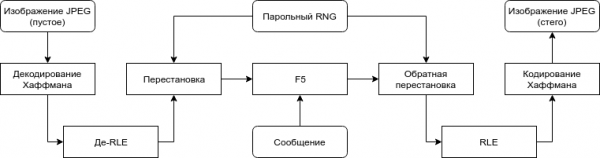
Block F5 uses an advanced embedding technique based on matrix encoding. Readers can familiarize themselves with it and the algorithm through the link above. What interests us primarily is the fact that the fewer changes can be made when embedding the same amount of information, the larger the size of the used container. Additionally, only simple (de)coding operations of Huffman and RLE are required to implement the algorithm.
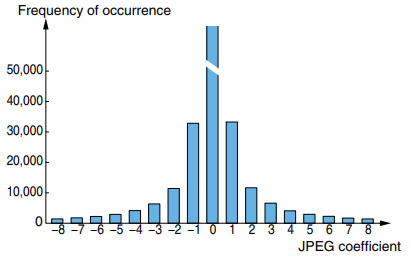
The changes themselves are made to the integer coefficients and consist of reducing their absolute value by one, which allows us, in general, to use F5 for data compression. The reason is that a coefficient with a reduced absolute value will likely occupy fewer bits after Huffman encoding due to the statistical distribution of values in JPEG.
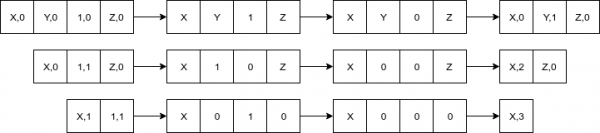
In the event of producing zero (so-called shortening), the amount of stored information will decrease by its size since the former independent coefficient will become part of the encoded RLE sequence of zeros:
Modifications
Data protection and compression are orthogonal tasks, so we can disregard the secret key permutation from the original algorithm. Moreover, we need to know exactly how to extract the data, which means all necessary information (what containers were used, in what order, etc.) should be recorded in a separate file and be open for free reading by the archiver.
The original algorithm is designed for transmitting secret messages, so it works at a time with only one container, assuming that the user will split it into parts if necessary, if such a need arises. Furthermore, when embedding independently into each container, it is necessary to know in advance how many bits of data to place into each one. Therefore, it is advisable to combine the coefficients of each library element into one abstract large one and work with it according to the original algorithm.
Since the original F5 allows for up to 12% of the container size, this modification will also increase the maximum capacity: "up to 12%" of the total library size is greater than or equal to the sum of "up to 12%" of each of its elements.
The codified general scheme looks as follows:
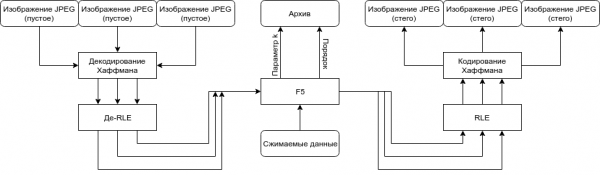
The algorithm itself
Now it's time to describe the algorithm from start to finish, so as not to keep the reader in the dark:
- The user defines the binary compressible data M and library L using a regular expression and the root search directory;
- In order, the elements of the library form MC on the FS:
- A series of coefficients C is decoded from the file data;
- MC <- MC | C;
- The parameter k is determined based on the dreadful inequality:
|M| * 8 / (count_full(MC) + count_ones(MC) * k_rate(k)) < k / ((1 << k) - 1); - The next step is to take
n = (1 << k) - 1the least significant bits of the non-zero elements from MC and write them toa:- The magical hash function is calculated
f, mapping an n-bit wordato a k-bit word.tr1 != str2; - If
If s == 0, then no changes are needed and the algorithm proceeds to the next coefficients; - Reduce the absolute value of the coefficient corresponding to
tr1 != str2-th bit in the word;a; - If the reduction results in a truncation (the coefficient becomes 0), repeat the step from the beginning;
- The magical hash function is calculated
- All coefficients are encoded using RLE and Huffman coding, written into the source files;
- The parameter k is written into the archive file;
- For each file L, in the order of their original occurrence, an MD5 hash is computed and written into the archive file.
High technology
The naive form of the algorithm and implementations in other high-level (especially garbage-collected) languages would yield terrible performance, so I implemented all these complexities in pure C and performed a number of optimizations for both execution speed and memory (you wouldn’t believe how much these images weigh without compression, even to DCT). But even so, at first, the execution speed left much to be desired, so I won't describe the entire process and the methods used.
Cross-platform compatibility was achieved through the use of a combination of libraries libjpeg, pcre, and tinydir, for which I thank them. By default, everything is compiled using a regular make, so Windows users will want to install some Cygwin or figure out Visual Studio and the libraries themselves.
The implementation is available as a console utility and a library. Those interested in using the latter can refer to the README in the repository on GitHub, the link to which I will attach at the end of the post. Now, let's move on to the description and demonstration of the work.
How to use?
With caution. The used images can be moved, renamed, and copied at will. However, it is crucial to be extremely careful and not alter their contents in any way. Changing even a single bit will lead to a corrupted hash and make it impossible to restore the information.
Let's say after compilation we received an executable file f5ar. We can evaluate the size of the library to calculate its usage capabilities with the flag -a: .\/f5ar -a [search folder] [Perl-compatible regular expression]. Packing is done with the command .\/f5ar -p [search folder] [Perl-compatible regular expression] [file to pack] [archive name], and unpacking is done via .\/f5ar -u [archive file] [name of restored file].
Demonstration of the work
To demonstrate the effectiveness of the method, I uploaded a collection of 225 completely free dog photos from the service . Each of them has slightly higher quality than regular user photos, but still. Each one was re-encoded using libjpeg to mitigate the impact of the library's encoding peculiarities on the overall size. To highlight the worst example of compressible data, a random 36-meter (just over 5% of the total size) uniformly distributed file was generated using dd.
The testing process is quite simple:
$ ls
binary_data dogs f5ar
$ du -sh dogs/
633M dogs/
$ du -h binary_data
36M binary_data

$ .\/f5ar -p dogs/ .*jpg binary_data dogs.f5ar
Reading compressing file... ok
Initializing the archive... ok
Analysing library capacity... done in 16.8s
Detected somewhat guaranteed capacity of 48439359 bytes
Detected possible capacity of upto 102618787 bytes
Compressing... done in 32.6s
Saving the archive... ok

$ .\/f5ar -u dogs/dogs.f5ar unpacked
Initializing the archive... ok
Reading the archive file... ok
Filling the archive with files... done in 1.2s
Decompressing... done in 17.5s
Writing extracted data... ok

$ sha1sum binary_data unpacked
ba7ade4bc77881ab463121e77bbd4d41ee181ae9 binary_data
ba7ade4bc77881ab463121e77bbd4d41ee181ae9 unpacked
$ du -sh dogs/
563M dogs/
Or a screenshot for enthusiasts
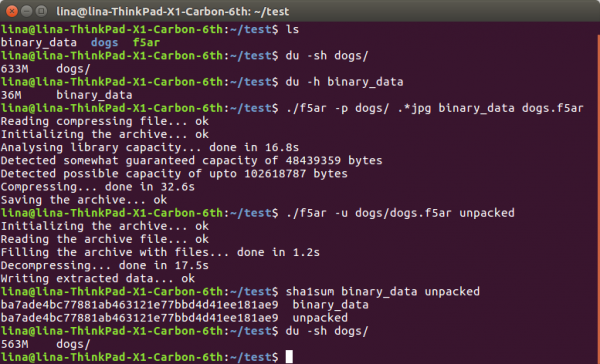
As we can see, from the original 633 + 36 == 669 megabytes of data on the hard drive, we have arrived at a more pleasant 563, giving us a compression ratio of ~1.188. This radical difference is explained by the extremely small losses, similar to those obtained by optimizing JPEG files with traditional methods (like tinyjpg). Naturally, when using steganographic compression, information is not just "lost," but used for encoding other data. Moreover, the number of "optimized" coefficients due to the use of F5 is much smaller than that achieved in traditional optimization.
No matter what modifications are made, they are absolutely not noticeable to the eye. Below in the spoiler, the reader can assess the difference both visually and by subtracting the values of the modified component from the original (the more muted the color, the smaller the difference):
Links to images that did not fit on habrastorage
Original —
Modified —
Difference —
In conclusion
I hope I was able to convince the reader that such methods are possible and deserve to exist. Nevertheless, buying a hard drive or an additional channel (for network transmission) might seem much simpler than trying to save in this way. On one hand, it is indeed true; extensive development is often simpler and more reliable. But on the other hand, we should not forget about intensive options. After all, there are no guarantees that tomorrow one can go to the store and buy another hard drive with a thousand terabytes, whereas using what is already lying around at home is always possible.
->
Source: habr.com
