

Another user wants to write a new chunk of data to the hard drive, but there's not enough free space for that. They don't want to delete anything either, as "everything is very important and necessary." So what do we do about it?
This problem doesn't only arise for them. Our hard drives hold terabytes of information, and that amount shows no signs of decreasing. But how unique is it? After all, all files are just sets of bits of a certain length, and most likely, the new one isn't very different from what is already stored.
It's clear that searching for already stored pieces of information on the hard drive is a task that's not only potentially doomed but at least ineffective. On the other hand, if the difference is minimal, we might be able to adjust things a bit...
TL;DR — a second attempt to explain a strange method of data optimization using JPEG files, now in a more understandable form.
About bits and differences
If we take two completely random chunks of data, on average, half of the bits they contain will match. Indeed, among all possible combinations for each pair (’00, 01, 10, 11′), exactly half will have matching values; it's quite straightforward.
But of course, if we just take two files and adjust one to the other, we will lose one of them. If we save the changes, we will simply reinvent , which already exists perfectly well without us, although it's not usually used for such purposes. We can attempt to embed a smaller sequence into a larger one, but even then we risk losing critical segments of data if used thoughtlessly with everything.
What can we then adjust the difference between? Well, the new file being written by the user is just a sequence of bits, which we can't do anything with on its own. Therefore, we need to find such bits on the hard drive that can be altered without the need to store the difference, allowing us to survive their loss without serious consequences. Additionally, it makes sense to modify not just the file itself on the file system, but some less sensitive information within it. But what kind and how?
Fitting methods
Lossy compressed files come to the rescue. All these JPEGs, MP3s, and others, while being lossy compressions, contain plenty of bits available for safe modification. Advanced techniques can be used to unobtrusively modify their components at different encoding points. Wait a minute. Advanced techniques... unobtrusive modification... bits into other bits... this is nearly what !
Indeed, embedding one piece of information within another is reminiscent of its methods. The unobtrusiveness of the alterations made is also impressive for human senses. Yet, this is where the paths diverge — the secrecy aspect: our task boils down to adding extra information onto the user's hard drive, which will only harm them. They'll forget it.
Therefore, while we can use them, certain modifications are necessary. I will explain and demonstrate them using one of the existing methods and a common file format.
About Jackals
If we are to compress, let's compress what is most compressible in the world. Of course, we are talking about JPEG files. Not only is there a ton of tools and existing methods to embed data into them, but they are also the most popular graphic format on this planet.
That said, to avoid dog-breeding, we need to limit our focus to files of this format. Nobody likes the monochrome squares that appear due to excessive compression, so we must restrict ourselves to working with already compressed files, avoiding re-encoding. Specifically, with integer coefficients that remain after operations responsible for data loss — DCT and quantization, which is well illustrated in the encoding diagram (thanks to the National Library of Bauman):

There are numerous possible methods for optimizing JPEG files. There is lossless optimization (jpegtran), and there is optimization "" that does indeed introduce quite a bit, but we are not concerned with that. After all, if a user is willing to embed one piece of information into another to increase free space on the disk, then they have either already optimized their images or are completely unwilling to do so out of fear of quality loss.
F5
A whole family of algorithms fits such conditions, which can be explored. . The most advanced of them is the algorithm authored by Andreas Westfeld, working with brightness component coefficients, as the human eye is least sensitive to its changes. Moreover, it employs an embedding technique based on matrix coding, which allows for fewer changes in embedding the same amount of information as the size of the container used increases.
The changes themselves reduce the absolute value of the coefficients by one under certain conditions (that is, not always), which allows the use of F5 for optimizing data storage on the hard disk. The point is that the coefficient after such a change will likely occupy fewer bits after Huffman coding due to the statistical distribution of values in JPEG, and the new zeros will yield a gain when coding them with RLE.
The necessary modifications involve removing the part responsible for secrecy (password permutation), which saves resources and execution time, and adding a mechanism to work with multiple files instead of one at a time. The reader may not be particularly interested in the details of the modification process, so let's move on to the description of the implementation.
High technology
To demonstrate the effectiveness of this approach, I implemented the method in pure C and conducted a series of optimizations in both execution speed and memory (you wouldn't believe how much these images weigh without compression even to DCT). Cross-platform capability is achieved by using a combination of libraries. , and , for which they deserve thanks. All of this is built using ‘make’, so Windows users who want to assess it should install some Cygwin or figure out Visual Studio and libraries on their own.
The implementation is available as a console utility and a library. More details on using the latter can be found in the README in the GitHub repository, the link to which I will attach at the end of the post.
How to use?
Caution. The images used for packaging are selected by searching through regular expressions in the specified root directory. Once completed, files can be moved, renamed, and copied as desired within it, and operating and file systems can be changed, etc. However, one must be extremely careful and not alter the actual content in any way. Losing the value of even a single bit can make it impossible to recover the information.
Upon completion, the utility leaves a special archive file containing all the necessary information for extraction, including data on the images used. The file itself weighs about a couple of kilobytes and does not significantly impact the occupied disk space.
You can analyze the possible capacity using the flag ‘-a’: ‘./f5ar -a [search folder] [Perl-compatible regular expression]’. Packaging is done with the command ‘./f5ar -p [search folder] [Perl-compatible regular expression] [packaged file] [archive name]’, and unpacking using ‘./f5ar -u [archive file] [restored file name]’.
Demonstration of the work
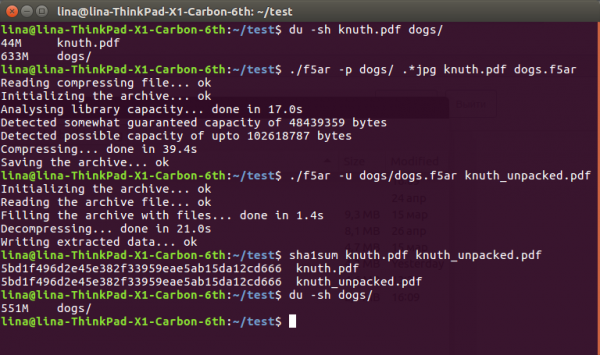
To demonstrate the effectiveness of the method, I uploaded a collection of 225 completely free dog photos from the service and found a large pdf document of the second volume measuring 45 meters in my documents Knuth.
The sequence is quite simple:
$ du -sh knuth.pdf dogs/
44M knuth.pdf
633M dogs/

$ ./f5ar -p dogs/ .*jpg knuth.pdf dogs.f5ar
Reading compressing file... ok
Initializing the archive... ok
Analysing library capacity... done in 17.0s
Detected somewhat guaranteed capacity of 48439359 bytes
Detected possible capacity of up to 102618787 bytes
Compressing... done in 39.4s
Saving the archive... ok

$ ./f5ar -u dogs/dogs.f5ar knuth_unpacked.pdf
Initializing the archive... ok
Reading the archive file... ok
Filling the archive with files... done in 1.4s
Decompressing... done in 21.0s
Writing extracted data... ok

$ sha1sum knuth.pdf knuth_unpacked.pdf
5bd1f496d2e45e382f33959eae5ab15da12cd666 knuth.pdf
5bd1f496d2e45e382f33959eae5ab15da12cd666 knuth_unpacked.pdf

$ du -sh dogs/
551M dogs/
Screenshots for enthusiasts
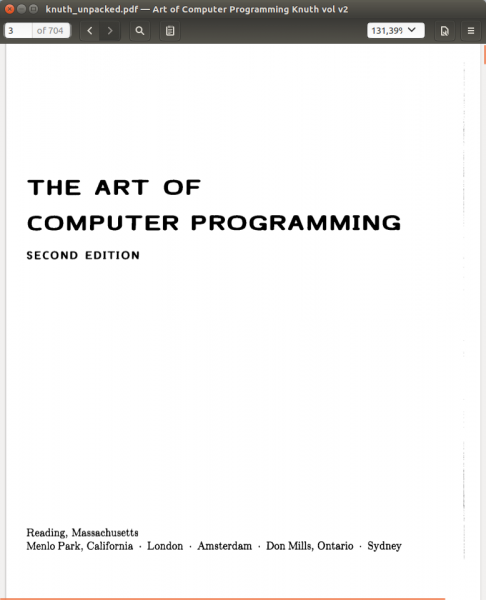
The unpacked file can still and should be read:
As seen, from the original 633 + 36 == 669 megabytes of data on the hard drive, we arrived at a more pleasant 551. This radical difference is explained by the very reduction in coefficient values affecting subsequent lossless compression: a single unit reduction can easily 'slice' a couple of bytes off the final file. Nevertheless, these are still data losses, albeit extremely minor, which one will have to accept.
Fortunately, they are completely invisible to the eye. Under the spoiler (since habrastorage doesn’t handle large files), readers can evaluate the difference both visually and in intensity, derived from subtracting the values of the modified component from the original: , , (the duller the color, the less difference in the block).
In conclusion
Considering all these complexities, buying a hard drive or uploading everything to the cloud may seem like a much simpler solution to the problem. However, even though we live in such a wonderful time, there are no guarantees that tomorrow we’ll still be able to access the internet and upload all our excess data somewhere. Or go to a store and buy another hard drive with a thousand terabytes. But using what you already have at home is always an option.
->
Source: habr.com
