


Background
It happened that the server was attacked by ransomware, which, by a 'happy accident', partially left the .ibd files (raw data files of InnoDB tables) untouched, but completely encrypted the .fpm files (structure files). The .idb files could be categorized into:
- those recoverable through standard means and guides. For such cases, there is an excellent ;
- partially encrypted tables. Primarily, these are large tables, which (as I understand) the attackers did not have enough RAM to encrypt completely;
- and completely encrypted tables, which are not recoverable.
To determine which option the tables belong to, it was enough to open them in any text editor with the necessary encoding (in my case, UTF8) and simply check the file for text fields, for example:
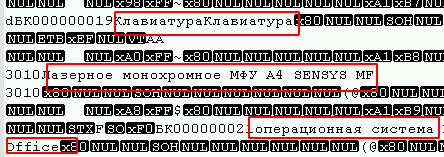
Also, at the beginning of the file, a large number of 0-byte sequences can be observed, and viruses that use block encryption algorithms (which are most common) usually affect them as well.

In my case, the attackers left a string of 4 bytes (1, 0, 0, 0) at the end of each encrypted file, which simplified the task. To find uninfected files, a simple script was sufficient:
def opened(path):
    files = os.listdir(path)
    for f in files:
        if os.path.isfile(path + f):
            yield path + f

for full_path in opened("C:somepath"):
    file = open(full_path, "rb")
    last_string = ""
    for line in file:
        last_string = line
        file.close()
    if (last_string[len(last_string) -4:len(last_string)]) != (1, 0, 0, 0):
        print(full_path)
Thus, files belonging to the first type were found. The second type requires lengthy manual work, but what was found was already sufficient. Everything would be fine, but it is necessary to know the exact structure and (of course) such a situation arose that I had to work with a frequently changing table. No one remembered whether the field type changed or if a new column was added.
Unfortunately, Debri City couldn't help with such a case, which is why this article is being written.
Getting to the point
There is a table structure from three months ago that does not match the current one (possibly due to one field, but maybe more). The table structure is as follows:
CREATE TABLE `table_1` (
    `id` INT (11),
    `date` DATETIME ,
    `description` TEXT ,
    `id_point` INT (11),
    `id_user` INT (11),
    `date_start` DATETIME ,
    `date_finish` DATETIME ,
    `photo` INT (1),
    `id_client` INT (11),
    `status` INT (1),
    `lead__time` TIME ,
    `sendstatus` TINYINT (4)
);
At the same time, it is necessary to extract:
id_pointINT (11);id_userINT (11);date_startDATETIME;date_finishDATETIME.
For recovery, a byte-by-byte analysis of the .ibd file is used, followed by converting them into a more readable format. Since it is sufficient for us to analyze data types such as int and datetime to find what is required, this article will only describe these types, but occasionally might reference other data types that could assist in other similar cases.
Problem 1: in fields with DATETIME and TEXT types, there were NULL values, and in the file they were simply skipped, making it impossible to determine the structure for recovery in my case. In the new columns, the default value was null, and part of the transaction might have been lost due to the setting innodb_flush_log_at_trx_commit = 0, therefore additional time would be needed to determine the structure.
Problem 2: it should be noted that rows deleted via DELETE will still be in the ibd file, but their structure will not be updated upon ALTER TABLE. Consequently, the data structure may vary from the beginning of the file to its end. If you frequently use OPTIMIZE TABLE, you are unlikely to encounter such a problem.
Note that, the version of the DBMS affects the way data is stored, and this example may not work for other major versions. In my case, the Windows version of MariaDB 10.1.24 was used. Also, although in MariaDB you work with InnoDB tables, in fact they are , which excludes the applicability of the InnoDB MySQL method.
File Analysis
In Python, the data type displays data in Unicode instead of a standard numerical set. Although the file can also be examined in this form, for convenience, bytes can be converted into numerical form by transforming the byte array into a regular array (list(example_byte_array)). In any case, both methods will be useful for analysis.
After reviewing several ibd files, the following can be encountered:

Moreover, if the file is divided by these keywords, predominantly even data blocks will result. We will use infimum as the delimiter.
table = table.split("infimum".encode())An interesting observation is that for tables with a small amount of data, there is a pointer to the number of rows in the block between infimum and supremum.
 — test table with 1 row
 — test table with 2 rows
The array of strings table[0] can be skipped. After examining it, I couldn't find any raw table data. Most likely, this block is used to store indices and keys.
Starting from table[1] and converting it into a numeric array, some patterns can already be observed, namely:
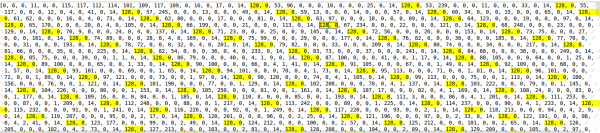
These are int values stored in a string. The first byte indicates whether the number is positive or negative. In my case, all numbers are positive. From the remaining 3 bytes, one can determine the number using the following function. Script:
def find_int(val: str):  # example '128, 1, 2, 3'
    val = [int(v) for v in  val.split(", ")]
    result_int = val[1]*256**2 + val[2]*256*1 + val[3]
    return result_int
For example, 128, 0, 0, 1 = 1, or 128, 0, 75, 108 = 19308.
The table had a primary key with auto-increment, which can also be found here.

By comparing the data from the test tables, it was found that the DATETIME object consists of 5 bytes starting with 153 (likely indicating annual intervals). Since the DATETIME range is from '1000-01-01' to '9999-12-31', I think the byte count might vary, but in my case, the data falls between the years 2016 and 2019, so we will assume that 5 bytes is sufficient.
To determine time without seconds, the following functions were written. Script:
day_ = lambda x: x % 64 // 2  # {x,x,X,x,x }

def hour_(x1, x2):  # {x,x,X1,X2,x}
    if x1 % 2 == 0:
        return x2 // 16
    elif x1 % 2 == 1:
        return x2 // 16 + 16
    else:
        raise ValueError

min_ = lambda x1, x2: (x1 % 16) * 4 + (x2 // 64)  # {x,x,x,X1,X2}
I couldn't write a properly functioning function for the year and month, so I had to hardcode it. Script:
ym_list = {'2016, 1': '153, 152, 64', '2016, 2': '153, 152, 128',
           '2016, 3': '153, 152, 192', '2016, 4': '153, 153, 0',
           '2016, 5': '153, 153, 64', '2016, 6': '153, 153, 128',
           '2016, 7': '153, 153, 192', '2016, 8': '153, 154, 0',
           '2016, 9': '153, 154, 64', '2016, 10': '153, 154, 128',
           '2016, 11': '153, 154, 192', '2016, 12': '153, 155, 0',
           '2017, 1': '153, 155, 128', '2017, 2': '153, 155, 192',
           '2017, 3': '153, 156, 0', '2017, 4': '153, 156, 64',
           '2017, 5': '153, 156, 128', '2017, 6': '153, 156, 192',
           '2017, 7': '153, 157, 0', '2017, 8': '153, 157, 64',
           '2017, 9': '153, 157, 128', '2017, 10': '153, 157, 192',
           '2017, 11': '153, 158, 0', '2017, 12': '153, 158, 64',
           '2018, 1': '153, 158, 192', '2018, 2': '153, 159, 0',
           '2018, 3': '153, 159, 64', '2018, 4': '153, 159, 128',
           '2018, 5': '153, 159, 192', '2018, 6': '153, 160, 0',
           '2018, 7': '153, 160, 64', '2018, 8': '153, 160, 128',
           '2018, 9': '153, 160, 192', '2018, 10': '153, 161, 0',
           '2018, 11': '153, 161, 64', '2018, 12': '153, 161, 128',
           '2019, 1': '153, 162, 0', '2019, 2': '153, 162, 64',
           '2019, 3': '153, 162, 128', '2019, 4': '153, 162, 192',
           '2019, 5': '153, 163, 0', '2019, 6': '153, 163, 64',
           '2019, 7': '153, 163, 128', '2019, 8': '153, 163, 192',
           '2019, 9': '153, 164, 0', '2019, 10': '153, 164, 64',
           '2019, 11': '153, 164, 128', '2019, 12': '153, 164, 192',
           '2020, 1': '153, 165, 64', '2020, 2': '153, 165, 128',
           '2020, 3': '153, 165, 192','2020, 4': '153, 166, 0',
           '2020, 5': '153, 166, 64', '2020, 6': '153, 1, 128',
           '2020, 7': '153, 166, 192', '2020, 8': '153, 167, 0',
           '2020, 9': '153, 167, 64','2020, 10': '153, 167, 128',
           '2020, 11': '153, 167, 192', '2020, 12': '153, 168, 0'}

def year_month(x1, x2):  # {x,X,X,x,x }

    for key, value in ym_list.items():
        key = [int(k) for k in key.replace("'", "").split(", ")]
        value = [int(v) for v in value.split(", ")]
        if x1 == value[1] and x2 // 64 == value[2] // 64:
            return key
    return 0, 0
I'm sure that if you spend a certain amount of time, this misunderstanding can be corrected.
Next, a function that returns a datetime object from a string. Script:
def find_data_time(val:str):
    val = [int(v) for v in val.split(", ")]
    day = day_(val[2])
    hour = hour_(val[2], val[3])
    minutes = min_(val[3], val[4])
    year, month = year_month(val[1], val[2])
    return datetime(year, month, day, hour, minutes)
Could detect frequently recurring values from int, int, datetime, datetime  , it seems this is what's needed. Moreover, such a sequence doesn't repeat twice in the string.
Using a regular expression, we find the necessary data:
fined = re.findall(r'128, d*, d*, d*, 128, d*, d*, d*, 153, 1[6,5,4,3]d, d*, d*, d*, 153, 1[6,5,4,3]d, d*, d*, d*', int_array)Note that when searching with this pattern, it will not be possible to determine NULL values in the required fields, but in my case this is not critical. Then we iterate over the found results. Script:
result = []
for val in fined:
    pre_result = []
    bd_int  = re.findall(r"128, d*, d*, d*", val)
    bd_date= re.findall(r"(153, 1[6,5,4,3]d, d*, d*, d*)", val)
    for it in bd_int:
        pre_result.append(find_int(bd_int[it]))
    for bd in bd_date:
        pre_result.append(find_data_time(bd))
    result.append(pre_result)
Essentially, the data from the result array is exactly what we need. ###PS.###
I understand that this approach won't suit everyone, but the main goal of the article is more to inspire action than to solve all your problems. I believe the most appropriate solution would be to start studying the source code itself. , but due to time constraints, the current method seemed to be the quickest.
In some cases, by analyzing the file, you can determine the approximate structure and restore it using one of the standard methods from the links above. This would be much more correct and cause fewer problems.
Source: habr.com
