

At Microsoft, we are focused on the idea of empowering developers to create high-quality applications more swiftly. One of the ways we achieve this goal is by offering a range of products and services that cover all stages of the software development lifecycle. This includes IDEs and DevOps tools, cloud application and data platforms, as well as operating systems, artificial intelligence, IoT solutions, and much more. All these are centered around developers as individuals, working in teams and organizations, as well as members of developer communities.
GitHub is one of the largest developer communities, and for millions of developers worldwide, their identity on GitHub has become a critical aspect of their digital lives. Recognizing this, we are excited to announce enhancements that help GitHub users get started more easily with our developer services, including and Azure.
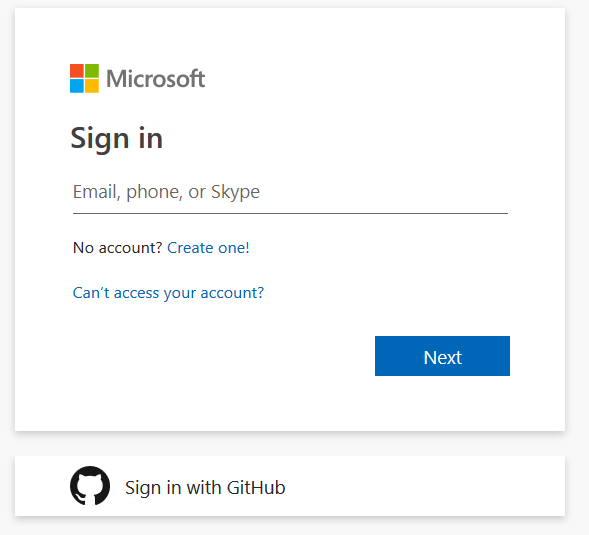
Your GitHub credentials can now be used to log in to Microsoft services.
We are now enabling developers to sign in to Microsoft online services using their existing GitHub account on any Microsoft sign-in page. By using your GitHub credentials, you can now log in via OAuth to any Microsoft service, including Azure DevOps and Azure.
You will see the option to sign in with your account by clicking on “Sign in with GitHub”.
After signing in through GitHub and authorizing the Microsoft application, you will receive a new Microsoft account linked to your GitHub credentials. During this process, you also have the option to link it to an existing Microsoft account if you already have one.
Sign in to Azure DevOps
Azure DevOps offers a set of services for developers that help them plan, create, and deliver any applications. With support for GitHub authentication, we have simplified the integration with Azure DevOps services such as Continuous Integration and Continuous Delivery (Azure Pipelines); Agile Planning (Azure Boards); and the storage of private packages like modules for NuGet, npm, PyPi, etc. (Azure Artifacts). The Azure DevOps suite is free for individuals and small teams of up to five people.
To get started with Azure DevOps using your GitHub account, click “Start free using GitHub” on the page. .
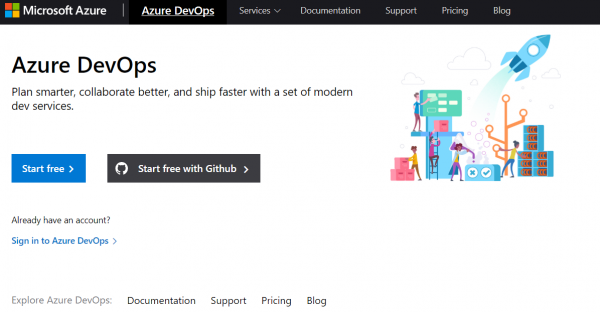
After completing the sign-in process, you will be taken directly to the last organization you visited in Azure DevOps. If you are new to Azure DevOps, you will be taken to a new organization created for you.
Access to all Microsoft online services
In addition to accessing developer services like Azure DevOps and Azure, your GitHub account can be used to access all Microsoft online services, from Excel Online to Xbox.
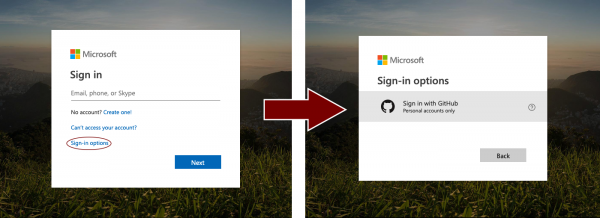
When authenticating to these services, you can select your GitHub account after clicking on 'Sign-in options.'
Our commitment to your privacy
When you first use your GitHub account to sign in to Microsoft services, GitHub will ask for permission to use your profile information.
If you give your consent, GitHub will provide the email addresses from your GitHub account (both public and private), as well as profile information like your name. We will use this data to verify whether you have an account in our system or if we need to create a new account if it doesn't exist. Linking your GitHub identifier to Microsoft does not give Microsoft access to your repositories on GitHub. Applications like Azure DevOps or Visual Studio will request access to your repositories separately if they need to work with your code, and you will need to provide separate consent for that.
While your GitHub account is used to sign in to your Microsoft account, they still remain separate – one simply uses the other as a sign-in method. Changes you make to your GitHub account (such as changing your password or enabling two-factor authentication) will not affect your Microsoft account, and vice versa. You can manage the connection between your GitHub and Microsoft identities on on the Security tab.
Start exploring Azure DevOps now
Go to the Azure DevOps page and click 'Start Free with GitHub' to get started.
If you have any questions, visit the support page. Also, as always, we would love to hear any feedback or suggestions you have, so let us know what you think in the comments below.
Source: habr.com
