

Over a year ago, it became known about the plans of the messenger Telegram to launch its own decentralized network. Telegram Open Network. At that time, a comprehensive technical document was made available, which was presumably written by Nikolai Durov and described the structure of the future network. For those who missed it — I recommend reviewing my summary of this document (, ; the third part, unfortunately, is still gathering dust in drafts).
Since then, there have been no significant news about the status of the TON development, until a couple of days ago (in one of the ) a link appeared to the page , where the following are hosted:
◦ — the source code for the light client for the TON test network;
◦ — a configuration file to connect to the test network;
◦ — information about building and running the client;
◦ — a step-by-step guide to creating a smart contract using the client;
◦ — an updated document (from March 2, 2019) with a technical overview of the TON network;
◦ — a technical description of TVM (TON Virtual Machine, the virtual machine of TON);
◦ — a technical description of the TON blockchain;
◦ — a description of the new language Fift, designed for creating smart contracts in TON.
I repeat, there have been no official confirmations of the page and all these documents from Telegram, but the volume of these materials makes them quite plausible. Launch the published client at your own risk. at your own risk.
Test client build
First, let's try to build and run the test client — fortunately, this straightforward process is detailed. I will do this using macOS 10.14.5; I cannot guarantee success on other systems.
Download and unpack . It is important to download the latest version as backward compatibility is not guaranteed at this stage.
Ensure that the latest versions of make, cmake (version 3.0.2 or higher), OpenSSL (including C header files), g++, or clang are installed on the system. I didn’t need to install anything extra; everything compiled right away.
Let's assume the sources are unpacked in the folder
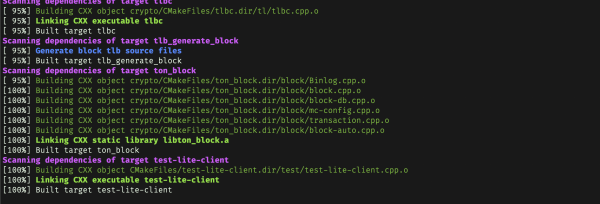
~/lite-client. Separately from it, create an empty folder for the built project (for example,~/liteclient-build), and from it (cd ~/liteclient-build) we call the commands:cmake ~/lite-client cmake --build . --target test-lite-client
To build the Fift language interpreter for smart contracts (more about it below), we also callcmake --build . --target fiftDownload the current to connect to the test network and place it in the folder with the built client.
Done, you can start the client:
./test-lite-client -C ton-lite-client-test1.config.json
If everything is done correctly, you should see something like this:
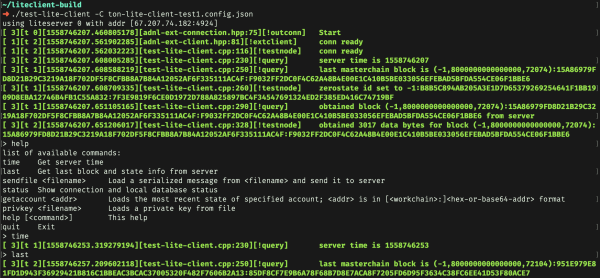
The available commands, as we see, are few:
◦ help — to display this list of commands;
◦ quit — to exit;
◦ time — to show the current time on the server;
◦ status — to show the connection status and local database;
◦ last — update the blockchain state (fetch the latest block). It is important to execute this command before any requests to ensure that you see the current state of the network.
◦ sendfile <filename> — upload a local file to the TON network. This is how interaction with the network occurs — including, for example, creating new smart contracts and making transfer requests between accounts;
◦ getaccount — show the current state (at the moment the command is executed last) of the account with the specified address;
◦ privkey <filename> — upload the private key from a local file.
If a folder is passed to the client at startup using the option -D, it will store the last block of the masterchain there:
./test-lite-client -C ton-lite-client-test1.config.json -D ~/ton-db-dirNow we can move on to more interesting things — exploring the Fift language, trying to compile a smart contract (for example, creating a test wallet), uploading it to the network, and attempting to transfer funds between accounts.
The Fift Language
According to the document , it can be learned that for creating smart contracts, the Telegram team has developed a new stack-based language Fift (presumably from the numeral fifth, analogous to Forth — a language that Fift shares many similarities with).
The document is quite extensive, spanning 87 pages, and I will not recount its content in detail in this article (not least because I haven't finished reading it myself :). I will focus on the main points and provide a couple of code examples in this language.
At a basic level, Fift's syntax is quite simple: its code consists of words, usually separated by spaces or line breaks (a special case: some words do not require a separator after themselves). Any word — is a case-sensitive sequence of characters that corresponds to a certain definition — roughly speaking, what the interpreter should do when it encounters this word. If there is no definition for the word, the interpreter attempts to parse it as a number and push it onto the stack. By the way, numbers here — surprisingly — are 257-bit integers, and there are no fractional numbers at all — rather, they immediately turn into a pair of integers that form the numerator and denominator of a rational fraction.
Words typically interact with values located at the top of the stack. A distinct type of word is prefix — uses not a stack, but the subsequent characters from the source file. For example, string literals are implemented this way — the symbol "quote" (") is a prefix word that searches for the next (closing) quote and places the string between them on the stack. Single-line (//) and multi-line (/*) comments behave similarly.
This is nearly all that concludes the internal structure of the language. Everything else (including control structures) is defined as words (either internal, such as arithmetic operations and defining new words; or defined in the "standard library" Fift.fif, which is located in the folder crypto/fift in the sources).
A simple example of a program in Fift:
{ dup =: x dup * =: y } : setxy
3 setxy x . y . x y + .
7 setxy x . y . x y + .
In the first line, a new word is defined setxy note the prefix {, which creates a block until the closing } and the prefix :, which actually defines the word). setxy takes the number from the top of the stack, defines (or redefines) it as a global constant x, while the square of this number is defined as a constant y considering that constants' values can be redefined, I would rather call them variables, but I follow the naming in the language.
In the next two lines, a number is placed on the stack, invoked setxy, then the constant values are outputted x, y for output it uses the word .), both constants are placed on the stack, summed up, and the result is also outputted. As a result, we will see:
3 9 12 ok
7 49 56 ok
(The line "ok" is outputted by the interpreter when it finishes processing the current line in interactive input mode)
And a full example of the code:
"Asm.fif" include
-1 constant wc
// create a wallet in workchain -1 (masterchain)
// Create new simple wallet
<{ SETCP0 DUP IFNOTRET INC 32 THROWIF
512 INT LDSLICEX DUP 32 PLDU
c4 PUSHCTR CTOS 32 LDU 256 LDU ENDS
s1 s2 XCPU
EQUAL 33 THROWIFNOT
s2 PUSH HASHSU
s0 s4 s4 XC2PU
CHKSIGNU
34 THROWIFNOT
ACCEPT
SWAP 32 LDU NIP
DUP SREFS IF:<{
8 LDU LDREF // pubk cnt mode msg cs
s0 s2 XCHG SENDRAWMSG // pubk cnt cs ; ( message sent )
}>
ENDS
INC NEWC 32 STU 256 STU ENDC c4 POPCTR
}>c
// code
<b 0 32 u, newkeypair swap dup constant wallet_pk "new-wallet.pk" b>file
B,
b> // data
// no libraries
<b b{00110} s, rot ref, swap b> // create StateInit
dup ."StateInit: " <s csr. cr
dup hash dup constant wallet_addr
."new wallet address = " wc . .": " x. cr
wc over 7 smca>$ type cr
256 u>B "new-wallet.addr" B>file
<b 0 32 u, b>
dup ."signing message: " <s csr. cr
dup hash wallet_pk ed25519_sign_uint rot
<b b{1000100} s, wc 8 i, wallet_addr 256 u, b{000010} swap <s b{0} b, b>
dup ."External message for initialization is " <s csr. cr
2 boc+>B dup Bx. cr
"new-wallet-query.boc" tuck B>file
."(Saved to file " type .")" crThis somewhat intimidating file is designed to create a smart contract — it will be placed in the file new-wallet-query.boc after execution. Note that another assembly language for the TON Virtual Machine is used here (I won’t dwell on it in detail), the instructions of which will be placed in the blockchain.
Thus, the assembler for TVM is written in Fift — the sources of this assembler are in the file crypto/fift/Asm.fif and are included at the beginning of the code snippet provided above.
What can I say, apparently, Nikolai Durov just loves to create new programming languages 🙂
Creating a smart contract and interacting with TON
So, let's assume we have gathered the TON client and the Fift interpreter as described above, and we are familiar with the language. How do we create a smart contract now? This is discussed in the file , attached to the source materials.
Accounts in TON
As I explained in the , this network contains more than one blockchain — there is one common, so-called 'masterchain', as well as an arbitrary number of additional 'workchains', identified by a 32-bit number. The masterchain has an identifier of -1, and in addition to it, a 'base' workchain can also be used with an identifier of 0. Each workchain can have its own configuration. Internally, each workchain is divided into shardchains, but that is already an implementation detail that doesn’t need to be kept in mind.
Within a single workchain, there are multiple accounts, each with its own account_id identifiers. For the masterchain and the zero workchain, they are 256 bits long. Thus, the account identifier is recorded, for example, like this:
-1:8156775b79325e5d62e742d9b96c30b6515a5cd2f1f64c5da4b193c03f070e0dThis is the 'raw' format: first the workchain identifier, then a colon, and then the account identifier in hexadecimal notation.
Additionally, there is a shortened format — the workchain number and account address are encoded in binary, a checksum is added to them, and all of it is encoded in Base64:
Ef+BVndbeTJeXWLnQtm5bDC2UVpc0vH2TF2ksZPAPwcODSkbKnowing this recording format, we can query the current state of any account through the test client using the command
getaccount -1:8156775b79325e5d62e742d9b96c30b6515a5cd2f1f64c5da4b193c03f070e0dWe will receive a response similar to the following:
[ 3][t 2][1558746708.815218925][test-lite-client.cpp:631][!testnode]    requesting account state for -1:8156775B79325E5D62E742D9B96C30B6515A5CD2F1F64C5DA4B193C03F070E0D
[ 3][t 2][1558746708.858564138][test-lite-client.cpp:652][!testnode]    got account state for -1:8156775B79325E5D62E742D9B96C30B6515A5CD2F1F64C5DA4B193C03F070E0D with respect to blocks (-1,8000000000000000,72355):F566005749C1B97F18EDE013EBA7A054B9014961BC1AD91F475B9082919A2296:1BD5DE54333164025EE39D389ECE2E93DA2871DA616D488253953E52B50DC03F and (-1,8000000000000000,72355):F566005749C1B97F18EDE013EBA7A054B9014961BC1AD91F475B9082919A2296:1BD5DE54333164025EE39D389ECE2E93DA2871DA616D488253953E52B50DC03F
account state is (account
  addr:(addr_std
    anycast:nothing workchain_id:-1 address:x8156775B79325E5D62E742D9B96C30B6515A5CD2F1F64C5DA4B193C03F070E0D)
  storage_stat:(storage_info
    used:(storage_used
      cells:(var_uint len:1 value:3)
      bits:(var_uint len:2 value:539)
      public_cells:(var_uint len:0 value:0)) last_paid:0
    due_payment:nothing)
  storage:(account_storage last_trans_lt:74208000003
    balance:(currencies
      grams:(nanograms
        amount:(var_uint len:7 value:999928362430000))
      other:(extra_currencies
        dict:hme_empty))
    state:(account_active
      (
        split_depth:nothing
        special:nothing
        code:(just
          value:(raw@^Cell
            x{}
             x{FF0020DDA4F260D31F01ED44D0D31FD166BAF2A1F80001D307D4D1821804A817C80073FB0201FB00A4C8CB1FC9ED54}
            ))
        data:(just
          value:(raw@^Cell
            x{}
             x{0000000D}
            ))
        library:hme_empty))))
x{CFF8156775B79325E5D62E742D9B96C30B6515A5CD2F1F64C5DA4B193C03F070E0D2068086C000000000000000451C90E00DC0E35B7DB5FB8C134_}
 x{FF0020DDA4F260D31F01ED44D0D31FD166BAF2A1F80001D307D4D1821804A817C80073FB0201FB00A4C8CB1FC9ED54}
 x{0000000D}
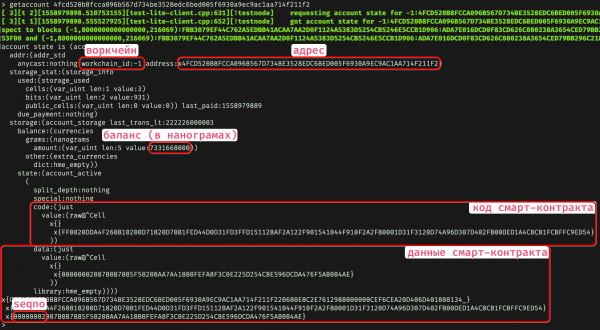
We see the structure stored in the DHT of the specified workchain. For instance, in the field storage.balance there's the current account balance, in storage.state.code — the smart contract code, while in storage.state.data — its current data. Note that the data storage of TON — Cell, the cells — is hierarchical, meaning each cell can have its own data as well as child cells. This is indicated by indentation in the last lines.
Building the smart contract
Now let's create such a structure (called BOC — bag of cells) using the Fift language. Fortunately, we don't have to write the smart contract ourselves — in the folder crypto/block within the source archive, there is a file new-wallet.fif, which will help us create a new wallet. Let's copy it to the folder with the assembled client (~/liteclient-build, if you followed the instructions above). The content of that file I provided earlier as an example of code in Fift.
We execute this file as follows:
./crypto/fift -I"/crypto/fift" new-wallet.fifHere <source-directory> needs to be replaced with the path to the unpacked sources (unfortunately, the symbol «~» cannot be used here; the full path is required). Instead of using the key -I we can define the environment variable FIFTPATH and place this path into it.
Since we launched Fift with a filename new-wallet.fif, it will execute it and terminate. If the filename is omitted, you can play with the interpreter in interactive mode.
The console should output something like this after execution:
StateInit: x{34_}
 x{FF0020DDA4F260810200D71820D70B1FED44D0D31FD3FFD15112BAF2A122F901541044F910F2A2F80001D31F3120D74A96D307D402FB00DED1A4C8CB1FCBFFC9ED54}
 x{0000000055375F730EDC2292E8CB15C42E8036EE9C25AA958EE002D2DE48A205E3A3426B}

new wallet address = -1 : 4fcd520b8fcca096b567d734be3528edc6bed005f6930a9ec9ac1aa714f211f2
0f9PzVILj8yglrVn1zS-NSjtxr7QBfaTCp7JrBqnFPIR8nhZ
signing message: x{00000000}

External message for initialization is x{89FEE120E20C7E953E31546F64C23CD654002C1AA919ADD24DB12DDF85C6F3B58AE41198A28AD8DAF3B9588E7A629252BA3DB88F030D00BC1016110B2073359EAC3C13823C53245B65D056F2C070B940CDA09789585935C7ABA4D2AD4BED139281CFA1200000001_}
 x{FF0020DDA4F260810200D71820D70B1FED44D0D31FD3FFD15112BAF2A122F901541044F910F2A2F80001D31F3120D74A96D307D402FB00DED1A4C8CB1FCBFFC9ED54}
 x{0000000055375F730EDC2292E8CB15C42E8036EE9C25AA958EE002D2DE48A205E3A3426B}

B5EE9C724104030100000000D60002CF89FEE120E20C7E953E31546F64C23CD654002C1AA919ADD24DB12DDF85C6F3B58AE41198A28AD8DAF3B9588E7A629252BA3DB88F030D00BC1016110B2073359EAC3C13823C53245B65D056F2C070B940CDA09789585935C7ABA4D2AD4BED139281CFA1200000001001020084FF0020DDA4F260810200D71820D70B1FED44D0D31FD3FFD15112BAF2A122F901541044F910F2A2F80001D31F3120D74A96D307D402FB00DED1A4C8CB1FCBFFC9ED5400480000000055375F730EDC2292E8CB15C42E8036EE9C25AA958EE002D2DE48A205E3A3426B6290698B
(Saved to file new-wallet-query.boc)
This means that the wallet with the identifier -1:4fcd520b8fcca096b567d734be3528edc6bed005f6930a9ec9ac1aa714f211f2 (or, similarly, 0f9PzVILj8yglrVn1zS-NSjtxr7QBfaTCp7JrBqnFPIR8nhZ) has been successfully created. The corresponding code will be in the file new-wallet-query.boc, its address will be in new-wallet.addr, and the private key will be in new-wallet.pk (be careful — re-running the script will overwrite these files).
Of course, the TON network does not know about this wallet yet; it is stored only in the form of these files. Now it needs to be uploaded to the network. The problem is that creating a smart contract requires a fee, and your account balance is currently zero.
In operational mode, this issue can be resolved by buying grams on the exchange (or transferring from another wallet). In the current testing mode, a special smart contract has been set up that allows you to request up to 20 grams for free.
Forming a request to a foreign smart contract
To request from the smart contract that distributes grams left and right, do it like this. In the same folder, crypto/block find the file testgiver.fif:
// "testgiver.addr" file>B 256 B>u@
0x8156775b79325e5d62e742d9b96c30b6515a5cd2f1f64c5da4b193c03f070e0d
dup constant wallet_addr ."Test giver address = " x. cr
0x4fcd520b8fcca096b567d734be3528edc6bed005f6930a9ec9ac1aa714f211f2
constant dest_addr
-1 constant wc
0x00000011 constant seqno
1000000000 constant Gram
{ Gram swap */ } : Gram*/
6.666 Gram*/ constant amount
// b x --> b' ( serializes a Gram amount )
{ -1 { 1+ 2dup 8 * ufits } until
rot over 4 u, -rot 8 * u, } : Gram,
// create a message (NB: 01b00.., b = bounce)
<b b{010000100} s, wc 8 i, dest_addr 256 u, amount gram, 0 9 64 32 + 1+ "gift" $, b>
<b seqno 32 u, 1 8 swap ref, b>
dup ."enveloping message: " <s csr. cr
<b b{1000100} s, wc 8 i, wallet_addr 256 u, 0 gram, b{00} s,
swap <s b>
dup ."resulting external message: " <s csr. cr
2 boc+>B dup Bx. cr
"wallet-query.boc" B>fileWe will also save it in the folder with the assembled client, but we will fix the fifth line — before the line "constant dest_addr". Replace it with the address of the wallet you created earlier (full, not shortened). Do not write "-1:" at the beginning; instead, start with "0x".
You can also change the line 6.666 Gram*/ constant amount is the amount in grams that you are requesting (no more than 20). Even if you specify a whole number, leave the decimal point.
Finally, you'll need to modify the string 0x00000011 constant seqno. The first number here is the current sequence number stored in the account issuing grams. Where to get it? As mentioned earlier, run the client and execute:
last
getaccount -1:8156775b79325e5d62e742d9b96c30b6515a5cd2f1f64c5da4b193c03f070e0d
At the very end of the smart contract data, there will be
...
x{FF0020DDA4F260D31F01ED44D0D31FD166BAF2A1F80001D307D4D1821804A817C80073FB0201FB00A4C8CB1FC9ED54}
 x{0000000D}
The number 0000000D (it will be larger for you) is the sequence number that needs to be substituted in testgiver.fif.
That's it, save the file and run (./crypto/fift testgiver.fif). The output will be the file wallet-query.boc. This is the formed the issue to someone else's smart contract — a request to "transfer a certain number of grams to a specific account."
Using the client, we upload it to the network:
> sendfile wallet-query.boc
[ 1][t 1][1558747399.456575155][test-lite-client.cpp:577][!testnode]    sending query from file wallet-query.boc
[ 3][t 2][1558747399.500236034][test-lite-client.cpp:587][!query]   external message status is 1
If we now call last, and then request the status of the account from which we requested grams, we should see that its sequence number has increased by one — this means it sent money to our account.
There’s one last step — we upload the code of our wallet (its balance has already been topped up, but without the smart contract code we cannot manage it). We execute sendfile new-wallet-query.boc — and that's it, you have your own wallet in the TON network (albeit still just a test one).
Creating outgoing transactions
To transfer money from the balance of the created account, there is a file crypto/block/wallet.fif, which also needs to be placed in the folder with the assembled client.
Similarly to the previous steps, you need to modify the amount you're transferring, the recipient address (dest_addr), and the seqno of your wallet (it equals 1 after the wallet is initialized and increases by 1 after each outgoing transaction — you can see it by querying the status of your account). For testing, you can use, for instance, my wallet — 0x4fcd520b8fcca096b567d734be3528edc6bed005f6930a9ec9ac1aa714f211f2.
When you run (./crypto/fift wallet.fif), the script will take the address of your wallet (from where you are transferring) and its private key from the files new-wallet.addr and new-wallet.pk, and the resulting message will be written to new-wallet-query.boc.
As before, to actually perform the transaction, we call sendfile new-wallet-query.boc in the client. After this, don't forget to update the blockchain state (last) and check that the balance and seqno of our wallet have changed (getaccount).
That's it! Now we know how to create smart contracts in TON and send requests to them. As we can see, the current functionality is already sufficient to, for instance, create a more user-friendly wallet with a graphical interface (however, it is expected that such a wallet will become available as part of the messenger).
Only registered users can participate in the survey. , please.
Are you interested in continuing articles analyzing TON, TVM, Fift?
Yes, I’m looking forward to the completion of the article cycle with a general overview of TON.
Yes, I would like to read more about the Fift language.
Yes, I want to learn more about the TON Virtual Machine and its assembler.
No, I am not interested in any of this.
39 users voted. 12 users abstained.
What is your opinion on Telegram's plans to launch TON?
I have high hopes for this project.
I’m just following its development with interest.
I am skeptical and doubt its success.
I tend to consider this initiative a failure, unnecessary for the masses.
47 users voted. 12 users abstained.
Source: habr.com
