

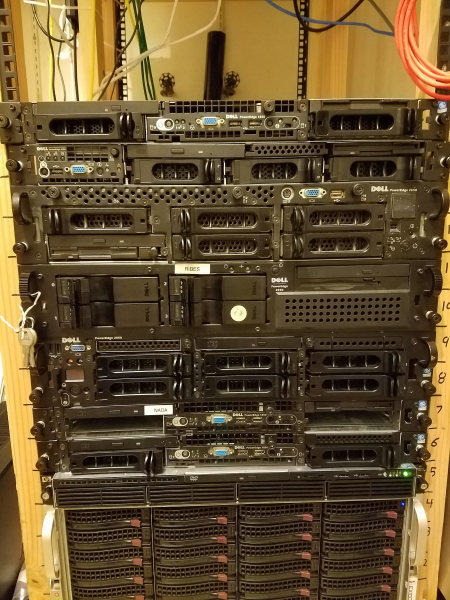
 Why the topic of this article is the upgrade of the disk subsystemIt is clear that first and foremost one usually needs to:
- Increase the RAM. This is such an obvious move that I even felt it unnecessary to write about it in the main article
- Install additional processor(s) or replace both processors with the highest performance versions supported by the server's sockets.
For old servers, both memory and processors can usually be found at bargain prices.
At a certain point, every server owner faces the question — upgrade or a new server.
Since the price of a new server can now be measured in millions of rubles, many opt for the upgrade path.
For a successful upgrade, it is very important to use compromises so that for a small cost (relative to the price of a new server) we achieve a significant performance gain.
The article includes a list of server SSDs PCI-E 2.0 x8, which have significantly decreased in price, along with RAID controllers supporting SSD caching and tested SATA III SSDs on the SATA II interface.
The most obvious way to upgrade the disk subsystem is to switch from HDD to SSD. This applies to both laptops and servers. On servers, perhaps the only difference is that SSDs can be easily configured in RAID.
However, there are nuances related to the fact that there may not be SATA III ports on an old server, and then it will be necessary to replace or install a respective controller.
Of course, there are also intermediate methods.
SSD caching.
Overall, this method is quite suitable for databases, 1C, or any random access. The speed does indeed increase. For large files, such as video surveillance, this method is useless.
LSI RAID controllers (IBM, DELL, CISCO, Fujitsu)
Starting from the 92xx series, LSI has CacheCade 2.0 technology that allows almost any SATA SSDs to be used as cache for RAID arrays, both for reading and writing. It can even create a mirror from caching SSDs.
Brand-name controllers are becoming more complex. This is especially true for IBM. Keys and SSDs for CacheCade must be purchased from IBM at outrageous prices, so it's easier to switch to an LSI controller and buy a hardware key at a lower cost. Software keys are significantly more expensive than hardware keys.
Adaptec RAID Controllers
Adaptec controllers feature MaxCache technology, which also allows SSDs to be used as cache. We are interested in the controller versions that end with the letter Q.
Q-controllers can use almost any SSD, not just the SSDs supplied by Adaptec.
- Starting from version 5xxx, all controllers support Hybrid RAID. The essence of this technology is that reading is always done from the SSD when there is a mirror of one of the disks with the SSD.
- 5xxxQ, for example, 5805ZQ. These controllers support MaxCache 1.0. Only read caching.
- 6xxQ, for example, 6805Q. MaxCache 2.0. Read and write caching.
- 7xxQ, for example, 7805Q. MaxCache 3.0. Read and write caching.
- Using 8xxQ for upgrade purposes is almost pointless due to high prices.
Software technologies for SSD caching
I won’t cover these technologies. Almost all operating systems currently support them. I remember that when using btrfs, it automatically redirects read requests to the device with the shortest queue — SSD.
SATA III SSD on a SATA II interface
Since there are not always opportunities and funds for a new controller, the question arises as to how well SATA III SSDs work on the outdated SATA II interface.
Let's conduct a small test. Our test subject will be a SATA III SSD Intel S3710 with 400GB.
Random Read, IOPS
Avg read latency, ms
Random Write, IOPS
Avg write latency, ms
Linear read, MB/s
Linear write, MB/s
SATA II
21241
2
13580
4
282
235
SATA III
68073
0.468
61392
0.52
514
462
Commands used for speed testing
fio --name LinRead --eta-newline=5s --filename=/dev/sda --rw=read --size=500m --io_size=10g --blocksize=1024k --ioengine=libaio --iodepth=32 --direct=1 --numjobs=1 --runtime=60 --group_reporting

fio --name LinWrite --eta-newline=5s --filename=/dev/sda --rw=write --size=500m --io_size=10g --blocksize=1024k --ioengine=libaio --fsync=10000 --iodepth=32 --direct=1 --numjobs=1 --runtime=60 --group_reporting

fio --name RandRead --eta-newline=5s --filename=/dev/sda --rw=randread --size=500m --io_size=10g --blocksize=4k --ioengine=libaio --iodepth=32 --direct=1 --numjobs=4 --runtime=60 --group_reporting

fio --name RandWrite --eta-newline=5s --filename=/dev/sda --rw=randwrite --size=500m --io_size=10g --blocksize=4k --ioengine=libaio --iodepth=32 --direct=1 --numjobs=4 --runtime=60 --group_reporting
As you can see, the difference in linear speed, IOPS, and latency is quite significant, so it makes sense to use only the SATA III interface, and if it's not available, then to install a controller.
To be fair, I should mention that in the difference in random read and write speeds turned out to be insignificant. Perhaps such a large difference in IOPS between SATA II and SATA III occurred because I had a particularly poor SATA II controller or a driver with some bugs.
However, the fact remains that you need to check the speed of SATA II — perhaps you have a similarly slow controller. In this case, upgrading to a SATA III controller is essential.
PCIe SSD on a PCI-e 2.0 or 1.0 bus
As is known, the fastest SSDs are PCI-e NVMe, which are not limited by SAS or SATA protocols.
However, when installing modern PCI-e SSDs, it’s important to consider that most of them use only 4 PCI-e lanes, usually PCI-e 3.0 or 3.1.
Now let's take a look at the speed table of the PCI-e bus.
PCI Express bandwidth, GB/s
Year
of release
Version
PCI Express
Encoding
Speed
transmission
Bandwidth on x lanes
×4
×8
×16
2002
1.0
8b/10b
0.50 GB/s
1.0 GB/s
2.0 GB/s
4.0 GB/s
2007
2.0
8b/10b
1.0 GB/s
2.0 GB/s
4.0 GB/s
8.0 GB/s
2010
3.0
128b/130b
1.97 GB/s
3.94 GB/s
7.88 GB/s
15.8 GB/s
When installing a PCI 3.0 x4 SSD in a PCI-e 2.0 bus, it will operate on the same number of lanes but at significantly lower speeds. The issue is that the linear speeds of modern PCI-e SSDs exceed the bandwidth of the PCI-e 2.0 bus and even more so of PCI-e 1.0.
M.2 SSD and PCI-e adapter
There are decent upgrade options when we buy an adapter for 10 dollars and install an M.2 SSD in the server, but again, for good SSDs, there will be speed reductions (especially on PCI-e 1.0), and M.2 SSDs are not always suitable for server workloads: high wear resistance, power protection, and stability of speed characteristics due to filling SLC cache on cheap models.
Thus, this method may only be suitable for a server with a PCI-e 2.0 bus and engaged in non-critical tasks.
PCI-E 2.0 x8 SSD
The most economically logical upgrade is to use PCI-E 2.0 x8 SSDs for servers with a PCI-e 1.0 bus (bandwidth up to 2 GB/s) and PCI-e 2.0 (up to 4 GB/s).
Such server SSDs can now be purchased quite cheaply on various marketplaces as well as on internet auctions, including in Russia.
I created a table of these morally outdated SSDs that can greatly boost your old server. At the end of the table, I added a few SSDs with PCI-E 3.0 x8 interfaces. Perhaps you'll get lucky and find them at a reasonable price.
Title
TB
PBW
PCI-E
4k read iops, K
4k write iops, K
read, MB/s
write, MB/s
2.4
32.5
2.0 x8
480
490
3000
2500
1.3
4
2.0 x8
225
345
2800
1300
1.3
16
2.0 x8
235
375
2700
1700
1.6
5.5
2.0 x8
270
375
2800
1700
3.2
11
2.0 x8
345
385
2700
2200
3.2
11
2.0 x8
345
385
2800
2200
2.6
32
2.0 x8
350
385
2700
2200
1,6
8,76
2.0 x8
395
270
1550
1100
3,2
17,52
2.0 x8
770
230
3100
2200
2,2
2.0 x8
340
110
2700
1000
2,2
33
2.0 x8
350
103
2700
1000
4,8
10.1
2.0 x8
269
51
2600
900
2,2
7.1
2.0 x8
531
59
2700
1400
Dell Micron P420M
1.4
9.2
2.0 x8
750
95
3300
630
1.4
9.2
2.0 x8
750
95
3300
630
1.6
25.10
3.0 x8
1200
200
6170
2200
3,2
17,52
3.0 x8
1200
200
6170
2200
3,2
17,5
3.0 x8
850
80
4500
2600
3,2
2,78
3.0 x8
1000
180
6800
6000
3.2
29
3.0 x8
750
120
5500
1800
3.2
29
3.0 x8
1000
120
6000
2000
3.2
29
3.0 x8
1000
180
6200
2600
3.2
18
3.0 x8
980
180
6200
2600
 Among these SSDs, Fusion ioMemory stands out. The scientific director was . Later, this company was acquired by SanDisk for $1.2 billion. At one time, they cost from $50,000 each. Now, you can buy them for a few hundred dollars in new condition for disks with a capacity of 1TB and above.
If you look closely at the table, you can see they have quite a high number of write IOPS, almost equal to the number of read IOPS. Considering their current price, in my opinion, these SSDs are worth paying attention to.
However, they have a few peculiarities:
- They cannot be bootable
- A driver is needed to use them. There are drivers available for almost everything, but for the latest versions of Linux, you will have to compile them.
- The optimal sector size is 4096 bytes. (512 is also supported)
- In the worst-case scenario, the driver may consume quite a bit of RAM (with a 512 byte sector size)
- Performance depends on the speed of the processor, so energy-saving technologies are better turned off. This is both an advantage and a disadvantage, as with a powerful processor, the device can perform even faster than specified in the specs.
- Requires good cooling. This shouldn't be a problem for servers.
- Not recommended for ESXi, as ESXi prefers disks with a 512N sector, which may lead to significant memory consumption by the driver.
- Branded versions of these SSDs are usually not supported by vendors up to the latest driver level from SanDisk (March 2019)
I conducted tests comparing Fusion ioMemory with a fairly modern Intel P3700 PCI-E 3.0 x8 server SSD (the latter costs about four times more than Fusion of similar capacity). You can also see how much speed is throttled due to the x4 bus.
Fusion PX600 1.3TB PCI-E 2.0 x8
Intel P3700 1.6TB PCI-E 3.0 x4
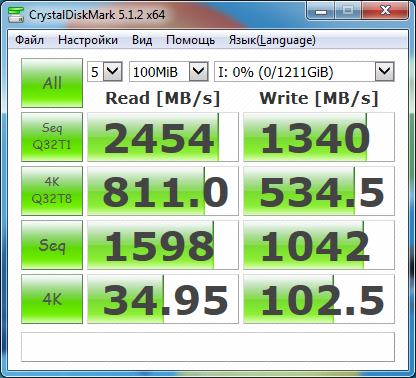
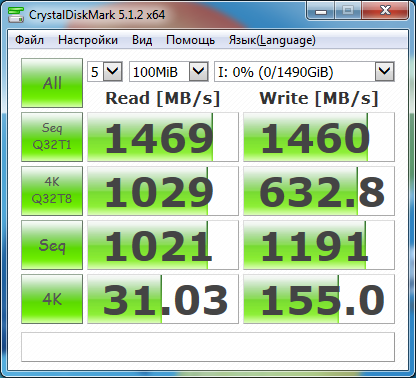
Yes, the linear read speed is definitely capped at Intel P3700. The specifications state it should be 2800 MB/sec, but we are seeing 1469 MB/sec. However, in general, it can be said that with a PCI-e 2.0 bus, server SSDs PCI-E 3.0 x4 can be used if they can be obtained at a reasonable price.
Conclusions
The disk subsystem of an old server with a PCI-E 1.0 or 2.0 bus can be boosted by using SSDs that can utilize 8 PCI-E lanes, providing bandwidth of up to 4GB/sec (PCI-E 2.0) or 2GB/sec (PCI-E 1.0). The most cost-effective way to do this is by using the somewhat outdated PCI-E 2.0 SSDs.
There are also straightforward compromise options related to purchasing a CacheCade key for LSI controllers or replacing an Adaptec controller with a Q-version.
A completely standard approach is to buy a SATA III (RAID) controller so that the SSDs operate at full speed and handle everything that requires velocity.
Source: habr.com
