

Google Inc. release of the web browser . At the same time, the stable release of the open-source project , which serves as the foundation for Chrome. The Chrome browser using Google logos, the ability to upload Flash modules on request, a notification system in the event of a crash, modules for playing protected video content (DRM), an automatic update installation system, and transmission during search . The next release of Chrome 76 is scheduled for July 30.
:
- In the canvas.getContext() method the ‘desynchronized’ flag for handling Canvas (2D or WebGL) contexts using an alternative rendering system that provides minimal latency by bypassing the regular DOM update mechanism and outputting directly through OpenGL;
- The API has been extended (the navigator.share object), which allows for the generation of a unified button for social media posting relevant to the visitor instead of a list of individual buttons. In this new release of the API there is the ability to display a standard dialog for sending files to other applications (for example, on Android, a block appears for sending via email, Bluetooth, etc.);
- the ability to separate groups of numbers in numeric literals with the underscore symbol. For example, to improve the readability of large numbers in code, you can specify 1_000_000_000 and this number will be processed as 1000000000;
- For all desktop users, it is enabled by default , where pages from different hosts are always loaded in the memory of separate processes, each of which applies its own sandbox. The main feature of strict isolation mode is the separation not by tabs, but by domains, that is, previously, the content loaded from scripts, iframes and popups from other domains was executed in the same process as the base site, but now they will be separated into different processes;
- Add-ons that are blacklisted will now be completely removed rather than disabled and switched to inactive mode.
- In Chrome's built-in task manager (Settings > More Tools > Task Manager) the display of Service worker handlers;
- In the window.open() method, the "" attribute has been added, allowing a page to be opened without filling in the Referer header;
- the directives (Content Security Policy) "script-src-attr", "script-src-elem", "style-src-attr", and "style-src-elem", providing functionality for script and style directives but with the ability to apply to individual event handlers, elements, or attributes;
- In the Web Authentication API FIDO CTAP2 PIN support for using a user-specified PIN code for authorizing operations with keys that support the protocol. . In the configurator, under the 'Advanced' section, a new item 'Manage security keys' has been added, allowing the assignment of a PIN code to protect keys stored on a USB drive, as well as an option to reset the key (clearing all data and the PIN);
- The Web Animations API has added objects
, which allow for interactive control over animated elements and timing (duration, delays).
Additionally, a new constructor has been added , providing more extensive tools for animation control. Previously, the Web Animations API allowed creating animations using the Element.animate() method, returning a pre-formed Animation object. Now developers can manage its creation through an explicit call to the constructor, where, for example, a KeyframeEffect object can be specified; - An option has been added , instructing the browser to display the video in the element's playback area (for example, to provide a full-screen playback method);
- The MediaStreamTrack.getCapabilities() method now provides the ability to obtain the range of acceptable values for properties related to audio devices (sample rate, latency, number of channels, etc.);
- In WebRTC, a new API has been added to obtain information about active transports, such as the use of SCTP or DTLS (Datagram Transport Layer Security), through which RTP and RTCP packets are sent or received. Also, the RTCIceTransport interface has been added to provide information about the state of the transports
ICE, used in the RTCPeerConnection object; - The Cache-Control header has implemented the directive '' allowing an additional time window during which the browser can use a resource with an expired asynchronous revalidation time;
- Scroll Snap Stop to determine attachment to elements during inertial scrolling (for example, a wide swiping gesture while selecting from a list of images will lead to the selection of the next element rather than the last one);
- The Android version has improved the autofill interface for account details in authentication forms. The suggestion block is now displayed directly above the on-screen keyboard and shows possible saved options instead of overlaying the input form.
- Experimental support for Reader Mode has been added, which, when enabled, displays only significant text while hiding all associated controls, banners, menus, navigation bars, and other non-content elements of the page. The support for the new mode is enabled via the option chrome://flags/#enable-reader-mode, after which an item appears in the dropdown menu for its use.
- In the JavaScript engine V8, a mode for explicit caching of WebAssembly compilation results has been implemented (when reopening a page, previously processed WebAssembly components will be launched from the cache).
New instructions have also been added to WebAssembly: memory.copy, memory.fill, table.copy, memory.init, and table.init for copying, filling, and initializing large memory areas. - Support has been added for direct parsing of scripts on the fly as they load over the network without involving the main Chrome thread. Previously, the thread was initially handled in the main thread, which was then redirected to the parser. This setup caused the redirection to be blocked by other tasks running in the main thread, such as HTML parsing and executing other JavaScript scripts. Now, this redirection has been eliminated.
- Improvements in tools for web developers:
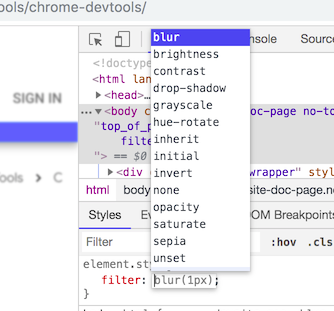
- In the CSS inspection mode, autocomplete for names and basic values of functions that can be applied to CSS properties is provided (for example, "filter: blur(1px)"). Suggested values are immediately reflected in the page layout being viewed.

- In the command panel displayed by pressing Ctrl+Shift+P, a "Clear Site Data" command has been implemented to clear all data related to the page (similar to calling the Application > Clear Storage menu), including Service workers, localStorage, sessionStorage, IndexedDB, Web SQL, Cookies, Cache, and Application Cache.
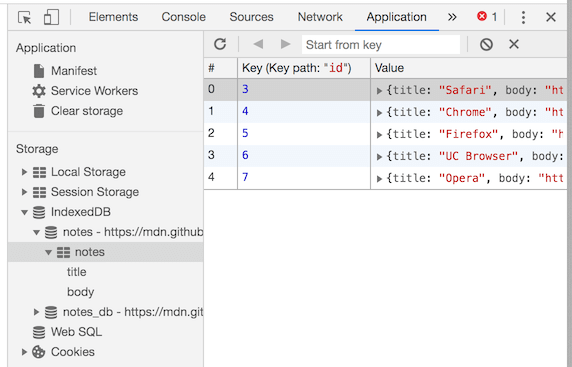
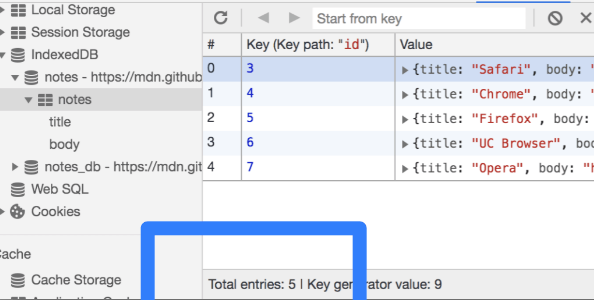
- The ability to view all existing IndexedDB databases has been added (previously in Application > IndexedDB, you could only view the databases for the current domain, which did not allow for instance, inspecting the use of IndexedDB in blocks loaded through iframe);

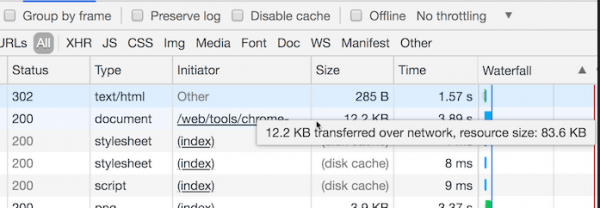
- In the network inspection interface, the tooltip that appears when hovering over fields in the ‘Size’ column now displays the resource size in its original form, without compression;

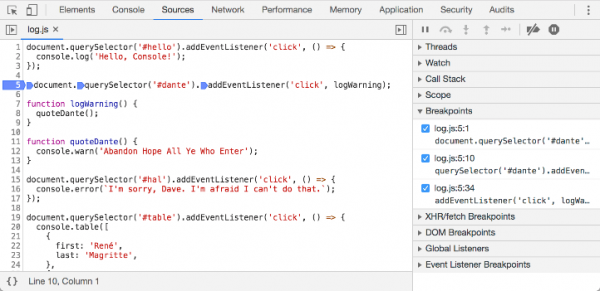
- The debugger's sidebar now provides separate output of the status information for breakpoints attached to individual parts of complex expressions in a line (inline breakpoint), for example, set in a method call chain;

- The IndexedDB and Cache inspection panels have implemented the display of counters for the total number of resources in the database or cache;

- In the CSS inspection mode, autocomplete for names and basic values of functions that can be applied to CSS properties is provided (for example, "filter: blur(1px)"). Suggested values are immediately reflected in the page layout being viewed.
- In experimental Canary builds, disabling the tracker blocking
DNS over HTTPS (DoH) can be activated at chrome://flags#dns-over-https. DoH may be useful to prevent information leaks about requested hostnames through ISP DNS servers, combat MITM attacks and DNS traffic spoofing, counter DNS-level blocking, or to facilitate operation in cases where direct access to DNS servers is impossible (for example, when working through a proxy);
56 vulnerabilities. AddressSanitizer , , , and . No critical issues that allow bypassing all levels of browser protection and executing code in the system outside the sandbox environment have been discovered. Under the bug bounty program for the current release, Google has awarded 13 prizes totaling $9,000 (one prize of $5,000, two prizes of $1,000, and four prizes of $500). The size of 7 rewards has not yet been determined.
Source: opennet.ru
