

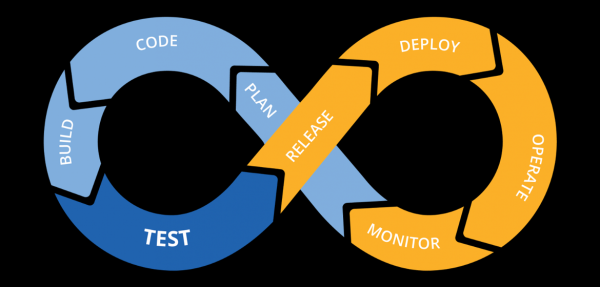
Continuous Deployment is a special approach in software development applied for the fast, secure, and efficient deployment of various features into software.
The core idea is to create a reliable automated process that allows developers to quickly deliver a finished product to users. This involves constant changes to production, referred to as the Continuous Delivery (CD) Pipeline.
Skillbox recommends: Practical Course .
Reminder: for all readers of 'Habr' - a discount of 10,000 rubles when enrolling in any Skillbox course with the promo code 'Habr'.
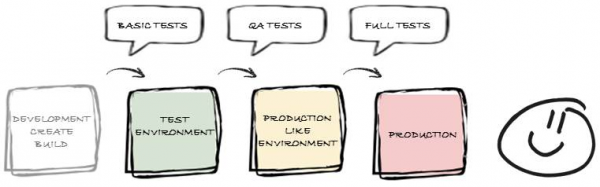
A wide range of tools, both paid and completely free, can be used to manage the workflow. This article describes three of the most popular solutions among developers that can be beneficial for any programmer.
Jenkins
A fully autonomous open-source automation server. It is worth using for automating all types of tasks related to building, testing, delivering, or deploying software.
Minimum PC requirements:
- 256 MB of RAM, 1 GB of storage space.
Optimal:
- 1 GB of RAM, 50 GB on the hard drive.
Additionally, you will need extra software — Java Runtime Environment (JRE) version 8.
The architecture (distributed computing) is as follows:
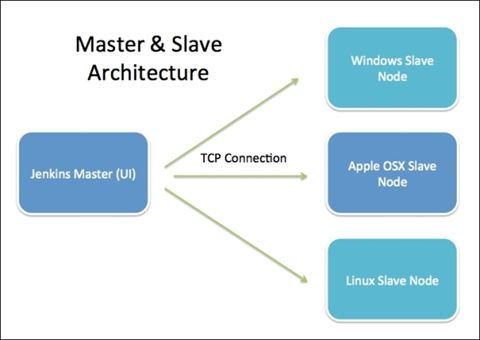
Jenkins Server — the installation responsible for GUI hosting and organizing and executing the entire build.
Jenkins Node/Slave/Build Server — devices that can be configured to perform build work on behalf of the Master.
Installation for Linux
First, you need to add the Jenkins repository to the system:
cd /tmp && wget -q -O - | sudo apt-key add - echo 'deb binary/' | sudo tee -a /etc/apt/sources.list.d/je
Update the package repository:
sudo apt update
Install Jenkins:
sudo apt install jenkins
After this, Jenkins will be available in the system on the default port 8080.
To check if it is working, you need to open the browser address :8080. The system will then prompt you to enter the initial user password with root privileges. This password can be found in the file /var/lib/jenkins/secrets/initialAdminPassword.
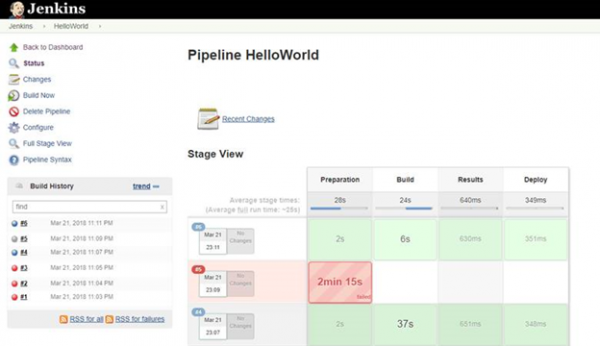
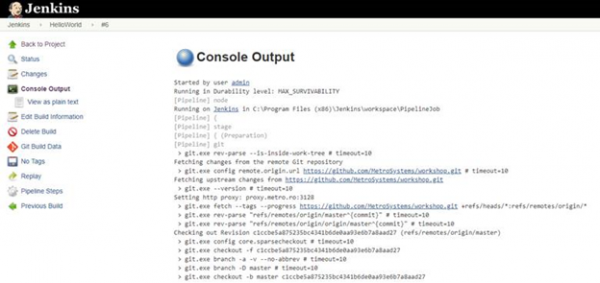
Now everything is ready to work, and you can start creating CI/CD pipelines. The graphical interface of the working environment looks as follows:
Strengths of Jenkins:
- scalability provided by the Master/Slave architecture;
- availability of a REST XML/JSON API;
- the ability to connect a large number of extensions using plugins;
- an active and constantly evolving community.
Cons:
- missing analytical block;
- not the most user-friendly interface.
TeamCity
Commercial development by JetBrains. The server is good with simple setup and an excellent interface. The default configuration includes a large number of features, and the number of available plugins is continuously increasing.
Java Runtime Environment (JRE) version 8 is required to work.
Server hardware requirements are not critical:
- RAM — 3.2 GB;
- processor — dual-core, 3.2 GHz;
- communication channel with a bandwidth of 1 Gb/s.
The server allows achieving high performance in operation:
- 60 projects with 300 build configurations;
- allocation of 2 MB for the build log;
- 50 build agents;
- the ability for 50 users to work in the web version and 30 users in the IDE;
- 100 connections to external version control systems, typically Perforce and Subversion. Average change time — 120 seconds;
- over 150 modifications per day;
- working with databases on a single server;
- JVM server process settings: -Xmx1100m -XX:MaxPermSize=120m.
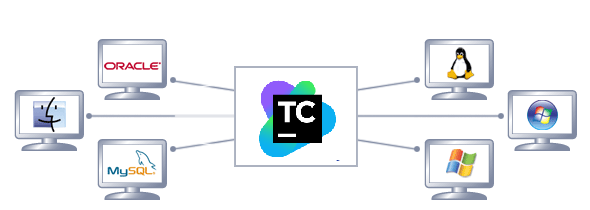
Agent requirements depend on the builds in operation. The main task of the server is to monitor all connected agents and distribute builds from the queue to these agents based on compatibility requirements, reporting the results. Agents have different platforms and operating systems, plus a pre-configured environment.
All information about build results is stored in a database. This primarily includes history and similar data, VCS changes, agents, build queues, user accounts, and permissions. Only build logs and artifacts are not included in the database.
Installation for Linux
For manual installation of TeamCity with a Tomcat servlet container, use the TeamCity archive: TeamCity .tar.gz. Download it .
tar -xfz TeamCity.tar.gz
/bin /runAll. sh [start|stop]
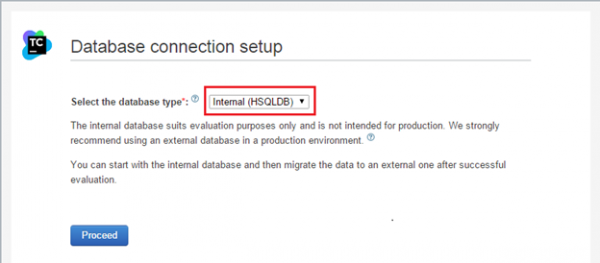
During the first launch, you need to choose the type of database where the build data will be stored.
The default configuration runs on :8111/ with one registered build agent running on the same PC.
Strengths of TeamCity:
- easy setup;
- user-friendly interface;
- a large number of built-in features;
- support service;
- has RESTful API;
- decent documentation;
- good security.
Cons:
- limited integration;
- this is a paid tool;
- a small community (which, however, is growing).
GoCD
An open-source project that requires Java Runtime Environment (JRE) version 8 for installation and operation.
System requirements:
- RAM — 1 GB minimum, more is better;
- processor — dual-core, with a core clock speed of 2 GHz;
- hard disk — at least 1 GB of free space.
Agent:
- RAM — a minimum of 128 MB, more is better;
- processor — at least 2 GHz.
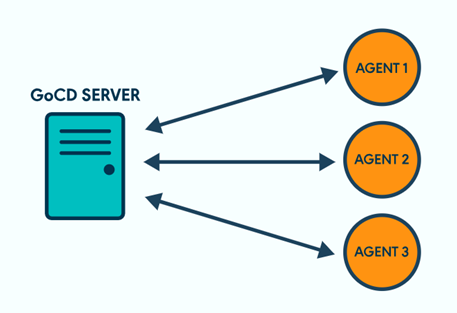
The server ensures the operation of agents and provides a convenient interface for the user:
Stages/Jobs/Tasks:
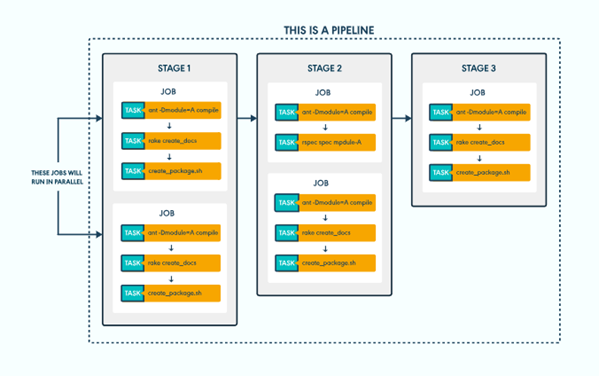
Installation for Linux
echo “deb /” | sudo tee /etc/apt/sources.list.d/gocd.list
curl | sudo apt-key add —
add-apt-repository ppa:openjdk-r/ppa
apt-get update
apt-get install -y openjdk-8-jre
apt-get install go-server
apt-get install go-agent
/etc/init.d/go-server [start|stop|status|restart]
/etc/init.d/go-agent [start|stop|status|restart]
By default, GoCd operates at :8153.
Strengths of GoCd:
- open source;
- easy installation and configuration;
- good documentation;
- great user interface:
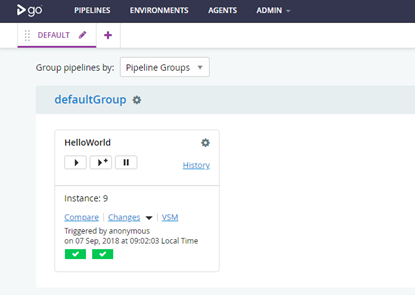
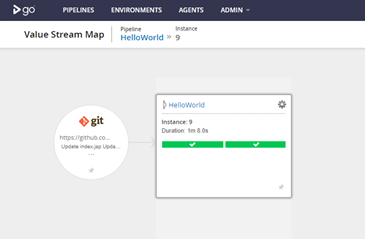
- the ability to display the deployment path of GoCD step-by-step in one view:
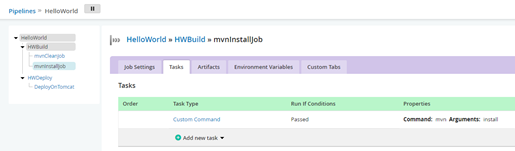
- excellent representation of the pipeline structure:
- GoCD optimizes the CD workflow in the most popular cloud environments, including Docker, AWS;
- the tool allows fixing issues in the pipeline, with tracking of each change from commit to deployment in real-time.
Cons:
- at least one agent is needed;
- there is no console to display all completed tasks;
- each command requires creating a task in the pipeline configuration;
- to install the plugin, you need to move the .jar file to /plugins/external and restart the server;
- a relatively small community.
In conclusion,
These are just three tools; in reality, there are many more. Choosing is difficult, so it's essential to pay attention to additional aspects.
The open-source nature of the tool allows understanding what it represents, plus faster addition of new features. However, if something does not work, one has to rely solely on oneself and community help. Paid tools provide support that can sometimes be critically important.
If security is paramount, it's best to work with a local tool. If not, choosing a SaaS solution is a good option.
Lastly, to ensure a truly efficient continuous deployment process, it is essential to establish criteria that will help narrow down the selection of available tools.
Skillbox recommends:
- Two-Year Practical Course .
- Online Course .
- Practical Year Course .
Source: habr.com
