

Web applications are now used everywhere, and among all transport protocols, HTTP takes the lion's share. When studying the nuances of web application development, most people pay very little attention to the operating system where these applications actually run. The division between development (Dev) and operations (Ops) has only worsened the situation. However, with the spread of DevOps culture, developers are starting to take responsibility for running their applications in the cloud, making it very useful for them to get acquainted with the backend of the operating system. This is particularly beneficial if you're trying to deploy a system for thousands or tens of thousands of simultaneous connections.
Limitations in web services are very similar to those in other applications. Whether it's load balancers or database servers, all of these applications have similar problems in a high-performance environment. Understanding these fundamental limitations and ways to overcome them will ultimately help evaluate the performance and scalability of your web applications.
I am writing this series of articles in response to questions from young developers who want to become well-informed system architects. It is impossible to clearly understand Linux application optimization methods without diving into the basics of how they work at the operating system level. While there are many types of applications, in this cycle, I want to explore network applications, rather than desktop ones like browsers or text editors. This material is aimed at developers and architects who want to understand how Linux or Unix programs work and how to structure them for high performance.
Linux is a server operating system, and most often your applications run on this OS. Although I say 'Linux', most of the time you can confidently assume that all Unix-like operating systems are meant in general. Nevertheless, I have not tested the accompanying code on other systems. So, if you're interested in FreeBSD or OpenBSD, the results may differ. When I try something specific to Linux, I indicate that.
While you can use the knowledge gained to create an application from scratch and it will be well optimized, it's usually best not to do so. If you write a new web server in C or C++ for your organization's business application, it might be your last day at work. However, understanding the structure of these applications will assist you in selecting existing programs. You will be able to compare process-based systems with thread-based and event-based systems. You will understand and appreciate why Nginx outperforms Apache httpd, and why a Python application based on Tornado can handle more users compared to a Python application based on Django.
ZeroHTTPd: A Learning Tool
— is a web server that I wrote from scratch in C as a teaching tool. It has no external dependencies, including access to Redis. We run our own Redis procedures. See below for more details.
While we could discuss theory for a long time, there is nothing better than writing code, running it, and comparing all server architectures with each other. This is the most visually effective method. Therefore, we will write a simple web server ZeroHTTPd, applying each model: process-based, thread-based, and event-based. We will test each of these servers and see how they perform in comparison to one another. ZeroHTTPd is implemented in a single C file. The event-based server includes , a great implementation of a hash table that comes in a single header file. Otherwise, there are no dependencies to complicate the project.
The code has many comments to help with understanding. As a simple web server in a few lines of code, ZeroHTTPd also serves as a minimal framework for web development. It has limited functionality but can serve static files and very simple "dynamic" pages. I must say that ZeroHTTPd is well suited for learning how to create high-performance Linux applications. Essentially, most web services wait for requests, check them, and process them. This is exactly what ZeroHTTPd will do. It is a teaching tool, not for production. It is not strong in error handling and is unlikely to boast best security practices (oh yes, I used strcpy) or with an abstract C language trick. But I hope it will perform its task well.
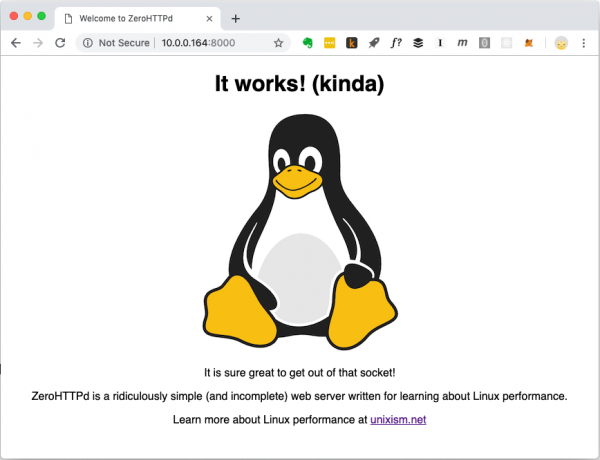
ZeroHTTPd Homepage. It can serve different types of files, including images.
Guest Book Application
Modern web applications are typically not limited to static files. They involve complex interactions with various databases, caches, etc. Therefore, we will create a simple web application called 'Guest Book,' where visitors can leave entries under their names. The guest book retains previously left entries. There is also a visitor counter at the bottom of the page.
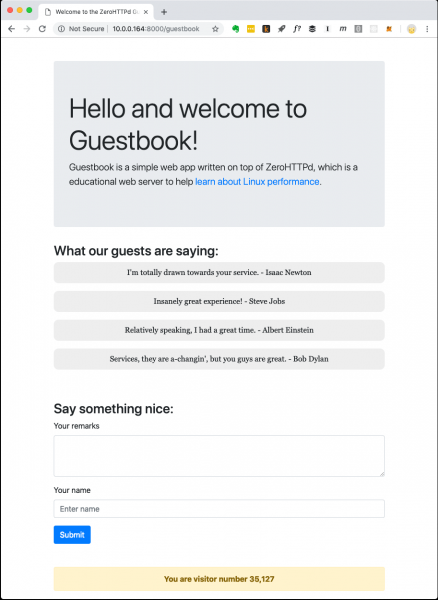
ZeroHTTPd Guest Book Web Application
The visitor counter and guest book entries are stored in Redis. Custom procedures for communicating with Redis have been implemented and are independent of external libraries. I am not a big fan of rolling out homemade code when there are public and well-tested solutions available. However, the goal of ZeroHTTPd is to explore Linux performance and access to external services, while handling HTTP requests seriously impacts performance. We need to maintain full control over communications with Redis in each of our server architectures. In one architecture, we use blocking calls, while in others, we use event-driven procedures. Using an external Redis client library would not provide such control. Moreover, our small Redis client only performs a few functions (get, set, and increment a key; get and add to an array). Additionally, the Redis protocol is remarkably elegant and simple. You don't even need to learn it explicitly. The fact that the entire protocol work is managed in about a hundred lines of code speaks volumes about its thoughtful design.
The next figure illustrates the actions of the application when a client (browser) makes a request. /guestbookURL.

How the guest book application works
When a guestbook page needs to be generated, a single call is made to the file system to read the template into memory, along with three network calls to Redis. The template file contains most of the HTML content for the page shown in the screenshot above. It also includes special placeholders for the dynamic content part: entries and the visitor counter. We retrieve these from Redis, insert them into the page, and deliver the fully formed content to the client. The third Redis call could be avoided, as Redis returns the new value of the key when incremented. However, for our event-driven asynchronous architecture server, multiple network calls serve as a good test for educational purposes. Thus, we discard the returned Redis value for the visitor count and request it with a separate call.
ZeroHTTPd Server Architectures
We build seven versions of ZeroHTTPd with identical functionality but different architectures:
- Iterative
- Fork server (one child process per request)
- Pre-fork server (process forking beforehand)
- Threaded server (one thread per request)
- Thread pool server
- Architecture based on
poll() - Architecture based on
epoll
We measure the performance of each architecture by loading the server with HTTP requests. However, when comparing architectures with high levels of parallelism, the number of requests increases. We test three times and calculate the average.
Testing Methodology
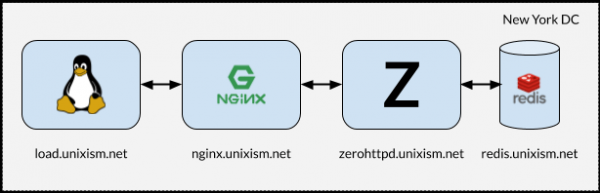
Setup for Load Testing ZeroHTTPd
It's crucial that during testing, all components do not run on a single machine. In such cases, the OS incurs additional scheduling overhead, as components compete for CPU. Measuring the operating system overhead with each of the selected server architectures is one of the most important goals of this exercise. Adding more variables would be detrimental to the process. Therefore, the setup shown in the illustration above works best.
What Each of These Servers Does
- load.unixism.net: here we run
ab, the Apache Benchmark utility. It generates the load necessary to test our server architectures. - nginx.unixism.net: sometimes we want to run more than one instance of the server program. For this, the Nginx server with the appropriate settings acts as a load balancer for the incoming requests from ab our server processes.
- zerohttpd.unixism.net: here we run our server programs on seven different architectures, one at a time.
- redis.unixism.net: on this server, the Redis daemon is running, where entries in the guestbook and the visitor counter are stored.
All servers run on a single CPU core. The idea is to assess the maximum performance of each architecture. Since all server programs are tested on the same hardware, this serves as a baseline for their comparison. My testing setup consists of virtual servers rented from Digital Ocean.
What are we measuring?
Different metrics can be measured. We assess the performance of each architecture in this configuration by loading the servers with requests at varying levels of parallelism: the load increases from 20 to 15,000 simultaneous users.
Test results
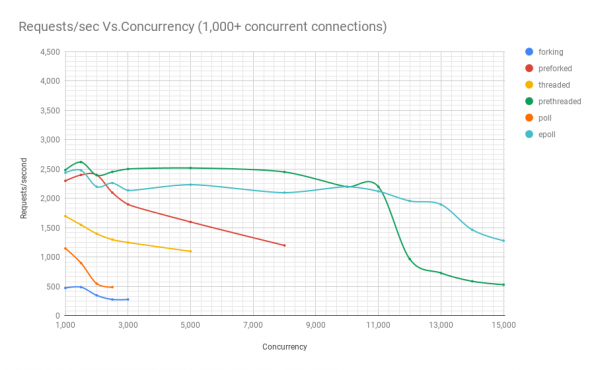
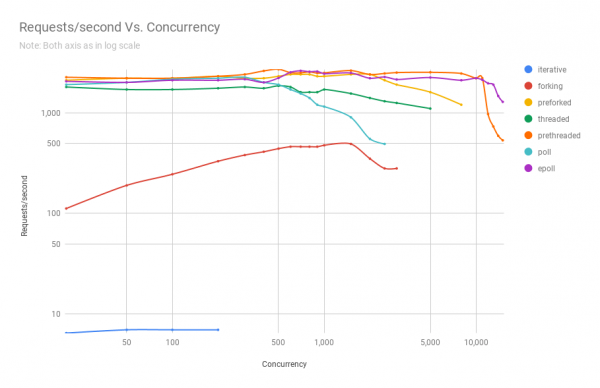
The next chart shows the performance of servers on different architectures at various levels of parallelism. On the y-axis — the number of requests per second, on the x-axis — parallel connections.
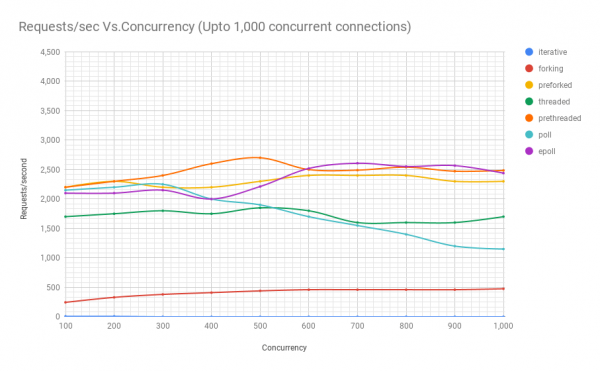
Below is a table with the results.
requests per second
parallelism
iterative
fork
pre-fork
threaded
pre-threaded
poll
epoll
20
7
112
2100
1800
2250
1900
2050
50
7
190
2200
1700
2200
2000
2000
100
7
245
2200
1700
2200
2150
2100
200
7
330
2300
1750
2300
2200
2100
300
–
380
2200
1800
2400
2250
2150
400
–
410
2200
1750
2600
2000
2000
500
–
440
2300
1850
2700
1900
2212
600
–
460
2400
1800
2500
1700
2519
700
–
460
2400
1600
2490
1550
2607
800
–
460
2400
1600
2540
1400
2553
900
–
460
2300
1600
2472
1200
2567
1000
–
475
2300
1700
2485
1150
2439
1500
–
490
2400
1550
2620
900
2479
2000
–
350
2400
1400
2396
550
2200
2500
–
280
2100
1300
2453
490
2262
3000
–
280
1900
1250
2502
high variability
2138
5000
–
high variability
1600
1100
2519
–
2235
8000
–
–
1200
high variability
2451
–
2100
10 000
–
–
high variability
–
2200
–
2200
11 000
–
–
–
–
2200
–
2122
12 000
–
–
–
–
970
–
1958
13 000
–
–
–
–
730
–
1897
14 000
–
–
–
–
590
–
1466
15 000
–
–
–
–
532
–
1281
From the graph and the table, it's clear that above 8000 simultaneous requests, only two contenders remain: pre-fork and epoll. As the load increases, the poll-based server performs worse than the threaded one. The architecture with pre-created threads provides worthy competition to epoll: this reflects how well the Linux kernel schedules a large number of threads.
ZeroHTTPd source code
ZeroHTTPd source code . A separate directory for each architecture.
ZeroHTTPd
│
├── 01_iterative
│   ├── main.c
├── 02_forking
│   ├── main.c
├── 03_preforking
│   ├── main.c
├── 04_threading
│   ├── main.c
├── 05_prethreading
│   ├── main.c
├── 06_poll
│   ├── main.c
├── 07_epoll
│    └── main.c
├── Makefile
├── public
│   ├── index.html
│   └── tux.png
└── templates
    └── guestbook
        └── index.html
In addition to the seven directories for all architectures, there are two more in the root directory: public and templates. The first contains the index.html file and the image from the first screenshot. You can place other files and folders there, and ZeroHTTPd should be able to serve these static files without any issues. If the path in the browser corresponds to the path in the public folder, ZeroHTTPd looks for the index.html file in this directory. The content for the guestbook is generated dynamically. It only has a main page, and its content is based on the file 'templates/guestbook/index.html'. Dynamic pages can be easily added in ZeroHTTPd for extension. The idea is that users can add templates in this directory and extend ZeroHTTPd as needed.
To build all seven servers, run make all from the root directory — and all builds will appear in this directory. Executable files look for the public and templates directories in the directory from which they are launched.
Linux API
To understand the information in this series of articles, you don't need to have a deep understanding of the Linux API. However, I recommend reading more on this topic, as there are many reference resources online. While we will touch on several categories of the Linux API, our focus will primarily be on processes, threads, events, and the network stack. In addition to books and articles about the Linux API, I also recommend reading the man pages for the system calls and library functions used.
Performance and Scalability
One note about performance and scalability. Theoretically, there is no connection between them. You can have a web service that performs very well, with response times of a few milliseconds, but it may not scale at all. Conversely, there may be a poorly performing web application that takes several seconds to respond, yet it scales to handle dozens of simultaneous users. Nevertheless, the combination of high performance and scalability is a very powerful one. High-performance applications generally use resources efficiently and thus can support more concurrent users on a server cost-effectively.
CPU and I/O Tasks
Finally, there are always two possible types of tasks in calculations: I/O and CPU. Receiving requests over the internet (network I/O), serving files (network and disk I/O), and communicating with a database (network and disk I/O) are all I/O actions. Some database queries may slightly load the CPU (sorting, calculating the average of a million results, etc.). Most web applications are limited by their maximum possible I/O, and the CPU is rarely utilized to its full capacity. When you see high CPU usage in an I/O task, it's likely a sign of poor application architecture. This may indicate that CPU resources are being spent on process management and context switching, which is not particularly useful. If you are doing something like image processing, audio file conversion, or machine learning, then the application requires strong CPU resources. But for most applications, this is not the case.
More on server architectures
Source: habr.com
