

Hello, I am involved in creating applications for DBMS — is a platform developed by Mail.ru Group that combines a high-performance DBMS and an application server in Lua. The high speed of solutions based on Tarantool is achieved, in particular, due to the support of in-memory DBMS mode and the ability to execute application business logic in a single address space with the data. At the same time, data persistence is ensured using ACID transactions (a WAL-log is maintained on disk). Tarantool includes built-in support for replication and sharding. Starting from version 2.1, SQL queries are supported. Tarantool is open-source and distributed under the Simplified BSD license. There is also a commercial Enterprise version.
Feel the power! (…aka enjoy the performance)
All this makes Tarantool an attractive platform for creating high-load applications working with databases. In such applications, there is often a need for data replication.
As mentioned above, Tarantool has built-in data replication. Its principle of operation involves the sequential execution of all transactions contained in the master log (WAL) on the replicas. Typically, this replication (hereafter referred to as low-level) is used to ensure the application’s fault tolerance and/or to distribute the read load across the nodes of the cluster.
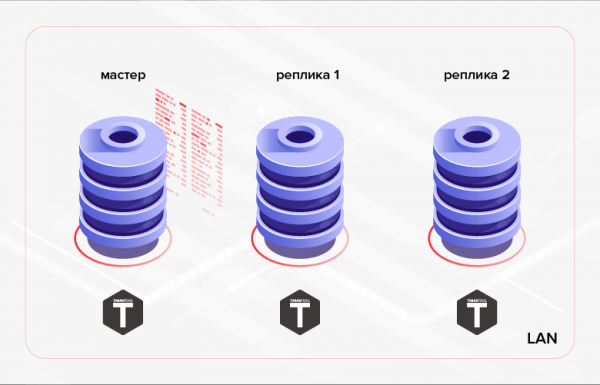
Figure 1. Replication within the cluster
An example of an alternative scenario can be the transfer of data created in one database to another database for processing/monitoring. In the latter case, a more convenient solution may turn out to be the use of high-level replication — data replication at the application’s business logic level. That is, we do not use a ready-made solution built into the DBMS, but implement replication ourselves within our developed application. This approach has both advantages and disadvantages. Let’s list the pros.
1. Traffic savings:
- you can transfer not all data, but only part of it (for example, you can transmit only certain tables, some of their columns, or records that meet certain criteria);
- Unlike low-level replication, which is performed continuously in either asynchronous (implemented in the current version of Tarantool — 1.10) or synchronous (will be implemented in future versions of Tarantool) mode, high-level replication can be conducted in sessions (i.e., the application first synchronizes data — a data exchange session, then there is a pause in replication, after which the next exchange session occurs, and so on);
- If a record has changed multiple times, only its latest version can be sent (unlike low-level replication, where all changes made on the master will be sequentially replayed on the replicas).
2. There are no complexities in implementing HTTP exchange, which allows synchronization of remote databases.
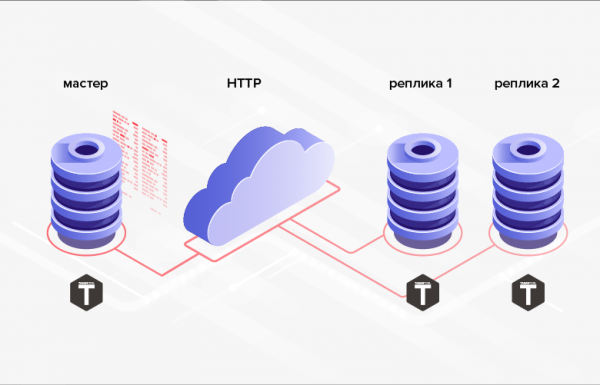
Fig. 2. HTTP Replication
3. The database structures between which data is transmitted do not have to be the same (moreover, in general, it is even possible to use different DBMSs, programming languages, platforms, etc.).
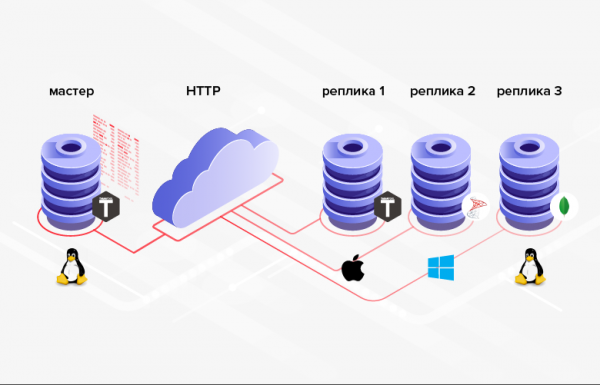
Fig. 3. Replication in Heterogeneous Systems
The downside is that programming, on average, is more complex/costly than configuration, and instead of setting up built-in functionality, one will have to implement their own.
If the advantages listed are crucial in your situation (or are a necessary condition), it makes sense to use high-level replication. Let's explore several ways to implement high-level data replication in Tarantool DBMS.
Minimizing Traffic
Thus, one of the advantages of high-level replication is the savings in traffic. To fully realize this advantage, it is necessary to minimize the amount of data transmitted during each exchange session. Naturally, one should not forget that by the end of the session, the data receiver must be synchronized with the source (at least regarding the data involved in replication).
How can one minimize the amount of data transmitted during high-level replication? A straightforward solution might be to filter data by date and time. For this, one can use an existing date-time field in the table (if available). For example, an order document may have a field for "required order completion time" — delivery_time. The problem with this solution is that the values in this field do not have to be arranged in the order of order creation. Therefore, we cannot remember the maximum value of the field delivery_time, transmitted during the previous exchange session, and during the next exchange session select all records with a higher field value delivery_time. In the interval between exchange sessions, records with a lower field value may have been added delivery_time. An order could also have undergone changes that nonetheless did not affect the field delivery_time. In both cases, changes will not be transmitted from the source to the receiver. To address these issues, we will need to transmit data 'overlapping'. That is, during each exchange session, we will transmit all data with a field value delivery_time, exceeding some point in the past (for example, N hours from the current moment). However, it is clear that for large systems, this approach is highly redundant and may negate the traffic savings we strive for. Additionally, the transmitted table may not have a field related to date-time.
Another solution, more complex in terms of implementation, involves confirming receipt of data. In this case, during each exchange session, all data whose receipt has not been confirmed by the receiver is transmitted. To implement this, it will be necessary to add a boolean column to the source table (for example, is_transferred). If the receiver confirms receipt of the record, the corresponding field is set to true, after which the record no longer participates in the exchanges. This implementation option has the following downsides. Firstly, for each transmitted record, it is necessary to generate and send a confirmation. Roughly speaking, this may be comparable to doubling the amount of transmitted data and lead to a doubling of the number of round trips. Secondly, there is no possibility of sending the same record to multiple receivers (the first receiving receiver will confirm receipt for themselves and for all others).
A method free from the aforementioned drawbacks consists of adding a column to the transmitted table for tracking changes to its rows. This column can have a datetime type and must be set/updated by the application to the current time each time records are added/modified (atomically with the addition/modification). As an example, let's refer to the column update_time. By storing the maximum value of this column's field for the transmitted records, we can start the next exchange session from that value (selecting records with a field value update_time, exceeding the previously stored value). The problem with this last approach is that data changes can occur in batches. As a result, the field values in the column update_time may not be unique. Therefore, this column cannot be used for paginated data output. To achieve paginated data output, additional mechanisms will need to be devised, which are likely to have very low efficiency (for example, retrieving all records from the database with a value update_time greater than the specified one and outputting a certain number of records starting from an offset from the beginning of the selection).
We can improve the efficiency of data transmission by slightly enhancing the previous approach. For this, we will use an integer type (long integer) as the values of the tracking change column. Let's refer to the column as row_ver. The value of this column's field must still be set/updated each time a record is created/modified. However, in this case, the field will be assigned not the current datetime, but the value of some counter, increased by one. As a result, the column row_ver will contain unique values and can be used not only for providing the "delta" of data (data that has been added/changed since the previous exchange session), but also for simple and efficient pagination.
The last proposed method for minimizing the amount of data transmitted during high-level replication seems to me the most optimal and universal. Let's focus on it in more detail.
Data transmission using row version counters
Implementation of the server/master part
In MS SQL Server, there is a special type of column for implementing a similar approach — rowversion. Each database has a counter that increments by one each time a record is added/modified in a table with a column of the type rowversion. The value of this counter is automatically assigned to the field of this column in the added/modified record. The Tarantool DBMS does not have a similar built-in mechanism. However, it's easy to implement it manually in Tarantool. Let’s look at how it is done.
First, a little terminology: tables in Tarantool are called spaces, and records are tuples. Sequences can be created in Tarantool. Sequences are simply named generators of ordered integer values. This is exactly what we need for our purposes. Below, we will create such a sequence.
Before performing any operation with the database in Tarantool, the following command must be executed:
box.cfg{}As a result, Tarantool will start writing database snapshots and transaction logs in the current directory.
Let's create a sequence row_version:
box.schema.sequence.create('row_version',
    { if_not_exists = true })
Option if_not_exists allows executing the creation script multiple times: if the object exists, Tarantool will not attempt to create it again. This option will be used in all subsequent DDL commands.
Let's create a space for the example.
box.schema.space.create('goods', {
    format = {
        {
            name = 'id',
            type = 'unsigned'

        },
        {
            name = 'name',
            type = 'string'

        },
        {
            name = 'code',
            type = 'unsigned'

        },
        {
            name = 'row_ver',
            type = 'unsigned'

        }
    },
    if_not_exists = true
})
Here we specified the name of the space (goods), the names of the fields and their types.
Auto-incrementing fields in Tarantool are also created using sequences. Let's create an auto-increment primary key based on the field id:
box.schema.sequence.create('goods_id',
    { if_not_exists = true })
box.space.goods:create_index('primary', {
    parts = { 'id' },
    sequence = 'goods_id',
    unique = true,
    type = 'HASH',
    if_not_exists = true
})
Tarantool supports several types of indexes. The most commonly used are TREE and HASH types, which are based on their respective names. TREE is the most versatile type of index. It allows retrieving data in an ordered manner. However, for equality selection, HASH is more suitable. Therefore, it's advisable to use HASH for the primary key (which we did).
To use a column row_ver for passing changed data, it is necessary to bind the sequence values to the fields of this column row_ver. But unlike the primary key, the value of the column field row_ver must increase by one not only when adding new records but also when modifying existing ones. For this, triggers can be used. In Tarantool, there are two types of triggers for spaces: before_replace and on_replace. Triggers are invoked on every data change in the space (for each tuple affected by changes, the trigger function is executed). Unlike on_replace, before_replace-triggers allow modifying the data of the tuple for which the trigger is executed. Accordingly, the last type of triggers suits our needs.
box.space.goods:before_replace(function(old, new)
    return box.tuple.new({new[1], new[2], new[3],
        box.sequence.row_version:next()})
end)
The provided trigger replaces the value of the field row_ver of the stored tuple with the next value of the sequence row_version.
In order to retrieve data from the space goods by column row_ver, we will create an index:
box.space.goods:create_index('row_ver', {
    parts = { 'row_ver' },
    unique = true,
    type = 'TREE',
    if_not_exists = true
})
The index type is tree (TREE), since we need to retrieve data in ascending order of values in the column. row_ver.
Let's add some data to the space:
box.space.goods:insert{nil, 'pen', 123}
box.space.goods:insert{nil, 'pencil', 321}
box.space.goods:insert{nil, 'brush', 100}
box.space.goods:insert{nil, 'watercolour', 456}
box.space.goods:insert{nil, 'album', 101}
box.space.goods:insert{nil, 'notebook', 800}
box.space.goods:insert{nil, 'rubber', 531}
box.space.goods:insert{nil, 'ruler', 135}
Since the first field is an auto-incrementing counter, we pass nil instead of it. Tarantool will automatically insert the next value. Similarly, for the values of the column fields, row_ver it is permissible to pass nil — or simply not specify a value at all, as this column occupies the last position in the space.
Let's check the result of the insertion:
tarantool> box.space.goods:select()
---
- - [1, 'pen', 123, 1]
  - [2, 'pencil', 321, 2]
  - [3, 'brush', 100, 3]
  - [4, 'watercolour', 456, 4]
  - [5, 'album', 101, 5]
  - [6, 'notebook', 800, 6]
  - [7, 'rubber', 531, 7]
  - [8, 'ruler', 135, 8]
...
As we can see, the first and last fields have been filled automatically. Now it will be easy to write a function for paginated extraction of changes from the space. goods:
local page_size = 5
local function get_goods(row_ver)
    local index = box.space.goods.index.row_ver
    local goods = {}
    local counter = 0
    for _, tuple in index:pairs(row_ver, {
        iterator = 'GT' }) do
        local obj = tuple:tomap({ names_only = true })
        table.insert(goods, obj)
        counter = counter + 1
        if counter >= page_size then
            break
        end
    end
    return goods
end
The function accepts a parameter value row_ver, starting from which the extraction of changes should occur, and returns a batch of changed data.
Data retrieval in Tarantool is done through indexes. The function get_goods uses an index iterator row_ver to obtain the changed data. The type of iterator is GT (Greater Than). This means that the iterator will sequentially traverse the index values starting from the provided key (the value of the field row_ver).
The iterator returns tuples. In order to later be able to transmit the data via HTTP, it is necessary to convert the tuples into a structure suitable for subsequent serialization. In the example, the standard function tomap. Instead of using tomap , one can write a custom function. For example, we may want to rename a field name, not transfer the field code and add a field comment:
local function unflatten_goods(tuple)
    local obj = {}
    obj.id = tuple.id
    obj.goods_name = tuple.name
    obj.comment = 'some comment'
    obj.row_ver = tuple.row_ver
    return obj
end
The page size of the returned data (the number of records in one batch) is determined by the variable page_size. In the example, the value is page_size equal to 5. In a real program, the page size usually matters more. It depends on the average size of the space tuple. The optimal page size can be determined experimentally by measuring data transfer time. The larger the page size, the fewer round trips there are between the sending and receiving parties. This can reduce the overall time for unloading changes. However, if the page size is too large, we will take too long for the server to serialize the selection. As a result, delays may occur in processing other requests that come to the server. The parameter page_size can be loaded from the configuration file. Each transmitted space can have its own value. At the same time, the default value (for example, 100) may be sufficient for most spaces.
Let's execute the function get_goods:
tarantool> get_goods(0)

---
- - row_ver: 1
    code: 123
    name: pen
    id: 1
  - row_ver: 2
    code: 321
    name: pencil
    id: 2
  - row_ver: 3
    code: 100
    name: brush
    id: 3
  - row_ver: 4
    code: 456
    name: watercolour
    id: 4
  - row_ver: 5
    code: 101
    name: album
    id: 5
...
Let's take the value of the field row_ver from the last row and call the function again:
tarantool> get_goods(5)

---
- - row_ver: 6
    code: 800
    name: notebook
    id: 6
  - row_ver: 7
    code: 531
    name: rubber
    id: 7
  - row_ver: 8
    code: 135
    name: ruler
    id: 8
...
And once more:
tarantool> get_goods(8)
---
- []
...
As we can see, with this usage, the function returns all records of the space page by page. goodsAfter the last page, there is an empty selection.
Let's make changes to the space:
box.space.goods:update(4, {{'=', 6, 'copybook'}})
box.space.goods:insert{nil, 'clip', 234}
box.space.goods:insert{nil, 'folder', 432}
We changed the value of a field name for one record and added two new records.
Let's repeat the last function call:
tarantool> get_goods(8)
---


- - row_ver: 9
    code: 800
    name: copybook
    id: 6
  - row_ver: 10
    code: 234
    name: clip
    id: 9
  - row_ver: 11
    code: 432
    name: folder
    id: 10
...
The function returned the modified and newly added records. Thus, the function get_goods allows you to get data that has changed since its last call, which is the basis of the replication method under consideration.
We'll leave the output of the results via HTTP in JSON format outside the scope of this article. You can read about it here:
Implementation of the client/slave part
Let's take a look at what the implementation on the receiving side looks like. We'll create a space on the receiving side to store the uploaded data:
box.schema.space.create('goods', {
    format = {
        {
            name = 'id',
            type = 'unsigned'

        },
        {
            name = 'name',
            type = 'string'

        },
        {
            name = 'code',
            type = 'unsigned'

        }
    },
    if_not_exists = true
})

box.space.goods:create_index('primary', {
    parts = { 'id' },
    sequence = 'goods_id',
    unique = true,
    type = 'HASH',
    if_not_exists = true
})
The structure of the space resembles that of the source space. However, since we do not intend to transfer the obtained data anywhere else, the column row_ver is absent in the recipient space. The field id will be used to record the source identifiers. Therefore, on the receiver's side, there is no need to make it auto-incrementing.
In addition, we will need a space to store the values row_ver:
box.schema.space.create('row_ver', {
    format = {
        {
            name = 'space_name',
            type = 'string'

        },
        {
            name = 'value',
            type = 'string'

        }
    },
    if_not_exists = true
})

box.space.row_ver:create_index('primary', {
    parts = { 'space_name' },
    unique = true,
    type = 'HASH',
    if_not_exists = true
})
For each loaded space (the field space_name), we will save the last loaded value here row_ver (the field value). The column space_name.
serves as the primary key. goods We will create a function to load data from the space
via HTTP. For this, we will need a library that implements an HTTP client. The following line loads the library and creates an instance of the HTTP client:local http_client = require('http.client').new()
We will also need a library for deserializing json:local json = require('json')
This is sufficient to create the data loading function: local function load_data(url, row_ver) local url = ('%s?rowVer=%s'):format(url, tostring(row_ver)) local body = nil local data = http_client:request('GET', url, body, { keepalive_idle = 1, keepalive_interval = 1 }) return json.decode(data.body) end row_ver The function performs an HTTP request to the provided url, passing it
as a parameter and returns the deserialized result of the request.
The function to save the obtained data looks as follows: local function save_goods(goods) local n = #goods box.atomic(function() for i = 1, n do local obj = goods[i] box.space.goods:put( obj.id, obj.name, obj.code) end end) end goods The loop for saving data into the space is placed in a transaction (using the functionbox.atomic
) to reduce the number of disk operations. goods Finally, the function for synchronizing the local space
local function sync_goods()
    local tuple = box.space.row_ver:get('goods')
    local row_ver = tuple and tuple.value or 0

    —— set your url here:
    local url = 'http://127.0.0.1:81/test/goods/list'

    while true do
        local goods = load_goods(url, row_ver)

        local count = #goods
        if count == 0 then
            return
        end

        save_goods(goods)

        row_ver = goods[count].rowVer
        box.space.row_ver:put({'goods', row_ver})
    end
end
with the source can be implemented as follows: row_ver First, read the previously saved value goodsfor the space. If it is missing (during the first exchange session), take it as row_ver zero. Next, in the loop, we perform page-by-page loading of modified data from the source at the specified url. On each iteration, we save the retrieved data to the corresponding local space and update the value row_ver (in the space row_ver and in the variable row_ver) — we take the value row_ver from the last line of the loaded data.
To protect against accidental looping (in case of a program error), the loop while can be replaced with for:
for _ = 1, max_req do ... As a result of the function's execution sync_goods space goods in the receiver will contain the latest versions of all records in the space goods in the source.
Clearly, this method cannot be used to translate data deletion. If such a need arises, a mark for deletion can be used. We add to the space goods a boolean field is_deleted and instead of physically deleting the record, we use logical deletion — we set the value of the field is_deleted to true. Sometimes, instead of a boolean field is_deleted it is more convenient to use a field deletedthat stores the date-time of the logical deletion of the record. After logical deletion, the marked record will be transferred from the source to the receiver (according to the logic discussed above).
The sequence row_ver can be used to transfer data from other spaces: there is no need to create a separate sequence for each space to be transferred.
We have considered an effective method of high-level data replication in applications using the Tarantool DBMS.
Conclusions
- The Tarantool DBMS is an attractive, promising product for creating high-load applications.
- High-level data replication has several advantages over low-level replication.
- The method discussed in the article allows minimizing the amount of data transmitted by only sending those records that have changed since the last exchange session.
Source: habr.com
