

The goal
It is necessary to organize a VPN Tunnel between two devices, such as Mikrotik and Juniper SRX series.
What we have
From the Mikrotiks, we selected a model from the Mikrotik wiki website that can support hardware encryption for IPSec; in our opinion, Mikrotik hEXS turned out to be quite compact and inexpensive.
The USB Modem was purchased from the nearest mobile operator, the model was Huawei E3370. No operations for unlocking from the operator were carried out. Everything is standard and flashed by the operator itself.
The core is equipped with the central router Juniper SRX240H.
What has been achieved
We managed to implement a working scheme that allows creating an IPsec connection through a mobile operator without having a static address, using a modem that wraps a GRE Tunnel.
This connection scheme is used and works on Beeline and Megafon USB modems.
The configuration is as follows:
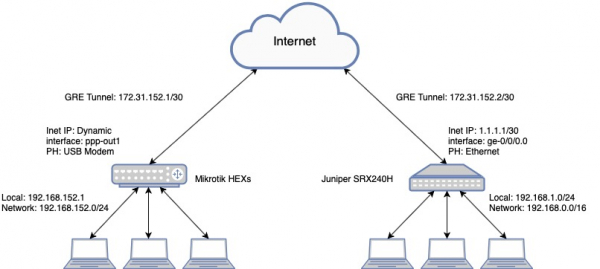
The core is equipped with Juniper SRX240H
Local Address: 192.168.1.1/24
External Address: 1.1.1.1/30
GW: 1.1.1.2
Remote point
Mikrotik hEX S
Local Address: 192.168.152.1/24
External Address: Dynamic
A small diagram for understanding the operation:
Configuration of Juniper SRX240:
JUNOS Software Release version [12.1X46-D82]
Juniper Configuration
interfaces {
    ge-0/0/0 {
        description Internet-1;
        unit 0 {
            family inet {
                address 1.1.1.1/30;
            }
        }
    }
    gr-0/0/0 {
        unit 1 {
            description GRE-Tunnel;
            tunnel {
                source 172.31.152.2;
                destination 172.31.152.1;
            }
            family inet;
    vlan {
        unit 0 {
            family inet {
                address 192.168.1.1/24;
            }
        }
    st0 {
        unit 5 {
            description "Area - 192.168.152.0/24";
            family inet {
                mtu 1400;
            }
        }
routing-options {
    static {
        route 0.0.0.0/0 next-hop 1.1.1.2;
        route 192.168.152.0/24 next-hop gr-0/0/0.1;
        route 172.31.152.0/30 next-hop st0.5;
    }
    router-id 192.168.1.1;
}
security {
    ike {
        traceoptions {
            file vpn.log size 256k files 5;
            flag all;
        }
        policy ike-gretunnel {
            mode aggressive;
            description area-192.168.152.0;
            proposal-set standard;
            pre-shared-key ascii-text "mysecret"; ## SECRET-DATA
        }
        gateway gw-gretunnel {
            ike-policy ike-gretunnel;
            dynamic inet 172.31.152.1;
            external-interface ge-0/0/0.0;
            version v2-only;
        }
    ipsec {
        }
        policy vpn-policy0 {
            perfect-forward-secrecy {
                keys group2;
            }
            proposal-set standard;
        }
        vpn vpn-gretunnel {
            bind-interface st0.5;
            df-bit copy;
            vpn-monitor {
                optimized;
                source-interface st0.5;
                destination-ip 172.31.152.1;
            }
            ike {
                gateway gw-gretunnel;
                no-anti-replay;
                ipsec-policy vpn-policy0;
                install-interval 10;
            }
            establish-tunnels immediately;
        }
    }
    policies {
        from-zone vpn to-zone vpn {
            policy st-vpn-vpn {
                match {
                    source-address any;
                    destination-address any;
                    application any;
                }
                then {
                    permit;
                    log {
                        session-init;
                        session-close;
                    }
                    count;
                }
            }
        }
        from-zone trust to-zone vpn {
            policy st-trust-to-vpn {
                match {
                    source-address any;
                    destination-address any;
                    application any;
                }
                then {
                    permit;
                    log {
                        session-init;
                        session-close;
                    }
                    count;
                }
            }
        }
        from-zone vpn to-zone trust {
            policy st-vpn-to-trust {
                match {
                    source-address any;
                    destination-address any;
                    application any;
                }
                then {
                    permit;
                    log {
                        session-init;
                        session-close;
                    }
                    count;
                }
            }
        }
    zones {
        security-zone trust {
                vlan.0 {
                    host-inbound-traffic {
                        system-services {
                            all;
                        }
                        protocols {
                            all;
                        }
                    }
                }
        security-zone vpn {
            interfaces {
                st0.5 {
                    host-inbound-traffic {
                        protocols {
                            ospf;
                        }
                    }
                }
                gr-0/0/0.1 {
                    host-inbound-traffic {
                        system-services {
                            all;
                        }
                        protocols {
                            all;
                        }
                    }
                }
        security-zone untrust {
            interfaces {
                ge-0/0/0.0 {
                    host-inbound-traffic {
                        system-services {
                            ping;
                            ssh;
                            ike;
                        }
                    }
                }
            }
        }
vlans {
    vlan-local {
        vlan-id 5;
        l3-interface vlan.1;
    }
Mikrotik hEX S Configuration:
RouterOS Software Version [6.44.3]
Mikrotik Configuration
/ip address
add address=172.31.152.1/24 comment=GRE-Tunnel interface=gre-srx network=172.31.152.0
add address=192.168.152.1/24 comment=Local-Area interface=bridge network=192.168.152.0

/interface gre
add comment=GRE-Tunnel-SRX-HQ !keepalive local-address=172.31.152.1 name=gre-srx remote-address=172.31.152.2

/ip ipsec policy group
add name=srx-gre

/ip ipsec profile
add dh-group=modp1024 dpd-interval=10s name=profile1

/ip ipsec peer
add address=1.1.1.1/32 comment=GRE-SRX exchange-mode=aggressive local-address=172.31.152.1 name=peer2 profile=profile1

/ip ipsec proposal
set [ find default=yes ] enc-algorithms=aes-256-cbc,aes-128-cbc,3des
add enc-algorithms=aes-128-cbc,3des name=proposal1

/ip route
add distance=10 dst-address=192.168.0.0/16 gateway=gre-srx

/ip ipsec identity
add comment=IPSec-GRE my-id=address:172.31.152.1 peer=peer2 policy-template-group=srx-gre secret=mysecret

/ip ipsec policy
set 0 disabled=yes
add dst-address=0.0.0.0/0 proposal=proposal1 sa-dst-address=1.1.1.1 sa-src-address=172.31.152.1 src-address=172.31.152.0/30 tunnel=yes

/ip address
add address=172.31.152.1/24 comment=GRE-Tunnel interface=gre-srx network=172.31.152.0
add address=192.168.152.1/24 comment=Local-Area interface=bridge network=192.168.152.0
Result:
From the Juniper SRX side
netscreen@srx240> ping 192.168.152.1
PING 192.168.152.1 (192.168.152.1): 56 data bytes
64 bytes from 192.168.152.1: icmp_seq=0 ttl=64 time=29.290 ms
64 bytes from 192.168.152.1: icmp_seq=1 ttl=64 time=28.126 ms
64 bytes from 192.168.152.1: icmp_seq=2 ttl=64 time=26.775 ms
64 bytes from 192.168.152.1: icmp_seq=3 ttl=64 time=25.401 ms
^C
--- 192.168.152.1 ping statistics ---
4 packets transmitted, 4 packets received, 0% packet loss
round-trip min/avg/max/stddev = 25.401/27.398/29.290/1.457 ms
From the Mikrotik side
net[admin@GW-LTE-] > ping 192.168.1.1
  SEQ HOST                                     SIZE TTL TIME  STATUS
    0 192.168.1.1                                56  64 34ms
    1 192.168.1.1                                56  64 40ms
    2 192.168.1.1                                56  64 37ms
    3 192.168.1.1                                56  64 40ms
    4 192.168.1.1                                56  64 51ms
    sent=5 received=5 packet-loss=0% min-rtt=34ms avg-rtt=40ms max-rtt=51ms
Conclusions
After completing the work, we achieved stability. VPN Tunnel, from the remote network we have access to the entire network located behind Juniper, and vice versa.
I do not recommend using IKE2 in this scheme; there were situations where after rebooting one device or another, IPSec does not come up.
Source: habr.com
