

In the previous article: we discussed the features of the first version of Yealink Meeting Server (hereafter YMS), its capabilities, and structure. 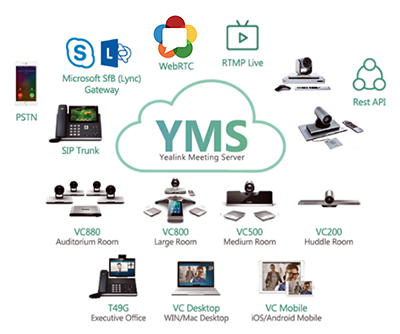 As a result, we received numerous requests from you to test this product, some of which evolved into comprehensive projects for creating or modernizing the video conferencing infrastructure.
The most common scenario anticipated replacing the previous MCU with the YMS server, while maintaining the existing fleet of terminal devices, and expanding with Yealink terminals.
There are three main reasons for this:
- The scalability of the existing MCU is either impossible or unjustifiably expensive.
- The 'accumulated debt' for technical support is comparable to the cost of a modern turn-key video conferencing solution.
- The manufacturer is leaving the market and support ceases altogether.
Many of you who have dealt with modernizing Polycom, for example, or supporting LifeSize, will understand what this is about.
The new functionality of Yealink Meeting Server 2.0, as well as the update of the Yealink terminal client model range, does not allow fitting all the information into a single article. Therefore, I plan to create a series of brief publications on the following topics:
- Overview of YMS 2.0
- Cascading of YMS servers
- Integration of YMS and S4B
- New Yealink terminals
- Multi-camera solution for large conference rooms
What’s New?
This year, the system has received several significant updates — both in functionality and in licensing scheme.
- Integration with the Skype For Business server has been ensured — through the built-in software gateway, YMS can gather video conferences involving both local and cloud S4B users. A regular competitive YMS license is used for the connection. This functionality will be covered in a separate review.
- The cascading functionality of YMS servers has been implemented — the system is capable of being installed in a 'cluster' mode to enhance performance and distribute the load. This feature will be detailed in the next article.
- A new type of license 'Broadcast' has appeared In reality, this is not a broadcast, but the first step towards optimizing license costs in asymmetrical conferences. Essentially, this type of license allows participants who are viewers, and who do not transmit their own video/audio in the conference, to see and hear participants with a full license. In this case, we get something like a webinar or a role-based conference, where participants are divided into speakers and viewers.
The 'Broadcast' license comes packaged with a number of connections in multiples of 50. In terms of one connection, a viewer costs six times less than a speaker.
First Steps
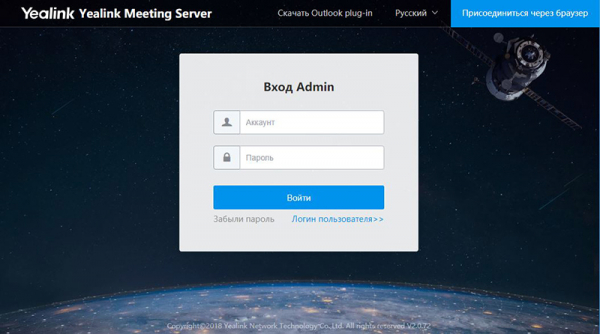
The main server page offers access either to the user interface or to the admin control panel.
The first entry is done as an admin.
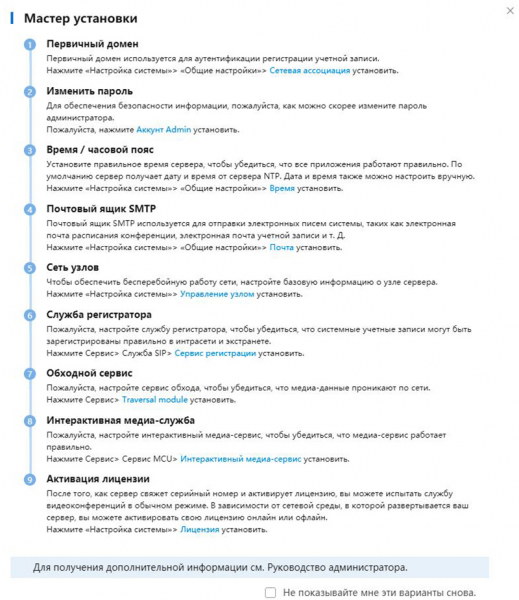
Upon first launch, a step-by-step Installation Wizard appears, allowing you to configure all necessary system modules (which we will discuss in more detail later).
The first step is to activate the license. In version 2.0, this process has undergone some changes. Previously, it was enough to install the license file, which was tied to the MAC address of the server's network controller, but now the procedure is divided into several stages:
- You need to upload the server certificate (*.tar), which is provided by Yealink, through a representative — through us, for example.
- In response to the certificate import, the system generates a request file (*.req)
- In exchange for the request file, Yealink sends the license key(s)
- These keys, in turn, are installed via the YMS interface and activate the required number of symmetrical connection ports, as well as the 'Broadcast' license package — if applicable.
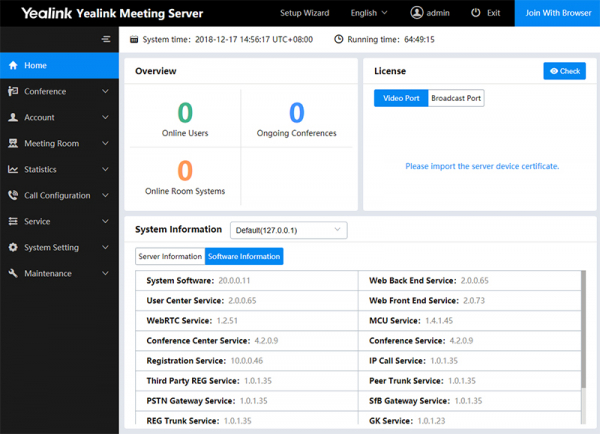
In order. We import the certificate in the License section of the home page.
To export the request file, you must click on the link 'Your license has not been activated. Please activate'. This will open the 'Offline Activation License' window.
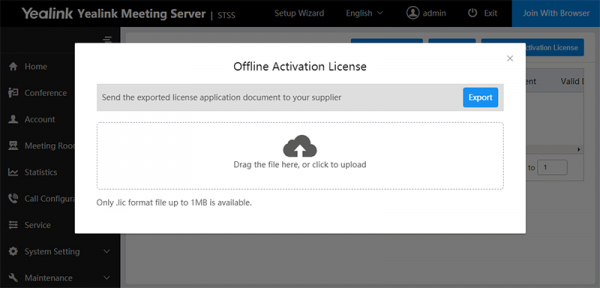
The exported request file is sent to us, and we provide you with one or two activation keys (one for each type of license).
The license files are installed through the same dialog window.
As a result, the system will display the status and the number of concurrent connections for each type of license.
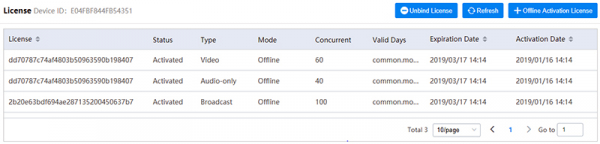
In our example, the licenses are trial versions with an expiration date. In the case of the commercial version, they are unlimited.
The YMS interface has several translation options, including Russian. However, the main terminology is more easily understood in English, so I will use it for the screenshots.
The admin panel home page displays brief information about active users/sessions, the status and number of licenses, as well as system information about the hardware server and the versions of all software modules.
After installing the licenses, you need to perform the initial server configuration — you can use the wizard.
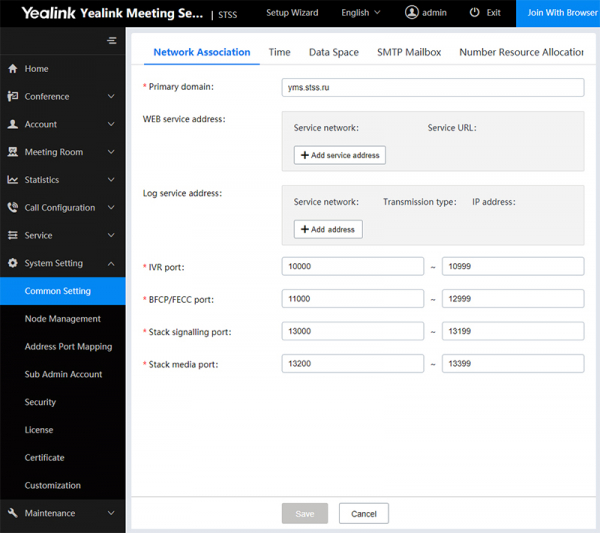
In the tab Network Association we set the domain name of the YMS server — the name can be real or fictional, but it is necessary for further terminal configuration. If it is not real, then in the client settings, the server address is entered with the domain name, and the proxy address is the real IP of the server.
Tab Time contains SNTP and timezone settings — this is important for the correct operation of the calendar and mailing.
Data Space — control and limitation of disk space for various system needs, such as logs, backups, and firmware.
SMTP Mailbox — email settings for mailings.
The new version of YMS includes useful functionality — Number Resource Allocation.
Previously, YMS's internal numbering was fixed. This could create difficulties when integrating with IP-PBX. To avoid overlaps and create your own flexible numbering, you need to configure each group that has the ability to make calls through a numbered dialing scheme.
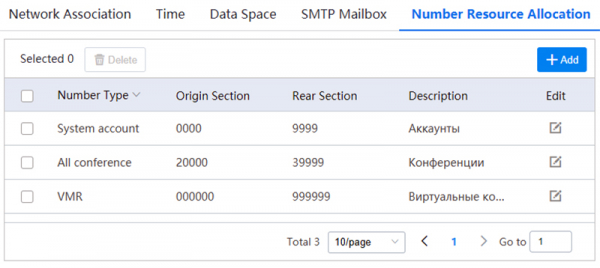
You can not only change the digit length of the numbers but also limit the ranges. This is very convenient, especially when working with existing IP telephony.
For the full operation of the YMS server, necessary services must be added.
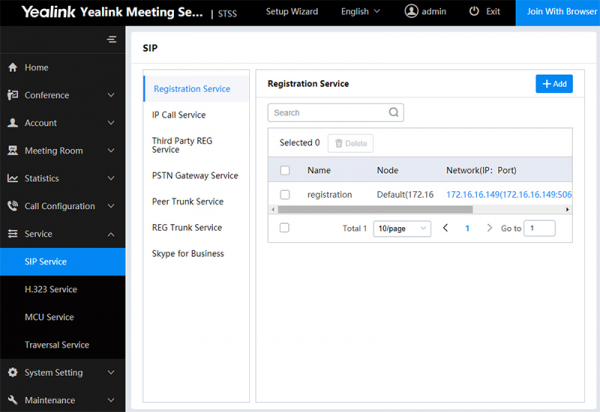
In the subsection SIP Service the primary services for operation using SIP connection are added. In fact, adding boils down to a few simple steps in each tab — you need to name the service, choose the server (in cluster mode), the network adapter, and if necessary, edit the connection ports.
Registration Service — is responsible for registering Yealink terminals
IP Call Service — making calls
Third Party REG Service - registration of hardware terminals from third-party manufacturers
Peer Trunk Service and REG Trunk Service - integration with IP PBX (with and without registration)
Skype for Business - integration with S4B server or cloud (more details in a separate article)
Next, in a similar way, you need to add the necessary services in the subsection H.323 Service, MCU Service and Traversal Service.
After the initial setup, you can proceed to account registration. Since this functionality has hardly changed during the update and was described in the previous article, we won't dwell on it.
Detailed setup and customization
A little bit about call configuration (Call Control Policy) - several useful options have appeared here.
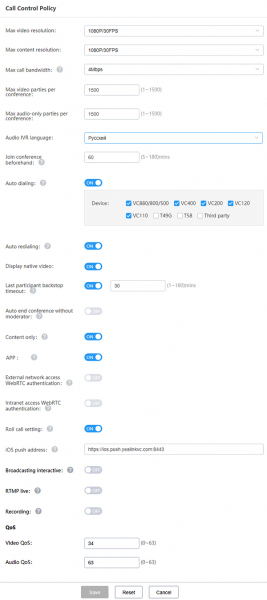
For example, Display native video - this displays your own video in conferences.
iOS push address - allows receiving pop-up notifications on iOS devices with Yealink VC Mobile installed.
Broadcasting interactive - allows viewers to connect when the "Broadcast" license is activated.
RTMP live and Recording - includes functionality for broadcasting and recording conferences. But it's important to remember that each recording/broadcast not only adds additional load on the server but also uses a full license for one concurrent connection. This needs to be taken into account when calculating the port capacity of the server and the number of licenses.
Video Display Policy - display settings.
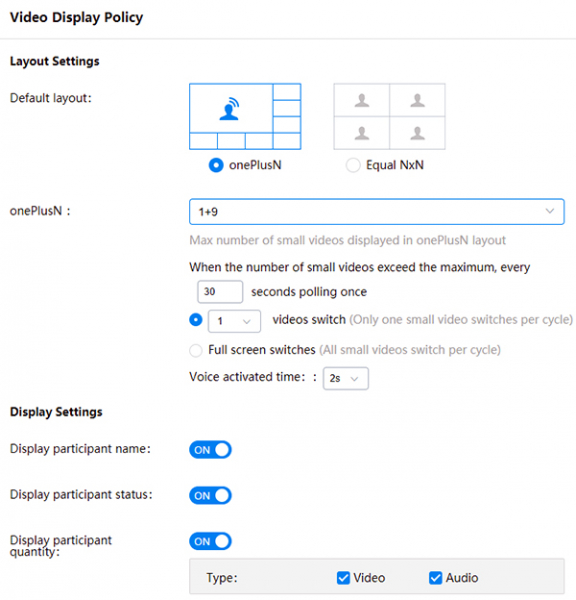
In conclusion, let's consider the submenu "Customization"
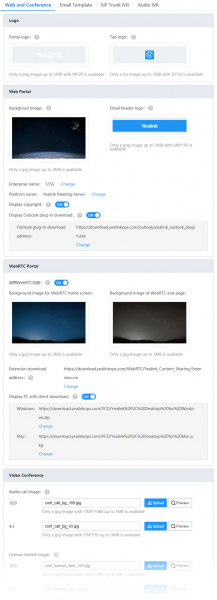
In this section, you can customize the YMS interface according to your corporate style. Adapt the email template and IVR recording to your needs.
Many graphical interface modules support replacements with user-defined options — from backgrounds and logos to system messages and screensavers.
Conclusion
The administrator interface is succinct and intuitive, despite gaining additional functionality with each update.
I see no reason to demonstrate the interface of an active video conference in this article — the quality remains at a high level for VC hardware systems. Regarding subjective matters such as quality and convenience, it’s better to test independently!
Testing
Deploy the Yealink Meeting Server in your infrastructure for testing! Integrate it with your telephony and existing SIP/H.323 terminals. Try working through a browser or codec, via mobile or desktop application. Add audio participants and viewers in 'Broadcast' mode to the conference.
To obtain the distribution package and test license, you just need to send a request to me at: 1@stss.ru
Email subject: Testing YMS 2.0 (your company name)
You must attach your company's profile to the email for project registration and to create a demo key for you.
In the body of the email, please briefly describe the task, the existing VKS infrastructure, and the planned scenario for using the VKS.
Considering the number of requests for testing and the somewhat complicated procedure for obtaining the key, there may be a delay in response. Therefore, I apologize in advance if we are unable to respond to you on the same day!
I express my gratitude to the company IpMatika for:
- Taking on the lion's share of technical support
- Consistent and relentless localization of the YMS interface
- Assistance in organizing the YMS testing
Thank you for your attention,
Sincerely,
Kirill Usikov ()
Head of the department
Video surveillance and video conferencing systems
Help me gather useful statistics — please complete two short surveys.
Thank you in advance!
Only registered users can participate in the survey. , please.
What do you think about the Yealink Meeting Server?
So far, nothing — I've just heard about such a solution for the first time, need to study it.
The product is interesting for its seamless integration with Yealink terminals.
Just regular software, there are plenty of those now!
Why experiment when there are more expensive but proven hardware VKS solutions?
Exactly what I need! I will definitely be testing it!
13 users voted. 2 users abstained.
Is there a point in a local VKS solution?
Of course not! Now everyone is moving to the cloud, and soon everyone will be buying cloud subscriptions for VKS!
Only for large companies, and those who are concerned about the confidentiality of negotiations.
Of course there is! The cloud will never provide the necessary level of quality and service availability compared to a dedicated VKS server.
13 users have voted. 4 users abstained.
Source: habr.com
