

Recently, Microsoft released a Canary build of the Edge browser based on Chromium. One of the new features is support for PWA — Progressive Web Apps. In other words, using the new version of the browser, you can now right-click on the PWA shortcut and directly access various application functions.

This feature is still experimental in the browser, so it needs to be activated manually. To do this, go to the flags page edge://flags, find the Jump list function, and enable it.
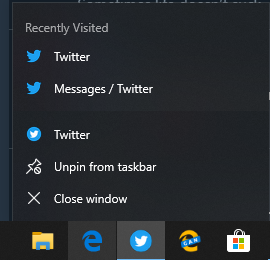
After enabling it, you need to restart the browser and open any PWA format application, such as the Twitter client. Then you can right-click on its icon in the Taskbar and see the recent actions with the application.
This feature could be useful for those users who regularly use PWAs. Currently, it is available for Edge Canary. It remains unclear when it will be expected on the Dev channel.
Meanwhile, the company implicitly Microsoft Edge based on Chromium for Windows 7, Windows 8, and Windows 8.1. It is claimed that this build functionally replicates the version for '10' and differs little from it. So far, there is only a version available on the Canary channel. It is unclear when to expect the developer build, and even more so, the beta. And the release will likely only appear by the end of the current year.
Source: 3dnews.ru
