

When I first started exploring Habra, my seniors strictly advised me to watch for double spaces and errors in texts. At first, I didn't think much of it, but after accumulating a lot of negative karma, my attitude towards this requirement changed dramatically. Just recently, my good friend from St. Petersburg, who is not exactly a geek, , shared a truly wonderful macro. I hope her first-person narrative will be useful to you.

Many years ago, while working as an editor and hunting down endless extra spaces and other formatting flaws, I asked my husband to help me escape from the routine. He created a simple yet incredibly useful tool—a editing macro. You press a designated key combination, and the problem is automatically solved.
Worrying about double spaces is quite a perfectionism; 99% of the population doesn’t suffer from it. But if you work with text (not only as a PR person, journalist, or editor, but also, say, as a salesperson writing proposals), take care of its perfect formatting. This will portray you as an educated person.
Here’s how the text looks before editing: double spaces, a hyphen instead of an en dash, confusion with quotes.
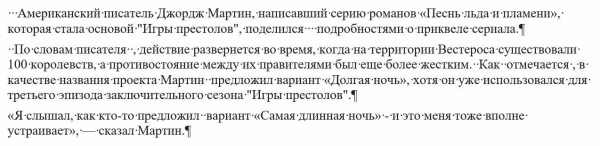
Such texts often come to the editor, and cleaning them can take a lot of time. Two presses of the Ctrl + «ё» key combination (that’s the one I have set up) — and the text is neatly formatted.
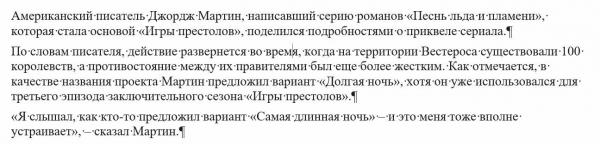
How does it work? With a simple macro for Word that even someone struggling to understand the word "macro" can easily install. You just need to and follow the instructions.
What the macro can do:
- replace double spaces with single ones;
- replace hyphens with en dashes and long dashes with en dashes;
- replace "ё" with "е";
- replace angled quotes with guillemets;
- remove non-breaking spaces;
- remove spaces before commas, periods, closing parentheses.
A complete list of commands can be seen in the macro code. The commands are tied to the standards from my previous work, and you can remove them if you like the letter "ё" or long dashes, as well as add your own.
Enjoy! And may your texts look perfect!
Source: habr.com
