

First release of the application , which allows defining profiles for changing hardware settings that adjust the GPU and CPU performance parameters based on the application being run (for example, for games and 3D modeling software you can attach a maximum performance profile, while for browsers and office applications you can enable power-saving mode and reduce the frequency to lower the cooler noise). The project code is written in C++ (interface in Qt and QML) and under the GPLv3 license.
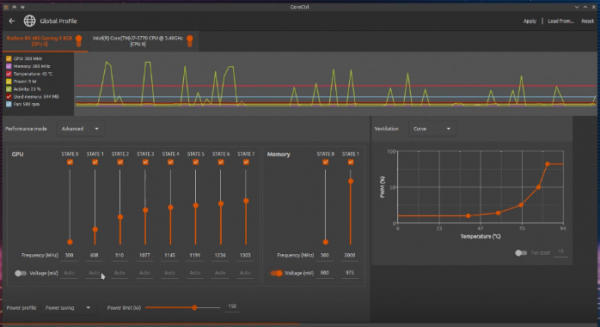
Profiles are linked to executable files (including Windows programs run through Wine). The program monitors system activity and automatically activates or deactivates profiles upon the launch or termination of the associated application. The system also allows monitoring temperature changes, the status of system sensors, and various metrics (CPU load, memory consumption) during application execution.
Currently, the project supports management of both new and old AMD GPUs, including changing fan rotation parameters, polling sensors, frequency and voltage manipulation, activation of power-saving modes, and performance management. Basic support for adjusting CPU frequency, configuring the CPU governor, setting limits on maximum frequency, and displaying processor operation parameters is also available. Further support for other GPUs and expanded CPU control tools is planned.
Source: opennet.ru
