

Recently, we faced the task of monitoring certificate expiration on Windows servers. Well, it arose after the certificates turned into pumpkins a few times when the colleague responsible for renewing them was on vacation. After that, we suspected something was off and decided to think about it. As we are gradually implementing the NetXMS monitoring system, it became the main and, in fact, the only candidate for this task.
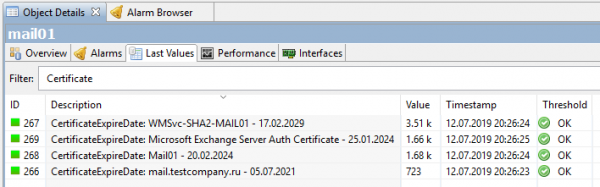
The result was eventually obtained in the following form:
And the process itself continued.
Here we go. There is no built-in counter for expiring certificates in NetXMS, so we need to create our own and use scripts to provide it with data. Of course, in Powershell, after all, this is Windows. The script should read all certificates in the operating system, take the expiration dates in days, and pass that number to NetXMS through its agent. That's where we will start.
Option one, the simplest. Just get the number of days until the closest certificate expiration date.
For the NetXMS server to know about the existence of our custom parameter, it needs to get it from the agent. Otherwise, this parameter cannot be added due to its absence. Therefore, we add an external parameter line with the name nxagentd.conf in the agent's configuration file. HTTPS.CertificateExpireDateSimple, where we specify the script's execution:
ExternalParameter = HTTPS.CertificateExpireDateSimple: powershell.exe -File "servershareNetXMS_CertExpireDateSimple.ps1"Considering the script runs over the network, we should not forget about , as well as remember the other "-NoLogo -NoProfile -NonInteractive" options that I omitted for better code readability.
As a result, the agent's config looks something like this:
#
# NetXMS agent configuration file
# Created by agent installer at Thu Jun 13 11:24:43 2019
#

MasterServers = netxms.corp.testcompany.ru
ConfigIncludeDir = C:NetXMSetcnxagentd.conf.d
LogFile = {syslog}
FileStore = C:NetXMSvar
SubAgent = ecs.nsm
SubAgent = filemgr.nsm
SubAgent = ping.nsm
SubAgent = logwatch.nsm
SubAgent = portcheck.nsm
SubAgent = winperf.nsm
SubAgent = wmi.nsm

ExternalParameter = HTTPS.CertificateExpireDateSimple: powershell.exe -File "servershareNetXMS_CertExpireDateSimple.ps1"
After that, we need to save the config and restart the agent. This can be done from the NetXMS console: open the config (Edit agent's configuration file), edit it, execute Save&Apply, which will essentially achieve the same result. Then re-read the configuration (Poll > Configuration), if you absolutely can't wait. After these steps, the option to add our custom parameter should appear.
In the NetXMS console, we go to Data Collection Configuration the test server on which we are going to monitor certificates and create a new parameter there (later, after the setup, it makes sense to transfer it to templates). We select HTTPS.CertificateExpireDateSimple from the list, enter a Description with a meaningful name, set the type to Integer, and configure the polling interval. For debugging, it makes sense to make it shorter, like 30 seconds. That's it, ready, that's enough for now.
We can check… no, it's too early. Right now, of course, we won't get anything. Simply because the script has not been written yet. We will fix this oversight. The script will return just a number, the number of days left until the certificate expires. The very minimum of all available. Example of the script:
try {
    # Get all certificates from the certificate store
    $lmCertificates = @( Get-ChildItem -Recurse -path 'Cert:LocalMachineMy' -ErrorAction Stop )

    # If there are no certificates, return "10 years"
    if ($lmCertificates.Count -eq 0) { return 3650 }

    # Get the Expiration Date of all certificates
    $expirationDates = @( $lmCertificates | ForEach-Object { return $_.NotAfter } )

    # Get the closest Expiration Date from all
    $minExpirationDate = ($expirationDates | Measure-Object -Minimum -ErrorAction Stop ).Minimum

    # Convert the closest Expiration Date to the number of remaining days, rounding down
    $daysLeft = [Math]::Floor( ($minExpirationDate - [DateTime]::Now).TotalDays )

    # Return the value
    return $daysLeft
}
catch {
    return -1
}
So it turns out:
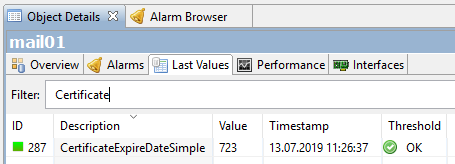
723 days, there are almost two years left until the certificate expires. It makes sense since I recently reissued the certificates on the Exchange test stand.
This was a simple option. Perhaps someone will be satisfied with this, but we wanted more. Our task was to obtain a list of all certificates on the server, by name, and see for each one the number of days left until it expires.
The second option, a bit more complex.
Again, we edit the agent config and instead of the line with ExternalParameter, we write two others:
ExternalList = HTTPS.CertificateNames: powershell.exe -File "serversharenetxms_CertExternalNames.ps1"
ExternalParameter = HTTPS.CertificateExpireDate(*): powershell.exe -File "serversharenetxms_CertExternalParameter.ps1" -CertificateId "$1"
In ExternalList we simply get a list of strings. In our case, a list of strings with certificate names. We will get this list using a script. The name of the list — HTTPS.CertificateNames.
Script NetXMS_CertNames.ps1:
#Список возможных имен сертификатов
$nameTypeList = @(
        [System.Security.Cryptography.X509Certificates.X509NameType]::SimpleName,
        [System.Security.Cryptography.X509Certificates.X509NameType]::DnsName,
        [System.Security.Cryptography.X509Certificates.X509NameType]::DnsFromAlternativeName,
        [System.Security.Cryptography.X509Certificates.X509NameType]::UrlName,
        [System.Security.Cryptography.X509Certificates.X509NameType]::EmailName,
        [System.Security.Cryptography.X509Certificates.X509NameType]::UpnName
)

#Ищем все сертификаты, имеющие закрытый ключ
$certList = @( Get-ChildItem -Path 'Cert:LocalMachineMy' | Where-Object { $_.HasPrivateKey -eq $true } )

#Проходим по списку сертификатов, формируем строку "Имя сертификата - Дата - Thumbprint" и возвращаем её
foreach ($cert in $certList) {
    $name = '(unknown name)'
    try {
        $thumbprint = $cert.Thumbprint
        $dateExpire = $cert.NotAfter
        foreach ($nameType in $nameTypeList) {
            $name_temp = $cert.GetNameInfo( $nameType, $false)
            if ($name_temp -ne $null -and $name_temp -ne '') {
                $name = $name_temp;
                break;
            }
        }
        Write-Output "$($name) - $($dateExpire.ToString('dd.MM.yyyy')) - [T:$($thumbprint)]"
    }
    catch {
        Write-Error -Message "Error processing certificate list: $($_.Exception.Message)"
    }
}
And already in ExternalParameter We input strings from the ExternalList, and in return, we will receive the same number of days for each. The identifier is the Thumbprint of the certificate. Note that HTTPS.CertificateExpireDate in this case contains an asterisk (*). This is necessary so that it accepts external variables, which is our CertificateId.
Script NetXMS_CertExpireDate.ps1:
#Определяем входящий параметр $CertificateId
param (
    [Parameter(Mandatory=$false)]
    [String]$CertificateId
)

#Проверка на существование
if ($CertificateId -eq $null) {
    Write-Error -Message "CertificateID parameter is required!"
    return
}

#По Thumbprint из строки в $CertificateId ищем сертификат и определяем его Expiration Date
$certId = $CertificateId;
try {
    if ($certId -match '^.*[T:(?<Thumbprint>[A-Z0-9]+)]$') {
        $thumbprint = $Matches['Thumbprint']
        $certificatePath = "Cert:LocalMachineMy$($thumbprint)"

        if (Test-Path -PathType Leaf -Path $certificatePath ) {
            $certificate = Get-Item -Path $certificatePath;
            $certificateExpirationDate = $certificate.NotAfter
            $certificateDayToLive = [Math]::Floor( ($certificateExpirationDate - [DateTime]::Now).TotalDays )
            Write-Output "$($certificateDayToLive)";
        }
        else {
            Write-Error -Message "No certificate matching this thumbprint found on this server $($certId)"
        }
    }
    else {
        Write-Error -Message "CertificateID provided in wrong format. Must be FriendlyName [T:<thumbprint>]"
    }
}
catch {
    Write-Error -Message "Error while executing script: $($_.Exception.Message)"
}
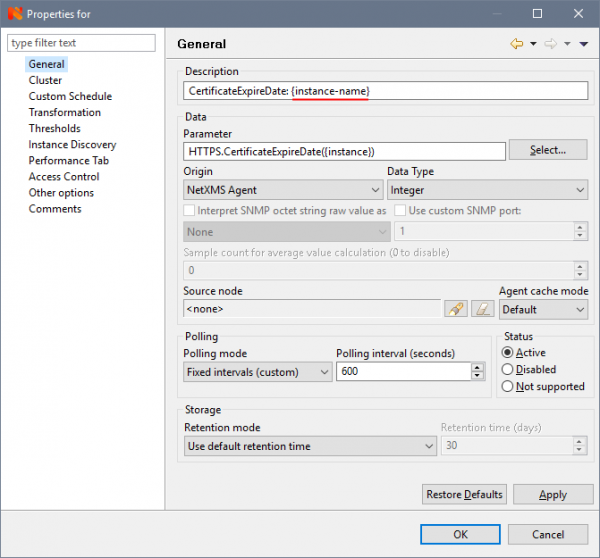
In the Data Collection Configuration of the server, create a new parameter. In Parameter, we select our HTTPS.CertificateExpireDate(*) from the list, and (attention!) we replace the asterisk with {instance}. This important step will allow the creation of separate counters for each instance (certificate). The rest is filled in as in the previous version:
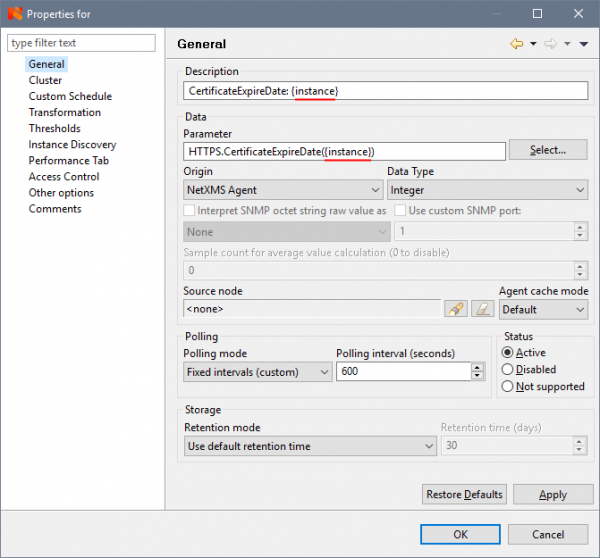
In order to create counters, on the Instance Discovery tab, select Agent List from the list and enter the name of our ExternalList from the script — HTTPS.CertificateNames in the List Name field.
Almost done, just wait a bit or force the Poll > Configuration and Poll > Instance Discovery if waiting is impossible. As a result, we get all our certificates with their expiration dates:
Is that what we need? Yes, but the perfectionist within me looks at this unnecessary Thumbprint in the counter name with sad eyes and won’t let me finish the article. To satisfy it, we reopen the counter properties and on the Instance Discovery tab, in the 'Instance discovery filter script' field, we add the script written in (the internal language of NetXMS):
instance = $1;
 if (instance ~= "^(.*)s-s[T:[a-zA-Z0-9]+]$")
 {
 return %(true, instance, $1);
 }
 return true;
which will filter out the Thumbprint:
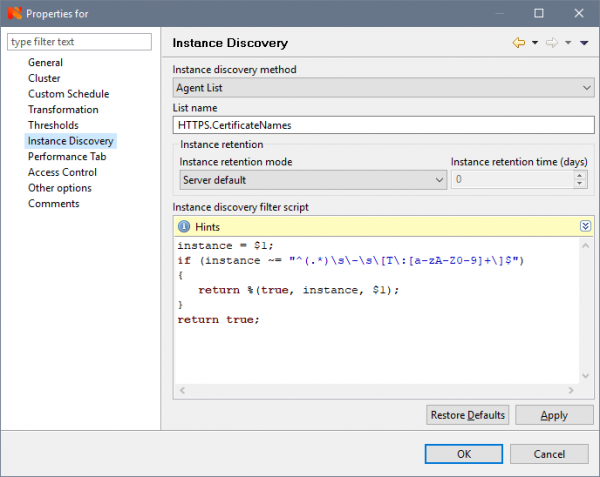
To display it filtered, on the General tab in the Description field, change CertificateExpireDate: {instance} to CertificateExpireDate: {instance-name}:
That's it, finally reaching the finish line:
Isn’t it beautiful?
Now, we just need to set up notifications to be sent to our email when the certificate's expiration date approaches.
1. First, we need to create an event template for triggering it when the counter value drops to a specified threshold. In Event Configuration we create two new templates called, let’s say, CertificateExpireDate_Threshold_Activate with the status Warning:
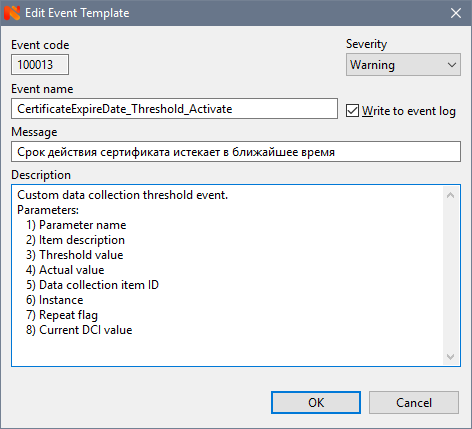
and a corresponding CertificateExpireDate_Threshold_Deactivate with the status Normal.
2. Next, we go to the counter properties and on the Thresholds tab, we configure the threshold:
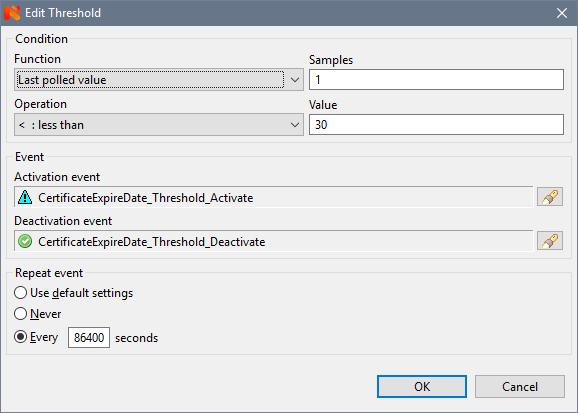
where we select our created events CertificateExpireDate_Threshold_Activate and CertificateExpireDate_Threshold_Deactivate, set the number of measurements (Samples) to 1 (specifically for this counter, setting more doesn’t make sense), a value of 30 (days), for example, and, importantly, configure the event repetition time. For production certificates, I set it to once a day (86400 seconds), otherwise, you could drown in notifications (which, by the way, happened once, to the extent that my mailbox was overflowing over the weekend). During debugging, there’s a reason to set it smaller, for example, 60 seconds.
3. In Action Configuration we create a notification email template, like this:
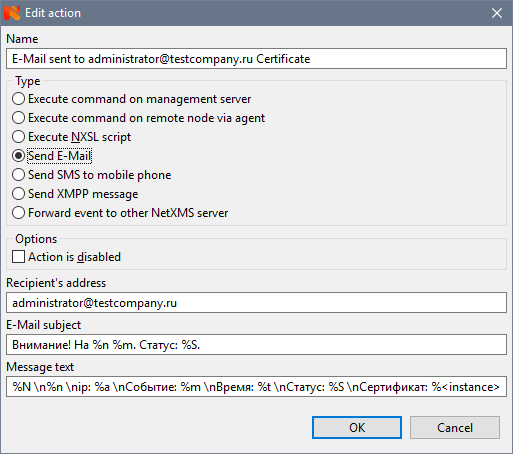
All these %m, %S, etc. are macros that will be replaced with values from our parameter. They are described in more detail in NetXMS.
4. Finally, combining the previous points, in Event Processing Policy we create a rule that will generate an Alarm and send an email:
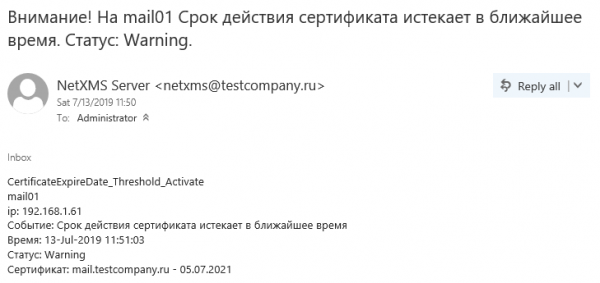
We save the policy, and that’s it, we can test it. I’ll set the threshold higher for testing. The nearest certificate is expiring in 723 days, so I set it to 724. As a result, we will get this alarm:

and this email notification:
Now it’s definitely all set. Of course, we could set up a dashboard, build graphs, but for certificates, it would just be several meaningless and boring straight lines, unlike graphs of CPU or memory usage, for example. But we can talk about that another time.
Source: habr.com
