

At the recent PHDays 9, we held a hacking competition at a gas pumping station. There were three stands on site with different security parameters (No Security, Low Security, High Security), simulating the same industrial process: air was pumped into (and then released from) a balloon under pressure.
Despite the varying security parameters, the hardware of the stands was identical: Siemens Simatic S7-300 PLC; an emergency deflation button and a pressure measurement device (connected to the PLC's digital inputs (DI)); valves for inflating and deflating air (connected to the PLC's digital outputs (DO)) — see the image below.
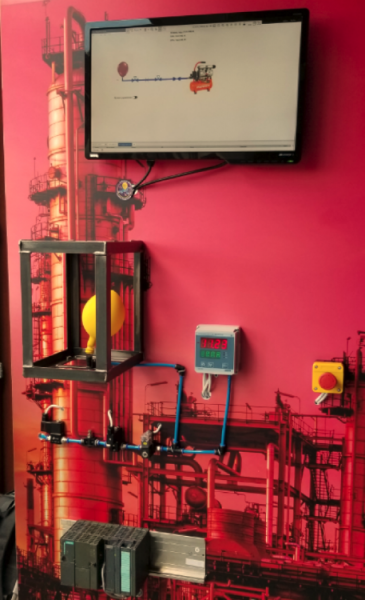
The PLC made decisions about inflating or deflating the balloon based on pressure readings and its program (opening and closing the corresponding valves). However, all stands had a manual control mode allowing for valve state management without any restrictions.
The stands differed in the complexity of engaging this mode: it was easiest to do so on the unprotected stand, and correspondingly more challenging on the High Security stand.
Over two days, five out of six tasks were solved; the participant who took first place earned 233 points (they spent a week preparing for the competition). The top three winners: 1st place — a1exdandy, 2nd — Rubikoid, 3rd — Ze.
However, during PHDays, none of the participants managed to overcome all three stands, so we decided to hold an online competition and published the most difficult task at the beginning of June. Participants had a month to complete the task, find the flag, and describe their solutions in detail and interestingly.
Below, we publish an analysis of the best solution from those submitted during the month, found by Alexey Kovrizhnykh (a1exdandy) from Digital Security, who took 1st place in the competition at PHDays. Below is his text along with our comments.
Initial Analysis
So, in the task, there was an archive with the following files:
- block_upload_traffic.pcapng
- DB100.bin
- hints.txt
The hints.txt file contains necessary information and tips for completing the task. Here is its content:
- Petrovich told me yesterday that you can upload blocks from PlcSim into Step7.
- The stand used a Siemens Simatic S7-300 PLC.
- PlcSim is a PLC emulator that allows you to execute and debug programs for the Siemens S7 PLC.
The file DB100.bin apparently contains a data block DB100 for the PLC:
00000000: 0100 0102 6e02 0401 0206 0100 0101 0102  ....n...........
00000010: 1002 0501 0202 2002 0501 0206 0100 0102  ...... .........
00000020: 0102 7702 0401 0206 0100 0103 0102 0a02  ..w.............
00000030: 0501 0202 1602 0501 0206 0100 0104 0102  ................
00000040: 7502 0401 0206 0100 0105 0102 0a02 0501  u...............
00000050: 0202 1602 0501 0206 0100 0106 0102 3402  ..............4.
00000060: 0401 0206 0100 0107 0102 2602 0501 0202  ..........&...
00000070: 4c02 0501 0206 0100 0108 0102 3302 0401  L...........3...
00000080: 0206 0100 0109 0102 0a02 0501 0202 1602  ................
00000090: 0501 0206 0100 010a 0102 3702 0401 0206  ..........7.....
000000a0: 0100 010b 0102 2202 0501 0202 4602 0501  ......".....F...
000000b0: 0206 0100 010c 0102 3302 0401 0206 0100  ........3.......
000000c0: 010d 0102 0a02 0501 0202 1602 0501 0206  ................
000000d0: 0100 010e 0102 6d02 0401 0206 0100 010f  ......m.........
000000e0: 0102 1102 0501 0202 2302 0501 0206 0100  ........#.......
000000f0: 0110 0102 3502 0401 0206 0100 0111 0102  ....5...........
00000100: 1202 0501 0202 2502 0501 0206 0100 0112  ......%.........
00000110: 0102 3302 0401 0206 0100 0113 0102 2602  ..3...........&.
00000120: 0501 0202 4c02 0501 0206 0100            ....L.......
Judging by the name, the file block_upload_traffic.pcapng contains a dump of the upload traffic of blocks to the PLC.
It is worth noting that obtaining this traffic dump at the competition site during the conference was somewhat more complex. It was necessary to analyze the script from the project file for TeslaSCADA2. From this, it was possible to understand where the encrypted dump using RC4 is located and which key needs to be used for decryption. The data block dumps at the site could be obtained using a client of the S7 protocol. I used the demo client from the Snap7 package for this.
Extracting signal processing blocks from the traffic dump
Looking at the contents of the dump, it becomes clear that it transmits signal processing blocks OB1, FC1, FC2, and FC3:
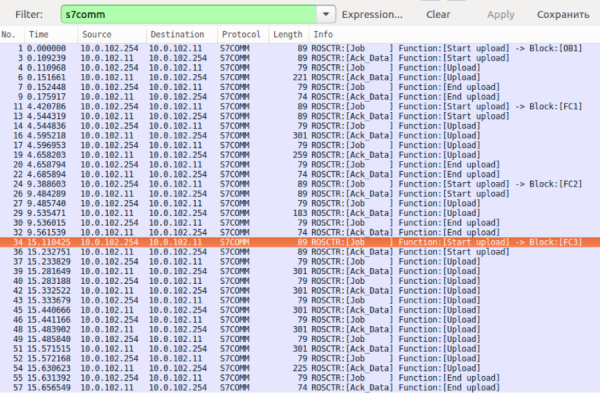
These blocks need to be extracted. This can be done, for example, using the following script, after converting the traffic from pcapng format to pcap:
#!/usr/bin/env python2

import struct
from scapy.all import *

packets = rdpcap('block_upload_traffic.pcap')
s7_hdr_struct = '>BBHHHHBB'
s7_hdr_sz = struct.calcsize(s7_hdr_struct)
tpkt_cotp_sz = 7
names = iter(['OB1.bin', 'FC1.bin', 'FC2.bin', 'FC3.bin'])
buf = ''

for packet in packets:
    if packet.getlayer(IP).src == '10.0.102.11':
        tpkt_cotp_s7 = str(packet.getlayer(TCP).payload)
        if len(tpkt_cotp_s7) < tpkt_cotp_sz + s7_hdr_sz:
            continue
        s7 = tpkt_cotp_s7[tpkt_cotp_sz:]
        s7_hdr = s7[:s7_hdr_sz]
        param_sz = struct.unpack(s7_hdr_struct, s7_hdr)[4]
        s7_param = s7[12:12+param_sz]
        s7_data = s7[12+param_sz:]
        if s7_param in ('x1ex00', 'x1ex01'):  # upload
            buf += s7_data[4:]
        elif s7_param == 'x1f':
            with open(next(names), 'wb') as f:
                f.write(buf)
            buf = ''
After studying the received blocks, you can notice that they always start with the bytes 70 70 (pp). Now you need to learn how to analyze them. The hint for the task suggests that it is necessary to use PlcSim for this.
Obtaining human-readable instructions from the blocks
To begin, let's program S7-PlcSim by loading several blocks with repeated instructions (= Q 0.0) using Simatic Manager software, and save the resulting PLC emulator output to a file named example.plc. By examining the file's content, we can easily identify the start of the loaded blocks by the signature 70 70, which we discovered earlier. Before the blocks, the size of the block appears to be recorded as a 4-byte little-endian value.
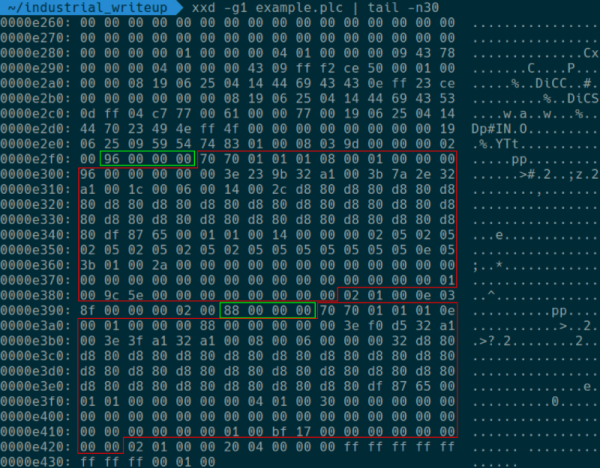
After we obtained information about the structure of PLC files, the next steps for reading the PLC S7 programs emerged:
- Using Simatic Manager, we create a block structure in S7-PlcSim similar to the one we obtained from the dump. The block sizes (achieved by filling the blocks with the necessary number of instructions) and their identifiers (OB1, FC1, FC2, FC3) must match.
- We save the PLC to a file.
- We replace the contents of the blocks in the resulting file with blocks from the traffic dump. The start of the blocks is determined by the signature.
- The resulting file is loaded into S7-PlcSim, and we look at the contents of the blocks in Simatic Manager.
The block replacement can be performed using the following code, for example:
with open('original.plc', 'rb') as f:
    plc = f.read()
blocks = []
for fname in ['OB1.bin', 'FC1.bin', 'FC2.bin', 'FC3.bin']:
    with open(fname, 'rb') as f:
        blocks.append(f.read())

i = plc.find(b'pp')
for block in blocks:
    plc = plc[:i] + block + plc[i+len(block):]
    i = plc.find(b'pp', i + 1)

with open('target.plc', 'wb') as f:
    f.write(plc)
Aleksey took a possibly more complex but still correct path. We assumed that participants would use the NetToPlcSim program to communicate with PlcSim over the network, load blocks into PlcSim via Snap7, and then download these blocks as a project from PlcSim using the development environment.
Opening the resulting file in S7-PlcSim allows us to read the overwritten blocks using Simatic Manager. The main device control functions are recorded in the block FC1. Special attention is drawn to the variable #TEMP0, which, when activated, apparently switches the PLC control to manual mode based on the values of the bit memory M2.2 and M2.3. The value of #TEMP0 is set by the function FC3.
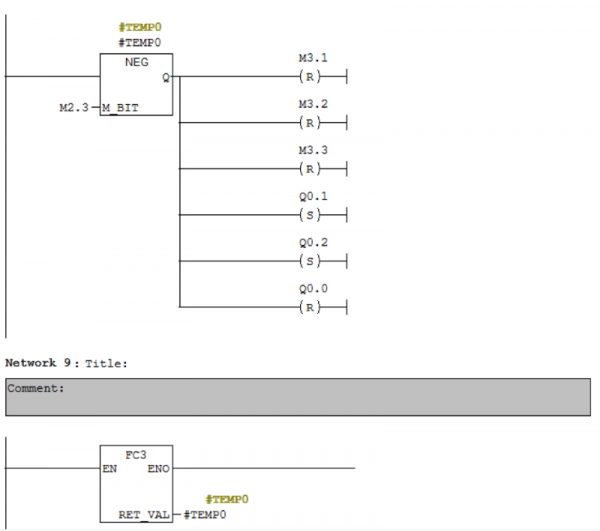
To solve the task, it is necessary to analyze the function FC3 and understand what needs to be done for it to return a logical one.
The PLC signal processing blocks at the Low Security test stand were configured in a similar manner, but to set the value of the variable #TEMP0, it was sufficient to write the line my ninja way in block DB1. Checking the value in the block was straightforward and did not require deep knowledge of the block programming language. It is clear that achieving manual control at the High Security level will be significantly more challenging, necessitating an understanding of the nuances of the STL language (one of the programming methods for PLC S7).
Reverse of block FC3
Content of block FC3 in STL representation:
      L     B#16#0
      T     #TEMP13
      T     #TEMP15
      L     P#DBX 0.0
      T     #TEMP4
      CLR
      =     #TEMP14
M015: L     #TEMP4
      LAR1
      OPN   DB   100
      L     DBLG
      TAR1
      <=D
      JC    M016
      L     DW#16#0
      T     #TEMP0
      L     #TEMP6
      L     W#16#0
      I
      JC    M00d
      L     P#DBX 0.0
      LAR1
M00d: L     B [AR1,P#0.0]
      T     #TEMP5
      L     W#16#1
      ==I
      JC    M007
      L     #TEMP5
      L     W#16#2
      ==I
      JC    M008
      L     #TEMP5
      L     W#16#3
      ==I
      JC    M00f
      L     #TEMP5
      L     W#16#4
      ==I
      JC    M00e
      L     #TEMP5
      L     W#16#5
      ==I
      JC    M011
      L     #TEMP5
      L     W#16#6
      ==I
      JC    M012
      JU    M010
M007: +AR1  P#1.0
      L     P#DBX 0.0
      LAR2
      L     B [AR1,P#0.0]
      L     C#8
      *I
      +AR2
      +AR1  P#1.0
      L     B [AR1,P#0.0]
      JL    M003
      JU    M001
      JU    M002
      JU    M004
M003: JU    M005
M001: OPN   DB   101
      L     B [AR2,P#0.0]
      T     #TEMP0
      JU    M006
M002: OPN   DB   101
      L     B [AR2,P#0.0]
      T     #TEMP1
      JU    M006
M004: OPN   DB   101
      L     B [AR2,P#0.0]
      T     #TEMP2
      JU    M006
M00f: +AR1  P#1.0
      L     B [AR1,P#0.0]
      L     C#8
      *I
      T     #TEMP11
      +AR1  P#1.0
      L     B [AR1,P#0.0]
      T     #TEMP7
      L     P#M 100.0
      LAR2
      L     #TEMP7
      L     C#8
      *I
      +AR2
      TAR2  #TEMP9
      TAR1  #TEMP4
      OPN   DB   101
      L     P#DBX 0.0
      LAR1
      L     #TEMP11
      +AR1
      LAR2  #TEMP9
      L     B [AR2,P#0.0]
      T     B [AR1,P#0.0]
      L     #TEMP4
      LAR1
      JU    M006
M008: +AR1  P#1.0
      L     B [AR1,P#0.0]
      T     #TEMP3
      +AR1  P#1.0
      L     B [AR1,P#0.0]
      JL    M009
      JU    M00b
      JU    M00a
      JU    M00c
M009: JU    M005
M00b: L     #TEMP3
      T     #TEMP0
      JU    M006
M00a: L     #TEMP3
      T     #TEMP1
      JU    M006
M00c: L     #TEMP3
      T     #TEMP2
      JU    M006
M00e: +AR1  P#1.0
      L     B [AR1,P#0.0]
      T     #TEMP7
      L     P#M 100.0
      LAR2
      L     #TEMP7
      L     C#8
      *I
      +AR2
      TAR2  #TEMP9
      +AR1  P#1.0
      L     B [AR1,P#0.0]
      T     #TEMP8
      L     P#M 100.0
      LAR2
      L     #TEMP8
      L     C#8
      *I
      +AR2
      TAR2  #TEMP10
      TAR1  #TEMP4
      LAR1  #TEMP9
      LAR2  #TEMP10
      L     B [AR1,P#0.0]
      L     B [AR2,P#0.0]
      AW
      INVI
      T     #TEMP12
      L     B [AR1,P#0.0]
      L     B [AR2,P#0.0]
      OW
      L     #TEMP12
      AW
      T     B [AR1,P#0.0]
      L     DW#16#0
      T     #TEMP0
      L     MB   101
      T     #TEMP1
      L     MB   102
      T     #TEMP2
      L     #TEMP4
      LAR1
      JU    M006
M011: +AR1  P#1.0
      L     B [AR1,P#0.0]
      T     #TEMP7
      L     P#M 100.0
      LAR2
      L     #TEMP7
      L     C#8
      *I
      +AR2
      TAR2  #TEMP9
      +AR1  P#1.0
      L     B [AR1,P#0.0]
      T     #TEMP8
      L     P#M 100.0
      LAR2
      L     #TEMP8
      L     C#8
      *I
      +AR2
      TAR2  #TEMP10
      TAR1  #TEMP4
      LAR1  #TEMP9
      LAR2  #TEMP10
      L     B [AR1,P#0.0]
      L     B [AR2,P#0.0]
      -I
      T     B [AR1,P#0.0]
      L     DW#16#0
      T     #TEMP0
      L     MB   101
      T     #TEMP1
      L     MB   102
      T     #TEMP2
      L     #TEMP4
      LAR1
      JU    M006
M012: L     #TEMP15
      INC   1
      T     #TEMP15
      +AR1  P#1.0
      L     B [AR1,P#0.0]
      T     #TEMP7
      L     P#M 100.0
      LAR2
      L     #TEMP7
      L     C#8
      *I
      +AR2
      TAR2  #TEMP9
      +AR1  P#1.0
      L     B [AR1,P#0.0]
      T     #TEMP8
      L     P#M 100.0
      LAR2
      L     #TEMP8
      L     C#8
      *I
      +AR2
      TAR2  #TEMP10
      TAR1  #TEMP4
      LAR1  #TEMP9
      LAR2  #TEMP10
      L     B [AR1,P#0.0]
      L     B [AR2,P#0.0]
      ==I
      JCN   M013
      JU    M014
M013: L     P#DBX 0.0
      LAR1
      T     #TEMP4
      L     B#16#0
      T     #TEMP6
      JU    M006
M014: L     #TEMP4
      LAR1
      L     #TEMP13
      L     L#1
      +I
      T     #TEMP13
      JU    M006
M006: L     #TEMP0
      T     MB   100
      L     #TEMP1
      T     MB   101
      L     #TEMP2
      T     MB   102
      +AR1  P#1.0
      L     #TEMP6
      +     1
      T     #TEMP6
      JU    M005
M010: L     P#DBX 0.0
      LAR1
      L     0
      T     #TEMP6
      TAR1  #TEMP4
M005: TAR1  #TEMP4
      CLR
      =     #TEMP16
      L     #TEMP13
      L     L#20
      ==I
      S     #TEMP16
      L     #TEMP15
      ==I
      A     #TEMP16
      JC    M017
      L     #TEMP13
      L     L#20
      <I
      S     #TEMP16
      L     #TEMP15
      ==I
      A     #TEMP16
      JC    M018
      JU    M019
M017: SET
      =     #TEMP14
      JU    M016
M018: CLR
      =     #TEMP14
      JU    M016
M019: CLR
      O     #TEMP14
      =     #RET_VAL
      JU    M015
M016: CLR
      O     #TEMP14
      =     #RET_VAL
The code is quite extensive and might appear complex to someone unfamiliar with STL. It doesn't make sense to dissect each instruction in this article; you can find detailed information about the instructions and capabilities of the STL language in the appropriate manual: . Here I will present the same code after processing — renaming labels and variables and adding comments that describe the algorithm and some constructs of the STL language. I should note that the block under consideration implements a virtual machine that executes some bytecode stored in block DB100, the contents of which we know. The instructions of the virtual machine consist of 1 byte of operation code and bytes of arguments, one byte for each argument. All the instructions examined have two arguments, which I have denoted in the comments as X and Y.
Processed Code]
# Инициализация различных переменных
      L     B#16#0
      T     #CHECK_N        # Счетчик успешно пройденных проверок
      T     #COUNTER_N      # Счетчик общего количества проверок
      L     P#DBX 0.0
      T     #POINTER        # Указатель на текущую инструкцию
      CLR
      =     #PRE_RET_VAL

# Основной цикл работы интерпретатора байт-кода
LOOP: L     #POINTER
      LAR1
      OPN   DB   100
      L     DBLG
      TAR1
      <=D                   # Проверка выхода указателя за пределы программы
      JC    FINISH
      L     DW#16#0
      T     #REG0
      L     #TEMP6
      L     W#16#0
      <>I
      JC    M00d
      L     P#DBX 0.0
      LAR1

# Конструкция switch - case для обработки различных опкодов
M00d: L     B [AR1,P#0.0]
      T     #OPCODE
      L     W#16#1
      ==I
      JC    OPCODE_1
      L     #OPCODE
      L     W#16#2
      ==I
      JC    OPCODE_2
      L     #OPCODE
      L     W#16#3
      ==I
      JC    OPCODE_3
      L     #OPCODE
      L     W#16#4
      ==I
      JC    OPCODE_4
      L     #OPCODE
      L     W#16#5
      ==I
      JC    OPCODE_5
      L     #OPCODE
      L     W#16#6
      ==I
      JC    OPCODE_6
      JU    OPCODE_OTHER

# Обработчик опкода 01: загрузка значения из DB101[X] в регистр Y
# OP01(X, Y): REG[Y] = DB101[X]
OPCODE_1: +AR1  P#1.0
      L     P#DBX 0.0
      LAR2
      L     B [AR1,P#0.0]   # Загрузка аргумента X (индекс в DB101)
      L     C#8
      *I
      +AR2
      +AR1  P#1.0
      L     B [AR1,P#0.0]   # Загрузка аргумента Y (индекс регистра)
      JL    M003            # Аналог switch - case на основе значения Y
      JU    M001            # для выбора необходимого регистра для записи.
      JU    M002            # Подобные конструкции используются и в других
      JU    M004            # операциях ниже для аналогичных целей
M003: JU    LOOPEND
M001: OPN   DB   101
      L     B [AR2,P#0.0]
      T     #REG0           # Запись значения DB101[X] в REG[0]
      JU    PRE_LOOPEND
M002: OPN   DB   101
      L     B [AR2,P#0.0]
      T     #REG1           # Запись значения DB101[X] в REG[1]
      JU    PRE_LOOPEND
M004: OPN   DB   101
      L     B [AR2,P#0.0]
      T     #REG2           # Запись значения DB101[X] в REG[2]
      JU    PRE_LOOPEND

# Обработчик опкода 02: загрузка значения X в регистр Y
# OP02(X, Y): REG[Y] = X
OPCODE_2: +AR1  P#1.0
      L     B [AR1,P#0.0]
      T     #TEMP3
      +AR1  P#1.0
      L     B [AR1,P#0.0]
      JL    M009
      JU    M00b
      JU    M00a
      JU    M00c
M009: JU    LOOPEND
M00b: L     #TEMP3
      T     #REG0
      JU    PRE_LOOPEND
M00a: L     #TEMP3
      T     #REG1
      JU    PRE_LOOPEND
M00c: L     #TEMP3
      T     #REG2
      JU    PRE_LOOPEND

# Опкод 03 не используется в программе, поэтому пропустим его
...

# Обработчик опкода 04: сравнение регистров X и Y
# OP04(X, Y): REG[0] = 0; REG[X] = (REG[X] == REG[Y])
OPCODE_4: +AR1  P#1.0
      L     B [AR1,P#0.0]
      T     #TEMP7          # первый аргумент - X
      L     P#M 100.0
      LAR2
      L     #TEMP7
      L     C#8
      *I
      +AR2
      TAR2  #TEMP9          # REG[X]
      +AR1  P#1.0
      L     B [AR1,P#0.0]
      T     #TEMP8
      L     P#M 100.0
      LAR2
      L     #TEMP8
      L     C#8
      *I
      +AR2
      TAR2  #TEMP10         # REG[Y]
      TAR1  #POINTER
      LAR1  #TEMP9          # REG[X]
      LAR2  #TEMP10         # REG[Y]
      L     B [AR1,P#0.0]
      L     B [AR2,P#0.0]
      AW
      INVI
      T     #TEMP12         # ~(REG[Y] & REG[X])
      L     B [AR1,P#0.0]
      L     B [AR2,P#0.0]
      OW
      L     #TEMP12
      AW                    # (~(REG[Y] & REG[X])) & (REG[Y] | REG[X]) - аналог проверки на равенство
      T     B [AR1,P#0.0]
      L     DW#16#0
      T     #REG0
      L     MB   101
      T     #REG1
      L     MB   102
      T     #REG2
      L     #POINTER
      LAR1
      JU    PRE_LOOPEND

# Обработчик опкода 05: вычитание регистра Y из X
# OP05(X, Y): REG[0] = 0; REG[X] = REG[X] - REG[Y]
OPCODE_5: +AR1  P#1.0
      L     B [AR1,P#0.0]
      T     #TEMP7
      L     P#M 100.0
      LAR2
      L     #TEMP7
      L     C#8
      *I
      +AR2
      TAR2  #TEMP9          # REG[X]
      +AR1  P#1.0
      L     B [AR1,P#0.0]
      T     #TEMP8
      L     P#M 100.0
      LAR2
      L     #TEMP8
      L     C#8
      *I
      +AR2
      TAR2  #TEMP10         # REG[Y]
      TAR1  #POINTER
      LAR1  #TEMP9
      LAR2  #TEMP10
      L     B [AR1,P#0.0]
      L     B [AR2,P#0.0]
      -I                    # ACCU1 = ACCU2 - ACCU1, REG[X] - REG[Y]
      T     B [AR1,P#0.0]
      L     DW#16#0
      T     #REG0
      L     MB   101
      T     #REG1
      L     MB   102
      T     #REG2
      L     #POINTER
      LAR1
      JU    PRE_LOOPEND

# Обработчик опкода 06: инкремент #CHECK_N при равенстве регистров X и Y
# OP06(X, Y): #CHECK_N += (1 if REG[X] == REG[Y] else 0)
OPCODE_6: L     #COUNTER_N
      INC   1
      T     #COUNTER_N
      +AR1  P#1.0
      L     B [AR1,P#0.0]
      T     #TEMP7          #  REG[X]
      L     P#M 100.0
      LAR2
      L     #TEMP7
      L     C#8
      *I
      +AR2
      TAR2  #TEMP9          #  REG[X]
      +AR1  P#1.0
      L     B [AR1,P#0.0]
      T     #TEMP8
      L     P#M 100.0
      LAR2
      L     #TEMP8
      L     C#8
      *I
      +AR2
      TAR2  #TEMP10         # REG[Y]
      TAR1  #POINTER
      LAR1  #TEMP9          # REG[Y]
      LAR2  #TEMP10         # REG[X]
      L     B [AR1,P#0.0]
      L     B [AR2,P#0.0]
      ==I
      JCN   M013
      JU    M014
M013: L     P#DBX 0.0
      LAR1
      T     #POINTER
      L     B#16#0
      T     #TEMP6
      JU    PRE_LOOPEND
M014: L     #POINTER
      LAR1
# Инкремент значения #CHECK_N
      L     #CHECK_N
      L     L#1
      +I
      T     #CHECK_N
      JU    PRE_LOOPEND

PRE_LOOPEND: L     #REG0
      T     MB   100
      L     #REG1
      T     MB   101
      L     #REG2
      T     MB   102
      +AR1  P#1.0
      L     #TEMP6
      +     1
      T     #TEMP6
      JU    LOOPEND

OPCODE_OTHER: L     P#DBX 0.0
      LAR1
      L     0
      T     #TEMP6
      TAR1  #POINTER

LOOPEND: TAR1  #POINTER
      CLR
      =     #TEMP16
      L     #CHECK_N
      L     L#20
      ==I
      S     #TEMP16
      L     #COUNTER_N
      ==I
      A     #TEMP16
# Все проверки пройдены, если #CHECK_N == #COUNTER_N == 20
      JC    GOOD
      L     #CHECK_N
      L     L#20
      <I
      S     #TEMP16
      L     #COUNTER_N
      ==I
      A     #TEMP16
      JC    FAIL
      JU    M019
GOOD: SET
      =     #PRE_RET_VAL
      JU    FINISH
FAIL: CLR
      =     #PRE_RET_VAL
      JU    FINISH
M019: CLR
      O     #PRE_RET_VAL
      =     #RET_VAL
      JU    LOOP
FINISH: CLR
      O     #PRE_RET_VAL
      =     #RET_VAL
After gaining an understanding of the virtual machine instructions, let's write a small disassembler to parse the bytecode in block DB100:
import string
alph = string.ascii_letters + string.digits

with open('DB100.bin', 'rb') as f:
    m = f.read()

pc = 0

while pc < len(m):
    op = m[pc]
    if op == 1:
        print('R{} = DB101[{}]'.format(m[pc + 2], m[pc + 1]))
        pc += 3
    elif op == 2:
        c = chr(m[pc + 1])
        c = c if c in alph else '?'
        print('R{} = {:02x} ({})'.format(m[pc + 2], m[pc + 1], c))
        pc += 3
    elif op == 4:
        print('R0 = 0; R{} = (R{} == R{})'.format(
            m[pc + 1], m[pc + 1], m[pc + 2]))
        pc += 3
    elif op == 5:
        print('R0 = 0; R{} = R{} - R{}'.format(
            m[pc + 1], m[pc + 1], m[pc + 2]))
        pc += 3
    elif op == 6:
        print('CHECK (R{} == R{})n'.format(
            m[pc + 1], m[pc + 2]))
        pc += 3
    else:
        print('unk opcode {}'.format(op))
        break
As a result, we will obtain the following virtual machine code:
Virtual Machine Code
R1 = DB101[0]
R2 = 6e (n)
R0 = 0; R1 = (R1 == R2)
CHECK (R1 == R0)

R1 = DB101[1]
R2 = 10 (?)
R0 = 0; R1 = R1 - R2
R2 = 20 (?)
R0 = 0; R1 = R1 - R2
CHECK (R1 == R0)

R1 = DB101[2]
R2 = 77 (w)
R0 = 0; R1 = (R1 == R2)
CHECK (R1 == R0)

R1 = DB101[3]
R2 = 0a (?)
R0 = 0; R1 = R1 - R2
R2 = 16 (?)
R0 = 0; R1 = R1 - R2
CHECK (R1 == R0)

R1 = DB101[4]
R2 = 75 (u)
R0 = 0; R1 = (R1 == R2)
CHECK (R1 == R0)

R1 = DB101[5]
R2 = 0a (?)
R0 = 0; R1 = R1 - R2
R2 = 16 (?)
R0 = 0; R1 = R1 - R2
CHECK (R1 == R0)

R1 = DB101[6]
R2 = 34 (4)
R0 = 0; R1 = (R1 == R2)
CHECK (R1 == R0)

R1 = DB101[7]
R2 = 26 (?)
R0 = 0; R1 = R1 - R2
R2 = 4c (L)
R0 = 0; R1 = R1 - R2
CHECK (R1 == R0)

R1 = DB101[8]
R2 = 33 (3)
R0 = 0; R1 = (R1 == R2)
CHECK (R1 == R0)

R1 = DB101[9]
R2 = 0a (?)
R0 = 0; R1 = R1 - R2
R2 = 16 (?)
R0 = 0; R1 = R1 - R2
CHECK (R1 == R0)

R1 = DB101[10]
R2 = 37 (7)
R0 = 0; R1 = (R1 == R2)
CHECK (R1 == R0)

R1 = DB101[11]
R2 = 22 (?)
R0 = 0; R1 = R1 - R2
R2 = 46 (F)
R0 = 0; R1 = R1 - R2
CHECK (R1 == R0)

R1 = DB101[12]
R2 = 33 (3)
R0 = 0; R1 = (R1 == R2)
CHECK (R1 == R0)

R1 = DB101[13]
R2 = 0a (?)
R0 = 0; R1 = R1 - R2
R2 = 16 (?)
R0 = 0; R1 = R1 - R2
CHECK (R1 == R0)

R1 = DB101[14]
R2 = 6d (m)
R0 = 0; R1 = (R1 == R2)
CHECK (R1 == R0)

R1 = DB101[15]
R2 = 11 (?)
R0 = 0; R1 = R1 - R2
R2 = 23 (?)
R0 = 0; R1 = R1 - R2
CHECK (R1 == R0)

R1 = DB101[16]
R2 = 35 (5)
R0 = 0; R1 = (R1 == R2)
CHECK (R1 == R0)

R1 = DB101[17]
R2 = 12 (?)
R0 = 0; R1 = R1 - R2
R2 = 25 (?)
R0 = 0; R1 = R1 - R2
CHECK (R1 == R0)

R1 = DB101[18]
R2 = 33 (3)
R0 = 0; R1 = (R1 == R2)
CHECK (R1 == R0)

R1 = DB101[19]
R2 = 26 (?)
R0 = 0; R1 = R1 - R2
R2 = 4c (L)
R0 = 0; R1 = R1 - R2
CHECK (R1 == R0)
As can be seen, this program simply checks each character from DB101 for equality to a given value. The final string to pass all checks is: n0w u 4r3 7h3 m4573r. If this string is placed in the block DB101, manual control of the PLC will be activated, allowing one to blow up or deflate the balloon.
That's it! Alexey demonstrated a high level of knowledge worthy of an industrial ninja 🙂 We sent memorable prizes to the winner. Thank you all participants!
Source: habr.com
