

When clicking on links posted on VKontakte, you might notice, just like in other social networks, that it first redirects to a 'safe' link, after which the social network decides whether to allow the user to proceed. Most attentive users have noticed the half-second appearance of "vk.com/away.php" in the browser's address bar, but of course, they didn't think much of it.

Background
Once, a programmer, after finishing another project, realized that he was obsessed with telling everyone about it. The project was hosted on a server with a unique IP but without a domain name. So, a nice third-level subdomain in the .ddns.net domain was quickly created and ultimately used as the link.
Returning some time later to the post, the programmer found that instead of the site, a VK placeholder was opening, informing about the navigation to an unsafe site:
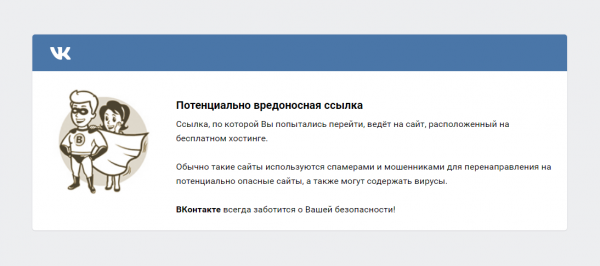
It seems that intelligent users should be allowed to decide which sites to visit, but VKontakte thinks otherwise and provides no way to proceed without workarounds.
What's wrong
This implementation has several significant drawbacks:
- The inability to open a suspicious site. As mentioned earlier, users cannot bypass the placeholder. The only way to open the link is to copy it and paste it into the address bar.
- Slows down link navigation. The speed of redirection depends on the ping. Thus, with high ping, precious seconds of life can be lost, which, as we know, is unacceptable.
- Monitoring transitions. This method facilitates the collection of information about user actions, which VK takes advantage of by adding the post ID from which the transition was made to the safe link.
Freeing Django
An optimal solution to all the aforementioned problems could be a browser extension. For obvious reasons, the choice falls on Chrome. There is an excellent article dedicated to writing extensions for Chrome.
To create such an extension, we need to create two files in a separate folder: a json manifest and a JavaScript file to monitor the current URL.
Creating the Manifest file
The main thing we need to do is give the extension permission to work with tabs and assign it an executable script:
{
  "manifest_version": 2,
  "name": "Run Away From vk.com/away",
  "version": "1.0",
  "background": {
    "scripts": ["background.js"]
  },
  "permissions": ["tabs"],
  "browser_action": {
    "default_title": "Run Away From vk.com/away"
  }
}
Create a js file
It's simple: in the event triggered by creating a new tab, we add a check for the URL address, if it starts with "", we replace it with the correct one, which is found in the GET request:
chrome.tabs.onCreated.addListener( function (tabId, changeInfo, tab) {
	chrome.tabs.query({'active': true, 'lastFocusedWindow': true}, function (tabs) {
		var url = tabs[0].url;
		if (url.substr(0,23) == "https://vk.com/away.php"){
			var last = url.indexOf("&", 0)
			if(last == -1)last = 1000;
			var url = decodeURIComponent(url.substr(27, last-27));
			chrome.tabs.update({url: url});
		}
	});
});
Assembling the extension
Once you've ensured that both files are in the same folder, open Chrome, go to the extensions tab, and click "Load unpacked extension." In the opened window, select the folder of the written extension and click build. Done! Now all links of the type vk.com/away are replaced with the originals.
In conclusion
Of course, this type of placeholder has saved many people from millions of fraudulent websites, however, I believe that people have the right to decide whether to follow unsafe links or not.
For convenience, I have placed the project on .
Source: habr.com
